1. הקדמה
This manual provides detailed instructions for the VINABTY Universal Replacement Remote Control. It is designed to function as a direct replacement for various Polaroid TV models without requiring any complex programming or setup. Please read this manual carefully to ensure proper use and longevity of your remote control.
2. פּראָדוקט איבערview
The VINABTY Universal Replacement Remote Control is engineered for ease of use and durability. It features an ergonomic design, soft rubber buttons, and robust ABS material construction, ensuring comfortable handling and a long lifespan. The remote utilizes infrared sensor technology for reliable communication with your television.
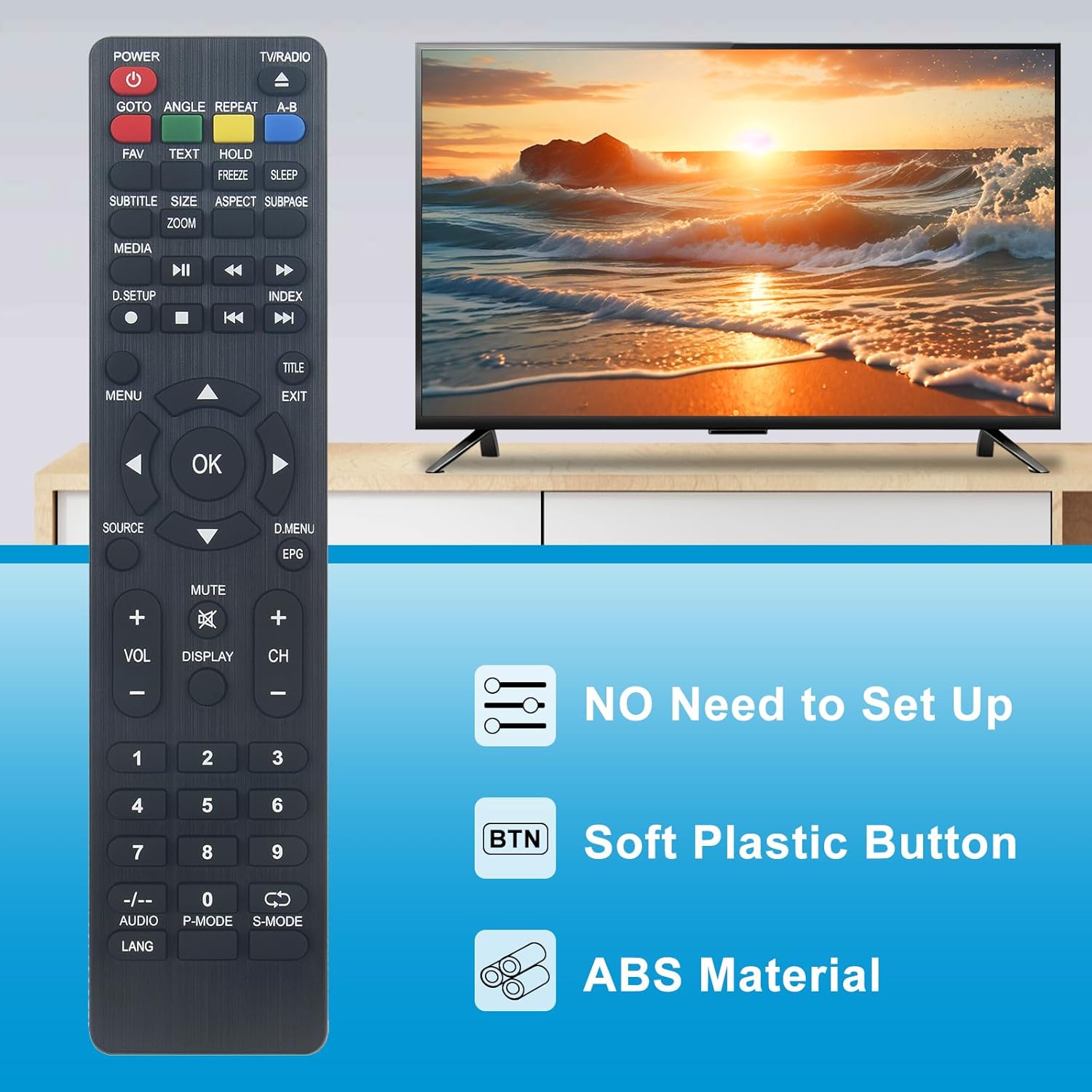
Image 2.1: The VINABTY remote control highlighting key features such as no setup requirement, soft plastic buttons, and durable ABS material construction.

Image 2.2: The remote control shown against a background suggesting advanced internal components, emphasizing its upgraded smart chip for stable performance.
שליסל פֿעיִקייטן:
- קיין סעטאַפּ נישט נויטיק: Ready to use right out of the box; no programming or pairing needed.
- ערגאָנאָמיק פּלאַן: Lightweight and comfortable to hold for extended periods.
- דוראַבאַל קאַנסטראַקשאַן: Made from high-quality ABS material with resilient buttons.
- לאַנג טראַנסמיסיע דיסטאַנס: Operates effectively up to 10 meters (approximately 33 feet).
- Sensitive Operation: Quick and responsive button presses.
3. סעטאַפּ
This VINABTY remote control is designed for immediate use with compatible Polaroid TV models. No complex programming or synchronization steps are required.
ייַנמאָנטירונג פון באַטאַרייע:
- געפֿינען די באַטאַרייע אָפּטייל אויף די צוריק פון די ווייַט קאָנטראָל.
- רוק דעם דעקן פון די באַטאַרייע אָפּטייל.
- Insert two (2) AAA batteries (not included), ensuring the positive (+) and negative (-) terminals match the indicators inside the compartment.
- פאַרמאַכן די באַטאַרייע אָפּטייל דעקן סיקיורלי.
Once batteries are installed, the remote control is ready for operation.
4. אַפּערייטינג ינסטרוקטיאָנס
To operate your television, point the remote control directly at the TV's infrared receiver. Ensure there are no obstructions between the remote and the TV.

Image 4.1: A clear front view of the VINABTY remote control, displaying all functional buttons.
Common Button Functions:
- מאַכט: טורנס די טעלעוויזיע אויף אָדער אַוועק.
- טעלעוויזיע / ראַדיאָ: טוישט צווישן טעלעוויזיע און ראַדיאָ מאָדעס.
- גיין צו: Function for direct access (specific to TV model).
- ווינקל: אַדזשאַסץ viewing angle (specific to TV model).
- איבערחזרן: Repeats playback (specific to TV model).
- AB: Marks A and B points for repeat playback (specific to TV model).
- FAV: אַקסעס באַליבסטע טשאַנאַלז.
- טעקסט: Displays teletext.
- האלט: Holds teletext page.
- פרירן: Freezes the current screen.
- שלאפן: שטעלט די שלאָף טייַמער.
- סאַבטייטאַל: Toggles subtitles.
- SIZE/ZOOM: Adjusts screen size or zoom level.
- אַספּעקט: ענדערונגען אַספּעקט פאַרהעלטעניש.
- סובפּאַגע: Accesses teletext subpages.
- מעדיע: Enters media playback mode.
- Playback Controls (Play, Pause, Stop, Rewind, Fast Forward, Skip): פֿאַר מעדיע ווידערשפּיל.
- D.SETUP: Digital setup menu.
- אינדעקס: Accesses index function.
- מעניו: אָפּענס די הויפּט מעניו.
- אקעי: קאַנפערמז סאַלעקשאַנז.
- פײַל קנעפּלעך (אַרויף, אַראָפּ, לינקס, רעכטס): נאַוויגירט מעניוז און אַדזשאַסטירט סעטטינגס.
- TITLE: Displays title menu.
- אַרויסגאַנג: פֿאַרלאָזט דעם איצטיקן מעניו אָדער פֿונקציע.
- מקור: סעלעקטירט אינפוט מקור (HDMI, AV, אאז"וו).
- D.MENU/EPG: Digital menu or Electronic Program Guide.
- VOL +/-: אַדדזשוסץ באַנד אַרויף אָדער אַראָפּ.
- שטיל: Mutes or unmutes sound.
- אַרויסווייַז: ווײַזט אינפֿאָרמאַציע וועגן דעם איצטיקן קאַנאַל.
- CH +/-: טוישט קאַנאַלן אַרויף אָדער אַראָפּ.
- נומער קנעפּלעך (0-9): דירעקטע קאַנאַל אויסוואַל.
- -/--: For two-digit channel input.
- אַודיאָ: Selects audio track.
- פּ-מאָדע: Picture mode selection.
- S-מאָדע: Sound mode selection.
- לאנג: שפּראַך סעלעקציע.
קאָמפּאַטיבלע טעלעוויזיע מאָדעלס:
This remote control is compatible with a wide range of Polaroid TV models, including but not limited to:
- TQL-22R4PR001
- TQL-40F4PR001
- TQL-32R4PR005
- TQL-32R4PR004
- TQL-32R4PR003
- TQL-32R4PR001
- FQL55UHPR001
- TFL55UHDPR001
- TQL-24F4PR001
- TQL-43F4PR0051
- TQL-19HDPR001
- TQL19R4PR002
- TQL19R4PR003
- TQL-24FPR003
- TQL24F4PR004
- TQL32R4PR0000
- TQL32R4PR012
- TQL48F4PR004
- TQL50F4PR001
- TQL55UHDPR001
- TQL60UHDPR001
- TQL65F4PR001
- TVC24HDP001112
- CELED754KB7
- CELED654KB7
- CELED55KP19B7
- OCEALED320516B7
- LED320516B7
5. וישאַלט
געהעריגע זאָרג און וישאַלט וועט פֿאַרלענגערן דאָס לעבן פֿון אייער ווײַטקאָנטראָל.

Image 5.1: The remote control emphasizing its premium ABS material and high resilience for durability.
רייניקונג:
- ווישט ווי די ווײַטקאָנטראָל מיט אַ ווייכן, טרוקענעם שטאָף.
- Do not use abrasive cleaners, solvents, or chemical agents, as these can damage the surface and internal components.
באַטערי זאָרגן:
- Replace batteries when the remote's performance diminishes or it becomes unresponsive.
- אַרויסנעמען די באַטעריעס אויב דער ווײַטקאָנטראָל וועט נישט ווערן גענוצט פֿאַר אַ לענגערע צײַט כּדי צו פֿאַרמײַדן ליקאַדזש.
סטאָרידזש:
- Store the remote control in a cool, dry place, away from direct sunlight and extreme temperatures.
- Avoid dropping the remote or exposing it to excessive force.
6. טראָובלעשאָאָטינג
If you encounter issues with your VINABTY remote control, please refer to the following troubleshooting steps:
ווייַט ניט ריספּאַנדינג:
- טשעק באַטעריז: זיכער מאַכן אַז די באַטעריעס זענען ריכטיק אַרײַנגעשטעלט מיט דער ריכטיקער פּאָלאַריטעט (+/-) און זענען נישט אויסגעשעפּט. אויב נייטיק, פֿאַרבײַטן זיי מיט נײַע AAA באַטעריעס.
- שורה פון דערזען: Make sure there is a clear path between the remote control and the TV's infrared sensor. Obstructions can block the signal.
- דיסטאַנסע: Confirm you are within the effective operating range of approximately 10 meters (33 feet).
- טעלעוויזיע מאַכט: Ensure your television is powered on and not in standby mode.
ספעציפישע קנעפּלעך ארבעטן נישט:
- This may indicate low battery power. Try replacing the batteries.
- Ensure the button is not physically stuck or damaged.
If the issue persists after following these steps, please refer to the 'Warranty and Support' section for further assistance.
7. ספּעסאַפאַקיישאַנז

Image 7.1: The remote control with its approximate dimensions of 4 cm width and 22 cm length.
| שטריך | דעטאַל |
|---|---|
| סאָרט | VINABTY |
| מאָדעל נאָמען | TQL-22R4PR001 |
| קאַנעקטיוויטי טעכנאָלאָגיע | ינפרערעד |
| קאַמפּאַטאַבאַל דעוויסעס | טעלעוויזיע |
| ספּעציעלע שטריך | ערגאָנאָמיק |
| קאָליר | שוואַרץ |
| מאַקסימום קייט | 10 מעטער |
| פּונקט וואָג | 60 גראַמז |
| פּראָדוקט דימענשאַנז (L x W x H) | 18 ל רענטגענ 3 וו רענטגענ 1.5 ה סענטימעטער |
| מאַטעריאַל | ABS |
8. וואָראַנטי און שטיצן
For support regarding product functionality, compatibility, or any other inquiries, please contact your retailer or the manufacturer directly. It is recommended to verify compatibility with your specific TV model before purchase. If you receive a remote that does not function as expected, please reach out to customer service for assistance.
ביטע באַהאַלטן אייער קויפן-באַווייַז פֿאַר יעדע וואָראַנטי-פאָדערונג אָדער שטיצע-בקשה.
