1. הקדמה
The ATTACK SHARK X820 Ultra is a 75% wireless gaming mechanical keyboard designed for versatility and performance. It features a hot-swappable gasket mount, RGB backlighting, and tri-mode connectivity (Bluetooth, 2.4G wireless, and wired USB-C). A unique Smart TFT Display and a multi-functional knob provide intuitive control and real-time information. This manual provides detailed instructions for setting up, operating, and maintaining your keyboard.

Figure 1: The ATTACK SHARK X820 Ultra Mechanical Keyboard in Starlight White.
2. פּעקל אינהאַלט
ביטע באַשטעטיקן אַז אַלע זאכן וואָס זענען אויסגערעכנט אונטן זענען פאַראַן אין אייער פּעקל:
- X820Ultra Keyboard (x1)
- וסב-C קאַבלע (x1)
- 2-in-1 Key Puller (x1)
- באַניצער מאַנואַל (x1)
- ATTACK SHARK Mascot Stickers (x2)
- Switches (x2)

Figure 2: All components included in the ATTACK SHARK X820 Ultra package.
3. סעטאַפּ
3.1 ערשט טשאַרדזשינג
Before first use, connect the keyboard to a USB power source using the provided USB-C cable to ensure it is fully charged. The Smart TFT Display will indicate the battery status.
3.2 קאָנעקטיוויטי מאָדעס
The X820 Ultra supports three connection modes: wired, 2.4GHz wireless, and Bluetooth. You can switch between modes using the dedicated switch on the keyboard or via the Smart TFT Display.
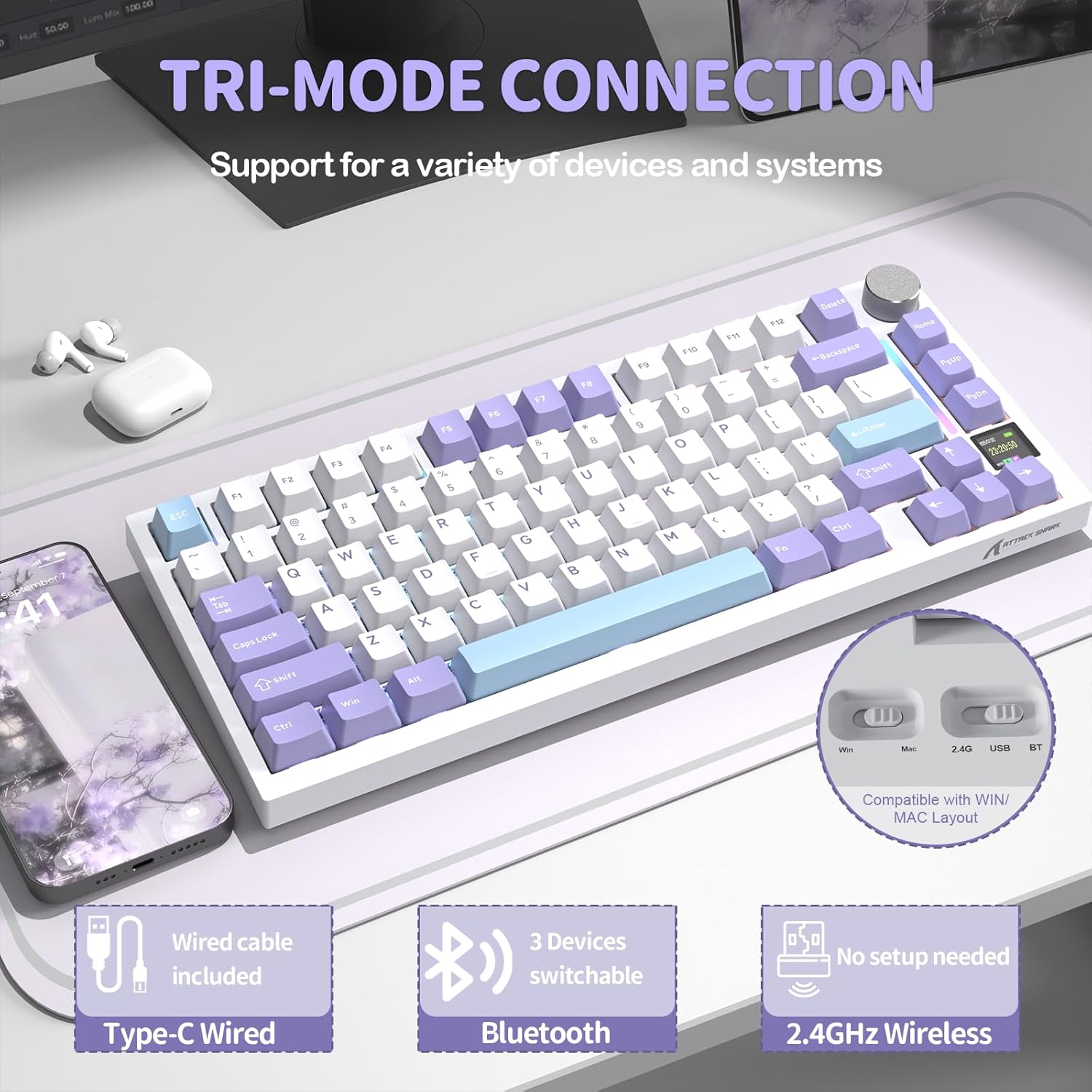
פיגורע 3: איבערview of the keyboard's tri-mode connectivity options.
3.2.1 ווייערד קאַנעקשאַן
Connect the USB-C cable from the keyboard to your computer's USB port. The keyboard will automatically switch to wired mode.
3.2.2 2.4GHz ווירעלעס פֿאַרבינדונג
Insert the 2.4GHz USB receiver into an available USB port on your computer. Switch the keyboard to 2.4G mode. The keyboard should connect automatically. For optimal performance, ensure the receiver is close to the keyboard.
3.2.3 בלועטאָאָטה קאַנעקשאַן
Switch the keyboard to Bluetooth mode. On your device, search for Bluetooth devices and select "ATTACK SHARK X820 Ultra" to pair. The keyboard can store up to three Bluetooth connections, allowing for easy switching between devices.
4. אַפּערייטינג ינסטרוקטיאָנס
4.1 Smart TFT Display & Metal Control Knob
The integrated TFT smart screen and precision metal knob provide real-time information and intuitive control over various keyboard functions.
- רעאַל-צייט אינפֿאָרמאַציע: View battery level, connection status, date, and time.
- RGB Adjustment: Instantly change RGB lighting effects and colors.
- OS Mode Switching: Easily switch between Windows and macOS modes.
- באַנד קאָנטראָל: Press Fn + Knob to activate volume control, then scroll the knob to adjust volume.
- מעניו נאַוויגאַציע: Scroll the knob to navigate menu pages on the display. Short press the knob to select or confirm.

פיגורע 4: דעטאַילעד view of the Smart TFT Display and Metal Control Knob functionalities.
4.2 דינאמישע RGB לייטינג
Personalize your typing experience with 16.8 million colors and over 19 lighting presets. The south-facing LEDs ensure vivid and even backlighting, especially through PBT keycaps. Adjust effects directly via the knob or screen, or use key combinations:
- Fn + { : Turn on/off RGB lighting.
- Fn + Enter: Change lighting color.
- Fn + }: Cycle through custom light effects.

Figure 5: Customization options for the keyboard's dynamic RGB backlight.
4.3 הייס-סוואַפּאַבל דיזיין
The X820 Ultra features hot-swappable sockets, supporting both 3-pin and 5-pin mechanical switches. This allows you to easily change switches without soldering, customizing your typing feel. The keyboard comes with custom linear Shark switches for smooth keystrokes and fast response. Precision-tuned stabilizers ensure firm, rattle-free large keys with satisfying rebound.

Figure 6: Components illustrating the hot-swappable PCB design, including pre-lubed linear switches, hot-swap sockets, and plate-mounted stabilizers.
4.4 Gasket Structure & Advanced Acoustic Tuning
The keyboard is built with a soft gasket-mounted structure, combining a 1.2mm FR4 fiberglass dual-layer PCB with individual switch slots for improved flex and keystroke uniformity. This design, paired with upgraded acoustic tuning layers (PORON foam, IXPE pad, PET sheet, DEPDM, and molded silicone), results in a deeper sound profile, softer touch, and enhanced typing feedback.

פיגורע 7: עקספּלאָדעד view of the keyboard's gasket structure, showing the various dampening and acoustic layers.
4.5 Web דרייווער קאַסטאַמייזיישאַן
The X820 Ultra offers extensive customization without the need for software installation. You can adjust macros, lighting, DPI, and key remapping directly through your browser using the cloud driver. Full QMK web driver support is also available at ק.מ.ק.טאַפּ for deeper customization and advanced key mapping options.

Figure 8: Screenshots of the web driver interface for customizing keyboard settings.
Video 1: An official product video demonstrating the ATTACK SHARK X820 Ultra Wireless Gaming Mechanical Keyboard in use, highlighting its features and typing experience.
5. וישאַלט
רעגולערע אויפהאלטונג העלפט פארלענגערן דאס לעבן און די פאָרשטעלונג פון אייער קלאַוויאַטור.
- רייניקונג קלאַוויאַטור קאַפּס: Use the provided key puller to remove keycaps. Clean them with a soft cloth dampגעוואשן מיט מילדן זייף און וואַסער. זיכער מאַכן אַז זיי זענען גאָר טרוקן איידער איר צוריקבאַפעסטיקט.
- רייניקונג פון די קלאַוויאַטור גוף: ניצט אַ ווייכע, טרוקענע שטאָף צו ווישן דעם קלאַוויאַטור קערפּער. פֿאַר שווערע שמוץ, אַ ביסל טרוקןamp שטאָף קען גענוצט ווערן, אָבער פֿאַרמייַדן איבעריקע פֿײַכטקייט.
- רייניקונג סוויטשיז: Use compressed air to remove dust and debris from around the switches. If switches are removed, clean the sockets carefully.
- סטאָרידזש: When not in use for extended periods, store the keyboard in a dry, cool place away from direct sunlight.
6. טראָובלעשאָאָטינג
If you encounter issues with your ATTACK SHARK X820 Ultra keyboard, refer to the following common problems and solutions:
- Keyboard not connecting (Wireless/Bluetooth):
- זייט זיכער אַז די קלאַוויאַטור איז אויפגעלאָדן.
- Verify the correct mode (2.4G/BT) is selected on the keyboard.
- For 2.4G, ensure the USB receiver is securely plugged in and close to the keyboard.
- פֿאַר בלועטוט, זיכער מאַכן אַז בלועטוט איז ענייבאַלד אויף דיין מיטל און פּרוּווט ווידער צו פאַרבינדן.
- Try connecting via wired USB-C to confirm keyboard functionality.
- RGB לייטינג ארבעט נישט אדער איז נישט קאנסיסטענט:
- Check if RGB is turned off via the knob or Fn key combination.
- זיכער מאַכן אַז די קלאַוויאַטור פירמווער איז אַרויף צו דאַטע דורך די web שאָפער.
- Perform a factory reset if customization settings are causing issues.
- קנעפּלעך רעאַגירן נישט:
- Ensure the keyboard is properly connected in the selected mode.
- If only specific keys are affected, try reseating the keycap and switch. Use the key puller to gently remove and reinsert the switch.
- Test with a different switch if available (from the included spare switches).
- Smart TFT Display is blank or frozen:
- ריטשאַרדזש די קלאַוויאַטור.
- Restart the keyboard by turning it off and on.
- אויב די אַרויסגעבן בלייַבט, קאָנטאַקט קונה שטיצן.
7. ספּעסאַפאַקיישאַנז
| שטריך | דעטאַל |
|---|---|
| מאָדעל נאָמען | ATTACK SHARK X820Ultra |
| קלאַוויאַטור באַשרייַבונג | מעטשאַניקאַל |
| קאַנעקטיוויטי | BT/2.4G/Wired (USB-C) |
| אויסלייג | 75% |
| נומער פון קיז | 81 |
| סוויטשיז | הייס-סוואַפּאַבל (3/5-פּין קאָמפּאַטיבל) |
| באַקלייט | RGB (16.8M colors, 19+ effects) |
| באַטאַרייע קאַפּאַציטעט | 4000 מאַה |
| ספּעציעלע פֿעיִקייטן | Smart TFT Display, Metal Control Knob, Gasket Mount, QMK Web Driver Support, Double-shot PBT Keycaps |
| קאַמפּאַטאַבילאַטי | Windows, macOS |
| פּונקט וואָג | 2.43 פונט |
| פּעקל דימענשאַנז | 13.86 X 7.28 X 1.97 אינטשעס |
8. וואָראַנטי און שטיצן
ATTACK SHARK products are designed and manufactured to the highest quality standards. For information regarding warranty coverage and support, please refer to the warranty card included in your package or visit the official ATTACK SHARK website. If you require technical assistance or have questions not covered in this manual, please contact ATTACK SHARK customer support through their official channels.


