הקדמה
The Beats Solo 4 are wireless Bluetooth on-ear headphones designed for a premium audio experience. They offer compatibility with both Apple and Android devices, extended battery life, and advanced audio features like Personalized Spatial Audio. This manual provides detailed instructions for setting up, operating, maintaining, and troubleshooting your Beats Solo 4 headphones.
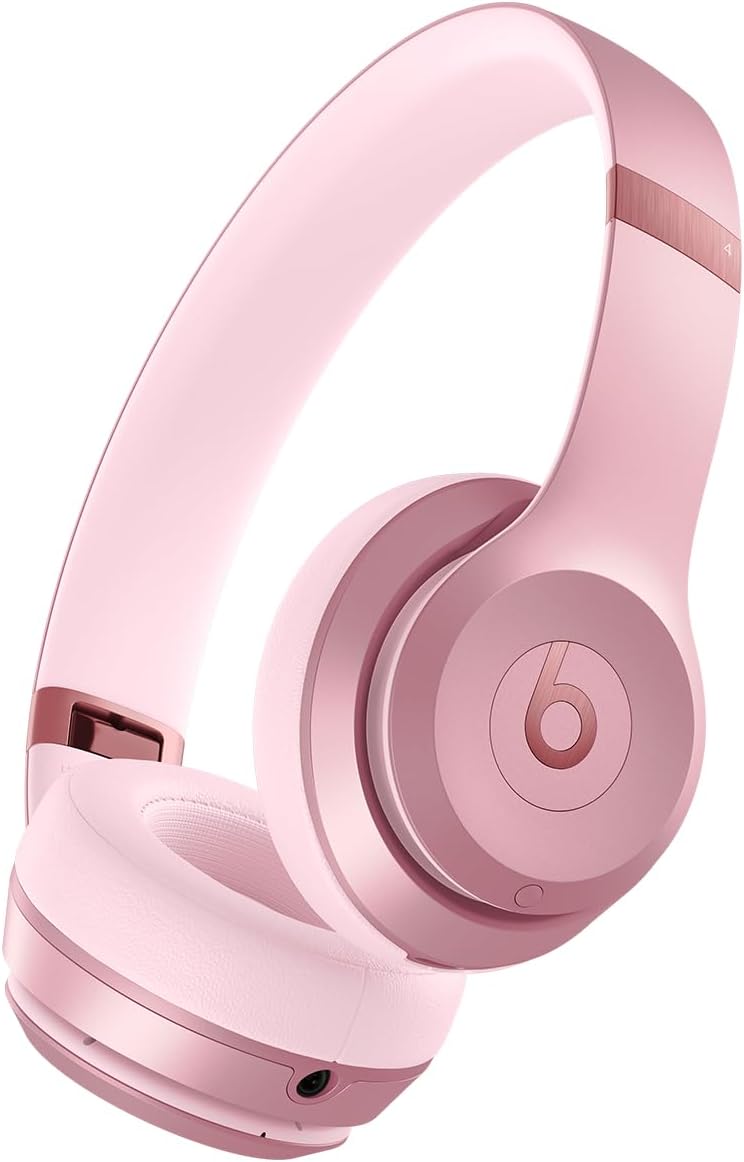
בילד: פראָנט view of the Beats Solo 4 Wireless Headphones in Metallic Pink.
וואָס איז אין די קעסטל
Upon unboxing your Beats Solo 4 headphones, verify that all the following components are included:
- ביץ סאָלאָ 4 כעדפאָונז
- פּראַטעקטיוו קאַסע
- USB-C צו USB-C קאַבל פֿאַר טשאַרדזשינג און אַודיאָ (USB-C מאַכט אַדאַפּטער ווערט פארקויפט באַזונדער)
- 3.5 מם אַנאַלאָג אַודיאָ קאַבלע
- שנעל אָנהייב גייד און וואָראַנטי קאָרט
סעטאַפּ
1. טשאַרדזשינג דיין כעדפאָונז
Before initial use, ensure your Beats Solo 4 headphones are fully charged. Connect the provided USB-C to USB-C cable to the charging port on the headphones and to a compatible USB-C power adapter (sold separately) or a USB-C port on a computer.
- A 10-minute charge provides up to 5 hours of playback (Fast Fuel feature).
- א פולע אָפּצאָל גיט ביז 50 שעה פון באַטאַרייע לעבן.

Image: Visual representation of the 50-hour battery life capability of the Beats Solo 4 headphones.
2. פארבינדן זיך מיט אייער דעווייס (בלוטעט)
The Beats Solo 4 headphones offer dual compatibility for one-touch pairing with both iOS and Android devices.
For iOS Devices (Apple):
- מאַכן זיכער אַז בלועטאָאָטה איז ענייבאַלד אויף דיין יאָס מיטל.
- Power on your Beats Solo 4 headphones.
- Hold your Beats Solo 4 near your unlocked iOS device.
- Follow the on-screen prompts to connect. This will automatically set up your headphones with all devices signed into your iCloud account.
פֿאַר אַנדרויד דעוויסעס:
- Download the Beats app from the Google Play Store (optional, but recommended for full features).
- זיכער מאַכן אַז בלועטוט איז ענייבאַלד אויף דיין אַנדרויד מיטל.
- Power on your Beats Solo 4 headphones.
- Open the Beats app or go to your device's Bluetooth settings.
- Select "Beats Solo 4" from the list of available devices to pair.

Image: The Beats Solo 4 headphones demonstrating Apple and Android compatibility with a smartphone.
אפערירן אייערע כעדפאָונז
קאָנטראָלס
The Beats Solo 4 headphones feature intuitive on-ear controls for managing audio playback, calls, and voice assistant interaction.
- באַנד קאָנטראָל: Use the dedicated volume buttons on the ear cup.
- פּלייבאַק קאָנטראָל: Press the 'b' button for play/pause, double-press for next track, triple-press for previous track.
- רופן פאַרוואַלטונג: Press the 'b' button to answer/end calls.
- שטימע אַססיסטאַנט: Press and hold the 'b' button to activate Siri or your device's voice assistant.
אַודיאָ פֿעיִקייטן
פערזענליכע ספּיישאַל אַודיאָ
Experience immersive sound with dynamic head tracking. This feature creates a theater-like experience, making it sound as if audio is coming from all around you. Compatible hardware and software are required. For Apple devices, an iPhone with TrueDepth camera is needed to create a personal profile for Spatial Audio.

Image: Visual representation of Personalized Spatial Audio, showing sound emanating from multiple directions around the headphones.
לאָססלעסס אַודיאָ
The Beats Solo 4 supports lossless audio playback via the included USB-C or 3.5 mm audio cables. This allows for high-fidelity audio transmission without compression, providing a richer listening experience. Compatible lossless content from supported apps/services is required.

Image: A user wearing Beats Solo 4 headphones, highlighting the lossless audio capability via wired connection.
וישאַלט
Proper care and maintenance will extend the lifespan of your Beats Solo 4 headphones.
- רייניקונג: ניצט אַ ווייכע, טרוקענע, לינט-פֿרייע שטאָף צו רייניקן די כעדפאָונז. ניצט נישט קיין שרײַבנדיקע רייניגער אָדער שפּריץ.
- סטאָרידזש: When not in use, store the headphones in the provided protective case to prevent scratches and damage. The foldable design makes them compact for storage.
- נעץ: The Beats Solo 4 are not water resistant. Avoid exposure to liquids, moisture, or extreme humidity.
- טעמפּעראַטור: דו זאלסט נישט ויסשטעלן די כעדפאָונז צו עקסטרעם טעמפּעראַטורעס.

Image: The Beats Solo 4 headphones in their folded, compact state, suitable for storage in the protective case.
טראָובלעשאָאָטינג
If you encounter issues with your Beats Solo 4 headphones, try the following solutions:
| פּראָבלעם | מעגלעך לייזונג |
|---|---|
| קאָפּהערער גייען נישט אָן | זיכער מאַכן אַז די קאָפּהערער זענען גאָר אָנגעלאָדן. פאַרבינדן צו אַ מאַכט מקור ניצן די USB-C קאַבל. |
| קען נישט צוזאמענשטעלן מיטן אפאראט |
|
| ניט געזונט אָדער נידעריק באַנד |
|
| נעבעך רופן קוואַליטעט |
|
| Headphones not responding | Perform a factory reset (refer to the Quick Start Guide for specific instructions on how to reset your Beats Solo 4). |
ספּעסאַפאַקיישאַנז
| שטריך | דעטאַל |
|---|---|
| מאָדעל נאָמען | ביץ סאָלאָ 4 |
| קאַנעקטיוויטי טעכנאָלאָגיע | ווירעלעס (בלוטוט קלאַס 1) |
| בלועטאָאָטה ווערסיע | 5.3 |
| בלועטאָאָטה קייט | אַרויף צו 100 מעטער |
| באַטערי לעבן | אַרויף צו 50 שעה |
| שנעלע ברענשטאָף טשאַרדזשינג | 10 מינוט אָפּצאָל גיט אַרויף צו 5 שעה פון פּלייבאַק |
| אַודיאָ אַרייַנשרייַב | USB-C audio, 3.5 mm analog input |
| אויער פּלייסמאַנט | אויף אויער |
| וואָג | 7.65 אַז / 217 ג |
| דימענסיעס (L X W X H) | 6.9 רענטגענ 6.2 רענטגענ 2.7 אינטשעס (17.7 סענטימעטער רענטגענ 15.8 סענטימעטער רענטגענ 6.8 סענטימעטער) |
| קאָנטראָל טיפּ | Volume Control, App Control, Button Control, Siri, Touch Control, Voice Control |
| וואַסער קעגנשטעל מדרגה | ניט וואַסער קעגנשטעליק |
| אַרייַנגערעכנט קאַמפּאָונאַנץ | Headphones, Protective Case, USB-C to USB-C cable, 3.5 mm audio cable, Quick Start Guide, Warranty Card |
וואָראַנטי און שטיצן
Your Beats Solo 4 headphones come with a limited warranty. Please refer to the included Warranty Card for detailed terms and conditions, including coverage period and how to make a claim.
For additional support, frequently asked questions, or to contact customer service, please visit the official Beats support webזייטל. איר קענט אויך געפֿינען מער אינפֿאָרמאַציע אויף די ביטס סטאָר אויף עמעזאָן.
Note: This manual does not include information on AppleCare+ protection plans, which are separate service agreements.
וויכטיק סאַפעטי אינפֿאָרמאַציע
Read all safety information before using your Beats Solo 4 headphones to avoid injury. Do not listen at high volume levels for long periods to prevent hearing damage. Do not use headphones while driving or cycling, or in situations where inability to hear ambient sounds could be dangerous.


