1. הקדמה
א דאנק פארן קויפןasing the LYNCAST N300 Mini Smart Projector. This manual provides essential information for setting up, operating, and maintaining your projector. Please read it thoroughly before use to ensure optimal performance and safety.
The LYNCAST N300 is a portable smart projector featuring Android 13, 1080P native resolution with 4K support, automatic keystone correction, WiFi 6, and Bluetooth 5.4 connectivity. Its 180° rotatable design offers flexible projection angles for various environments.
2. זיכערקייַט אינפֿאָרמאַציע
- קוק נישט גלייך אריין אין די פּראָיעקטאָר לינז ווען די לamp איז אויף.
- פאַרזיכערן געהעריק ווענאַליישאַן אַרום די פּראַדזשעקטער צו פאַרמייַדן אָוווערכיטינג.
- ניצן בלויז די צוגעשטעלט מאַכט אַדאַפּטער.
- האַלט דעם פּראָיעקטאָר ווײַט פֿון וואַסער אָדער אַנדערע פֿליסיקייטן.
- ויסמיידן פּלייסינג די פּראַדזשעקטער אויף אַנסטייבאַל סערפאַסיז.
- פרובירט נישט צו צענעמען אדער פאררעכטן דעם פראיעקטאר אליין. קאנטאקטירט קוואליפיצירטע סערוויס פערסאנעל.
- האַלטן אויס פון דערגרייכן פון קינדער.
3. פּעקל אינהאַלט
באַשטעטיקן אַז אַלע זאכן זענען פאַראַן אין דיין פּעקל:
- LYNCAST N300 Mini Smart Projector
- מאַכט אַדאַפּטער
- HDMI קאַבלע
- ווייַט קאָנטראָל
- באַניצער מאַנואַל (דעם דאָקומענט)
4. פּראָדוקט איבערview
4.1 פּראָיעקטאָר קאָמפּאָנענטן
Familiarize yourself with the main components and interfaces of your LYNCAST N300 projector.
בילד 4.1: דערציען view of the LYNCAST N300 projector showing HDMI and USB ports.
- לענס: פּראָיעקטירט דאָס בילד אויפן עקראַן.
- פאָקוס ראָד: Manual adjustment for image sharpness.
- מאַכט קנעפּל: טורנס די פּראַדזשעקטער אויף / אַוועק.
- הדמי פּאָרט: Connects to external devices like TV sticks, laptops, gaming consoles (PS5), and TV boxes.
- וסב פּאָרט: Connects to USB storage devices or charges compatible devices.
- מאַכט אַרייַנשרייַב: קאַנעקץ די מאַכט אַדאַפּטער.
- רעדנער: אינטעגרירטע אַודיאָ אַרויסגאַנג.
- אַדזשאַסטאַבאַל שטיין: Allows for 180° rotation and flexible projection angles.
5. סעטאַפּ
5.1 מאַכט קאַנעקשאַן
- פֿאַרבינדט דעם מאַכט אַדאַפּטער צום פּראָיעקטאָר'ס מאַכט אַרייַנגאַנג פּאָרט.
- צאַפּן די מאַכט אַדאַפּטער אין אַ וואַנט ווענטיל.
- דריק דעם מאַכט קנעפּל אויף דעם פּראָיעקטאָר אָדער ווײַטקאָנטראָל צו עס אנצינדן.
5.2 Placement and Angle Adjustment
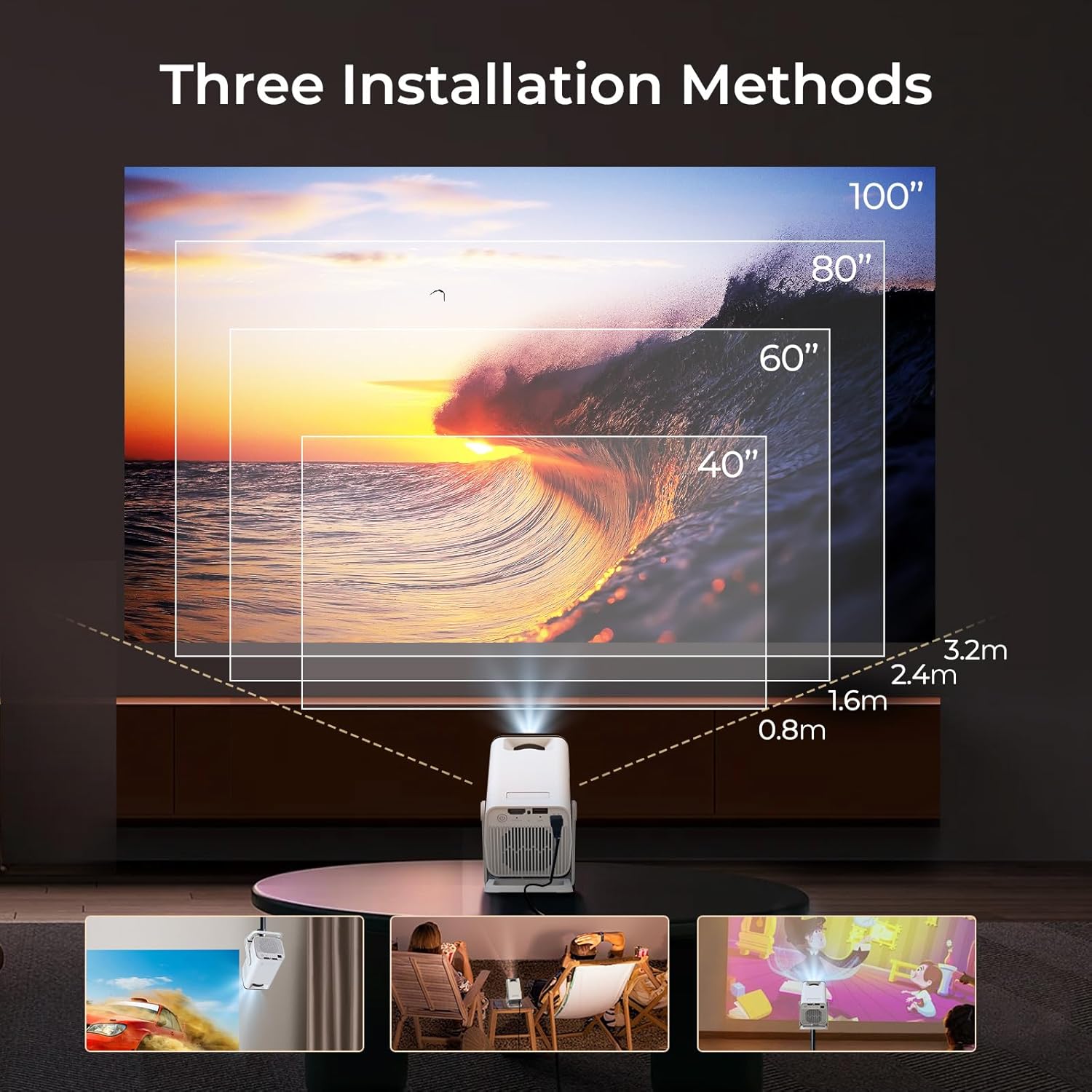
The LYNCAST N300 features a 180° rotatable design, allowing for versatile placement options.

בילד 5.1: The projector's adjustable stand allows for various projection angles, including ceiling projection.
- שטעלן די פּראַדזשעקטער אויף אַ סטאַביל ייבערפלאַך.
- Adjust the projector's angle using its integrated stand to project onto a wall, ceiling, or screen. The stand supports up to 180° rotation.
5.3 פאָקוס אַדזשאַסטמאַנט
To achieve a clear image, manually adjust the focus.

בילד 5.2: Location of the manual focus wheel on the projector.
- קער אויף די פּראַדזשעקטער און ווייַזן אַ בילד.
- Rotate the focus wheel located on the side of the projector until the image appears sharp and clear.
5.4 Automatic Keystone Correction
The LYNCAST N300 features automatic keystone correction to adjust distorted images caused by angled projection. This feature automatically squares the image.
- The projector will automatically detect and correct vertical keystone distortion.
- If further adjustments are needed, refer to the on-screen display (OSD) settings for manual keystone correction options.
6. אַפּערייטינג ינסטרוקטיאָנס
6.1 Connecting External Devices via HDMI
Connect devices such as TV sticks, laptops, gaming consoles, or TV boxes using an HDMI cable.
- Connect one end of the HDMI cable to the HDMI port on the projector.
- פֿאַרבינדט דעם אַנדערן עק צום HDMI אַרויסגאַנג פֿון אייער עקסטערנעם מיטל.
- Select the HDMI input source from the projector's menu.
6.2 וסב קאַנעקטיוויטי
דער USB פּאָרט דערמעגלעכט איר צו שפּילן מעדיע files גלייַך פֿון אַ וסב סטאָרידזש מיטל.
- Insert your USB storage device into the USB port on the projector.
- Navigate to the media player application on the projector's home screen to browse and play files.
6.3 וויירלעסע קאָנעקטיוויטי (WiFi 6 און בלועטוט 5.4)
The projector supports WiFi 6 for faster and more stable internet connection and Bluetooth 5.4 for audio devices.
6.3.1 קאַנעקטינג צו WiFi
- Go to the projector's Settings menu.
- Select "Network & Internet" or "WiFi".
- Choose your desired WiFi network and enter the password if prompted.
6.3.2 פֿאַרבינדן בלוטוט דעוויסעס
- Go to the projector's Settings menu.
- Select "Connected Devices" or "Bluetooth".
- אַקטיווירן בלועטוט און זוכן פֿאַר בנימצא דעוויסעס.
- Select your Bluetooth speaker or headphones to pair.
6.4 Screen Mirroring (Phone Link)
Mirror your iOS or Android device screen to the projector.

בילד 6.1: Screen mirroring from a smartphone to the projector.
6.4.1 For iOS Devices (AirPlay)
- Ensure both your iOS device and the projector are connected to the same WiFi network.
- On your iOS device, open Control Center and tap "Screen Mirroring".
- אויסקלייבן דעם פּראָיעקטאָר פֿון דער רשימה פֿון פֿאַראַן דעוויסעס.
6.4.2 For Android Devices (Miracast/Google Cast)
- Ensure both your Android device and the projector are connected to the same WiFi network.
- On your Android device, go to Settings and look for "Cast", "Screen Mirroring", or "Wireless Display". The exact name may vary by device.
- אויסקלייבן דעם פּראָיעקטאָר פֿון דער רשימה פֿון פֿאַראַן דעוויסעס.
6.5 Using Android 13 Smart Features
The LYNCAST N300 runs on Android 13, providing access to a wide range of applications.

בילד 6.2: Android 13 interface showing pre-installed applications.
- פאַר-אינסטאַלירן אַפּפּס: Access popular streaming services like Netflix, YouTube, Prime Video, and Disney+ directly from the home screen.
- אַפּ סטאָר: דאַונלאָוד און ינסטאַלירן נאָך אַפּליקאַציעס פֿון די אינטעגרירטע אַפּ סטאָר.
- נאַוויגאַציע: ניצט די ווײַטקאָנטראָל צו נאַוויגירן די אַנדרויד צובינד.
7. וישאַלט
7.1 רייניקן די לינז
- ניצט אַ ווייכן, לינט-פֿרייע שטאָף ספּעציעל דיזיינד פֿאַר אָפּטישע לענסעס.
- Gently wipe the lens to remove dust or smudges. Do not use abrasive cleaners or excessive force.
7.2 רייניקן דעם פּראָיעקטאָר קערפּער
- ווישט ווי די אויסערליכע זייט פון דעם פּראָיעקטאָר מיט אַ ווייכן, טרוקענעם שטאָף.
- ניצט נישט פליסיקע רייניגער אדער סאָלווענטן.
7.3 סטאָרידזש
- ווען נישט אין באַנוץ פֿאַר לענגערע פּעריאָדן, זאָל מען האַלטן דעם פּראָיעקטאָר אין אַ קיל, טרוקן אָרט, אַוועק פֿון דירעקטער זון און עקסטרעמע טעמפּעראַטורן.
- Consider using the original packaging or a protective case to prevent dust accumulation and damage.
8. טראָובלעשאָאָטינג
| פּראָבלעם | מעגלעך סיבה | לייזונג |
|---|---|---|
| קיין מאַכט | שטראָם קאַבל נישט פארבונדן; שטראָם אַוטלעט דעפעקט | זיכער מאַכן אַז דער עלעקטרישער קאַבל איז זיכער פארבונדן; פּרוּווט אַן אַנדער עלעקטרישער אַוטלעט. |
| קיין בילד | Incorrect input source; Loose HDMI cable; Device not powered on | Select correct input source; Check HDMI cable connection; Ensure connected device is powered on. |
| בילד בלערי | פאָקוס נישט אַדזשאַסטיד; פּראָיעקטאָר צו ווייט/נאָענט | Adjust the manual focus wheel; Reposition the projector for optimal distance. |
| קיין געזונט | Volume too low; Muted; Incorrect audio output selected; Bluetooth device not connected | Increase volume; Unmute; Check audio settings; Reconnect Bluetooth device. |
| ווייַט קאָנטראָל נישט ארבעטן | Dead batteries; Obstruction between remote and projector | Replace batteries; Ensure clear line of sight to the projector's IR receiver. |
| WiFi פֿאַרבינדונג פּראָבלעמען | Incorrect password; Out of range; Router issues | Verify WiFi password; Move projector closer to router; Restart router. |
9. ספּעסאַפאַקיישאַנז
| שטריך | דעטאַל |
|---|---|
| סאָרט | LYNCAST |
| מאָדעל נאָמען | Netflix VisualCube N300 (X1AA) |
| אָפּערייטינג סיסטעם | אַנדרויד 13 |
| ווייַז טעכנאָלאָגיע | LED, Laser |
| געבוירן האַכלאָטע | 1920 רענטגענ 1080 (1080 פּ) |
| מאַקסימום האַכלאָטע שטיצן | 3840 Pixels (4K) |
| קאַנטראַסט פאַרהעלטעניש | 1000:1 |
| קאַנעקטיוויטי טעכנאָלאָגיע | בלועטאָאָטה 5.4, וויפי 6 |
| ייַזנוואַרג צובינד | HDMI, וסב |
| ספּעציעלע פֿעיִקייטן | Automatic Obstacle Avoidance (Auto Keystone), 180° Rotation |
| קאַמפּאַטאַבאַל דעוויסעס | Speaker, Game Console, Laptop, Smartphone, Tablet, TV Stick |
| פּראָדוקט דימענשאַנז | 10 X 10 X 17 סענטימעטער |
| פּראָדוקט וואָג | 770 ג |
| מאַונטינג טיפּ | טיש בארג |
10. וואָראַנטי און שטיצן
For warranty information and technical support, please refer to the warranty card included in your package or visit the official LYNCAST webזייטל. האַלט אייער קויף קוויטל ווי אַ באַווייַז פון קויפן.
LYNCAST Official Webפּלאַץ: LYNCAST Brand Store on Amazon
11. פּראָדוקט ווידעא דעמאַנסטראַציע
קוקט דעם ווידעא פאר א וויזועלע איבערבליקview of the LYNCAST N300 Mini Smart Projector's features and usage.
ווידעא 11.1: LYNCAST N300 Projector overview, demonstrating features like Netflix compatibility, portable design, 270° rotation, manual focus, and phone link (screen mirroring).


