1. הקדמה
This manual provides detailed instructions for the setup, operation, and maintenance of your ATTACK SHARK G3PRO Wireless Gaming Mouse. Please read this manual thoroughly to ensure proper use and to maximize the performance of your device.
2. פּראָדוקט פֿעיִקייטן
- Pro-Grade Precision & Speed: Equipped with PixArt PAW3311 gaming sensor and Broadcom BK52820 custom MCU for zero latency and pixel-perfect tracking. Adjustable DPI from 100 to 25000, polling rate up to 1000Hz, tracking speed 300IPS, and acceleration 40G.
- Legendary Durability & Tactile Clicks: Features genuine mechanical switches rated for 100 million clicks, providing crisp, responsive, and reliable feedback. The unique F-Switch encoder ensures precise scrolling.
- Ultra-Light Agility & Effortless Glide: Weighs only 59±3 grams, reducing wrist fatigue during extended use. Ergonomic design supports palm, claw, and finger grip styles. Double-layer premium mouse feet offer smooth, consistent glide.
- Seamless Tri-Mode Connectivity: Supports stable 2.4GHz wireless, low-latency Bluetooth, and reliable wired USB-C connections. Quickly switch between modes using the button at the bottom of the mouse. Compatible with desktops, laptops, smartphones, and tablets.
- AI Designed Driver: Utilizes an innovative cloud-driven webpage for customization, eliminating the need for traditional software installation. Allows for DPI adjustment, polling rate, competitive mode, customized buttons, macro recording, and personalized key mapping.
- RGB Backlight Charging Base: The included charging dock features cool RGB backlighting and allows for quick recharging. It also serves as a convenient passthrough for the 2.4GHz USB receiver, optimizing wireless signal reception.
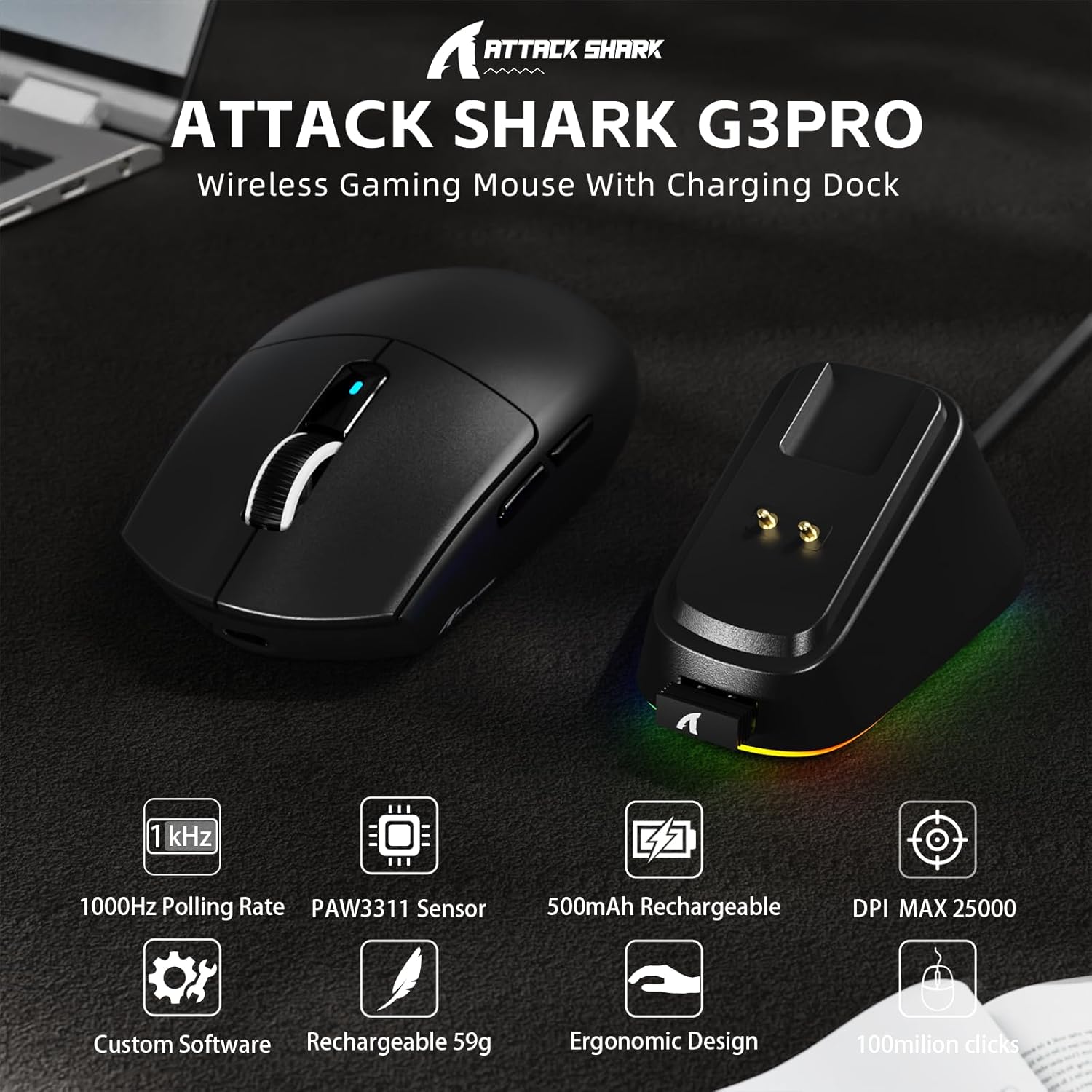
בילד: איבערview of the ATTACK SHARK G3PRO mouse and its charging dock, highlighting key features such as 1000Hz polling rate, PAW3311 sensor, 500mAh rechargeable battery, 25K DPI, custom software, lightweight design, ergonomic shape, and 100 million click lifespan.

Image: A composite image detailing the internal components and features of the G3PRO mouse, including the 1K polling rate, PixArt PAW3311 sensor, Omron microswitches, 500mAh battery, BK52820 MCU, and the web driver interface.
3. פּעקל אינהאַלט
ביטע באַשטעטיקן אַז אַלע זאכן זענען פאַראַן אין דיין פּעקל:
- ATTACK SHARK G3PRO Wireless Gaming Mouse
- RGB Backlight Charging Dock
- וסב-C צו וסב-א קאַבלע
- USB 2.4GHz Wireless Receiver (often stored inside the mouse or dock)
- באַניצער מאַנואַל
- סטיקערז (קען זיין אַנדערש)
- Grip Tape (if included with your specific bundle)
4. סעטאַפּ
4.1 אויפלאָדן די מויז
Before first use, it is recommended to fully charge the mouse. Connect the USB-C cable to the charging dock and then to a power source (e.g., computer USB port, USB wall adapter). Place the mouse onto the charging dock. The RGB lighting on the dock will indicate charging status.

Image: The ATTACK SHARK G3PRO Wireless Gaming Mouse resting on its RGB backlight charging dock, connected via a USB-C cable. This illustrates the primary charging method.
4.2 פֿאַרבינדן די מויז
The G3PRO mouse offers three connectivity modes: 2.4GHz Wireless, Bluetooth, and USB-C Wired.

Image: A visual representation of the three connectivity options for the G3PRO mouse: USB-C Wired, 2.4G Wireless, and Bluetooth, showing the mouse interacting with a charging dock and a laptop.
4.2.1 2.4GHz ווירעלעס פֿאַרבינדונג
- Locate the USB 2.4GHz receiver. It may be stored in a compartment on the underside of the mouse or within the charging dock.
- Plug the receiver into an available USB port on your computer. For optimal signal, you can plug the receiver into the USB port on the charging dock, then connect the dock to your computer.
- Switch the mode selector switch on the bottom of the mouse to the '2.4G' position.
- The mouse should automatically connect. If not, press and hold the 'Left/Center/Right' buttons simultaneously for 3 seconds to force pairing.
4.2.2 בלועטאָאָטה קאַנעקשאַן
- Switch the mode selector switch on the bottom of the mouse to the 'BT' position.
- אויף אייער קאָמפּיוטער אָדער מיטל, גייט צו בלועטוט סעטטינגס און אַקטיווירט בלועטוט.
- זוכן פֿאַר new devices. The mouse should appear as 'ATTACK SHARK G3PRO' or similar.
- Select the mouse to pair. If prompted, press and hold the 'Left/Center/Right' buttons simultaneously for 3 seconds to force pairing.
4.2.3 USB-C ווייערד קאנעקשאן
- פֿאַרבינדט דעם USB-C עק פֿונעם קאַבל צום מויז און דעם USB-A עק צו אייער קאָמפּיוטער.
- Switch the mode selector switch on the bottom of the mouse to the 'OFF' position (or ensure it's not in 2.4G/BT mode). The mouse will operate in wired mode.
5. אַפּערייטינג ינסטרוקטיאָנס
The ATTACK SHARK G3PRO mouse features multiple programmable buttons and adjustable settings for enhanced gaming and productivity.

Image: A detailed diagram illustrating the multi-functional buttons on the G3PRO mouse (Left Key, Right Key, Center Key, Backward Button, Forward Button, DPI Switch) and the components of the charging dock (Type C Port, Charging Thimble, Receiver Interface, RGB Light Switch, Receiver Organizer).
5.1 קנעפּל פאַנגקשאַנז
- לינקס שליסל: ערשטיק גיט פֿונקציע.
- רעכט שליסל: צווייטיק גיט פֿונקציע.
- Center Key (Scroll Wheel Click): Middle click function.
- פֿאָרווערטס קנעפּל: נאַוויגירט פאָרויס אין web בראַוזערז אָדער אַפּליקאַציעס.
- צוריק קנעפּל: נאַוויגירט צוריק אין web בראַוזערז אָדער אַפּליקאַציעס.
- דפּי סוויטש: גייט דורך פאָרגעשטעלטע DPI לעוועלס.
5.2 דפּי אַדזשאַסטמאַנט
Press the DPI switch button (located on the top of the mouse, usually behind the scroll wheel) to cycle through different DPI sensitivity levels. The default DPI settings can be customized using the AI Designed Driver.
5.3 RGB לייטינג קאָנטראָל
The RGB lighting on the charging dock can be controlled via a switch on the dock itself. The mouse's internal lighting (if any) and effects can be customized through the AI Designed Driver.
6. Customization (AI Designed Driver)
The ATTACK SHARK G3PRO features an innovative cloud-driven web driver for advanced customization. This eliminates the need for software installation.

Image: A screenshot of the web-based driver interface for the ATTACK SHARK G3PRO mouse, showing options for button settings, DPI settings, parameter settings, macro editing, and a personal center for customization.
6.1 אַקסעס די Web דרייווער
To access the customization options, open a web בלעטערער און נאַוויגירן צו די URL provided in the product documentation or on the official ATTACK SHARK website. The driver is designed to automatically identify your computer system.
6.2 קאַסטאַמייזיישאַן אָפּציעס
דורך די web driver, you can:
- אַדזשאַסטירן DPI לעוועלס און שאַפֿן מנהג פּראָfiles.
- Modify polling rate.
- Program individual buttons for various functions (e.g., multimedia controls, keyboard shortcuts, macros).
- Record and assign complex macros.
- Personalize key mapping.
- Configure competitive modes and other advanced functions.
7. טשאַרדזשינג און באַטאַרייע
The G3PRO mouse is equipped with a 500mAh built-in battery for extended playtime.
7.1 טשאַרדזשינג מעטהאָדס
- דורך טשאַרדזשינג דאָק: Simply place the mouse onto the RGB backlight charging dock. The magnetic connection will ensure proper alignment and charging.
- דורך USB-C קאַבל: Connect the mouse directly to your computer or a USB power adapter using the provided USB-C cable.
7.2 באַטערי סטאַטוס
Battery status can typically be monitored through the AI Designed Driver interface or your operating system's Bluetooth device settings.
8. וישאַלט
To ensure the longevity and optimal performance of your ATTACK SHARK G3PRO mouse, follow these maintenance guidelines:
- רייניקונג: Use a soft, dry cloth to wipe the mouse and charging dock. For stubborn dirt, a slightly damp מען קען ניצן אַ שטאָף, אָבער זאָרגט זיך אַז קיין נעץ זאָל נישט אַרײַנגיין אין דעם אַפּאַראַט. פֿאַרמײַדט שאַרפֿע כעמיקאַלן אָדער אַברייסיוו מאַטעריאַלן.
- סענסאָר זאָרגן: האַלט דעם אָפּטישן סענסאָר אויף דער אונטערשטער זייט פון דער מויז ריין און פריי פון שטויב אָדער שמוץ. ניצט אַ וואַטע שטעכל אָדער קאָמפּרעסירטע לופט אויב נייטיק.
- סטאָרידזש: ווען נישט אין באַנוץ פֿאַר לענגערע פּעריאָדן, האַלט די מויז אין אַ קיל, טרוקן אָרט.
- ויסמיידן עקסטרעמע טנאָים: שטעלט נישט אויס די מויז צו עקסטרעמע טעמפּעראַטורן, דירעקטע זונשייַן, אדער הויכע הומידיטי.
9. טראָובלעשאָאָטינג
If you encounter issues with your ATTACK SHARK G3PRO mouse, please refer to the following common solutions:
| פּראָבלעם | מעגלעך סיבה / לייזונג |
|---|---|
| מויז רעאַגירט נישט (ווירעלעס) |
|
| מויז רעאַגירט נישט (ווייערד) |
|
| DPI אַדזשאַסטמענט אַרבעט נישט |
|
| Charging dock RGB not lighting up |
|
| Mouse tracking issues / erratic movement |
|
10. ספּעסאַפאַקיישאַנז
- סאָרט: באַפאַלן שאַרק
- מאָדעל: G3PRO
- קאָליר: שוואַרץ
- קאַנעקטיוויטי טעכנאָלאָגיע: 2.4Ghz Wireless, Bluetooth, USB-C Wired
- באַוועגונג דעטעקשאַן טעכנאָלאָגיע: Optical (PixArt PAW3311 Sensor)
- DPI קייט: 100 - 25000 DPI (אַדזשאַסטאַבאַל)
- פּאָללינג קורס: אַרויף צו 1000 הז
- טראַקינג גיכקייַט: 300 יפּס
- אַקסעלעריישאַן: 40G
- סוויטשיז: Mechanical (100 million click lifespan)
- באַטאַרייע קאַפּאַציטעט: 500 מאַה
- וואָג: 59 ± 3 גראַמז
- ספּעציעלע פֿעיִקייטן: Ergonomic Design, Lightweight, Programmable Buttons, Rechargeable, Wireless, RGB Charging Dock
- פּעקל דימענשאַנז: 6.57 X 4.37 X 1.93 אינטשעס
- נומער וואָג: 8.1 אונסעס
11. פּראָדוקט ווידעאָ
ווידעא: אן אפיציעלע פראדוקט ווידעא ווייזונגasing the ATTACK SHARK G3PRO Wireless Gaming Mouse, highlighting its design, features, and various color options. This video provides a dynamic view of the mouse and its charging dock.
12. וואָראַנטי און שטיצן
פֿאַר וואָראַנטי אינפֿאָרמאַציע און טעכנישע שטיצע, ביטע זען די באַאַמטער אַטאַק שאַרק webזייטל אדער קאנטאקט דעם פארקויפער פון וועמען איר האט געקויפט דאס פראדוקט. האלט אייער באווייז פון קויפן פאר גאראנטיע פארלאנגען.


