הקדמה
This user manual provides comprehensive instructions for the Chieftec AS-02B-TG-OP Midi Tower PC Case. It covers essential information regarding product features, installation procedures, operational guidelines, maintenance tips, and technical specifications. Please read this manual thoroughly before installing or operating your PC case to ensure proper functionality and longevity.
פּראָדוקט איבערview
The Chieftec AS-02B-TG-OP is a Midi Tower PC case designed for optimal cooling and a modern aesthetic. It features a sleek brushed front panel, a tempered glass side panel, and a pre-installed 120mm PWM fan for efficient heat dissipation.
שליסל פֿעיִקייטן:
- Sleek brushed front panel design.
- Tempered glass side panel for component visibility.
- Optimized interior layout for efficient cooling.
- Pre-installed 120mm PWM fan at the rear.
- Support for various motherboard form factors (ATX, micro ATX, Mini-ITX).
- Multiple expansion bays for storage devices.
- Front I/O panel with USB 2.0, USB Type-C, and audio ports.
קאָמפּאָנענט אידענטיטעט:

פיגורע 1: פראָנט-לינקס view of the Chieftec AS-02B-TG-OP PC case, showcasing the brushed front panel and the tempered glass side panel.

פיגורע 2: דירעקט פראָנט view of the Chieftec AS-02B-TG-OP PC case, highlighting the brushed finish of the front panel.

פיגורע 3: Front-right angle view of the Chieftec AS-02B-TG-OP PC case, showing the subtle design elements.
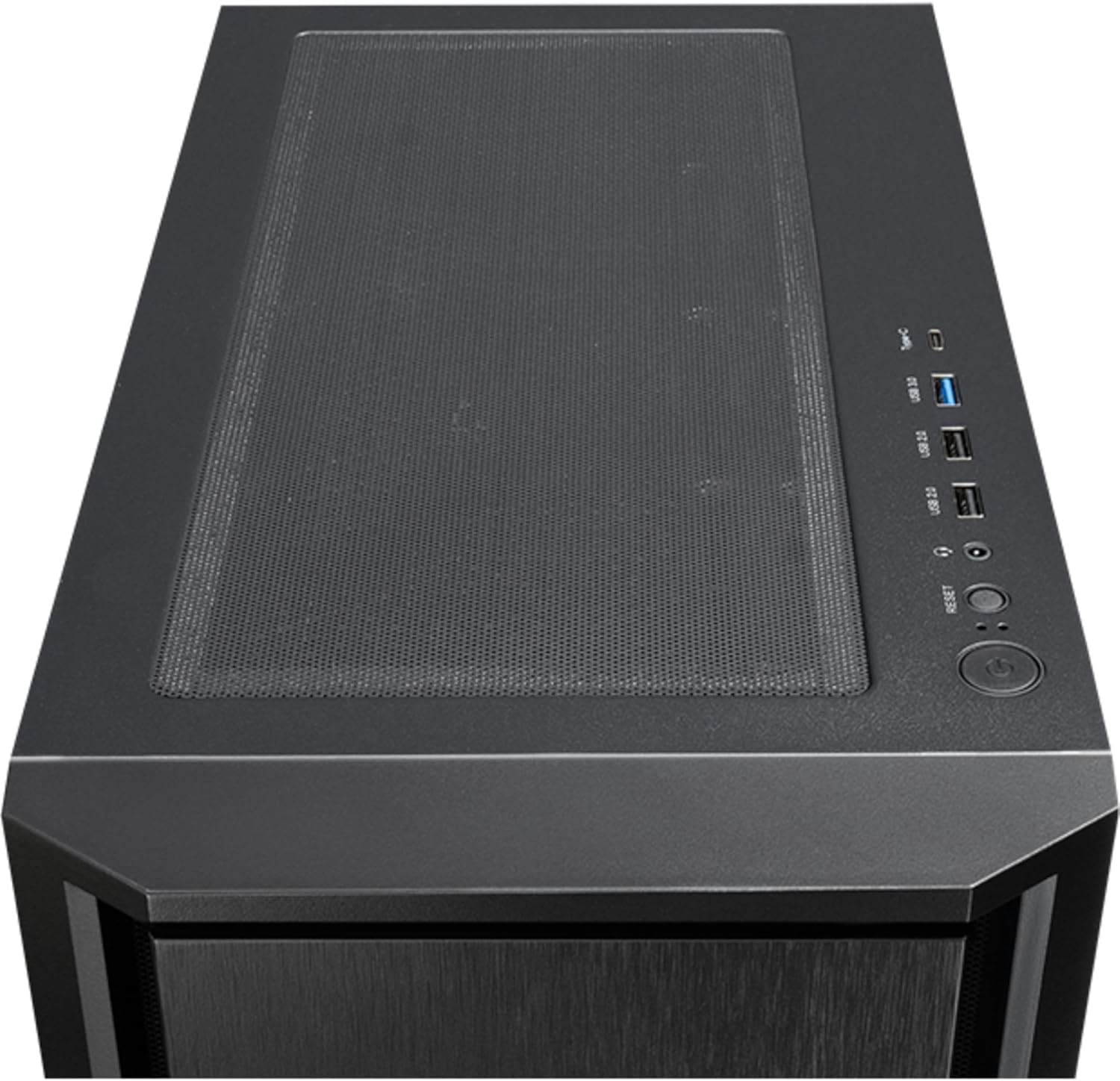
פיגורע 4: Top view of the Chieftec AS-02B-TG-OP PC case, showing the top ventilation and the front I/O panel with USB ports and audio jacks.

פיגורע 5: דערציען view of the Chieftec AS-02B-TG-OP PC case, detailing the expansion slots, rear fan mount, and PSU opening.

פיגורע 6: דנאָ view of the Chieftec AS-02B-TG-OP PC case, showing the case feet and bottom dust filter area.
סעטאַפּ און ינסטאַלירונג
This section guides you through the process of installing components into your Chieftec AS-02B-TG-OP PC case.
1. Preparing the Case:
- שטעלט דעם קעסטל אויף א סטאַבילער, גלאַטער ייבערפלאַך.
- Carefully remove the tempered glass side panel by unscrewing the thumb screws at the rear.
- Remove the opposite side panel to access the cable management area.
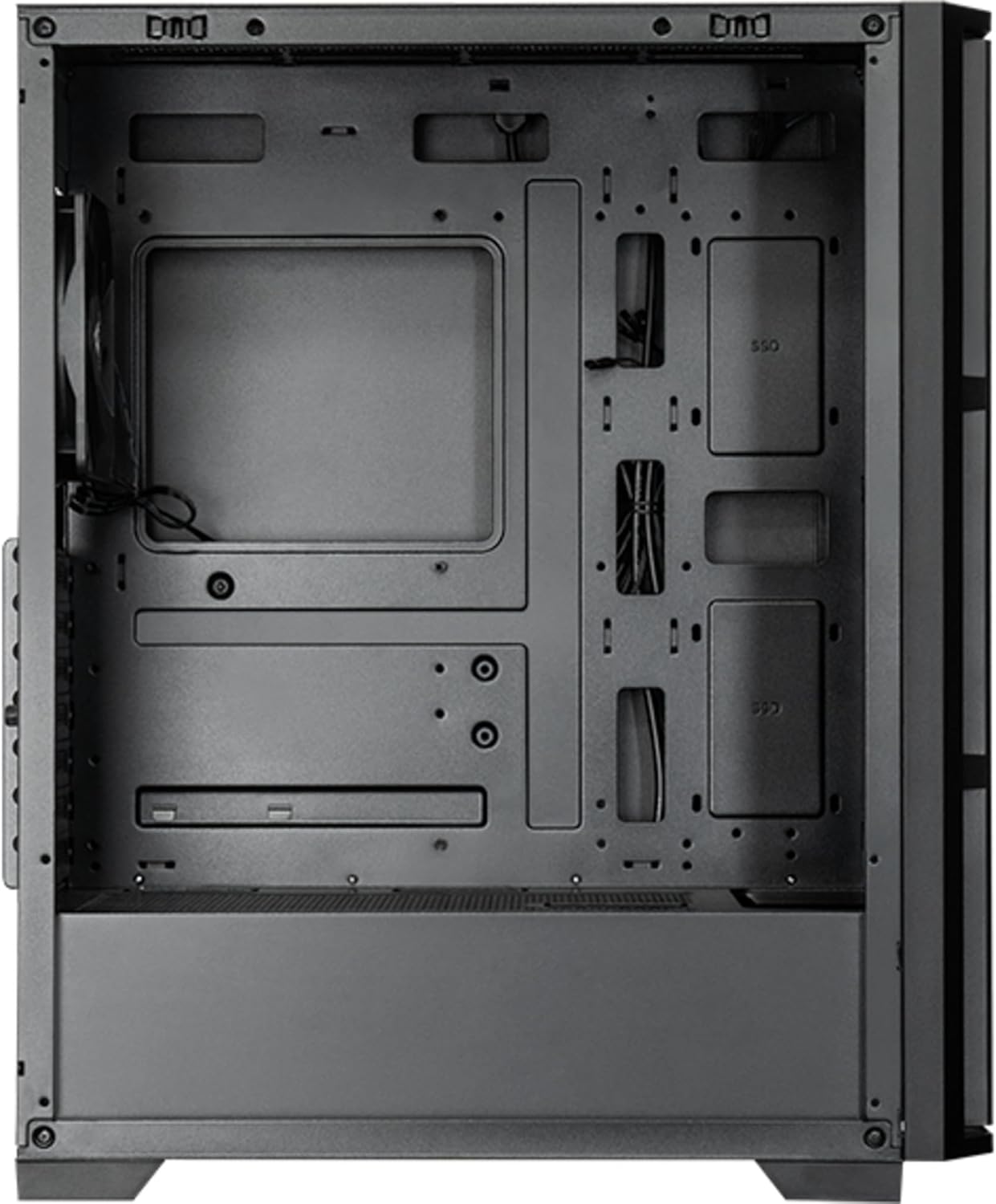
פיגורע 7: ינלענדיש view of the main compartment, showing the motherboard tray and fan mounting points.
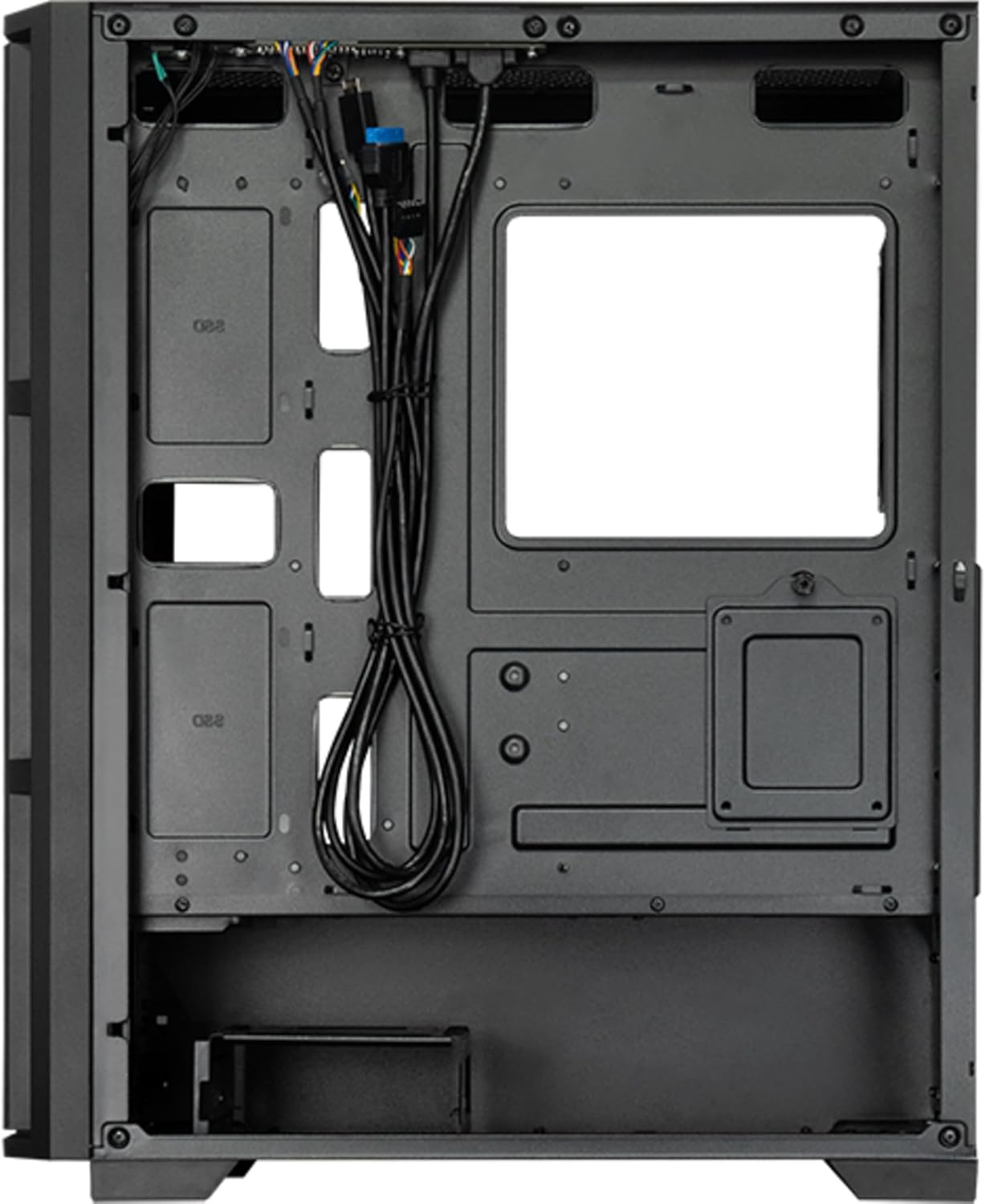
פיגורע 8: ינלענדיש view from the backside, illustrating the cable management routes and drive mounting locations.
2. מאָטהערבאָאַרד ינסטאַלירונג:
- אינסטאלירט דעם I/O שילד אין דער הינטערשטער עפענונג פונעם קעיס.
- Align your ATX, micro ATX, or Mini-ITX motherboard with the standoffs inside the case.
- באַפֿעסטיקן די מאַדערבאָרד מיט די צוגעשטעלטע שרויפֿן.
3. Power Supply Unit (PSU) Installation:
- The PSU is not included. Install your ATX power supply into the dedicated compartment at the bottom rear of the case.
- באַפֿעסטיקן די PSU מיט שרויפֿן פֿון דער הינטערשטער זײַט פֿון דער קעיס.
4. Storage Drive Installation:
- Install 3.5" HDDs into the drive cages located at the bottom.
- Install 2.5" SSDs/HDDs into the dedicated mounting points behind the motherboard tray.
- Secure all drives with appropriate screws.
5. Graphics Card and Expansion Cards:
- אַראָפּנעמען די נייטיקע יקספּאַנשאַן סלאָט דעקל אויף די הינטערשטע טייל פון די קעסטל.
- Insert your graphics card or other expansion cards into the PCIe slots on the motherboard.
- באַזײַטיקט די קאַרטלעך מיט שרויפן.
6. קאַבלע מאַנאַגעמענט:
- פירט אלע מאַכט און דאַטן קייבאַלז דורך די אויסשניטן און בינדונג פונקטן הינטער די מוטערבאָרד טאַץ.
- Connect the front panel I/O cables (USB, audio, power switch, reset switch, LED indicators) to the corresponding headers on your motherboard.
- Ensure cables do not obstruct airflow.
7. אינסטאַלאַציע פון ווענטילאַטאָר און קיל סיסטעם:
- The case includes one pre-installed 120mm PWM fan at the rear.
- Additional fans can be installed at the front (up to 3x 120mm/140mm) and top (up to 2x 120mm/140mm).
- Radiators up to 360mm can be installed at the front and up to 280mm at the top.
- Connect fan power cables to the motherboard fan headers.
אַפּערייטינג ינסטראַקשאַנז
Once all components are installed and secured, and the side panels are reattached, your PC is ready for operation.
מאַכט אויף:
- Connect the power cable from your power supply to a wall outlet.
- Press the power button located on the top I/O panel of the case.
- The system should boot up, and any installed lighting will illuminate.
Front I/O Panel Usage:
- וסב 2.0 פּאָרץ (x2): For connecting peripherals such as keyboards, mice, and USB drives.
- USB Type-C Port (x1): פֿאַר פֿאַרבינדן מאָדערנע USB-C דעוויסעס.
- Audio Jacks (Headphone/Microphone): פֿאַר פֿאַרבינדן כעדפאָונז, רעדנערס אָדער מיקראָפֿאָנען.
- באַשטעטיק קנעפּל: צו ריסטאַרטן דעם קאָמפּיוטער.
וישאַלט
רעגולערע אויפהאלטונג העלפט זיכער מאכן אפטימאלע פאָרשטעלונג און פארלענגערט די לעבנס-צייט פון אייערע פּיסי קאָמפּאָנענטן.
רייניקונג:
- עקסטעריע: ניצן אַ ווייך, דamp טוך צו אפווישן די אויסערליכע ייבערפלאַכן. פֿאַרמייַדן שרײַבנדיקע רייניקונגסמיטלען.
- שטויב פילטערס: The case features dust filters (e.g., on the top and bottom). Regularly remove and clean these filters with compressed air or by rinsing with water (ensure they are completely dry before reinstallation).
- ינלענדיש: Periodically use compressed air to remove dust buildup from fans, heatsinks, and other internal components. Ensure the system is powered off and unplugged before cleaning the interior.
לופט לויפן:
- Ensure adequate space around the case for proper airflow.
- ויסמיידן בלאַקינג ווענטאַליישאַן אָופּאַנינגז.
טראָובלעשאָאָטינג
די סעקציע באהאנדלט אלגעמיינע פראבלעמען וואס איר קענט באגעגענען.
קיין מאַכט:
- Check if the power cable is securely connected to both the PSU and the wall outlet.
- Ensure the power switch on the PSU itself is in the "ON" position.
- וועריפיצירט אז דער פראנט פאנעל מאכט סוויטש קאבל איז ריכטיג פארבונדן צום מאדערבארד כעדער.
פעןס דרייען זיך נישט:
- Check if fan power cables are securely connected to the motherboard fan headers or a fan controller.
- Ensure fan speed settings in BIOS/UEFI or operating system are not set to zero RPM.
פראָנט פּאַנעל USB/אַודיאָ אַרבעט נישט:
- Verify that the USB and audio cables from the front panel are correctly connected to the corresponding headers on the motherboard.
- Check motherboard drivers for USB and audio functionality.
ספּעסאַפאַקיישאַנז
| שטריך | דעטאַל |
|---|---|
| מאָדעל נאָמען | AS-02B-TG-OP |
| סאָרט | טשיףטעק |
| פאָרם פאַקטאָר | מידי טאַוער |
| פּראָדוקט קאָליר | שוואַרץ |
| Supported Motherboard Form Factors | ATX, micro ATX, Mini-ITX |
| דימענשאַנז (ב x ד x ה) | 215 מ״מ x 390 מ״מ x 485 מ״מ (8.46" x 15.35" x 19.09") |
| פּונקט וואָג | 5.3 קג (בעערעך 11.68 לבס) |
| 3.5" Expansion Bays | 2 |
| 2.5" Expansion Bays | 2 |
| 5.25" Expansion Bays | 0 |
| יקספּאַנשאַן סלאָץ | 7 |
| זייַט פֿענצטער | Yes (Tempered Glass) |
| לייטינג | Yes (Multi-color) |
| מאַקסימום קפּו קולער הייך | 16.5 סענטימעטער |
| פראָנט איך / אָ פּאָרץ | 2x USB 2.0, 1x USB Type-C, Audio In/Out |
| פאַר-אינסטאַלירן פאַנס | 1x 120mm PWM (Rear) |
| Supported Front Fans (Max) | 3x 120mm or 3x 140mm |
| Supported Top Fans (Max) | 2x 120mm or 2x 140mm |
| Supported Front Radiators | 120 מם, 140 מם, 240 מם, 280 מם, 360 מם |
| Supported Top Radiators | 120 מם, 140 מם, 240 מם, 280 מם |
| מאַכט צושטעלן ינקלודעד | ניין |
וואָראַנטי אינפֿאָרמאַציע
The Chieftec AS-02B-TG-OP PC case comes with a 2-יאָר פאַבריקאַנט ס וואָראַנטי from the date of purchase. This warranty covers defects in materials and workmanship under normal use. It does not cover damage caused by misuse, accident, modification, unauthorized repair, or improper installation.
ביטע האַלטן דיין דערווייַז פון קויפן פֿאַר וואָראַנטי קליימז.
שטיצן
For technical assistance, troubleshooting beyond this manual, or warranty inquiries, please contact Chieftec customer support.
- Webפּלאַץ: Refer to the official Chieftec webזייטל פֿאַר שטיצע רעסורסן און קאָנטאַקט אינפֿאָרמאַציע.
- אימעיל/טעלעפאן: Specific contact details can typically be found on the product packaging or the official Chieftec support page.
When contacting support, please have your product model (AS-02B-TG-OP) and proof of purchase readily available.


