הקדמה
This manual provides detailed instructions for the installation, operation, and maintenance of your Vetroo M06 Micro-ATX/Mini-ITX Gaming PC Case. Please read this manual thoroughly before beginning assembly to ensure proper setup and optimal performance.

Image: The Vetroo M06 Micro-ATX/Mini-ITX Gaming PC Case in black, showcasing its mesh front panel and side window, viewעד פון אַ ווינקל.
שליסל פֿעיִקייטן
- סאָליד פּלאַן: Micro-ATX / Mini-ITX form factor with a high-airflow mesh front panel, designed for space-efficient builds.
- אָפּטימיזירטע קאָאָלינג: Supports up to five 120mm fans and a 240mm top-mounted liquid radiator for efficient thermal management.
- GPU Compatibility: אַקאַמאַדירט גראַפיקס קאַרדס ביז 355 מם אין לענג.
- Flexible PSU Mounting: Features an adjustable power supply installation area with a maximum length of 160mm.
- מאָדערן קאַנעקטיוויטי: Front panel includes USB Type-C and USB 3.0 ports for convenient peripheral access.
פּעקל אינהאַלט
ביטע באַשטעטיקן אַז אַלע קאָמפּאָנענטן זענען פאַראַן איידער איר גייט ווייטער מיט דער אינסטאַלאַציע:
- Vetroo M06 PC Case
- Accessory Box (screws, standoffs, cable ties)
- SFX PSU Bracket (1x)
- באַניצער מאַנואַל (דעם דאָקומענט)
ספּעסאַפאַקיישאַנז
| שטריך | דעטאַל |
|---|---|
| מאָדעל נאָמען | M06 |
| טיפּ פון קאַסטן | מיני-טורעם |
| מאָטהערבאָאַרד קאַמפּאַטאַבילאַטי | מיקראָ אַטקס, מיני יטקס |
| פּראָדוקט דימענשאַנז (L x W x H) | 15.55" x 7.87" x 13.07" (395 מ״מ x 200 מ״מ x 332 מ״מ) |
| פּונקט וואָג | 13.37 פונט (6.06 קג) |
| מאַטעריאַל | Acrylonitrile Butadiene Styrene (ABS), SPCC (0.8mm metal plate) |
| מאַקסימום גפּו לענג | 355 מם |
| מאַקסימום קפּו קולער הייך | 165 מם |
| מאַקסימום פּסו לענג | 160mm (Adjustable mounting) |
| פאָכער סופּפּאָרט | אַרויף צו 5 X 120 מם פאַנס |
| ראַדיאַטאָר שטיצן | 1 x 240mm (Top) |
| פראָנט איך / אָ פּאָרץ | 1 x USB Type-C, 1 x USB 3.0, HD Audio, Power Button, Reset Button |

Image: Diagram illustrating the compact dimensions of the Vetroo M06 PC case, measuring 15.5 inches in depth, 7.8 inches in width, and 13.0 inches in height.

Image: A detailed diagram outlining the compatibility specifications for the Vetroo M06 PC case, including maximum CPU cooler height (165mm), GPU length (355mm), PSU length (160mm), and supported motherboard form factors (M-ATX/ITX).
סעטאַפּ און ינסטאַלירונג
Before starting, ensure you have a clean, static-free workspace. Refer to your component manuals for specific installation details.
1. מאָטהערבאָאַרד ינסטאַללאַטיאָן
- Remove the side panel(s) of the case.
- Install the necessary motherboard standoffs into the case tray according to your motherboard's form factor (Micro-ATX or Mini-ITX).
- Carefully place your motherboard onto the standoffs, aligning the screw holes.
- באַוואָרענען די מאָטהערבאָאַרד מיט סקרוז.
2. GPU אינסטאַלאַציע
- Remove the appropriate PCIe slot covers from the rear of the case.
- Insert your graphics card into the primary PCIe slot on your motherboard.
- באַפֿעסטיקן די גראַפיקס קאַרטל צום קעיס מיט שרויפֿן.
- Connect any required PCIe power cables from your power supply to the GPU.
3. פּסו ינסטאַלירונג
- Determine the desired mounting position for your power supply. The Vetroo M06 supports adjustable PSU mounting.
- If using an SFX power supply, attach the included SFX bracket to the PSU.
- Slide the power supply into its designated bay and secure it with screws from the rear of the case.
- Route the necessary power cables to your components.

בילד: אן אינערליכע view of the Vetroo M06 PC case highlighting the three adjustable mounting positions for ATX/SFX power supplies, along with an illustration of the included SFX bracket.
4. Storage Installation (HDD/SSD)
- Locate the designated mounting points for 3.5" HDDs and 2.5" SSDs.
- Secure your storage drives using the provided screws.
- Connect SATA data and power cables to each drive.
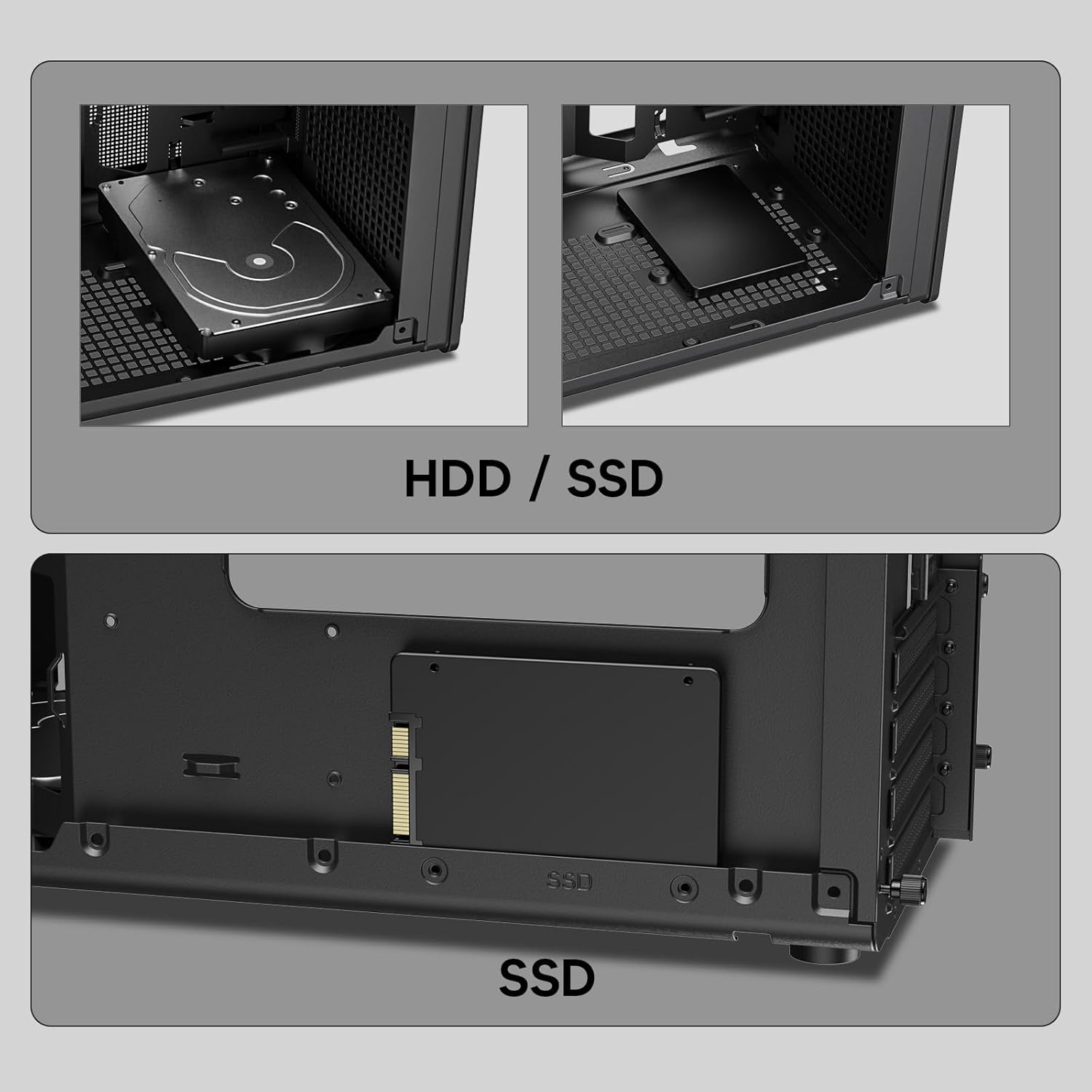
בילד: נאָענט-אַרויף views of the Vetroo M06 PC case interior, demonstrating the mounting options for both 3.5-inch Hard Disk Drives (HDDs) and 2.5-inch Solid State Drives (SSDs).
5. קיל סיסטעם אינסטאַלאַציע (ווענטילאַטאָרן/ראַדיאַטאָרן)
- Identify the fan mounting locations (up to five 120mm fans).
- Mount fans using appropriate screws, ensuring correct airflow direction.
- For liquid cooling, install a 240mm radiator at the top mounting position, securing it with screws.
- Connect fan and pump cables to your motherboard or fan controller.
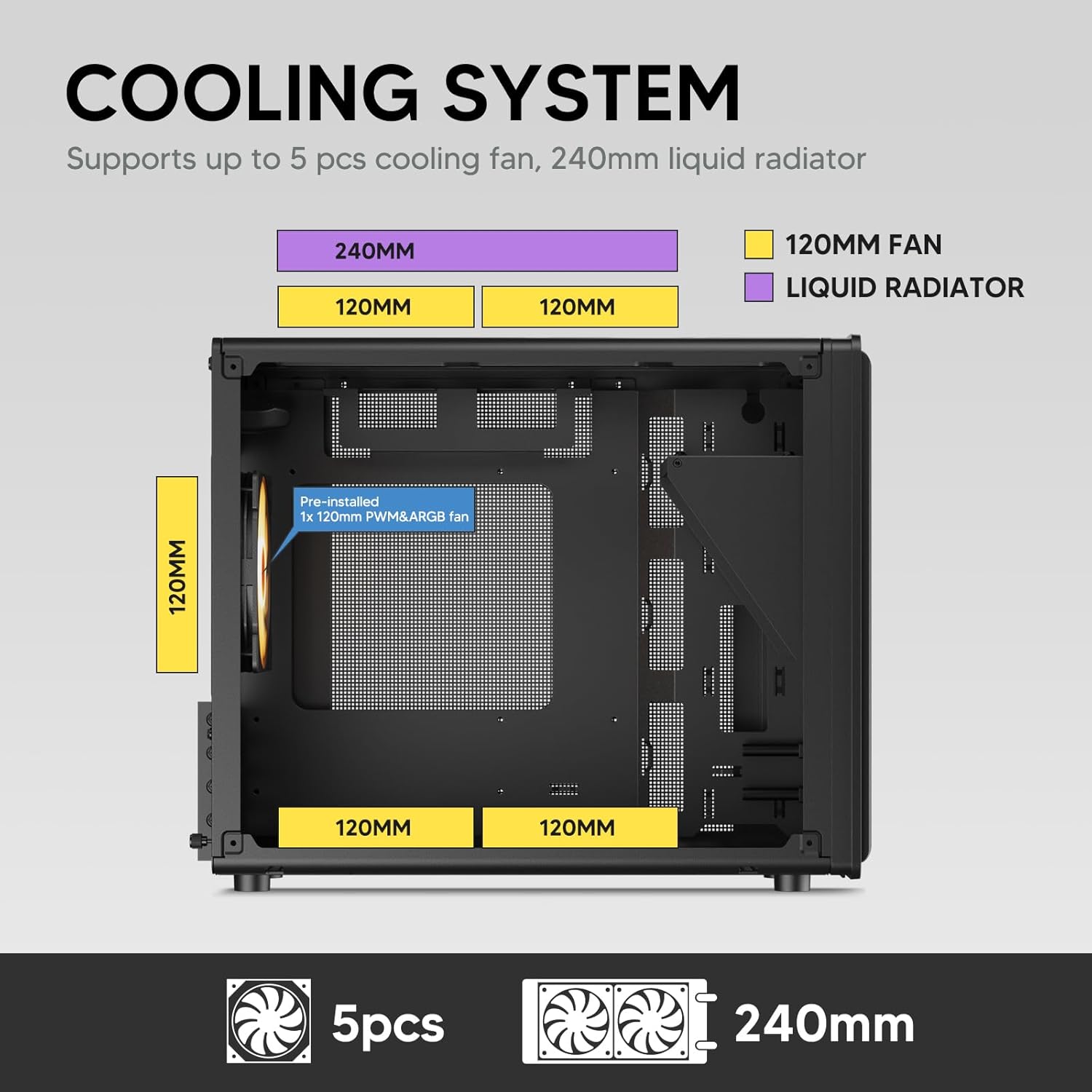
Image: A diagram illustrating the cooling system layout within the Vetroo M06 PC case, detailing the positions for up to five 120mm fans and a 240mm liquid radiator at the top.
6. I/O Panel Connections
- Connect the front panel cables (Power, Reset, USB 3.0, USB Type-C, HD Audio) to the corresponding headers on your motherboard. Refer to your motherboard manual for header locations.

Image: A close-up of the Vetroo M06 PC case's front I/O panel, clearly labeling the Power button, Reset button, USB 3.0 port, HD Audio jack, and USB Type-C port.
אַפּערייטינג ינסטראַקשאַנז
Once all components are installed and cables are connected, replace the side panels. Connect your peripherals (monitor, keyboard, mouse) and power cable to the PSU. Press the power button on the front panel to start your system.
אַירפלאָוו מאַנאַגעמענט
The Vetroo M06 case features an excellent airflow design with mesh panels to facilitate optimal cooling. Ensure fans are installed to create a balanced airflow, typically with intake fans at the front/bottom and exhaust fans at the rear/top.

Image: An exploded diagram of the Vetroo M06 PC case, illustrating the intended airflow patterns with blue arrows indicating cool air intake and red arrows showing warm air exhaust through its mesh panels.
וישאַלט
Regular maintenance helps prolong the life of your PC components and ensures optimal performance.
- שטויב רייניקונג: רייניקט פּעריִאָדיש שטויב פֿילטערס און אינעווייניקסטע קאָמפּאָנענטן מיט קאָמפּרעסירטע לופֿט. מאַכט זיכער אַז די סיסטעם איז אויסגעלאָשן און אַרויסגעצויגן פֿון די פּלאָג איידער איר רייניקט.
- קאַבלע פאַרוואַלטונג: Verify that internal cables are neatly routed and do not obstruct airflow.
- קאָמפּאָנענט טשעקס: Ensure all screws are tight and components are securely seated.

Image: A close-up shot of the Vetroo M06 PC case, featuring a digital caliper measuring the thickness of the metal plate, which is specified as 0.8mm, highlighting the case's robust construction.
טראָובלעשאָאָטינג
אויב איר טרעפט פּראָבלעמען, זעט די פאלגענדע געוויינטלעכע טראָובלעשווטינג טריט:
- סיסטעם גייט נישט אן:
- Check all power connections, including the PSU to wall outlet, PSU to motherboard (24-pin and CPU 8-pin), and front panel power switch cable to motherboard.
- זיכער מאַכן אַז דער PSU סוויטש איז אין דער 'ON' פּאָזיציע.
- קיין אַרויסווייַז רעזולטאַט:
- Verify that your monitor is connected to the graphics card (not the motherboard's integrated graphics ports, unless you are using integrated graphics).
- לייג צוריק די גראַפיקס קאַרטל און ראַם מאָדולן.
- אָוווערכיטינג ישוז:
- Ensure all case fans are spinning and oriented correctly for optimal airflow.
- Check CPU cooler installation and thermal paste application.
- Clean any dust buildup from fans and filters.
- USB פּאָרטן אַרבעטן נישט:
- Verify that the front panel USB 3.0 and USB Type-C cables are correctly connected to the motherboard headers.
וואָראַנטי און שטיצן
Vetroo products are designed for quality and reliability. For warranty information and technical support, please visit the official Vetroo webזייטל אדער קאנטאקט זייער קאסטומער סערוויס. האלט אייער באווייז פון קויפן פאר גאראנטיע טענות.
Vetroo Official Webפּלאַץ: Vetroo Store on Amazon
For further assistance, please refer to the contact information provided with your product packaging or on the official Vetroo support channels.


