הקדמה
This manual provides detailed instructions for the ATTACK SHARK G3 Tri-Mode Wireless Gaming Mouse. Please read this manual thoroughly before use to ensure proper operation and to maximize your experience with the product.
The ATTACK SHARK G3 is a high-performance gaming mouse designed for versatility and precision. It offers three connectivity modes: 2.4GHz wireless, Bluetooth 5.2, and wired USB-C, allowing seamless switching between various devices and setups. Featuring a lightweight design, a high-precision PAW3311 sensor, and programmable buttons, the G3 is engineered for both gaming and productivity.
פּעקל אינהאַלט
- ATTACK SHARK G3 Wireless Gaming Mouse
- יו-עס-בי-סי טשאַרדזשינג/דאַטן קאַבל
- 2.4 גהז וסב ופנעמער
- באַניצער מאַנואַל
פּראָדוקט איבערview
Familiarize yourself with the components of your ATTACK SHARK G3 mouse.

בילד: פון אויבן אַראָפּ view of the ATTACK SHARK G3 Wireless Gaming Mouse in Berry Red, showing the left and right click buttons, scroll wheel, and two side buttons on the left.
- לינקער קליק קנעפל: Standard primary mouse function.
- רעכט קליק קנעפל: Standard secondary mouse function.
- סקראָל ראָד: פֿאַר סקראָלן און מיטל-קליק פונקציע.
- זייט קנעפּלעך (x2): Default to Forward/Backward, programmable via software.
- DPI Button (underside): גייט דורך פאָרגעשטעלטע DPI לעוועלס.
- Mode Switch (underside): Toggles between 2.4GHz, Bluetooth, and Wired modes.
- וסב- C פּאָרט: פֿאַר דראָטיקער פֿאַרבינדונג און טשאַרדזשינג.
- 2.4GHz USB Receiver Storage: Located on the underside of the mouse.

בילד: א קאלאזש אויסשטעלונגasing key features of the G3 mouse, including its 59g ultra-light design, 500mAh battery, PixArt PAW3311 sensor, 25000 DPI capability, Huano Blue Shell Pink Dot Switches, and Tri-mode connectivity.
סעטאַפּ
1. ווייערד מאָדע קאַנעקשאַן
- פֿאַרבינדט דעם USB-C עק פֿונעם צוגעשטעלטן קאַבל צום מויז.
- פֿאַרבינדט דעם USB-A עק פֿונעם קאַבל צו אַ פֿאַראַן USB פּאָרט אויף אייער קאָמפּיוטער.
- Ensure the mode switch on the underside of the mouse is set to the "Wired" position.
- The mouse will be recognized by your computer and is ready for use.
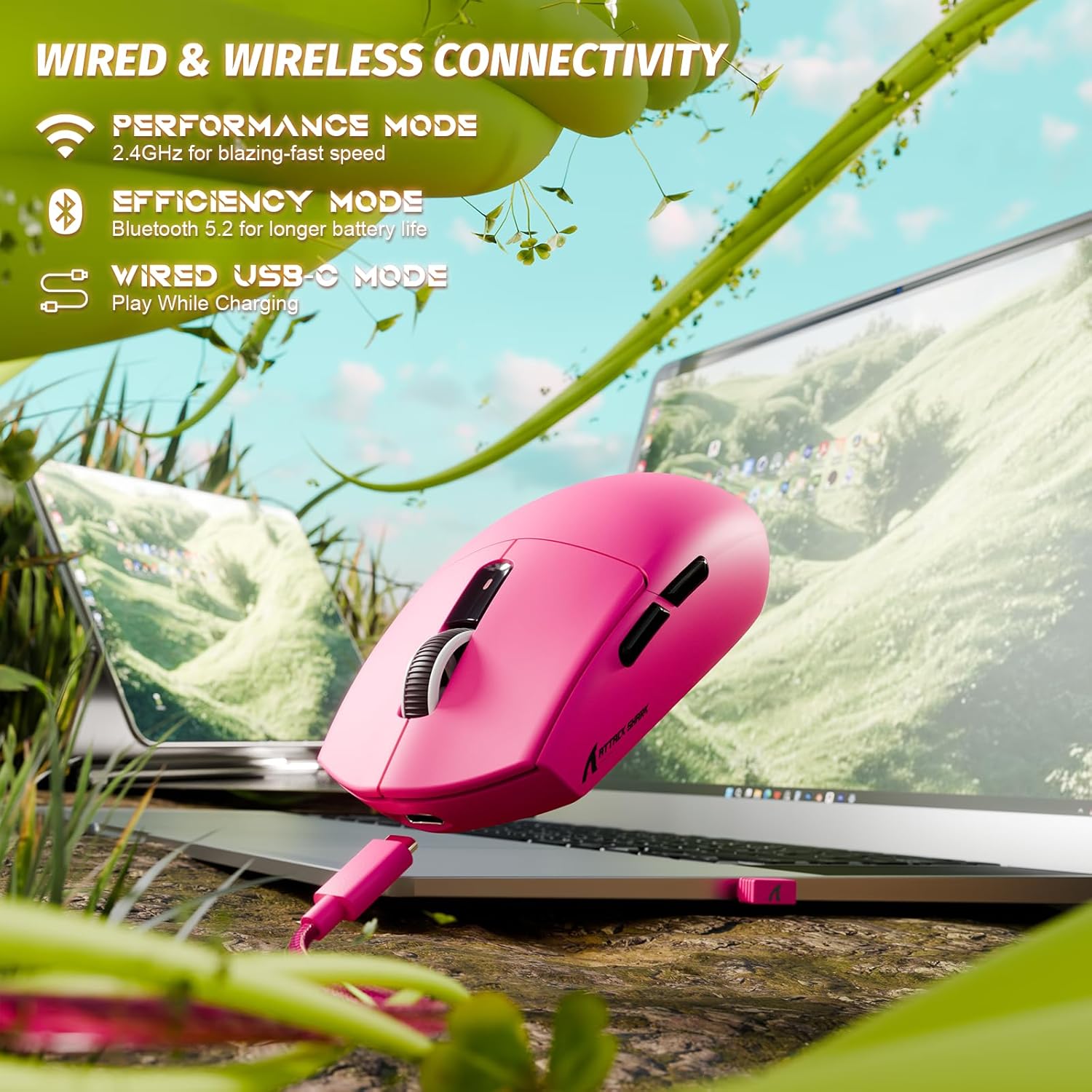
Image: The ATTACK SHARK G3 mouse connected to a laptop via its USB-C cable, illustrating the wired connectivity option.
2. 2.4GHz Wireless Mode Connection
- Locate the 2.4GHz USB receiver stored on the underside of the mouse.
- צאַפּן די וסב ופנעמער אין אַ בנימצא וסב פּאָרט אויף דיין קאָמפּיוטער.
- Set the mode switch on the underside of the mouse to the "2.4G" position.
- The mouse should automatically connect to the receiver. If not, press and hold the DPI button and a side button simultaneously for 3 seconds to initiate pairing.
3. Bluetooth 5.2 Mode Connection
- Set the mode switch on the underside of the mouse to the "BT" (Bluetooth) position.
- The mouse will enter pairing mode, indicated by a blinking LED light.
- אויף אייער קאָמפּיוטער אָדער מיטל, גייט צו די בלועטוט סעטטינגס.
- זוכן פֿאַר new devices and select "ATTACK SHARK G3" from the list.
- גיי קיין פּראַמפּס אויף דעם עקראַן צו פאַרענדיקן דעם פּערינג פּראָצעס.
אַפּערייטינג ינסטראַקשאַנז
דפּי אַדזשאַסטמאַנט
The ATTACK SHARK G3 features a PAW3311 sensor with adjustable DPI settings. You can cycle through preset DPI levels by pressing the DPI button located on the underside of the mouse. For fine adjustments and custom DPI profiles, use the dedicated driver software.

בילד: א נאָענטע בילד view of the PixArt PAW3311 sensor inside the mouse, highlighting its capabilities such as 1000Hz polling rate, 25000 DPI max, and 40G acceleration.
פּראָגראַמירבאַרע קנעפּלעך און ווייכווארג
The G3 mouse includes 5 programmable buttons. To customize button functions, create macros, and adjust settings like polling rate and Lift-Off Distance (LOD), download and install the official ATTACK SHARK driver software from the manufacturer's website. The software allows for personalized configurations to suit your specific needs.

Image: A screenshot of the ATTACK SHARK G3 customization software interface, showing options for mouse settings, DPI settings, parameter settings, macro editing, and personal center.
טשאַרדזשינג די מאַוס
The mouse is equipped with a built-in 500mAh rechargeable lithium-ion battery. When the battery is low, the LED indicator will signal. Connect the mouse to your computer using the provided USB-C cable to charge. The mouse can be used normally while charging in wired mode.

Image: The ATTACK SHARK G3 mouse in a natural setting, emphasizing its 500mAh battery capacity for extended use.
וישאַלט
- רייניקונג: ניצט אַ ווייכע, טרוקענע שטאָף צו רייניקן די מויז ייבערפלאַך. פֿאַר שווערע שמוץ, אַ ביסל טרוקןamp מען קען ניצן אַ שטאָף, און זיכער מאַכן אַז קיין נעץ גייט נישט אַרײַן אין די אינעווייניקסטע קאָמפּאָנענטן.
- סענסאָר זאָרגן: האַלט דעם אָפּטישן סענסאָר אויף דער אונטערשטער זייט פון דער מויז ריין און פריי פון שטויב אָדער דעבריס צו ענשור פּינקטלעכע טראַקינג.
- באַטאַרייע לאָנדזשעוואַטי: כדי צו פארלענגערן די באַטעריע לעבן, זאָלט איר נישט אָפט אויסלאָדן די מויז גאָר. לאָדט זי אויף ווען דער אינדיקאַטאָר פֿאַר נידעריקע באַטעריע דערשיינט.
- סטאָרידזש: ווען נישט אין באַנוץ פֿאַר לענגערע פּעריאָדן, האַלט די מויז אין אַ קיל, טרוקן אָרט.

Image: An inverted view of the ATTACK SHARK G3 mouse, showcasing its double-layer mouse feet for smooth gliding and stability.
טראָובלעשאָאָטינג
- מויז ענטפערט נישט:
- זייט זיכער אז די מויז איז אויפגעלאָדן.
- Check the mode switch (2.4G, BT, Wired) is set correctly.
- פֿאַר 2.4GHz, זאָרגט אַז דער USB ריסיווער איז זיכער אַרײַנגעשטעקט. פּרוּווט אַן אַנדער USB פּאָרט.
- פֿאַר בלועטוט, זאָרגט אַז בלועטוט איז אַקטיווירט אויף אייער מיטל און די מויז איז געפּאָרט.
- Try connecting in wired mode to confirm functionality.
- נישט פּינקטלעכע טראַקינג:
- רייניקט דעם אָפּטישן סענסאָר אויף דער אונטערשטער זײַט פֿון דער מויז.
- זייט זיכער אַז איר ניצט די מויז אויף אַ פּאַסיקער ייבערפלאַך (למשל, אַ מויז פּאַד).
- Adjust DPI settings via the DPI button or software.
- קאָנעקטיוויטי פּראָבלעמען:
- Move the mouse closer to the receiver/device to reduce interference.
- Avoid using the 2.4GHz receiver near other wireless devices that may cause interference.
- Re-pair the mouse in 2.4GHz or Bluetooth mode if connection is lost.
- ווייכווארג דעטעקטירט נישט מויז:
- Ensure the mouse is connected in wired or 2.4GHz mode (Bluetooth may not be supported by all software).
- ריסטאַרט די ווייכווארג און/אָדער דיין קאָמפּיוטער.
- ריאינסטאלירן די דרייווער ווייכווארג.
ספּעסאַפאַקיישאַנז
| שטריך | דעטאַל |
|---|---|
| מאָדעל | G3 |
| קאַנעקטיוויטי | 2.4GHz ווירעלעס, בלועטוט 5.2, USB-C מיט ווייערס |
| סענסאָר | פּיקסאַרט PAW3311 אָפּטישער סענסאָר |
| DPI קייט | 800 - 25,000 DPI (adjustable) |
| טראַקינג ספּיד | 400 יפּס |
| אַקסעלעריישאַן | 40G |
| פּאָללינג קורס | 1000Hz (Wired/2.4GHz) |
| קנעפּלעך | 5 פּראָגראַממאַבלע קנעפּלעך |
| סוויטשיז | Huano Blue Shell Pink Dot Switches (80 million clicks) |
| באַטערי | 500mAh ריטשאַרדזשאַבאַל ליטהיום-יאָן |
| מויז ווייט | אומגעפער 59 גראַם (2.08 אונס) |
| קאַמפּאַטאַבילאַטי | PC, Mac (Windows/macOS) |
וואָראַנטי און שטיצן
ATTACK SHARK products are designed and manufactured to the highest quality standards. For warranty information and technical support, please refer to the official ATTACK SHARK webזייטל אדער קאנטאקט זייער קאסטומער סערוויס גלייך. האלט אייער באווייז פון קויפן פאר גאראנטיע פארלאנגען.
For further assistance, visit the official ATTACK SHARK store: ATTACK SHARK Store


