1. הקדמה
The Thunderobot L1 Computer Monitor Lamp is designed to provide optimal lighting for your workspace, focusing on eye comfort and visual clarity. It features an asymmetric light source, high color rendering (Ra≥95), flicker-free illumination, low blue light protection, and adjustable color temperature and brightness levels.
2. זיכערקייַט אינפֿאָרמאַציע
- פאַרזיכערן די לamp is securely placed on the monitor to prevent accidental falls.
- צי ניט ויסשטעלן די לamp צו וואַסער אָדער איבערגעטריבענע נעץ.
- Avoid disassembling the product. Contact support for repairs.
- Use only the provided USB cable for power.
- האַלטן אויס פון דערגרייכן פון קינדער.
3. פּעקל אינהאַלט
באַשטעטיקן אַז אַלע זאכן זענען פאַראַן אין פּעקל:
- Thunderobot L1 Computer Monitor Lamp
- וסב מאַכט קאַבלע
- באַניצער מאַנואַל
4. סעטאַפּ אינסטרוקציעס
- שטעלע די לamp: Gently place the Thunderobot L1 Monitor Lamp on top of your computer monitor. The gravity-activated clamping mechanism and silicone anti-slip stabilizers will help secure it in place. Adjust the lamp's angle using the dual-pivot adjustment system to direct light onto your workspace without screen glare.
- קאַנעקטינג מאַכט: Connect the provided USB cable to the USB-C port on the lamp and plug the other end into an available USB port on your computer or a USB power adapter (not included). The lamp will power on.

Image: The Thunderobot L1 lamp features a gravity-activated clamp, silicone stabilizers, and a dual-pivot adjustment system for secure and flexible positioning.
Video: This video demonstrates the assembly and installation of the Thunderobot L1 Computer Monitor Lamp, showing how to attach it to a monitor and connect the power cable.
5. אַפּערייטינג ינסטרוקטיאָנס
The Thunderobot L1 Monitor Lamp features intuitive touch controls located on the top surface of the lamp.
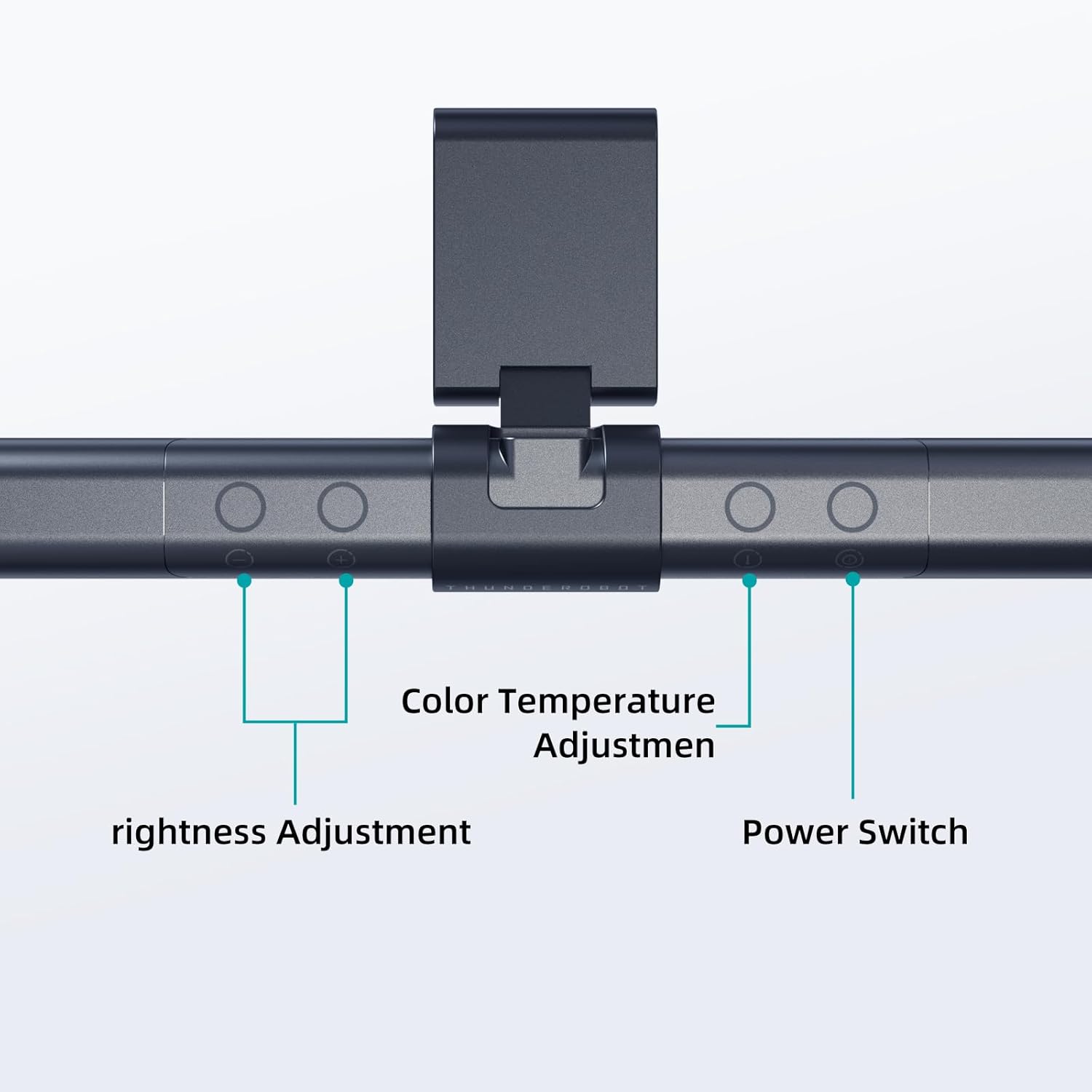
Image: The touch controls include buttons for brightness adjustment, color temperature adjustment, and power.
- מאַכט אויף / אַוועק: דרוק דעם מאַכט קנעפּל (O) צו ווענדן די לamp אויף אָדער אַוועק.
- ברייטנאַס אַדזשאַסטמאַנט: ניצט די ליכטיקייט אַדזשאַסטמענט קנעפּלעך (+ און -) to cycle through ten levels of brightness.
- קאָליר טעמפּעראַטור אַדזשאַסטמאַנט: Press the color temperature button (i) to switch between six different color temperature settings.

בילד: די לamp offers six adjustable color temperatures, ranging from 3000K (Warm Light) to 6000K (Cool White Light), suitable for various activities like movie viewing, reading, studying, and working.
6. שליסל פֿעיִקייטן
- Asymmetric Light Source: The advanced asymmetric light design ensures uniform light distribution across the workspace, eliminating screen glare and shadows. This optimizes the light path for comfortable, prolonged use.
- Ra≥95 High Color Rendering: With a color rendering index of Ra≥95, the lamp accurately reproduces colors, providing a vivid and true-to-life visual experience for various tasks.
- פליקער-פריי לייטינג: Equipped with flicker-free technology, this lamp provides constant, stable illumination, reducing eye strain and headaches associated with traditional lighting.
- Low Blue Light Protection: Advanced low blue light technology reduces harmful blue wavelengths, alleviating eye strain, dryness, and fatigue, especially during extended screen time.
- Six Color Temperatures: Offers a versatile range of six color temperature options, from warm white to cool white, allowing users to customize the lighting atmosphere for different scenarios and preferences.
- Ten-Level Dimming: Provides ten adjustable brightness levels for precise control over illumination intensity.

Image: The Ra≥95 High CRI ensures colors are displayed accurately and vibrantly, as demonstrated by the fruit comparison.

בילד: די לamp provides low blue light protection, reducing harmful blue light exposure for eye comfort.
7. ספּעסאַפאַקיישאַנז
| שטריך | דעטאַל |
|---|---|
| פּראָדוקט דימענשאַנז | 3.5"ד רענטגענ 17.7"וו רענטגענ 3.85"ה |
| פּונקט וואָג | 16 אונסעס |
| Lamp טיפּ | דעסק לamp |
| שאָטן קאָליר | שוואַרץ |
| שאָטן מאַטעריאַל | פּאָליעסטער |
| באַשטימען טיפּ | דרוק קנעפּל |
| קאַנעקטיוויטי טעכנאָלאָגיע | USB (פֿאַר מאַכט) |
| Voltage | 12 וואלטס |
| קאָליר | שוואַרץ |
| פאָרעם | פלאַך |
| מאַטעריאַל טיפּ | פּאָליקאַרבאָנאַטע |
| מאָדעל נומער | TH-L1-B2 |
8. וישאַלט
- רייניקונג: טרענט אפ די עלעקטריציטעט איידער איר רייניגט. ניצט א ווייכע, טרוקענע שטאָף צו אפווישן די לamp. דו זאלסט נישט נוצן אַברייסיוו קלינערז אָדער סאָלוואַנץ.
- סטאָרידזש: ווען נישט אין באַנוץ פֿאַר לענגערע צייטן, זאָל מען אויפֿהיטן דאָס לamp אין אַ קיל, טרוקן אָרט.
9. טראָובלעשאָאָטינג
- Lamp צינדט זיך נישט:
- פאַרזיכערן די וסב קאַבלע איז סיקיורלי פארבונדן צו ביידע די לamp און די מאַכט מקור.
- Verify that the power source (USB port or adapter) is functional.
- ליכט פליקערט:
- קוק די מאַכט קשר.
- אויב די פליקערינג בלייבט, קאָנטאַקטירט קונה שטיצע.
- קאָנטראָלס רעאַגירן נישט:
- Disconnect and reconnect the power cable to reset the lamp.
- זייט זיכער אז אייערע פינגער זענען ריין און טרוקן ווען איר ניצט די ריר קאנטראלס.
10. וואָראַנטי און שטיצן
Thunderobot provides 1-year product quality support for the L1 Computer Monitor Lamp. For warranty claims or technical assistance, please contact Thunderobot customer service.


