הקדמה
א דאנק פארן קויפןasing the Dierya DK68 Wireless Mechanical Gaming Keyboard. This manual provides detailed instructions on how to set up, operate, and maintain your keyboard. Please read this manual thoroughly before use to ensure optimal performance and longevity of your device.

Image: The Dierya DK68 wireless mechanical gaming keyboard, showcasinג זײַן קאָמפּאַקט 60% אויסלייג און RGB באַקלייטונג.
שליסל פֿעיִקייטן
- קאָמפּאַקט 60% אויסלייג: 68-key design for space efficiency, with all functions accessible via FN key combinations. Ideal for portability and maximizing desk space.
- Tri-Mode Seamless Connectivity: Supports USB-C wired, Bluetooth, and 2.4GHz wireless receiver connections. Easily switch between up to 3 devices (PC, Mac, smartphone/tablet).
- Customizable 16.8 Million Color RGB Backlight: Features 21 dynamic lighting effects. Adjust effects and colors using FN key combinations.
- Long-Lasting Battery & Standby: Equipped with a 3000mAh battery, providing approximately 8 hours of continuous use with backlight on, or up to 90 hours with backlight off. Standby time up to 360 hours (approx. 15 days).
- שטאַרקע מעכאַנישע סוויטשעס: Utilizes Dierya's proprietary mechanical switches with a 60 million keystroke lifespan. Red switches (linear, silent) are suitable for gaming and office work.
- N-Key Rollover (NKRO): Ensures all key presses are registered accurately, even during simultaneous inputs, for competitive gaming.
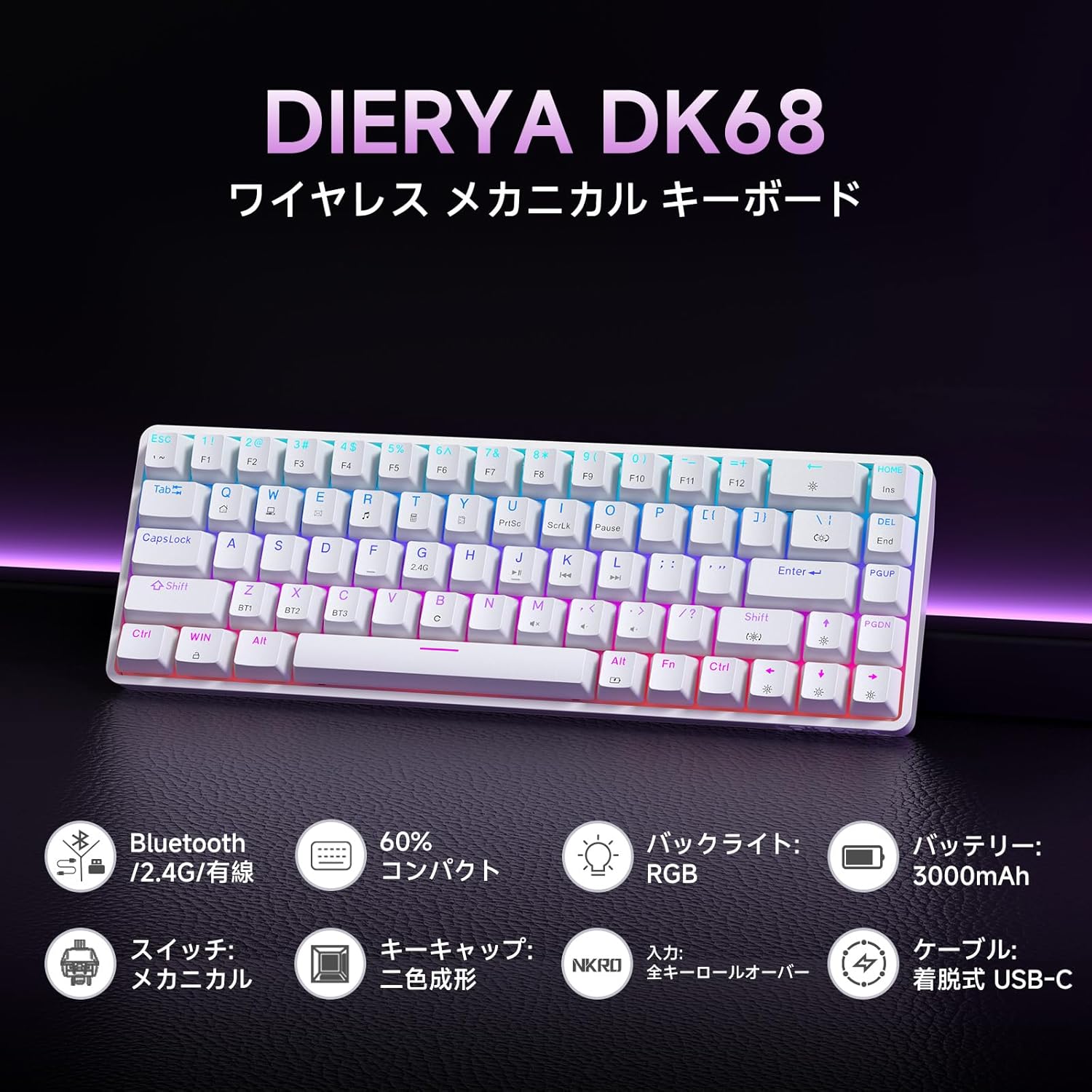
בילד: אן איבערview of the Dierya DK68 keyboard's main features, including Bluetooth/2.4G/Wired connectivity, 60% compact design, RGB backlight, 3000mAh battery, mechanical switches, double-shot keycaps, N-Key Rollover, and a detachable USB-C cable.
סעטאַפּ
1. אויפלאָדן די קלאַוויאַטור
Before first use, fully charge the keyboard using the provided USB-C cable. Connect the cable to the keyboard's USB-C port and to a power source (e.g., computer USB port, USB wall adapter).
- די טשאַרדזשינג אינדיקאַטאָר ליכט וועט ווייַזן טשאַרדזשינג סטאַטוס.
- א פולע אָפּצאָל נעמט טיפּיש אַ פּאָר שעה.
2. קאַנעקטינג די קלאַוויאַטור
The DK68 supports three connection modes: USB-C wired, 2.4GHz wireless, and Bluetooth.
וסב-C ווייערד קאַנעקשאַן
- פֿאַרבינדט דעם צוגעשטעלטן USB-C קאַבל צום USB-C פּאָרט פֿון דער קלאַוויאַטור.
- קאָננעקט די אנדערע סוף פון די קאַבלע צו אַ בנימצא וסב פּאָרט אויף דיין קאָמפּיוטער.
- די קלאַוויאַטור וועט ווערן אויטאָמאַטיש דערקענט און גרייט פֿאַר באַנוץ.
2.4 גהז ווירעלעסס קאַנעקשאַן
- געפינט דעם 2.4GHz USB ריסיווער (געווענליך געהאלטן אין א קאמפארטמענט אויף דער קלאַוויאַטור אדער פּאַקאַדזשינג).
- צאַפּן די וסב ופנעמער אין אַ בנימצא וסב פּאָרט אויף דיין קאָמפּיוטער.
- צינד אן די קלאַוויאַטור. די קלאַוויאַטור זאָל זיך אויטאָמאַטיש פֿאַרבינדן צום ריסיווער.
- אויב די פֿאַרבינדונג איז נישט געגרינדעט, דריק פן + ר to switch to 2.4GHz mode.
בלועטאָאָטה קאַנעקשאַן
The keyboard can store up to three Bluetooth device pairings.
- קער אויף די קלאַוויאַטור.
- דריקן און האַלטן FN + ז, פן + רענטגענ, אָדער FN + C. for 3-5 seconds to enter pairing mode for BT1, BT2, or BT3 respectively. The indicator light will flash rapidly.
- On your device (PC, Mac, smartphone, tablet), enable Bluetooth and search for new devices.
- Select "Dierya DK68" from the list of available devices.
- אַמאָל פּערד, די גראדן ליכט וועט האַלטן פלאַשינג און בלייַבן האַרט.
- צו בייטן צווישן פארבינדענע בלוטוט דעווייסעס, דריק FN + ז, פן + רענטגענ, אָדער FN + C. בעקיצער.

Image: Diagram illustrating the three connection modes: USB-C wired, Bluetooth, and 2.4GHz wireless, along with compatibility icons for Windows, Mac, iOS, Android, Xbox, PC, Laptop, and Tablet.
אַפּערייטינג ינסטראַקשאַנז
1. FN קנעפּל קאָמבינאַציעס
Due to the compact 60% layout, many functions are accessed using the FN שליסל אין קאָמבינאַציע מיט אַנדערע שליסלען.
| קאָמבינאַציע | פֿונקציע |
|---|---|
| FN + 1-0 (top row) | פקסנומקס-פקסנומקס |
| FN + - = | פ11, פ12 |
| FN + Backspace | Toggle Backlight ON/OFF |
| FN + Shift | טוישן באַקלייט קאָליר |
| FN + | | טוישן די באַקלייט מאָדע |
| פן + אַרויף עראָו | פאַרגרעסערן די ברייטנאַס פון די באַקלייט |
| FN + אַראָפּ עראָו | פאַרמינערן די ברייטנאַס פון די באַקלייט |
| FN + לינקער פײַל | פאַרמינערן די באַקלייט ספּיד |
| FN + רעכטע פײַל | פאַרגרעסערן די באַקלייט ספּיד |
| פן + ז / רענטגענ / C | Switch Bluetooth Device (BT1/BT2/BT3) |
| פן + ר | Switch to 2.4GHz Wireless Mode |
| FN + T | Switch to USB-C Wired Mode |
| פן + געווינען | לאַק / ופשליסן Windows שליסל |

Image: A visual guide to customizing the RGB backlight on the Dierya DK68 keyboard using FN key combinations for turning the light on/off, changing colors, modes, brightness, and speed.
2. RGB באַקלייט קאַסטאַמייזיישאַן
The keyboard features over 20 dynamic RGB lighting effects. Use the FN key combinations listed above to personalize your lighting experience.
- דרוק FN + Backspace to toggle the backlight on or off.
- דרוק FN + Shift to cycle through different backlight colors.
- דרוק FN + | to switch between various lighting effects.
- ניצן FN + אַרויף/אַראָפּ פײַל to adjust brightness and FN + Left/Right Arrow to adjust effect speed.
3. מאַכט שפּאָרן מאָדע
To conserve battery life, the keyboard will automatically enter sleep mode after approximately 3 minutes of inactivity. Press any key to wake it up.
וישאַלט
- רייניקונג: Use a soft, dry cloth to wipe the keyboard surface. For deeper cleaning, you may use a can of compressed air to remove dust and debris from between the keycaps. Avoid using harsh chemicals or abrasive materials.
- סטאָרידזש: האַלט די קלאַוויאַטור אין אַ קיל, טרוקן אָרט אַוועק פון דירעקט זונשייַן און עקסטרעמע טעמפּעראַטורן.
- באַטערי זאָרגן: To prolong battery life, avoid fully discharging the battery frequently. Charge the keyboard regularly, especially if it will be stored for an extended period.
- קלאַוויאַטור אַראָפּנעמען: If you need to remove keycaps for cleaning or switch replacement, use a keycap puller to avoid damage. Pull straight up with gentle force.
טראָובלעשאָאָטינג
- קלאַוויאַטור רעאַגירט נישט:
- פאַרזיכערן די קלאַוויאַטור איז אויסגעדרייט אויף.
- קאָנטראָלירט די באַטאַרייע מדרגה און לאָדנט אויף אויב נייטיק.
- Verify the correct connection mode (USB-C, 2.4GHz, or Bluetooth) is selected.
- For 2.4GHz, ensure the receiver is properly plugged in.
- For Bluetooth, re-pair the device if connection is lost.
- פרובירט צו קאנעקטן דורך א USB-C קאבל צו אויסשליסן פראבלעמען מיט די ווייערלעס.
- שליסלען רעגיסטרירן זיך נישט אדער טייפן זיך צוויי מאל:
- Clean under the keycaps to remove any debris.
- Ensure the switches are properly seated.
- RGB backlight not working:
- Ensure the backlight is turned on (FN + Backspace).
- Check battery level; low battery might disable backlighting.
- בלועטוט פֿאַרבינדונג נישט סטאַביל:
- Ensure the keyboard is within range of the device.
- מינימיזירן אריינמישונג פון אנדערע וויירלעס דעווייסעס.
- פּרוּווט ווידער צו פאַרבינדן די קלאַוויאַטור מיט דיין דעווייס.
ספּעסאַפאַקיישאַנז
| שטריך | דעטאַל |
|---|---|
| סאָרט | DIERYA |
| מאָדעל נומער | DK68 |
| אויסלייג | 60% (68 שליסלען) |
| קאַנעקטיוויטי | 2.4GHz ווירעלעס, בלועטוט, USB-C ווייערד |
| באַשטימען טיפּ | Mechanical Red Switches (Linear, Silent) |
| אַקטואַטיאָן פאָרס | 45gf (±15gf) |
| אַקטואַציע רייזע | 2.0 מם (± 0.6 מם) |
| קיז-דראָוק לעבנסדויער | בעערעך. 60 מיליאָן |
| באַקלייט | RGB (16.8 מיליאָן קאָלירן, 21+ עפֿעקטן) |
| באַטאַרייע קאַפּאַציטעט | 3000 מאַה ליטהיום באַטערי |
| Battery Life (Backlight ON) | בעערעך. 8 שעה |
| Battery Life (Backlight OFF) | בעערעך. 90 שעה |
| סטאַנדביי צייט | בעערעך 360 שעה (15 טעג) |
| קאַמפּאַטאַבילאַטי | Windows, Mac, iOS, Android, Xbox, PC, Laptop, Tablet |
| דימענסיעס (L X W X H) | 372 X 115 X 51 מם |
| וואָג | 830 ג |
| קייקאַפּס | Double-shot (OFS height) |
| אַנטי-גהאָסטינג | פולע N-Key Rollover (NKRO) |

Image: A diagram showing the compact 60% layout of the Dierya DK68 keyboard with its dimensions: 372mm length, 115mm width, and 51mm height, highlighting its 68-key configuration.

בילד: נאָענט-אַרויף view of the Dierya DK68's mechanical red switches, detailing their linear and silent operation, 45gf actuation force, 2.0mm travel, and pre-lubricated design for smooth keystrokes.

Image: An exploded diagram of the Dierya DK68 keyboard, showing its internal layers including ABS keycaps, mechanical switches, positioning plate, EVA mat, PCB, high-density sound-absorbing foam, and bottom case, highlighting its robust construction.
וואָראַנטי און שטיצן
DIERYA products are designed for durability and performance. For warranty information or technical support, please refer to the official DIERYA webזייטל אדער קאנטאקט זייער קאסטומער סערוויס גלייך. האלט אייער קויף קוויטל אלס באווייז פון קויפן פאר גאראנטיע קליימס.


