1. הקדמה
The ANCEL FX6000 is a professional-grade OBD2 bidirectional scan tool designed for comprehensive vehicle diagnostics. This manual provides detailed instructions for setting up, operating, maintaining, and troubleshooting your device to ensure optimal performance and accurate vehicle analysis.
2. פּעקל אינהאַלט
ביטע באַשטעטיקן אַז אַלע זאכן וואָס זענען ליסטעד אונטן זענען אַרייַנגערעכנט אין דיין פּעקל:
- 1 x ANCEL FX6000 4-System Scan Tool
- 1 x EVA Hard Protective Case
- 1 x OBD2 דיאַגנאָסטיק קאַבלע
- 1 x USB-A צו וסב-C טשאַרדזשינג קאַבלע
- 1 x Power Adapter with Swappable Plugs (US, UK, EU)
- 1 x שנעל אָנהייב גייד
3. פּראָדוקט איבערview
The ANCEL FX6000 features a robust design with a 7-inch touchscreen display, offering a user-friendly interface for efficient vehicle diagnostics. The device is housed in a durable EVA hard protective case for enhanced portability and protection.

Figure 3.1: ANCEL FX6000 Protective Case with dimensions (13.38in x 8.68in x 4.33in).
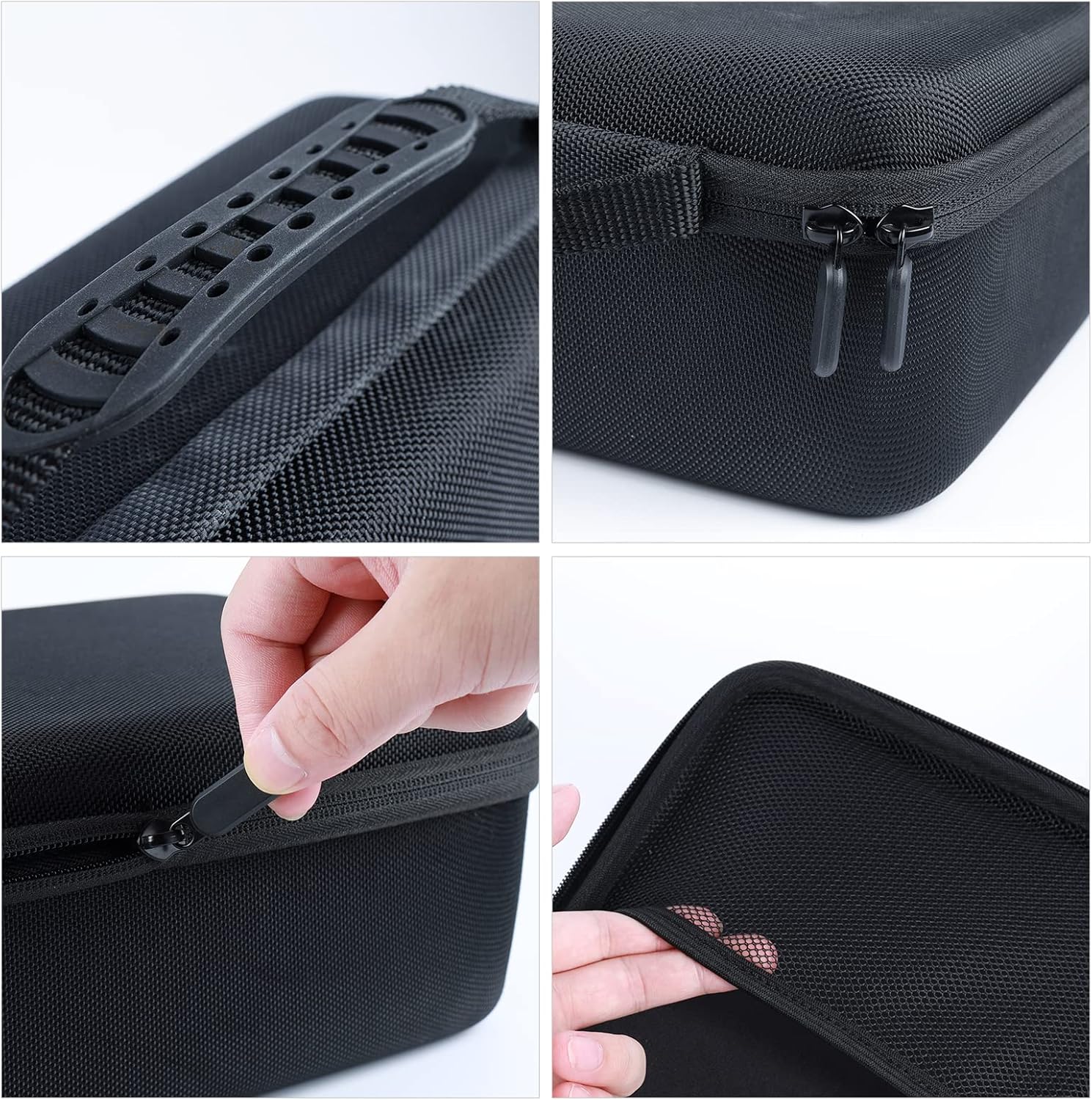
פיגורע 3.2: דעטאַילעד view of the protective case handle, zipper, and interior padding.
The device is equipped with various ports including USB-A, USB-C, and an OBD port for connectivity. Its rugged construction ensures durability in a workshop environment.

Figure 3.3: The ANCEL FX6000 performing a 4-system diagnostic scan, covering Engine, ABS, SRS, and Transmission systems.
The FX6000 supports comprehensive diagnostic functions including reading and erasing fault codes, I/M readiness checks, and DTC lookup.

Figure 3.4: The ANCEL FX6000 demonstrating bidirectional control capabilities, allowing direct command sending for various actuator tests like Injectors, Fuel Pump, Shift Solenoid, and Cooling Fan.

Figure 3.5: The ANCEL FX6000 displaying a range of over 7 maintenance services, including ABS Bleeding, Battery Matching, Brake-pad Reset, Electronics Throttle Adaption, Gear Learning, Oil Reset, and Steering Angle Reset.
4. סעטאַפּ
4.1 ערשט טשאַרדזשינג
Before first use, it is recommended to fully charge the device. Connect the USB-C charging cable to the device and the power adapter to a suitable power outlet. The power adapter supports international voltages (100-240V) and includes swappable plugs for different regions.
4.2 קאַנעקטינג צו פאָרמיטל
Locate your vehicle's OBD2 diagnostic port, typically found under the dashboard on the driver's side. Connect the provided OBD2 diagnostic cable from the ANCEL FX6000 to the vehicle's OBD2 port. The device will automatically power on upon connection.
4.3 ווי-פי קאַנעקשאַן
Upon initial power-on, the device will prompt you to connect to a Wi-Fi network. Follow the on-screen instructions to select your network and enter the password. A stable internet connection is required for software updates and online features.
4.4 ווייכווארג דערהייַנטיקונגען
After connecting to Wi-Fi, navigate to the 'Update' section on the main menu. The device offers lifetime free updates, ensuring compatibility with the latest vehicle models and diagnostic protocols. Select 'Upgrade' to download and install available software updates.
5. אַפּערייטינג ינסטרוקטיאָנס
5.1 גרונטלעכע דיאַגנאָסטיקס
- Auto VIN Detection: The device can automatically identify your vehicle's VIN for quick and accurate model recognition.
- Read/Clear Fault Codes (DTCs): Access the 'Diagnose' menu to read current, pending, and permanent diagnostic trouble codes. Select 'Clear Codes' to erase DTCs after repairs are completed.
- לעבעדיקע דאַטן סטרים: View real-time vehicle sensor data in text or graphical format. This allows for monitoring various parameters like accelerator pedal position, engine RPM, and fuel pressure.
- פולער סיסטעם סקען: Perform a comprehensive scan of all available vehicle systems, including Engine, ABS, SRS, and Transmission, to identify any issues.

Figure 5.1: The ANCEL FX6000 displaying live data streams for various vehicle parameters, allowing for real-time monitoring and analysis.
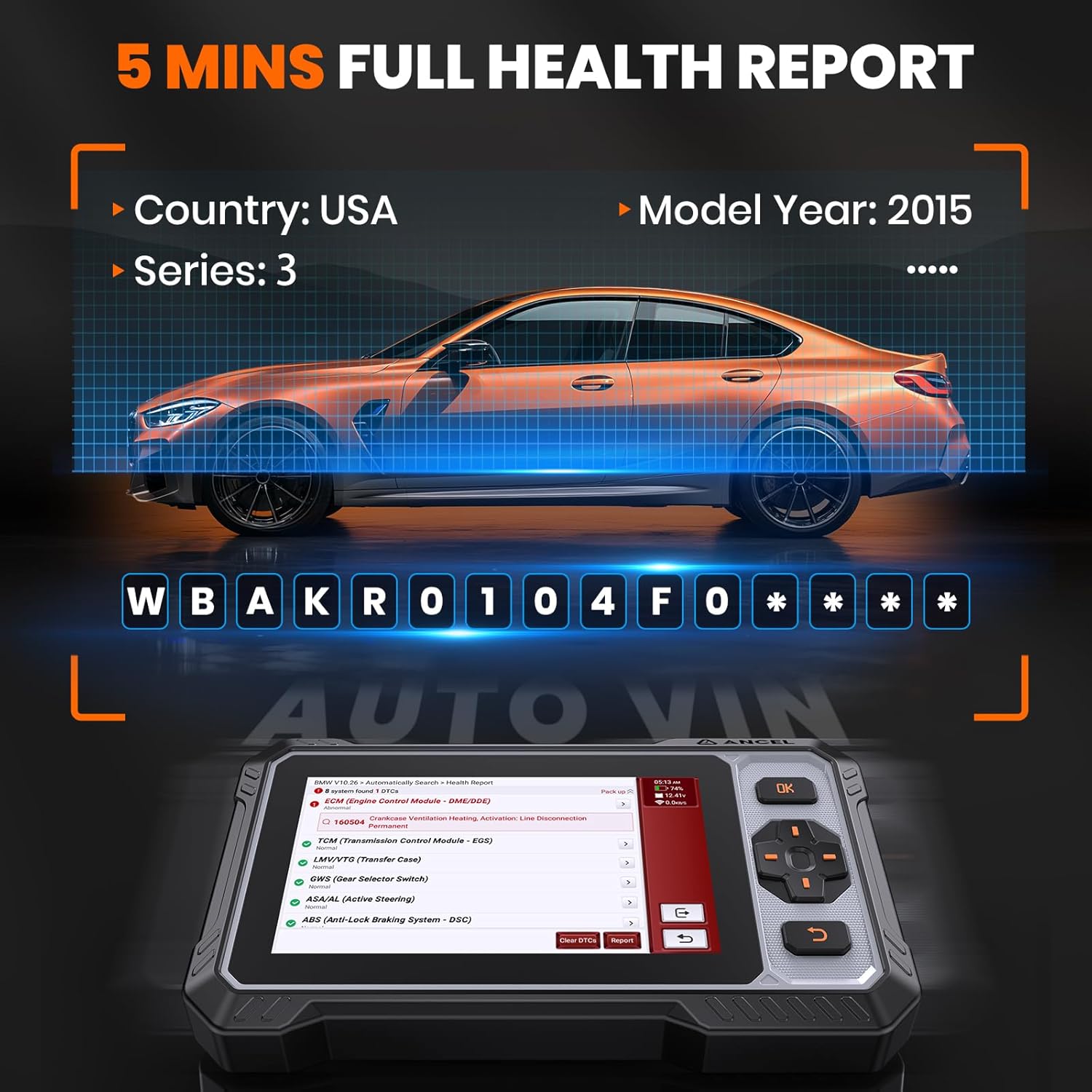
Figure 5.2: The ANCEL FX6000 performing an Auto VIN scan and generating a full health report, identifying vehicle information and system status.
5.2 ספּעציעלע פאַנגקשאַנז
The FX6000 offers advanced special functions for various vehicle maintenance and repair tasks:
- Bidirectional Control (Actuation Tests): This function allows you to send commands to vehicle systems to perform active tests on components like injectors, fuel pumps, cooling fans, and more, to verify their functionality.
- וישאַלט סערוויסעס: Access a wide range of reset and adaptation functions including:
- אָיל באַשטעטיק
- עלעקטראָנישע פּאַרקינג ברעיק (EPB) ריסעט
- סטירינג ווינקל סענסאָר (SAS) קאַלאַבריישאַן
- באַטעריע פאַרוואַלטונג סיסטעם (BMS) ריסעט
- דיעסעל פּאַרטיקיאַלאַט פֿילטריר (דפף) רידזשענעריישאַן
- ינדזשעקטער קאָודינג
- אַבס בלידינג
- גערגל אַדאַפּטיישאַן
- גאַנג לערנען
- TPMS באַשטעטיק
- און פילע מער.
Video 5.3: Demonstration of the ANCEL FX6000's full bidirectional control capabilities, allowing users to send commands to various vehicle components for testing and diagnosis.
Video 5.4: An in-depth look at the ANCEL FX6000's full systems diagnosis and automatic VIN detection features, providing comprehensive vehicle health reports.
5.3 ווייַט הילף
The device supports remote assistance via TeamViewer. This feature allows technical support personnel to remotely access your device to provide troubleshooting or guidance, enhancing user support.
6. וישאַלט
- רייניקונג: Regularly clean the device screen and body with a soft, damp שטאָף. ויסמיידן ניצן אַברייסיוו קלינערז אָדער סאָלוואַנץ.
- ווייכווארג דערהייַנטיקונגען: Keep your device's software updated to ensure access to the latest features, vehicle coverage, and bug fixes. Connect to Wi-Fi and check for updates periodically.
- באַטערי זאָרגן: To prolong battery life, avoid extreme temperatures and store the device with a partial charge if not used for extended periods.
7. טראָובלעשאָאָטינג
If you encounter issues with your ANCEL FX6000, consider the following:
- קיין מאַכט: Ensure the device is properly connected to the vehicle's OBD2 port or the power adapter. Check the charging cable for damage.
- קשר ישוז: Verify the OBD2 cable is securely connected to both the device and the vehicle. Ensure the vehicle's ignition is on.
- ווייכווארג גליטשיז: Perform a software update or restore factory settings if the device is behaving erratically.
- Fault Code Information: Utilize the integrated Google search function within the device to find more information and repair suggestions for specific fault codes.
8. ספּעסאַפאַקיישאַנז
| שטריך | באַשרייַבונג |
|---|---|
| פאַרשטעלן גרייס | 7.0 אינטשעס |
| האַכלאָטע | 1024 X 600 בילדצעלן |
| אַרבעט סוויווע | 0°C צו 50°C (32°F צו 122°F) |
| סטאָרידזש סוויווע | -20°C צו 60°C (-4°F צו 140°F) |
| טיפּ-C אַרייַנשרייַב | 5V DC/2.5A |
| OBD Input | 9-18 וו דק / 1.2 אַ |
| שטיצט פּראָטאָקאָלס | SAE J1850 PWM, SAE J1850 VPW, ISO 9141-2, ISO, ISO 14230-4 KWP, ISO 15765-4 CAN, CANFD |
9. וואָראַנטי און שטיצן
The ANCEL FX6000 comes with a manufacturer's warranty. For detailed warranty information, technical support, or service inquiries, please refer to the contact information provided in your Quick Start Guide or visit the official ANCEL website. The device also offers remote assistance capabilities for convenient support.


