1. הקדמה
Thank you for choosing the NIMO 15.6" IPS FHD-Gaming-Laptop. This manual provides essential information for setting up, operating, maintaining, and troubleshooting your new laptop. Designed for versatile performance, this laptop is equipped with an AMD Ryzen 5 6600H processor, 32GB DDR5 RAM, and a 1TB SSD, making it suitable for work, gaming, and everyday use. Please read this manual thoroughly before using your device to ensure optimal performance and longevity.

Figure 1.1: NIMO 15.6" IPS FHD-Gaming-Laptop
The NIMO 15.6" IPS FHD-Gaming-Laptop features a sleek design with a vibrant Full HD IPS display, ideal for both productivity and entertainment.
2. וואָס איז אין דער קעסטל
ביטע באַשטעטיקן אַז אַלע זאכן זענען פאַראַן אין דעם פּעקל:
- 1 x נימאָ N153 לאַפּטאָפּ
- 1 x טיפ-C 100W PD שנעלער טשאַרדזשער
- 1 x באַניצער מאַנואַל
- ווינדאָוס 11 היים (פאַר-אינסטאַלירט)
- 2 Years Warranty, 90 Days Return Information
3. סעטאַפּ גייד
3.1 ערשטע איינשטראָם און אויפלאָדן
Before first use, ensure your laptop is fully charged. Connect the provided Type-C 100W PD Fast Charger to the laptop's Type-C port and a power outlet. The charge LED indicator will illuminate.
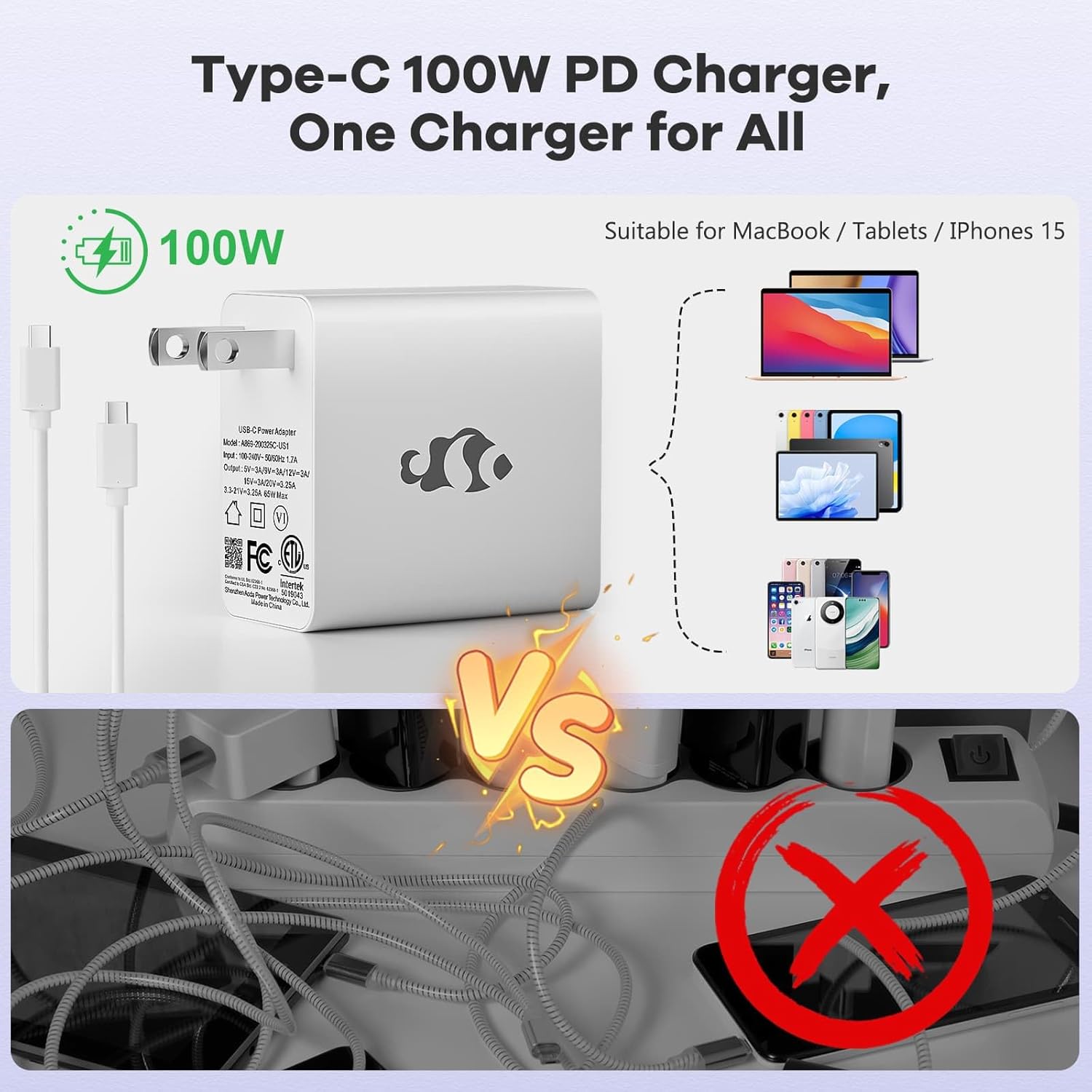
פיגור 3.1: טיפ-C 100W PD שנעלער טשאַרדזשער
The compact 100W USB-C PD fast charger and 6.56ft cable provide efficient power delivery, compatible with various devices.
3.2 קאַנעקטינג פּעריפעראַלס
Your NIMO laptop offers multiple ports for enhanced versatility. Refer to the diagram below for port locations and types:
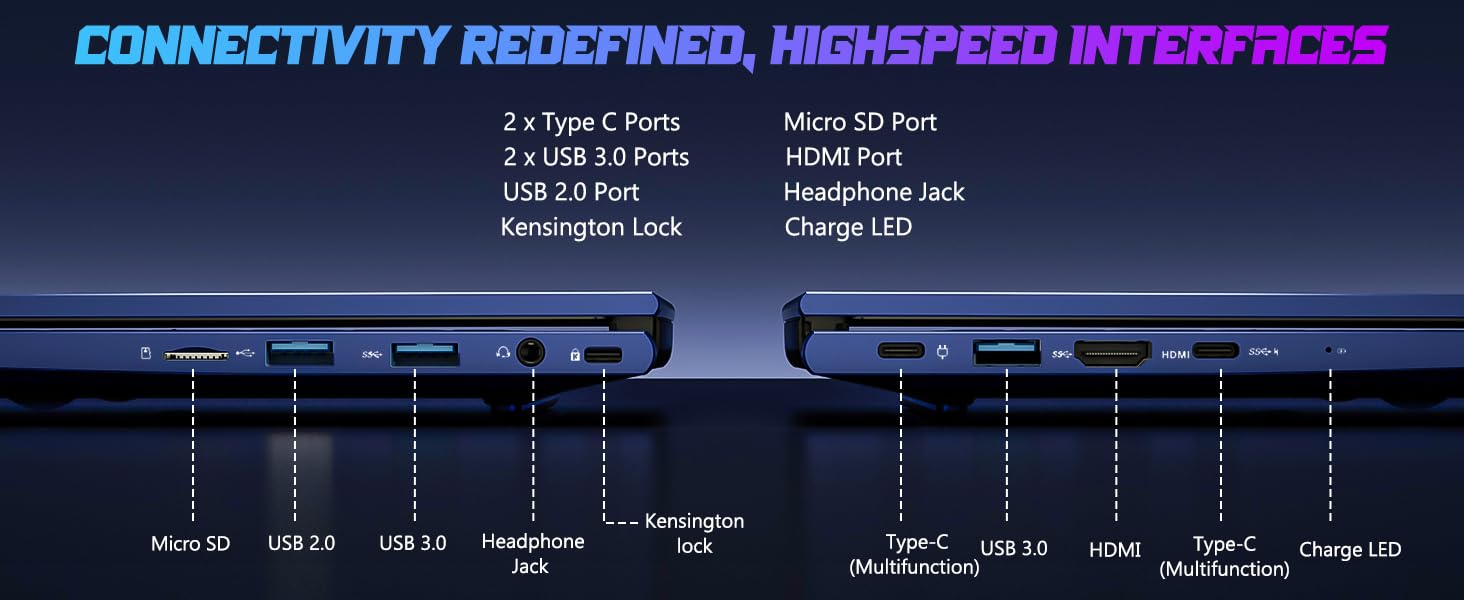
פיגור 3.2: קאָנעקטיוויטי פּאָרטן
The laptop includes 2x Type-C ports, 2x USB 3.0 ports, 1x USB 2.0 port, Micro SD port, HDMI port, Headphone Jack, and Kensington Lock for comprehensive connectivity.
- וסב פּאָרץ: Connect external devices such as mice, keyboards, or external storage drives.
- הדמי פּאָרט: פֿאַרבינדט זיך צו אַן עקסטערנעם מאָניטאָר אָדער טעלעוויזיע פֿאַר אַ גרעסערן דיספּליי.
- כעדפאָון דזשאַק: פֿאַר אַודיאָ אַרויסגאַנג צו כעדפאָונז אָדער עקסטערנע רעדנערס.
- מיקראָ סד שפּעלטל: אַרײַנשטעלן אַ מיקראָ SD קאַרטל פֿאַר נאָך סטאָרידזש אָדער דאַטן אַריבערפירן.
4. אפערירן דיין לאַפּטאָפּ
4.1 ווייַז פֿעיִקייטן
The NIMO laptop features a 15.6" FHD IPS (1920x1080) anti-glare display with an 85% screen-to-body ratio, providing clear and vibrant visuals for all your tasks.
4.2 Keyboard and Fingerprint Reader
The laptop is equipped with a backlit keyboard for comfortable typing in various lighting conditions and a multi-touch touchpad for precise navigation. The built-in fingerprint reader allows for secure, one-touch login.

Figure 4.1: Backlit Keyboard and Fingerprint Reader
The backlit keyboard enhances visibility, while the integrated fingerprint reader provides quick and secure access to your system.
4.3 Webקאַם פּריוואַטקייט
For enhanced privacy, the laptop includes a built-in privacy camera switch, allowing you to easily disable the 2.0M webקאַם ווען ניט אין נוצן.

פיגורע 4.2: Webקאַם שילד
The physical webcam shield provides an extra layer of privacy, ensuring your camera is off when you need it to be.
4.4 פאָרשטעלונג איבערview
The NIMO laptop is powered by an AMD Ryzen 5 6600H CPU (6 cores, 12 threads, up to 4.5 GHz) and an integrated AMD Radeon 660M GPU (6nm process, 6 GPU cores, 1900 MHz). This configuration provides balanced performance for productivity and light gaming.

Figure 4.3: Outstanding Performance
The AMD Ryzen 5 6600H processor and Radeon 660M iGPU deliver robust performance for various computing tasks.
With 32GB of DDR5 RAM and a 1TB PCIe 4.0 SSD, the laptop ensures seamless multitasking, faster load times, and ampלאַ סטאָרידזש פֿאַר דיין files and applications. The memory is upgradable to 64GB and the SSD is detachable for future expansion.

Figure 4.4: Seamless Multitasking and Ampדי סטאָרידזש
The combination of 32GB DDR5 RAM and a 1TB PCIe 4.0 SSD provides lightning-fast performance and significant storage capacity.
4.5 באַטאַרייע לעבן
The laptop is equipped with a 54Wh smart battery, providing up to 5 hours of active use and up to 10 hours of standby time. A 15-minute charge can provide up to 2 hours of standby time with the 100W PD fast charger.

Figure 4.5: 54Wh Smart Battery
The efficient 54Wh smart battery offers extended usage and quick charging capabilities.
5. וישאַלט
כדי צו זיכער מאַכן די לאַנגלעבעדיקייט און אָפּטימאַלע פאָרשטעלונג פון דיין NIMO לאַפּטאָפּ, נאָכפאָלגן די וישאַלט גיידליינז:
- האַלטן עס ריין: רייניקט רעגולער דעם עקראַן מיט אַ מיקראָפיבער שטאָף און די קלאַוויאַטור מיט קאָמפּרעסירטע לופט צו באַזייַטיקן שטויב און שמוץ.
- ווייכווארג דערהייַנטיקונגען: Keep your Windows 11 operating system and drivers updated to ensure security and performance improvements.
- באַטערי זאָרגן: Avoid completely draining the battery frequently. For long-term storage, charge the battery to about 50-60%.
- געהעריק ווענטאַליישאַן: Ensure the laptop's vents are not obstructed to prevent overheating. Use it on a hard, flat surface.
- זיכער האַנדלינג: Avoid dropping or subjecting the laptop to strong impacts.
6. טראָובלעשאָאָטינג
די סעקציע באהאנדלט אלגעמיינע פראבלעמען וואס איר קענט באגעגענען מיט אייער NIMO לעפטאפ.
| פּראָבלעם | מעגלעך סיבה | לייזונג |
|---|---|---|
| לאַפּטאָפּ גייט נישט אָן | Low battery; Power adapter issue | Connect the charger and wait a few minutes. Ensure the power adapter is securely connected to both the laptop and the outlet. |
| פּאַמעלעך פאָרשטעלונג | Too many applications running; Low disk space; Outdated drivers | שליסט אומנייטיקע אַפּליקאַציעס. מאַכט פריי דיסק פּלאַץ. דערהייַנטיקט ווינדאָוז און מיטל דרייווערס. |
| ווי-פי קאַנעקטיוויטי ישוז | Wi-Fi adapter off; Router issue; Driver issue | Ensure Wi-Fi is enabled in Windows settings. Restart your router. Update Wi-Fi drivers. |
| קלאַוויאַטור באַקלייט אַרבעט נישט | Backlight disabled; Driver issue | Press the dedicated backlight key (usually Fn + F key). Check keyboard drivers in Device Manager. |
If you encounter issues not listed here or require further assistance, please contact NIMO customer support.
7. ספּעסאַפאַקיישאַנז
Detailed technical specifications for the NIMO 15.6" IPS FHD-Gaming-Laptop:
| שטריך | דעטאַל |
|---|---|
| שטייענדיק פאַרשטעלן ווייַז גרייס | 15.6 אינטשעס |
| מאַקסימום סקרין האַכלאָטע | 1920 x 1080 פּיקסעלס (FHD IPS) |
| פּראַסעסער | AMD Ryzen 5 6600H (6 Cores, up to 4.5 GHz) |
| באַראַן | 32 גיגאבייט DDR5 (4800 מעגהערץ) |
| שווער דרייוו | 1 טב SSD (PCIe 4.0) |
| גראַפיקס קאָופּראַסעסער | AMD Radeon 660M (אינטעגרירט) |
| אָפּערייטינג סיסטעם | Windows 11 |
| ווירעלעסס טיפּ | 802.11a/b/g/n/ac |
| וסב פּאָרץ | 1x USB 2.0, 3x USB 3.0, 2x טיפּ-C |
| דורכשניטלעך באַטאַרייע לעבן | 5 Hours (active use) |
| פּונקט וואָג | 3.8 פונט |
| פּראָדוקט דימענשאַנז | 14.07 X 8.98 X 0.76 אינטשעס |
| קאָליר | בלוי |
| ספּעציעלע פֿעיִקייטן | באַקלייט קלאַוויאַטור, פינגערפּרינט לייענער, HD אַודיאָ, נומערישער קלאַוויאַטור |
8. וואָראַנטי און שטיצן
NIMO is committed to providing high-quality products and excellent customer service.
8.1 וואָראַנטי אינפֿאָרמאַציע
Your NIMO laptop comes with a comprehensive 2-יאָר פאַבריקאַנט ס וואָראַנטי. This warranty covers defects in materials and workmanship under normal use. Additionally, we offer a 90-Day Hassle-Free Return Policy פון די דאַטע פון קויפן.
8.2 קונה שטיצן
Our dedicated support team is ready to assist you with any questions or issues. For technical support, warranty claims, or general inquiries, please contact us via:
- בליצפּאָסט: service@nimopc.com
- אָנליין: באַזוכט דעם אָפֿיציעלן NIMO webוועבזייטל פֿאַר אָפֿט געשטעלטע פֿראַגעס און שטיצע רעסורסן.
We strive to resolve any issues swiftly and ensure your satisfaction.
8.3 פּראָדוקט איבערview ווידעא
Watch this official video for a quick overview of the NIMO laptop's features and benefits:
Video: NIMO Laptop Overview
This video provides a brief look at the NIMO 15.6" laptop, highlighting its key features and user experience, including its display, camera, and overall performance.


