1. הקדמה
This manual provides essential instructions for setting up, operating, and maintaining your LEFFOT H618 Plus 4K Ultra HD Streaming Device. Please read this guide thoroughly before use to ensure proper functionality and to maximize your entertainment experience.
2. זיכערקייַט אינפֿאָרמאַציע
- זיכער מאַכן אַז די דעווייס איז געשטעלט אויף אַ סטאַביל, פלאַך ייבערפלאַך צו פאַרמייַדן אַקסאַדענטאַל פאלן.
- שטעלט נישט אויס דעם אפאראט צו וואסער, פייכטקייט, אדער עקסטרעמע טעמפעראטורן.
- ויסמיידן בלאַקינג ווענטאַליישאַן אָופּאַנינגז צו פאַרמייַדן אָוווערכיטינג.
- ניצט נאָר דעם צוגעשטעלטן מאַכט אַדאַפּטער צו פאַרמייַדן שעדיקן.
- האַלטן די מיטל און אַקסעסעריז אויס פון דערגרייכן פון קינדער.
- פרובירט נישט צו צענעמען אדער פאררעכטן דאס אפאראט אליין. קאנטאקטירט קוואליפיצירטע סערוויס פערסאנעל פאר הילף.
3. פּעקל אינהאַלט
באַשטעטיקן אַז אַלע זאכן זענען פאַראַן אין פּעקל:
- LEFFOT H618 Plus Streaming Device
- קול רימאָוט קאָנטראָל
- מאַכט אַדאַפּטער
- HDMI קאַבלע
- באַניצער מאַנואַל

פיגורע 3.1: פּעקל אינהאַלט
4. סעטאַפּ אינסטרוקציעס
4.1 קאַנעקטינג די מיטל
- פאַרבינדן צו טעלעוויזיע: Plug one end of the HDMI cable into the HDMI port on the LEFFOT H618 Plus device and the other end into an available HDMI input on your television.
- פאַרבינדן מאַכט: Connect the power adapter to the DC port on the device and then plug the adapter into a wall outlet.
- מאַכט אויף: דער אַפּאַראַט זאָל זיך אויטאָמאַטיש אָנצינדן. אויב נישט, דריק דעם מאַכט קנעפּל אויף דער ווײַטקאָנטראָל.

Figure 4.1: Connection Overview
4.2 רימאָוט קאָנטראָל סעטאַפּ
- אַרייַנלייגן באַטעריז: Open the battery compartment on the back of the voice remote control and insert two AAA batteries (included), ensuring correct polarity.
- פּאָרינג: The remote control should automatically pair with the device upon first use. If not, follow the on-screen instructions or press and hold the pairing button (usually located inside the battery compartment or on the side of the remote) until the indicator light flashes.
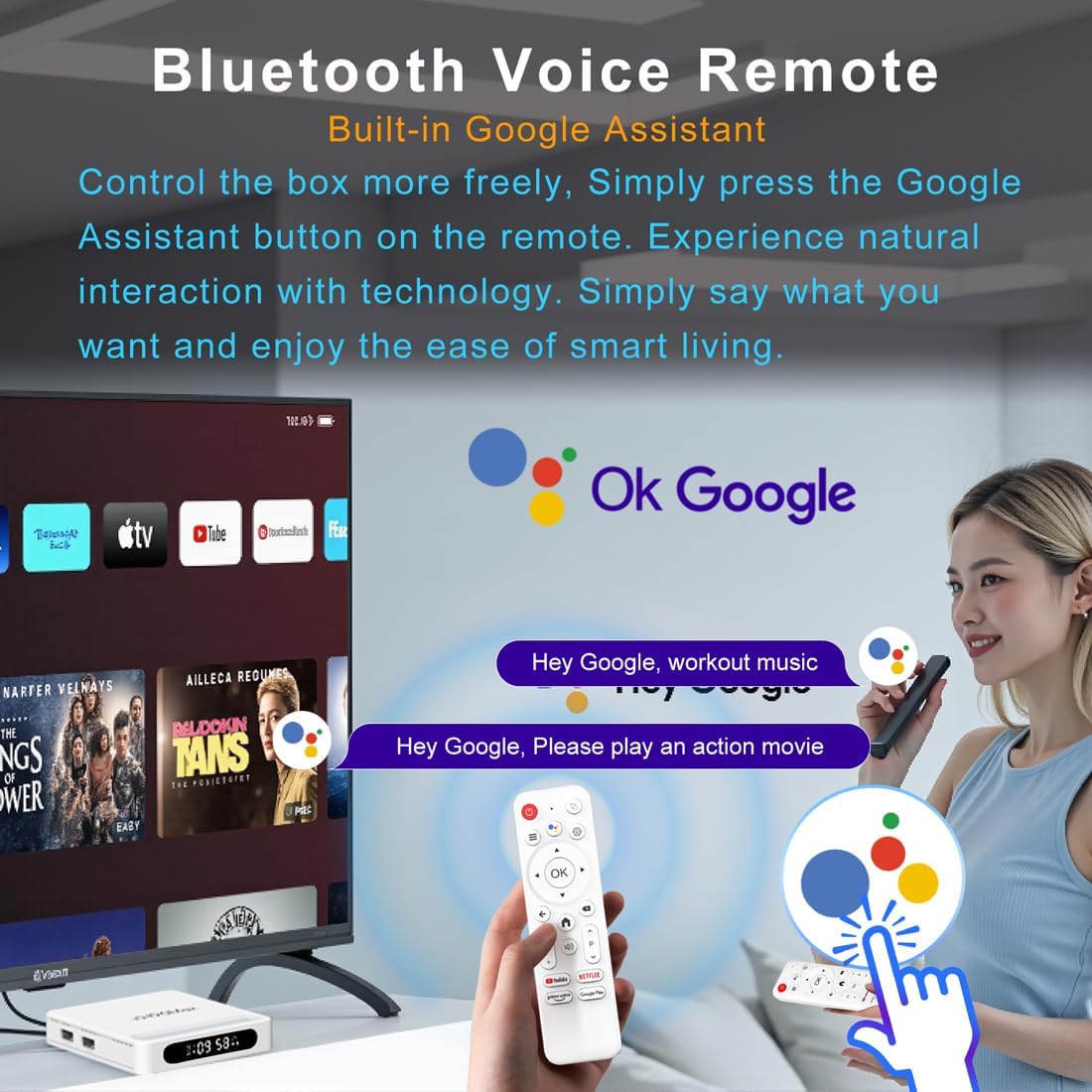
Figure 4.2: Voice Remote Control
4.3 ערשטע מיטל קאָנפיגוראַציע
פֿאָלגט די אינסטרוקציעס אויף דעם עקראַן צו פֿאַרענדיקן די ערשטע סעטאַפּ, וואָס טיפּיש כולל:
- שפּראַך סעלעקציע.
- Connecting to a Wi-Fi network or Ethernet.
- זיך אריינלאָגירן מיט אייער גוגל אקאונט.
- Installing essential applications.
5. אַפּערייטינג ינסטרוקטיאָנס
5.1 נאַוויגאַציע און צובינד
Use the directional pad (D-pad) on your remote to navigate through the Android TV interface. The 'OK' button confirms selections, 'Back' returns to the previous screen, and 'Home' takes you to the main screen.
5.2 Voice Remote with Google Assistant
Press the Google Assistant button on your remote and speak your commands. You can search for content, open apps, control playback, and more using your voice.
5.3 אַקסעס אַפּפּליקאַטיאָנס
The device comes pre-loaded with Google Play, allowing access to over 5000+ applications. Navigate to the 'Apps' section on the home screen to browse, download, and manage your applications.

Figure 5.1: Accessing Apps via Google Play
5.4 4K UHD Playback and HDR10
The LEFFOT H618 Plus supports 8K@22fps decoding and 4K@60fps playback with HDR10. Ensure your television is 4K HDR compatible and that you are streaming 4K HDR content for the best visual experience.

Figure 5.2: 4K UHD and HDR10 Visuals
5.5 Screen Casting
Utilize the built-in Airplay and Miracast features to cast content from your smartphone or tablet directly to your TV screen.
6. ספּעסאַפאַקיישאַנז
| שטריך | באַשרייַבונג |
|---|---|
| סאָרט | לעפֿאָט |
| מאָדעל נאָמען | H618 Plus |
| אָפּערייטינג סיסטעם | אַנדרויד 14 |
| קפּו | Allwinner H618 Quad-Core ARM Cortex A53 |
| גפּו | Mali-G31 MP2 |
| באַראַן | 2 גיגאבייט |
| ראַם | 16 גיגאבייט |
| ווידעא דיקאָודינג | 8K@22fps, 4K@60fps with HDR10 |
| קאַנעקטיוויטי | Dual-band WiFi 6 (2.4G/5G), 100M Ethernet, Bluetooth 5.4 |
| פּאָרץ | HDMI 2.0a, USB 2.0 (x2), AV, DC |
| ספּעציעלע פֿעיִקייטן | Voice Remote with Google Assistant, Airplay, Miracast |
| דימענשאַנז | 3.2 X 3.2 X 0.67 אינטשעס |
| וואָג | 4.1 אונסעס |

פיגור 6.1: הויפּט פֿעיִקייטן איבערview
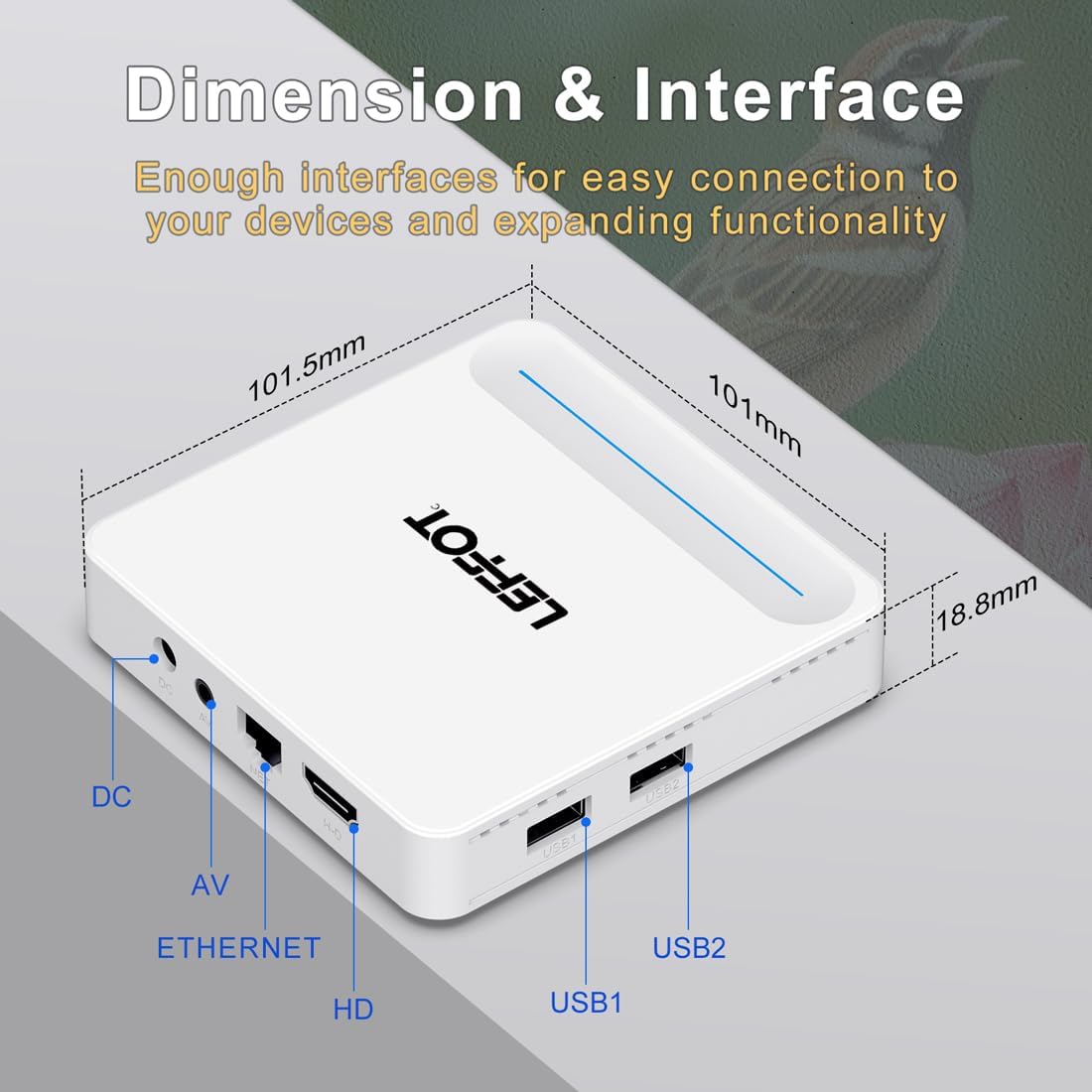
Figure 6.2: Device Dimensions and Interface
7. טראָובלעשאָאָטינג
7.1 No Power / Device Not Turning On
- Check if the power adapter is securely connected to the device and the power outlet.
- Ensure the power outlet is functional. Try plugging another device into the same outlet.
- Press the power button on the remote control or the device itself.
7.2 No Signal on TV Screen
- Verify that the HDMI cable is securely connected to both the device and the TV.
- זייט זיכער אז אייער טעלעוויזיע איז איינגעשטעלט צו די ריכטיגע HDMI אינפוט מקור.
- Try using a different HDMI cable or a different HDMI port on your TV.
- Restart the streaming device and your TV.
7.3 ווײַטקאָנטראָל רעאַגירט נישט
- קאָנטראָלירט און פאַרבייט די באַטעריעס אין דער ווײַטקאָנטראָל.
- פאַרזיכערן אַז עס זענען קיין אַבסטראַקשאַנז צווישן די ווייַט און די מיטל.
- Re-pair the remote control with the device by following the instructions in Section 4.2.
7.4 Buffering or Slow Performance
- Check your internet connection speed. A stable and fast connection is crucial for streaming 4K content.
- If using Wi-Fi, try moving the device closer to your router or connecting via an Ethernet cable for a more stable connection.
- Close any unused applications running in the background on the device.
- Clear the cache of streaming applications.
- Restart your router, modem, and the streaming device.
8. וישאַלט
- רייניקט דעם אַפּאַראַט רעגולער מיט אַ ווייכן, טרוקענעם שטאָף. ניצט נישט קיין פליסיקע רייניגערס אדער אַעראָזאָלן.
- Keep the device free from dust and debris, especially around ventilation areas.
- האַלט דעם אַפּאַראַט אין אַ קיל, טרוקן אָרט ווען נישט אין באַנוץ פֿאַר לענגערע פּעריאָדן.
9. וואָראַנטי און שטיצן
For warranty information and technical support, please refer to the documentation included with your purchase or visit the official LEFFOT webזייטל. האַלט דיין קויפן באַווייַז פֿאַר וואָראַנטי קליימז.


