1. הקדמה
This manual provides detailed instructions for the installation, operation, and maintenance of your BOTSLAB W510 4K Wireless Outdoor Security Camera System. Please read this manual thoroughly before using the product to ensure proper functionality and safety.
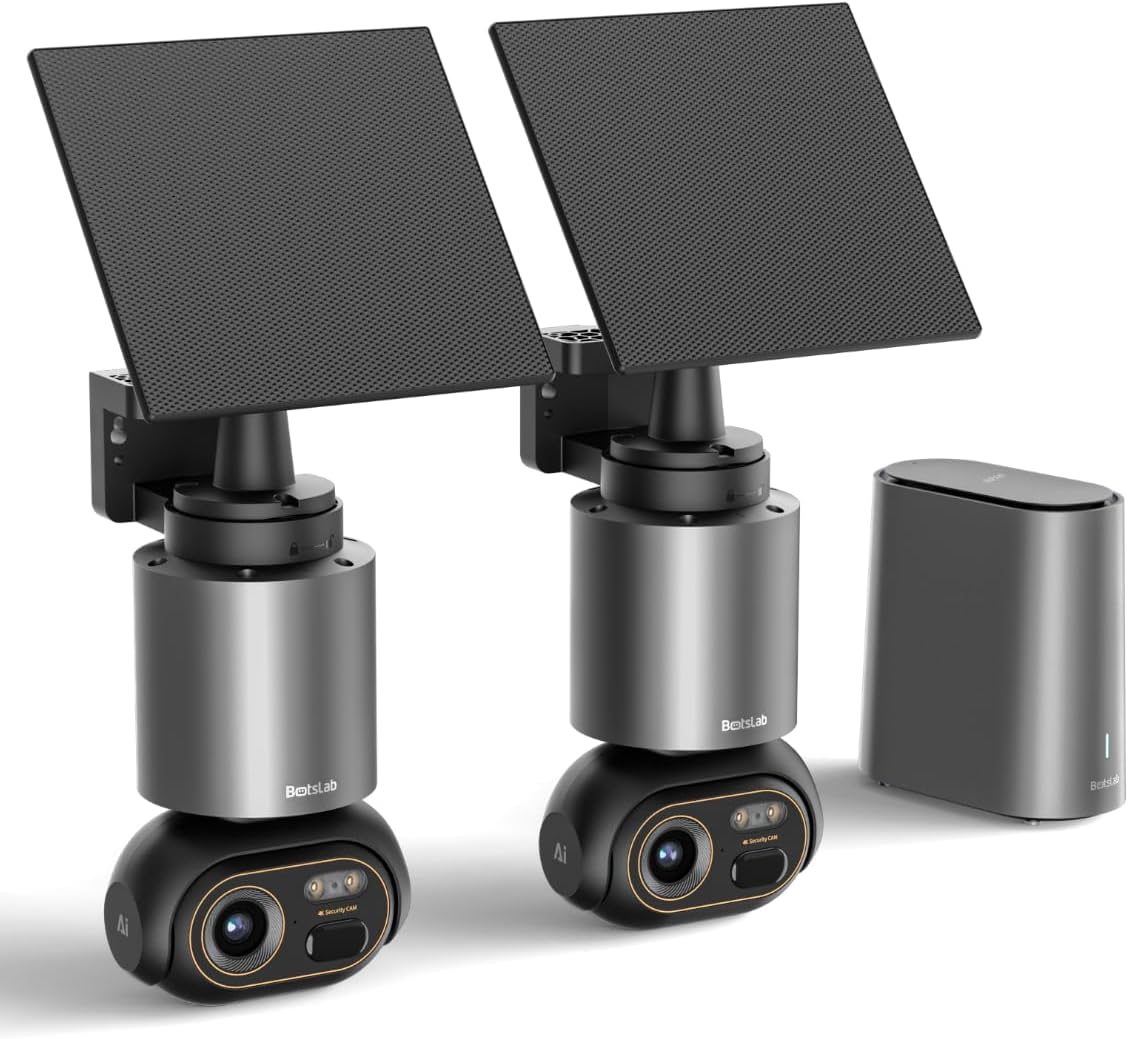
Image 1.1: The BOTSLAB W510 4K Wireless Outdoor Security Camera System, including two cameras with solar panels and the HomeBase unit.
2. וואָס איז אין דער קעסטל
באַשטעטיקן אַז אַלע קאָמפּאָנענטן זענען פאַראַן אין דיין פּעקל:
- W510 Camera body *2
- מאָונטינג קלאַמער *2
- זונ - טאַפליע *2
- H200 HomeBase *1
- Camera Mounting Brackets / Wall Stickers *2
- Wall Mounting Screws Package *2
- Solar Panel Mounting Bracket / Wall Stickers *2
- Solar Panel Installation Screws (for mounting) *2
- טיפּ- C טשאַרדזשינג קאַבלע *2
- User Manual (Quick Guide + Certification) *1
- ווארענונג סטיקערז *2
- Base Station Adapter *1
- Hard Drive Mounting Screws *1
- עטהערנעט קאַבלע *1
- User Guide Card *1

Image 2.1: All included components of the BOTSLAB W510 2-Cam Kit.
3. פּראָדוקט איבערview
The BOTSLAB W510 system offers advanced security features for outdoor surveillance.
3.1 שליסל פֿעיִקייטן
- 4K Ultra HD האַכלאָטע: קאַפּטשערז קלאָר און דיטיילד ווידעא פאָאָtage.
- קאָליר נאַכט זעאונג: Provides vivid, full-color images even in low-light conditions.
- זונ - פּאַוערד: Equipped with a 5W external solar panel and a 10,000mAh built-in battery for continuous operation.
- 360° פּאַן און טילט: Offers a comprehensive panoramic view מיט קיין בלינד ספּאַץ.
- BOTSLAB IQ (AI-Powered): Features intelligent notifications, customized warnings, quick search, and auto-tracking for people, vehicles, and pets.
- קיין כוידעשלעך אָפּצאָל: Utilizes local storage via the H200 HomeBase (32GB internal, expandable up to 16TB with HDD).
- IP66 וועטערפּרוף: דיזיינד צו וויטשטיין פארשידענע דרויסנדיקע וועטער באדינגונגען.
- 2.4G Wi-Fi קאָנעקטיוויטי: Ensures stable and long-distance wireless communication.

Image 3.1: Demonstrates the clarity of 4K Ultra HD resolution.

Image 3.2: Illustrates the effectiveness of Color Night Vision.
4. סעטאַפּ גייד
4.1 מאָנטירן די קאַמעראַ און זונ פּאַנעל
The camera and solar panel can be mounted together or separately, offering flexibility for optimal solar exposure and camera placement.
- קלייבט אויס א פאסיגע לאקאציע פאר אייער קאמערא, זיכער מאכנדיג אז זי האט א קלארע view of the area you wish to monitor and is within Wi-Fi range of the HomeBase.
- Use the provided mounting bracket and screws to securely attach the camera to a wall or ceiling.
- If mounting the solar panel separately, select a location that receives ample direct sunlight throughout the day. The solar panel can be adjusted 360° horizontally and 180° vertically.
- Connect the solar panel's USB-C cable to the camera's charging port. Ensure the port cover is securely closed after connection to maintain weather resistance.

Image 4.1: Various mounting options for the camera and solar panel.
4.2 Connecting to HomeBase
The H200 HomeBase acts as the central hub for your security system, providing local storage and managing camera connections.
- Place the HomeBase in a central location within your home, ensuring it is connected to your router via the provided Ethernet cable and powered on.
- The HomeBase will automatically connect to your cameras once they are powered on and within range.
4.3 אַפּ אינסטאַלאַציע און פּערינג
Manage your cameras and access features through the Botslab app.
- Download the 'Botslab' app from your smartphone's app store (available on Google Play and Apple App Store).
- שאַפֿן אַ חשבון אָדער קלאָץ אין אויב איר שוין האָבן איין.
- Follow the in-app instructions to add your HomeBase and cameras. This typically involves scanning a QR code on the device or manually selecting the model.
- Ensure your smartphone is connected to a 2.4GHz Wi-Fi network during the initial setup process.

Image 4.2: The Botslab mobile application for device management.
5. אַפּערייטינג ינסטרוקטיאָנס
5.1 לעבן View און קאָנטראָלס
Access real-time video feed and control camera movement via the Botslab app.
- Open the Botslab app and select the desired camera to view זײַן לעבעדיגע פֿיד.
- Use the on-screen controls to pan (horizontal movement) and tilt (vertical movement) the camera for a 360° view.
- Digital zoom allows you to magnify specific areas of the live feed or recorded video.

Image 5.1: Illustrates the 360° pan and tilt capabilities and PIR detection range.
5.2 באַוועגונג דעטעקציע און נאָוטאַפאַקיישאַנז
The system uses advanced AI to provide intelligent alerts.
- Intelligent Notification: Receive detailed, descriptive notifications on your smartphone, identifying visitors or events without needing to open the app.
- Customized Warnings: The camera analyzes the scene and can send tailored warnings to suspicious individuals based on the perceived threat level.
- Adjust detection sensitivity and set activity zones within the app to minimize false alarms.

בילד 5.2: עקס.ample of intelligent notifications from the Botslab app.
5.3 רעקאָרדינג און סטאָרידזש
אַלע פאָוtage is stored locally without monthly fees.
- The H200 HomeBase includes 32GB of internal local storage, automatically looping and saving footage for up to two months.
- Storage can be expanded up to 16TB by adding a hard disk drive (not included).
- אַקסעס רעקאָרדעד פאָאָtage through the app's timeline or use the Intelligent Search feature.

Image 5.3: HomeBase H200 with local and expandable storage options.
5.4 צוויי-וועג אַודיאָ
Communicate with individuals near your camera using the two-way audio feature.
- פון די לייוו view אין דער אַפּ, צאַפּן דעם מיקראָפאָן בילדל צו רעדן דורך דער קאַמעראַ'ס רעדנער.
- The camera's built-in microphone allows you to hear audio from the camera's location.
5.5 קינסטלעכע אינטעליגענץ פֿעיִטשערס
Leverage BOTSLAB IQ for enhanced surveillance capabilities:
- Human Recognition: Identifies human figures and filters videos.
- פאָרמיטל דעטעקשאַן: Recognizes vehicles in the camera's view.
- ליבלינג דעטעקציע: Identifies pets (cats and dogs supported).
- אַוטאָ טראַקינג: The camera automatically tracks the movement of detected subjects (people, vehicles, pets) within its 360° field of view.
- אינטעליגענטע זוכן: Quickly find specific events, people, vehicles, or objects in historical footage.

Image 5.4: Intelligent Search feature in the Botslab app.
6. וישאַלט
6.1 באַטערי טשאַרדזשינג
The camera is designed for minimal power intervention.
- The 5W solar panel continuously charges the built-in 10,000mAh battery. Approximately 30 minutes of direct sunlight can power the camera for a full day.
- In periods of low sunlight, the large battery capacity ensures stable operation for extended durations.
- If manual charging is required, detach the camera from its mount and use the provided Type-C charging cable.
6.2 רייניקונג
To maintain optimal performance, periodically clean the camera lens and solar panel.
- ניצן אַ ווייך, דamp cloth to gently wipe the lens and solar panel.
- פֿאַרמײַדן ניצן שאַרפֿע כעמיקאַלן אָדער אַברייסיוו מאַטעריאַלן וואָס קענען קראַצן די ייבערפֿלאַכן.
6.3 Firmware Updates (OTA)
The system supports Over-The-Air (OTA) firmware updates to improve performance and add new features.
- Ensure your camera and HomeBase are connected to the internet.
- The Botslab app will notify you when a new firmware update is available. Follow the in-app instructions to initiate the update.
7. טראָובלעשאָאָטינג
If you encounter issues with your BOTSLAB W510 system, refer to the following common solutions:
- קיין לעבן View/Offline Device: Check the HomeBase's internet connection (Ethernet cable, router status). Ensure the camera is powered on and within range of the HomeBase. Restart the HomeBase and camera if necessary.
- נעבעך ווידעא קוואַליטעט: Verify your Wi-Fi signal strength. Ensure the camera lens is clean and free from obstructions. Adjust the camera's position if there are strong light sources directly facing the lens.
- די באַטאַרייע איז געשווינד ויסגעשעפּט: Ensure the solar panel is positioned to receive maximum direct sunlight. Reduce motion detection sensitivity or frequency of recordings if not critical.
- פאַלש אַלאַרמס: Adjust the motion detection sensitivity in the app. Define specific activity zones to monitor only relevant areas.
- אַפּ קאַנעקטיוויטי ישוז: Ensure your smartphone has a stable internet connection. Restart the Botslab app.
8. ספּעסאַפאַקיישאַנז
| שטריך | דעטאַל |
|---|---|
| דרינענדיק / דרויסנדיק באַניץ | דרויסנדיק |
| קאַמפּאַטאַבאַל דעוויסעס | סמאַרטפאָנע (אַנדרויד) |
| מאַכט מקור | זונ - פּאַוערד |
| קאַנעקטיוויטי פּראָטאָקאָל | Wi-Fi (2.4G) |
| מאַונטינג טיפּ | וואנט בארג |
| ווידעא קאַפּטורע רעסאָלוטיאָן | 4K |
| נומער פון זאכן | 2 (2-Cam Kit) |
| Viewינג אַנגלע | 360 גראַד (פּאַן און טילט) |
| נומער דימענשאַנז L X W X H | 4.72 X 3.8 X 7.54 אינטשעס |
| פלאַש זכּרון אינסטאַלירן גרייס | 32 GB (HomeBase) |
| פלאַש מעמאָרי שטיצט מאַקסימום גרייס | 16 TB (with external HDD) |
| באַטעריז פארלאנגט? | Yes (1 12V battery included) |
| פאָקוס טיפּ | אַוטאָ פאָקוס |
| נידעריק ליכט טעכנאָלאָגיע | נאַכט קאָליר |
| פארגרעסער טיפּ | דיגיטאַל פארגרעסער (8x) |
| ווידעא קאַפּטורע פֿאָרמאַט | AVI |
| ספּעציפיש ניצט פֿאַר פּראָדוקט | 360 גראַד קאַווערידזש, סערוויילאַנס |
| קאָנטראָל מעטאָד | אַפּ |
| פּונקט וואָג | 9.13 פונט |
| מאָדעל נאָמען | W510 |
| ספּעציעלע שטריך | 10000mAh Battery, 4K/8MP, No Monthly Fee, 32G Local Storage, Intelligent Notification, Intelligent Alarm, Intelligent Search, Cross-camera Tracking, Facial Detection, Human Detection, Vehicle Detection, Night Vision |
9. וואָראַנטי און שטיצן
BOTSLAB is committed to providing reliable products and customer satisfaction.
- 12-חודש גאַראַנטירן: Your BOTSLAB W510 system is covered by a 12-month warranty from the date of purchase.
- 24/7 טעכניש שטיצן: For any questions or technical assistance, please contact BOTSLAB customer support.
- קאָנטאַקט אינפֿאָרמאַציע: You can reach support via Amazon Messages or through the contact details provided in the Botslab app.


