1. פּראָדוקט איבערview
The TRIGKEY Key i13 Mini PC is a compact and powerful computing solution designed for various applications, from gaming and content creation to business and educational use. It features a 13th Gen Intel Core i9-13900HK processor, high-speed DDR5 RAM, and PCIe 4.0 SSD storage, offering robust performance in a small form factor.

Figure 1: The TRIGKEY Key i13 Mini PC, showcasing its compact design and various ports on the front and rear.
שליסל פֿעיִקייטן:
- פּראַסעסער: 13th Gen Intel Core i9-13900HK (14 Cores/20 Threads, up to 5.4 GHz)
- זכּרון: 32GB DDR5 באַראַן (עקספּאַנדאַבאַל)
- סטאָרידזש: 1TB PCIe 4.0 SSD (expandable with dual M.2 2280 slots)
- גראַפיקס: Intel Iris Xe Graphics (96EU)
- ווייַז רעזולטאַט: Triple display support via HDMI (4K 60Hz), DisplayPort 1.4 (4K 144Hz), and Thunderbolt 4 (40Gbps/DP1.4)
- קאַנעקטיוויטי: WiFi 6 (Intel AX200), Bluetooth 5.2, 2.5G LAN
- פּאָרץ: Thunderbolt 4, USB-C 3.2, USB-A 3.2, DP1.4, HDMI, 2.5G LAN, 3.5mm audio jacks
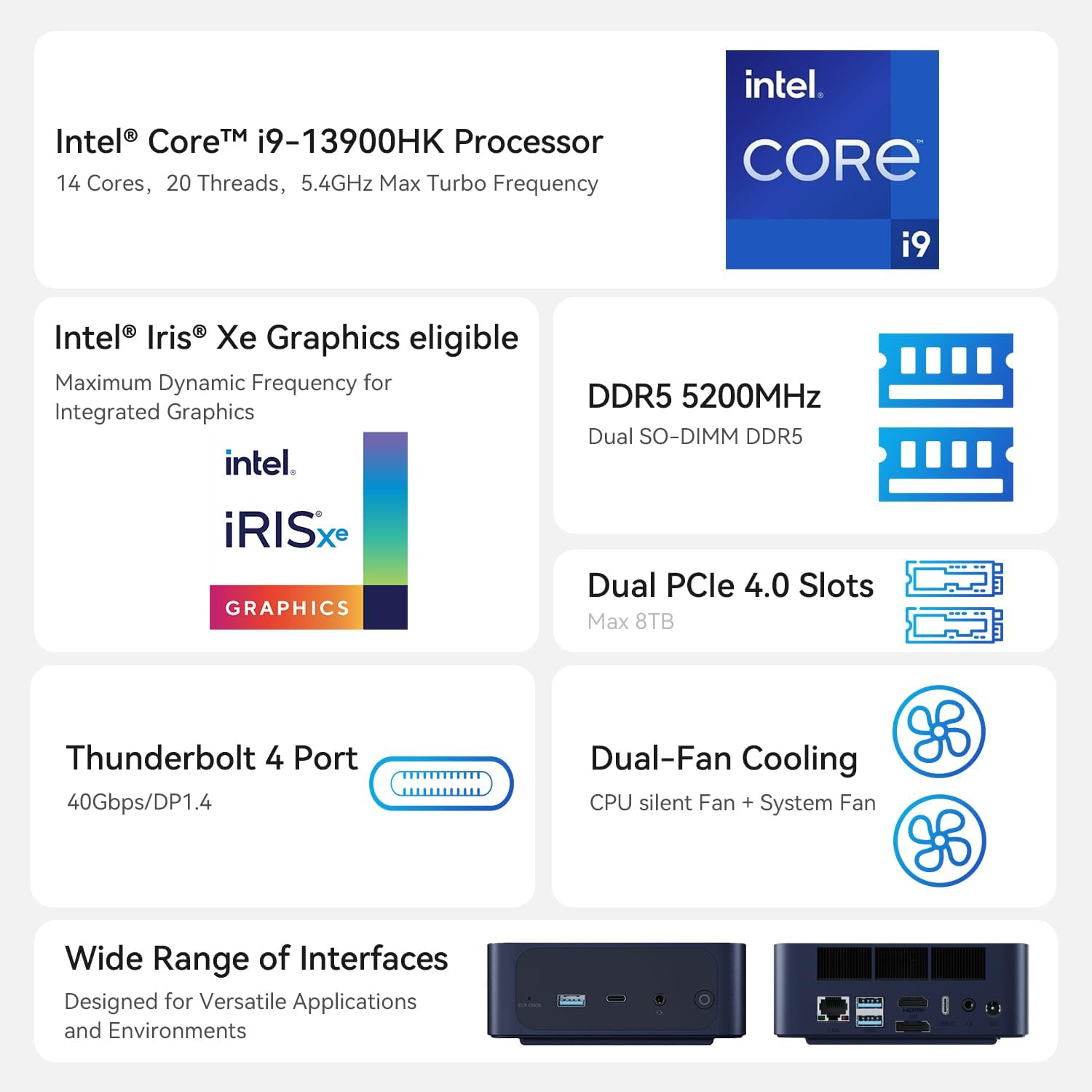
Figure 2: An illustration of the Intel Core i9-13900HK processor, emphasizing its core count, threads, and turbo frequency.
2. סעטאַפּ גייד
2.1 וואָס איז אין דער קעסטל
Before proceeding with the setup, please ensure all components are present:
- 1 x TRIGKEY Key i13 Mini PC
- 1 x HDMI Cable (100CM)
- 1 x באַניצער מאַנואַל
- 1 X מאַכט אַדאַפּטער (19V/5.26A)
2.2 פֿאַרבינדן דיין מיני פּיסי
Follow these steps to connect your TRIGKEY Key i13 Mini PC:
- פֿאַרבינדן דיספּליי: Use the provided HDMI cable or a DisplayPort/Thunderbolt cable to connect your monitor(s) to the corresponding ports on the mini PC. The device supports up to three independent displays.
- פאַרבינדן פּעריפעראַלס: Plug in your USB keyboard, mouse, and any other USB devices into the available USB-A or USB-C ports.
- פאַרבינדן נעץ: For a wired connection, connect an Ethernet cable from your router or modem to the 2.5G LAN port on the mini PC. For wireless, ensure the WiFi antennas are properly positioned (if external) or that the internal antenna has clear signal access.
- פאַרבינדן מאַכט: Insert the power adapter into the DC IN port on the mini PC, then plug the adapter into a power outlet.
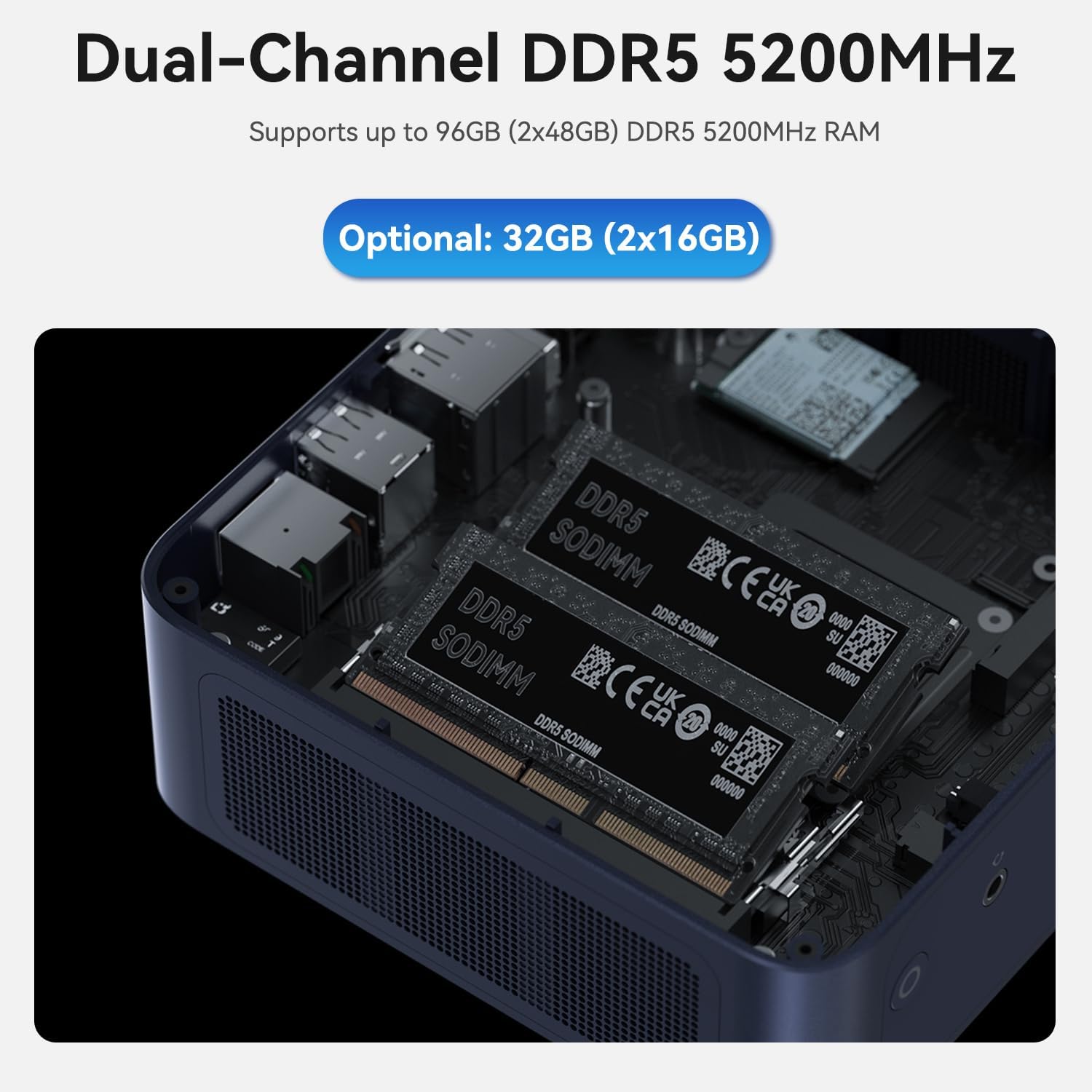
Figure 3: A diagram illustrating the various ports on the TRIGKEY Key i13 Mini PC, including Thunderbolt 4, USB-C, USB-A, DP1.4, HDMI, LAN, and audio jacks.
2.3 ערשט מאַכט אויף
After connecting all necessary cables, press the power button located on the front of the mini PC. The system will boot up, and you should see the operating system loading on your connected display.
3. אַפּערייטינג ינסטרוקטיאָנס
3.1 מאַכט מאַנאַגעמענט
- מאַכט אויף: דרוק די מאַכט קנעפּל אַמאָל.
- שאַט אַראָפּ: Access the operating system's power options to perform a proper shutdown.
- ריסטאַרט: Access the operating system's power options to restart the system.
- שלאָפן מאָדע: Access the operating system's power options to put the system into sleep mode.
3.2 ווייַז קאַנפיגיעריישאַן
The TRIGKEY Key i13 supports up to three independent displays. To configure multiple displays:
- Connect your monitors to the HDMI, DisplayPort, and Thunderbolt 4 ports.
- Once connected, the operating system (e.g., Windows) should automatically detect the displays.
- Navigate to your display settings (e.g., right-click on desktop > Display settings) to arrange, extend, or duplicate your displays as needed.
3.3 נעץ און וויירלעסע קאָנעקטיוויטי
The mini PC offers advanced connectivity options:
- Wired Network (2.5G LAN): For optimal speed and stability, use the 2.5G Ethernet port. Ensure your router and network infrastructure support 2.5G speeds for full performance.
- Wireless Network (WiFi 6): The integrated WiFi 6 (Intel AX200) module provides high-speed wireless connectivity. To connect, open your operating system's network settings, select your desired WiFi network, and enter the password.
- בלועטוט (BT 5.2): Use Bluetooth 5.2 to connect wireless peripherals such as keyboards, mice, headphones, or speakers. Access your operating system's Bluetooth settings to pair devices.

פיגור 4: אן איבערview of the mini PC's connectivity options, including WiFi 6, Bluetooth 5.2, and 2.5G LAN.
3.4 סטאָרידזש און זכּרון יקספּאַנשאַן
The TRIGKEY Key i13 Mini PC is designed for easy upgrades:
- באַראַן: The device comes with 32GB DDR5 RAM (2x16GB) and supports up to 96GB (2x48GB) DDR5 5200MHz SO-DIMM memory. To upgrade, carefully open the chassis and replace the existing SO-DIMM modules.
- SSD: It includes a 1TB PCIe 4.0 SSD. The mini PC features dual M.2 2280 PCIe 4.0 slots, each supporting up to 4TB, for a total of 8TB storage. To add or upgrade SSDs, open the chassis and install M.2 2280 NVMe SSDs into the available slots.

פיגור 5: אן אינערליכע view of the mini PC, displaying the dual DDR5 SO-DIMM slots for memory installation.

פיגור 6: אן אינערליכע view of the mini PC, illustrating the dual M.2 2280 PCIe 4.0 slots for storage expansion.
4. וישאַלט
4.1 רייניקונג
כדי צו זיכער מאַכן אָפּטימאַלע פאָרשטעלונג און לאַנגלעבעדיקייט, זאָלט איר רעגולער רייניקן אייער מיני פּיסי:
- ניצן אַ ווייך, טרוקן שטאָף צו ווישן די יקסטיריער פון די מיטל.
- For dust accumulation in vents, use compressed air. Ensure the device is powered off and unplugged before cleaning.
- פֿאַרמײַדט צו ניצן פֿליסיגע רייניקונגס־מיטלען גלייך אויף דעם אַפּאַראַט.
4.2 ווייכווארג דערהייַנטיקונגען
Keep your operating system and drivers updated to ensure system stability, security, and performance. Regularly check for updates through your operating system's settings.
4.3 קאָאָלינג סיסטעם
The TRIGKEY Key i13 features a dual-fan cooling system to manage internal temperatures. Ensure the vents are not obstructed to allow for proper airflow. If you notice excessive fan noise or overheating, ensure the device is in a well-ventilated area.

Figure 7: A diagram demonstrating the airflow and cooling mechanism within the TRIGKEY Key i13 Mini PC, highlighting the system fan and SSD heatsink.
5. טראָובלעשאָאָטינג
This section addresses common issues you might encounter with your TRIGKEY Key i13 Mini PC.
5.1 קיין מאַכט
- זיכער מאַכן אַז דער מאַכט אַדאַפּטער איז זיכער פארבונדן צו ביידע די מיני פּיסי און אַ אַרבעטנדיק מאַכט ווענטיל.
- באַשטעטיקן אַז די עלעקטרישע ווענטיל אַרבעט דורך אַרײַנשטעקן אַן אַנדער דעוויס.
- קאָנטראָלירט דעם מאַכט אַדאַפּטער פֿאַר קיין קענטיק שעדיקן.
5.2 קיין אַרויסווייַזונג רעזולטאַט
- Confirm that the display cable (HDMI, DP, Thunderbolt) is securely connected to both the mini PC and the monitor.
- זייט זיכער אז דער מאָניטאָר איז אנגעצונדן און איינגעשטעלט צו דער ריכטיקער אינפוט מקור.
- פרובירט זיך צו פארבינדן צו אן אנדערן דיספלעי אדער ניצן אן אנדערן קאבל צו אויסשליסן פראבלעמען מיטן דיספלעי אדער קאבל.
5.3 נעץ קאָנעקטיוויטי פּראָבלעמען
- ווייערד: Check if the Ethernet cable is properly connected. Verify your router/modem is working correctly.
- ווירעלעסס: Ensure WiFi is enabled in your operating system settings. Confirm you are connected to the correct network and have entered the password accurately. Restart your router/modem if necessary.
- Update network drivers if issues persist.
5.4 סיסטעם פאָרשטעלונג פּראָבלעמען
- שליסט אומנייטיקע אַפּליקאַציעס וואָס לויפן אין הינטערגרונט.
- Check for and install any pending operating system or driver updates.
- Ensure the mini PC has adequate ventilation and is not overheating.
- לויפט א סיסטעם דיאַגנאָסטיק אָדער אַנטיווירוס סקען צו קאָנטראָלירן פֿאַר ווייכווארג קאָנפליקטן אָדער מאַלוואַרע.
If you encounter issues not covered here or require further assistance, please contact TRIGKEY customer support.
6. ספּעסאַפאַקיישאַנז
| שטריך | באַשרייַבונג |
|---|---|
| פּראַסעסער | Intel Core i9-13900HK (14C/20T, up to 5.4 GHz) |
| באַראַן | 32GB DDR5 5200MHz (2x16GB), Max 96GB |
| סטאָרידזש | 1TB PCIe 4.0 SSD (Dual M.2 2280 slots, Max 8TB) |
| גראַפיקס | Intel Iris Xe Graphics (96EU) |
| מאַקסימום סקרין האַכלאָטע | 3840x2160 (4K) |
| אָפּערייטינג סיסטעם | OS (Pre-installed, typically Windows 11 Pro) |
| ווירעלעסס קאַנעקטיוויטי | WiFi 6 (Intel AX200), Bluetooth 5.2 |
| ווייערד נעטוואָרק | 2.5 ג לאַן |
| פּאָרץ | 1x Thunderbolt 4 (40Gbps/DP1.4), 1x USB-C 3.2 (10Gbps), 3x USB-A 3.2 (10Gbps), 1x DP1.4 (4K 144Hz), 1x HDMI (4K 60Hz), 1x 2.5G LAN, 2x 3.5mm audio jack, 1x DC IN |
| פּונקט וואָג | 2.38 פונט |
| פּעקל דימענשאַנז | 5.67 X 5.51 X 4.29 אינטשעס |
| פּלאַן טיפּ | מיני פּיסי |
7. וואָראַנטי און שטיצן
7.1 וואָראַנטי אינפֿאָרמאַציע
The TRIGKEY Key i13 Mini PC comes with a one-year warranty from the date of purchase. This warranty covers manufacturing defects and hardware malfunctions under normal use conditions. Please retain your proof of purchase for warranty claims.
7.2 קונה שטיצן
TRIGKEY is committed to providing excellent customer service. For any technical assistance, troubleshooting, or warranty inquiries, please utilize the following support options:
- אָנליין שטיצן: Visit the official TRIGKEY store on Amazon for FAQs and product information: TRIGKEY Amazon Store
- טעכניש שטיצן: We offer 24/7 one-to-one customer service and lifelong technical support. Refer to the contact information provided with your product packaging or on the official TRIGKEY webזייטל פֿאַר דירעקטע שטיצע קאַנאַלן.


