1. הקדמה
The PARD Leopard 256 Thermal Imaging Monocular is an advanced device designed for various applications including hunting, surveillance, and outdoor exploration. It features an ultra-compact design, a high-sensitivity 256x192 sensor, an OLED display, and 5 distinct image modes. Its unparalleled sensitivity, with NETD ≤25mK, allows for the detection of subtle temperature differences, enhancing object identification in diverse weather conditions. This manual provides essential information for the proper setup, operation, and maintenance of your Leopard 256 monocular.
2. פּראָדוקט איבערview
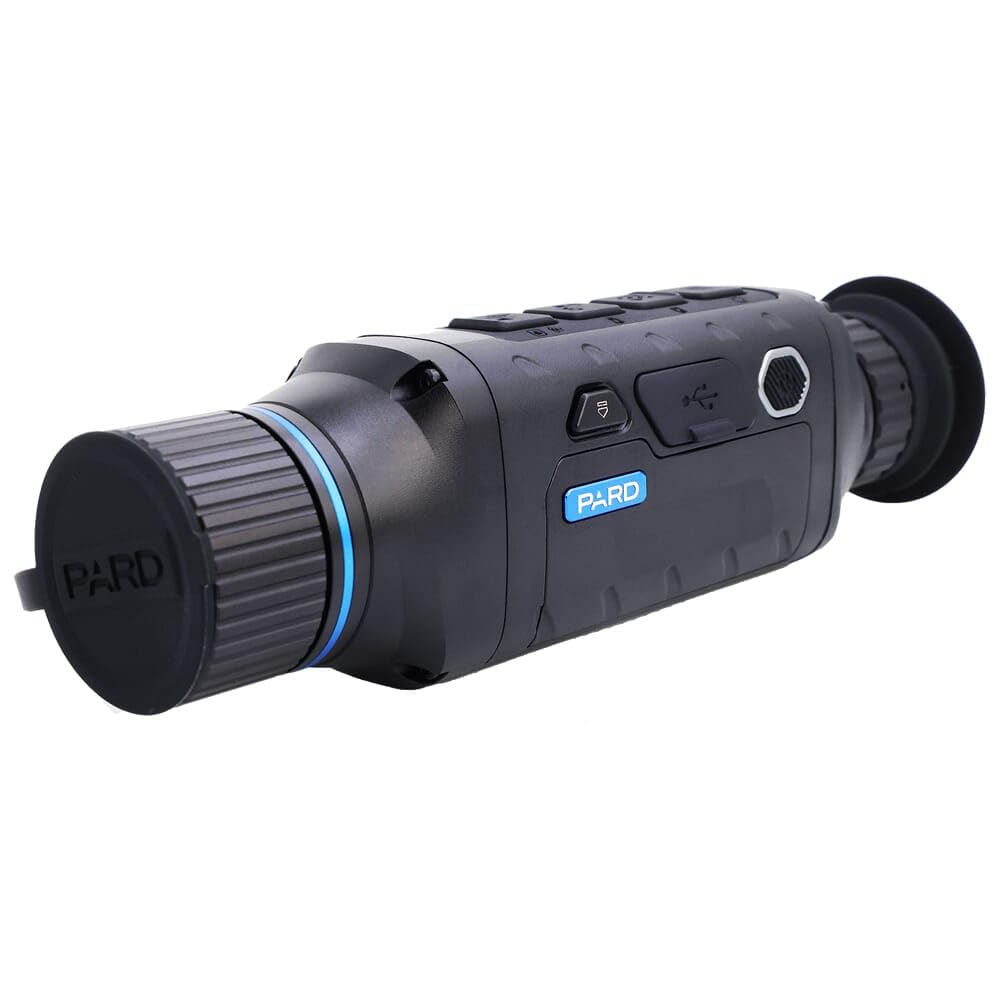
פיגור 2.1: פראָנט-זייט view of the PARD Leopard 256 Thermal Imaging Monocular, showcasing its compact design and objective lens with cap.

פיגורע 2.2: זייַט view of the monocular, highlighting the control buttons and USB port for connectivity.

פיגורע 2.3: View of the eyepiece and the included wrist strap, emphasizing ergonomic handling.

פיגורע 2.4: שפּיץ view of the monocular, showing the arrangement of the main control buttons.
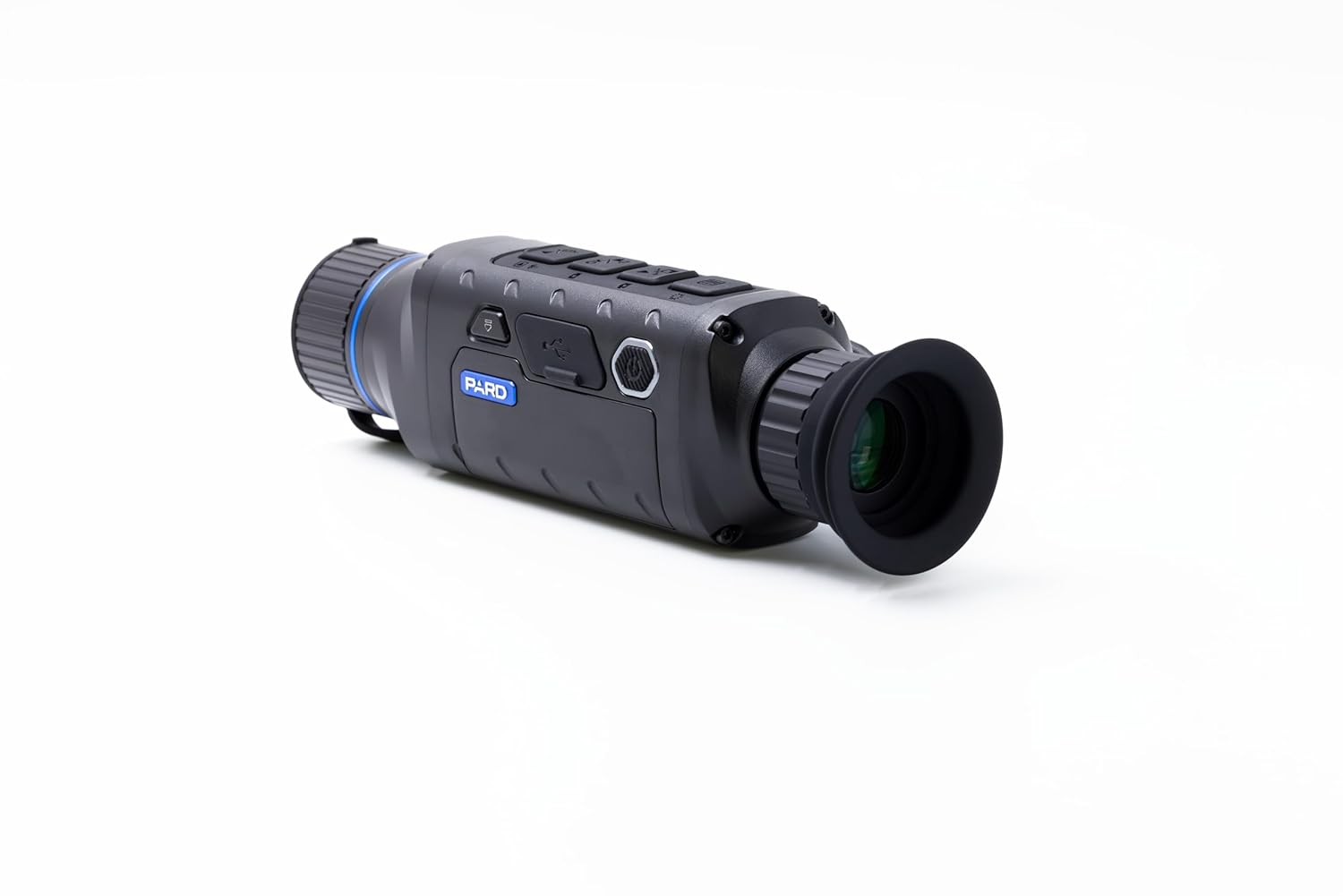
פיגור 2.5: ווינקלדיק view of the monocular, providing a comprehensive look at its form factor.

פיגור 2.6: פון אויבן אַראָפּ view of the monocular with the wrist strap attached, showing its overall length.
שליסל פֿעיִקייטן:
- NETD ≤25mK Unparalleled Sensitivity: Detects subtle temperature differences below 0.025°C for enhanced object identification.
- Super Tiny & Compact Design: Lightweight (300g) for comfortable, prolonged observation without hand strain.
- Brand New UI Icons: User-friendly interface allows simultaneous prey observation and menu settings.
- ברייט View for Effortless Scanning: Up to 16° (28m@100m) horizontal field of view for swift target location and tracking.
- 5 Image Modes: Includes WT-HOT, BK-HOT, RD-HOT, IN-HOT, and SKY modes to highlight targets based on user preference.
- Smart Screen Recording: Records home screen icons alongside photos and videos for richer information.
- 3 סצענע מאָדעס: City, Rain, and Forest modes provide adaptability across different environments.
- הייס שפּירט: Enables swift detection and tracking of heat signatures.
- Stand By Mode: Single press of the power button for quick awakening, reducing power drain.
- IP67 שאַץ: Ensures reliable performance in extreme weather conditions.
- Firmware דערהייַנטיקן: Easy firmware upgrade by copying software to the built-in storage card.
3. סעטאַפּ
- ונבאָקסינג: Carefully remove the monocular and all accessories from the packaging. Verify that all components listed in the packing list are present.
- ייַנמאָנטירונג פון באַטאַרייע: Locate the battery compartment, typically at the rear or side of the device. Insert the specified battery type (e.g., 18650 lithium-ion battery) according to the polarity markings. Ensure the battery compartment cover is securely closed.
- ערשט אָפּצאָל: If the battery is not fully charged, connect the monocular to a power source using the provided USB cable. The charging indicator will typically show the charging status.
- רימען אַטאַטשמאַנט: Attach the wrist strap to the designated attachment point on the monocular for secure handling during use.
4. אַפּערייטינג ינסטרוקטיאָנס
- מאַכט אויף / אַוועק: Press and hold the power button (usually located on the top or side) for a few seconds to turn the device on. The PARD logo will appear, followed by the live thermal image. To power off, press and hold the power button again until the device shuts down.
- סטאַנדביי מאָדע: A single short press of the power button will put the device into standby mode, conserving battery life. Press it again to quickly resume operation.
- פאָקוס אַדזשאַסטמאַנט: Rotate the objective lens focus ring (at the front of the monocular) to achieve a clear image of your target. Adjust the diopter ring (near the eyepiece) for optimal clarity for your individual eyesight.
- מעניו נאַוויגאַציע: Use the navigation buttons (up, down, left, right, OK/Menu) to access and navigate through the device's menu system.
- בילד מאָדעס: The Leopard 256 offers 5 image modes:
- WT-HOT (White Hot): הייסע אביעקטן דערשייַנען ווייס.
- BK-HOT (Black Hot): הייסע אביעקטן זעען אויס שוואַרץ.
- RD-HOT (Red Hot): Hot objects appear red.
- IN-HOT (Iron Hot): Displays a spectrum of colors from black to white, with hot objects in brighter colors.
- SKY: Specific mode for sky observation.
- סצענע מאָדעס: Select from City, Rain, or Forest scene modes to optimize image quality for different environmental conditions. These modes adjust image processing to enhance detail and contrast.
- Hot Track Function: Activate the Hot Track feature to automatically identify and highlight the hottest point in the field of view, aiding in quick target acquisition.
- אויפנעמען בילדער און ווידעאס: Use the dedicated record button to capture still images or start/stop video recording. Recorded files are saved to the internal storage. The Smart Screen Recording feature captures the entire screen, including UI icons.
- דיגיטאַל פארגרעסער: Use the zoom buttons to digitally magnify the image. Note that digital zoom may reduce image quality.
5. וישאַלט
- רייניקונג די לענסעס: Use a soft, lint-free cloth specifically designed for optics to clean the objective and eyepiece lenses. For stubborn smudges, use a small amount of lens cleaning solution. Avoid abrasive materials or harsh chemicals.
- רייניקונג דעם גוף: Wipe the monocular body with a soft, damp שטאָף. דו זאלסט נישט נוצן סאָלוואַנץ אָדער שטאַרק דיטערדזשאַנץ.
- באַטערי זאָרגן: Remove the battery if the device will not be used for an extended period. Store batteries in a cool, dry place. Avoid overcharging or completely draining the battery.
- סטאָרידזש: Store the monocular in its protective case in a cool, dry, and dust-free environment. Avoid extreme temperatures and high humidity.
- Firmware דערהייַנטיקונגען: רעגולער קאָנטראָלירן די פאַבריקאַנט ס website for firmware updates. Updating the firmware can improve performance, add new features, or fix bugs. Follow the instructions provided by PARD for firmware updates.
- וואַסער קעגנשטעל (IP67): While the device has an IP67 rating, meaning it is protected from dust and can withstand immersion in 1 meter of water for 30 minutes, it is not designed for prolonged underwater use. Ensure all ports and covers are securely closed before exposure to water or dust.
6. טראָובלעשאָאָטינג
| פּראָבלעם | מעגלעך סיבה | לייזונג |
|---|---|---|
| די מיטל טוט נישט מאַכט אויף. | די באַטעריע איז נידעריק אָדער נישט ריכטיק אינסטאַלירט. | Charge the battery or ensure it is inserted with correct polarity. |
| דאָס בילד איז פֿאַרשוואָמען אָדער נישט אין פֿאָקוס. | Objective lens or diopter not adjusted. | Rotate the objective lens focus ring and/or the diopter ring until the image is clear. |
| דער עקראַן פרירט זיך אָדער דער מיטל רעאַגירט נישט. | ווייכווארג פראבלעם אדער צייטווייליגע טעות. | Perform a soft reset by holding the power button until the device restarts. If problem persists, remove and reinsert the battery. |
| Poor image quality or detection range. | Environmental conditions (fog, heavy rain), dirty lens, or incorrect scene mode. | Clean the lens. Adjust scene modes (City, Rain, Forest) to match conditions. Ensure NETD ≤25mK is optimal for the environment. |
| קען נישט רעקאָרדירן פאָטאָס/ווידעאָס. | Internal storage is full. | אַריבערפירן files to a computer and delete them from the device to free up space. |
7. ספּעסאַפאַקיישאַנז
- סאָרט: פּאַרד
- פאַבריקאַנט: PARD USA
- מאָדעל: LE2-16-PARD
- נומער מאָדעל נומער: LE2-16-PARD
- פּראָדוקט דימענשאַנז: 2.54 x 2.54 x 2.54 ס״מ (25 x 25 x 25 מילימעטער)
- נומער וואָג: 726 ג
- ASIN: B0FB5Y5WHW
- UPC: 850050408895
- סענסאָר: 256x192 Thermal Sensor
- NETD: ≤25mK
- ווייַז: OLED
- פעלד פון View: Up to 16° (28m@100m) horizontal
- בילד מאָדעס: WT-HOT, BK-HOT, RD-HOT, IN-HOT, SKY
- סצענע מאָדעס: City, Rain, Forest
- וואָטערפּרוף שאַץ: IP67
8. וואָראַנטי און שטיצן
Specific warranty details for the PARD Leopard 256 Thermal Imaging Monocular are not provided in this document. For information regarding warranty coverage, terms, and conditions, please refer to the warranty card included with your product or visit the official PARD website. For technical support, service, or inquiries, please contact PARD customer service through their official channels. Keep your purchase receipt as proof of purchase for any warranty claims.
פאַבריקאַנט: PARD USA


