הקדמה
This manual provides essential information for setting up, operating, and maintaining your TCL 32S5K 32-inch QLED Smart TV. Please read these instructions carefully before using your television to ensure proper functionality and safety. Keep this manual for future reference.

פראָנט view of the TCL 32S5K 32-inch QLED Smart TV. This image shows the television screen displaying vibrant colors, supported by two sleek stands.
וואָס איז אין די קעסטל
באַשטעטיקן אַז אַלע קאָמפּאָנענטן זענען פאַראַן אין דער פּאַקאַדזשינג:
- TCL 32S5K Television
- מאַכט אַדאַפּטער
- מאַכט קאַבלע
- ווייַט קאָנטראָל
- טעלעוויזיע שטאַנד (2 שטיק)
- באַניצער מאַנואַל (דעם דאָקומענט)
סעטאַפּ
1. אנשטעלן דעם טעלעוויזיע שטאנד
- לייגט פֿאָרזיכטיק דעם טעלעוויזיע־עקראַן אַראָפּ אויף אַ ווייכער, גלאַטער ייבערפֿלאַך כּדי צו פֿאַרמייַדן שאָדן.
- גלייכט יעדן שטאַנד מיט די קאָרעספּאָנדירנדיקע סלאָץ אויף דער אונטערשטער טייל פון דעם טעלעוויזאָר.
- באַפעסטיקט די שטאַנדן מיט די צוגעשטעלטע שרויפן. מאַכט זיכער אַז זיי זענען פעסט באַפעסטיקט.

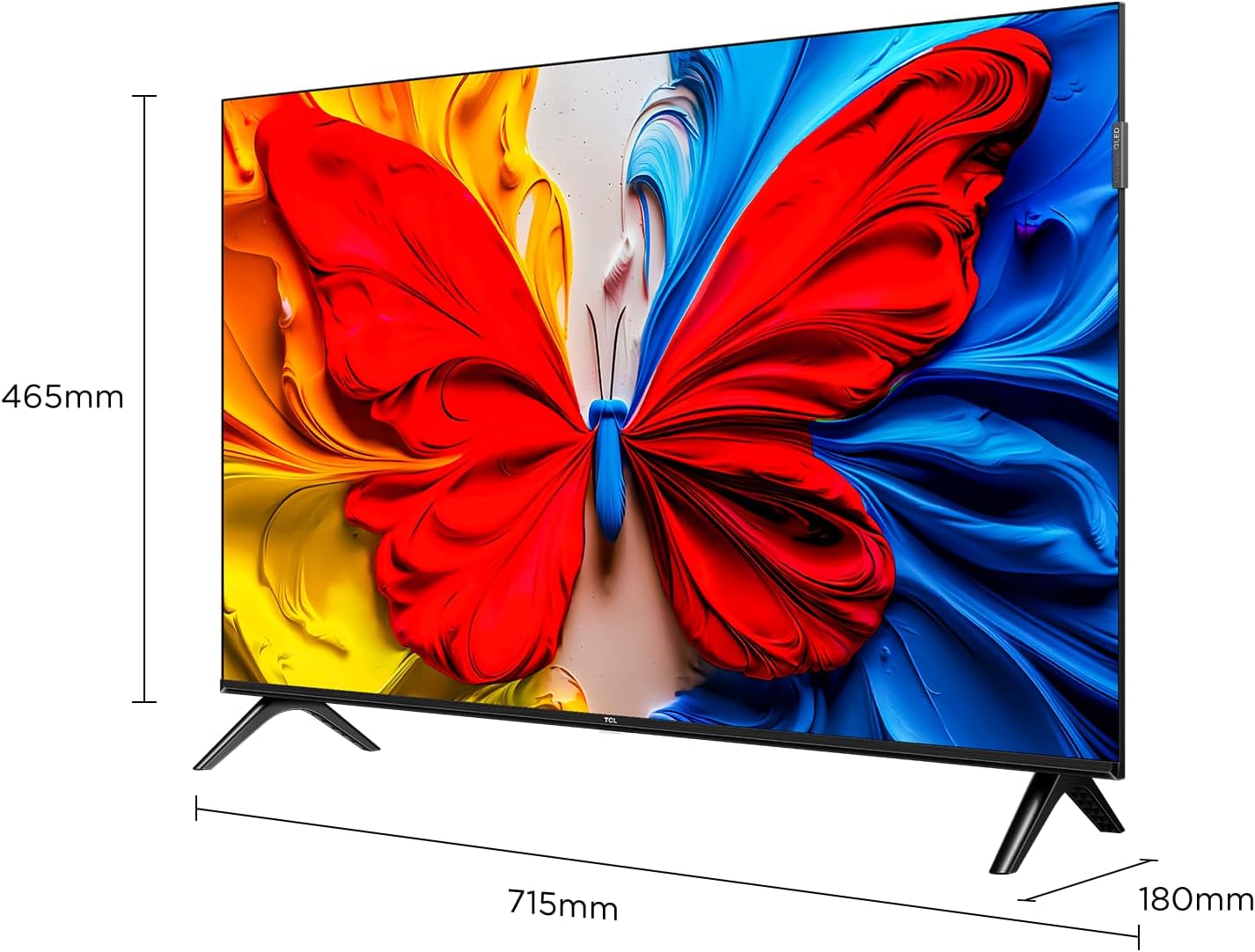
Image illustrating the dimensions of the TCL 32S5K TV and how the stands are attached to the bottom of the unit. The image shows measurements for width (715mm) and height (465mm).
2. וואַנט מאָונטינג (אַפּשאַנאַל)
If you choose to wall mount your TV, refer to the instructions provided with your wall mount kit. Ensure the wall mount is compatible with the VESA mounting pattern of the TCL 32S5K TV. Professional installation is recommended for wall mounting.
דערציען view of the TCL 32S5K TV, showing the VESA mounting points and various input ports. This view is useful for understanding wall mount compatibility and cable management.
3. קאַנעקטינג פונדרויסנדיק דעוויסעס
די טעלעוויזיע האט קייפל פּאָרטן פֿאַר פֿאַרבינדן עקסטערנע דעוויסעס:
- HDMI פּאָרץ: Connect Blu-ray players, game consoles, cable/satellite boxes, etc. (Total 2 HDMI ports).
- וסב פּאָרץ: פֿאַרבינדט USB דרייווז פֿאַר מעדיע ווידערשפּיל.
- ווי-פי: פֿאַרבינדט זיך צו אייער היים נעץ פֿאַר אינטערנעט צוטריט און סטרימינג.
- בלועטאָאָטה: Connect compatible wireless accessories.

זייַט view of the TCL 32S5K TV, highlighting the accessible input ports including HDMI and USB. This image helps users locate the connectivity options.
4. מאַכט קאַנעקשאַן
Connect the power cable to the TV's power input, then plug the other end into a suitable electrical outlet.
5. ערשט סעטאַפּ
ביים ערשטן מאָל אנצינדן, וועט דער טעלעוויזיע אייך פירן דורך דעם ערשטן סעטאַפּ פּראָצעס, אַרייַנגערעכנט:
- שפּראַך סעלעקציע.
- Network connection (Wi-Fi).
- Google Account sign-in (for Google TV features).
- Channel scanning (if connecting an antenna).
אַפּערייטינג ינסטראַקשאַנז
ווייַט קאָנטראָל
The included remote control allows you to navigate the TV's interface and control various functions. Insert two AAA batteries (not included) into the remote control, observing polarity.
- מאַכט קנעפּל: טורנס די טעלעוויזיע אויף אָדער אַוועק.
- אַרייַנשרייַב קנעפּל: Selects input sources (HDMI 1, HDMI 2, USB, etc.).
- נאַוויגאַציע קנעפּלעך: Up, Down, Left, Right arrows to move through menus.
- OK קנעפּל: קאַנפערמז סאַלעקשאַנז.
- צוריק קנעפּל: קערט צו די פריערדיקע פאַרשטעלן.
- היים קנעפּל: גייט אריין אין גוגל טיווי היים עקראַן.
- באַנד קנעפּלעך: אַדזשאַסץ די באַנד מדרגה.
- קאַנאַל קנעפּלעך: Changes TV channels (if applicable).
- גוגל אַסיסטאַנט קנעפּל: אַקטיוויזירט שטימע קאָנטראָל.
גוגל טעלעוויזיע אינטערפֿייס
Your TCL 32S5K TV runs on the Google TV operating system, providing access to a wide range of streaming apps, movies, and shows. Navigate using the remote control to browse content, search, and manage settings.
- היים פאַרשטעלן: Displays personalized content recommendations, installed apps, and quick access to inputs.
- אַפּפּס: דאַונלאָוד און פאַרוואַלטן אַפּליקאַציעס פֿון די גוגל פּליי סטאָר.
- סעטטינגס: Access TV settings for picture, sound, network, system, and more.
שליסל פֿעיִקייטן
QLED Display Technology
The TCL 32S5K features QLED (Quantum Dot LED) technology, which enhances color volume and accuracy, delivering a more vibrant and lifelike viewing experience compared to conventional LED TVs.

Diagram explaining the difference between Colorful Quantum Crystal (TCL QLED) and Conventional Quantum Crystal, highlighting the layers and efficiency.
HDR 10 Support
With HDR 10 support, the TV can display a wider range of brightness and contrast, revealing more detail in both the darkest and brightest areas of the picture. This results in a more dynamic and immersive visual experience.

Comparison image showing a scene with HDR (left) and without HDR (right), demonstrating the enhanced detail and dynamic range provided by HDR 10.
Dolby Audio
Experience rich, clear, and powerful sound with Dolby Audio. This technology optimizes the TV's audio output for an immersive listening experience, whether you're watching movies, sports, or playing games.

Image depicting a TV screen displaying a dynamic ocean wave, with visual elements suggesting enhanced audio quality, representing Dolby Audio.
שפּיל מאָדע
Game Mode automatically optimizes display settings for gaming, reducing input lag and improving responsiveness. This provides a smoother and more enjoyable gaming experience.

Split-screen image comparing "Game Mode Off" (left) and "Game Mode On" (right) during a video game scene, illustrating the visual improvements and reduced lag.
שלאַנק פּלאַן
The TCL 32S5K features a modern, slim design with a metallic bezel-less display, allowing the screen to blend seamlessly into your living space and providing a more immersive viewינג דערפאַרונג.

בילד ווייַזונגasing the slim profile and metallic bezel-less design of the TCL 32S5K TV, emphasizing its modern aesthetic.
וישאַלט
- רייניקונג די פאַרשטעלן: ווישט אָפּ דעם עקראַן מיט אַ ווייכן, לינט-פֿרייע שטאָף. פֿאַר שווערע פֿלעקן, ניצט אַ עקראַן רייניגער ספּעציעל דיזיינד פֿאַר טעלעוויזיעס, אויפֿגעטראָגן אויף דעם שטאָף, נישט גלייך אויף דעם עקראַן.
- רייניקונג די קאַבינעט: ניצט אַ ווייכע, טרוקענע שטאָף צו ווישן דעם טעלעוויזיע קאַבינעט. פֿאַרמייַדט ניצן אַברייסיוו רייניגער אָדער סאָלווענטן.
- ווענטילאַטיאָן: זיכערט זיך אז די טעלעוויזיע'ס ווענטילאציע עפענונגען זענען נישט פארשטאפט צו פארמיידן איבערהיצונג.
- מאַכט שנור: Regularly check the power cord for any damage. If damaged, contact customer support for replacement.
טראָובלעשאָאָטינג
איידער איר קאָנטאַקטירט קונה שטיצע, פּרוּווט די פאלגענדע לייזונגען פֿאַר געוויינטלעכע פּראָבלעמען:
| פּראָבלעם | מעגלעך לייזונג |
|---|---|
| קיין עלעקטרע / טעלעוויזיע צינדט זיך נישט אן. |
|
| קיין בילד נישט, אבער סאונד איז דא. |
|
| קיין קלאַנג, אָבער בילד איז דאָ. |
|
| ווייַט קאָנטראָל נישט ארבעטן. |
|
| TV turns on for a few seconds then shuts off. |
|
ספּעסאַפאַקיישאַנז
| שטריך | דעטאַל |
|---|---|
| מאָדעל נאָמען | 32S5K |
| פאַרשטעלן גרייס | 32 אינטשעס |
| ווייַז טעכנאָלאָגיע | QLED |
| האַכלאָטע | 1920 X 1080 (FHD) |
| דערפרישן קורס | 60 הז |
| HDR פֿאָרמאַט שטיצט | HDR10 |
| אַודיאָ טעכנאָלאָגיע | Dolby Audio, DTS, Dolby Atmos |
| אָפּערייטינג סיסטעם | גוגל טעלעוויזיע |
| קאַנעקטיוויטי | Wi-Fi, Bluetooth, 2x HDMI, USB |
| פּראָדוקט דימענשאַנז (ד רענטגענ וו רענטגענ ה) | 2.95"ד רענטגענ 28.15"וו רענטגענ 16.61"ה |
| פּונקט וואָג | 4.42 קילאָגראַמס |
| מאַונטינג טיפּ | Table Mount, Wall Mount |
| אַרייַנגערעכנט קאַמפּאָונאַנץ | מאַכט אַדאַפּטער, מאַכט קאַבל, ווייַט קאָנטראָל, שטאַנד, באַניצער מאַנואַל |
וואָראַנטי און שטיצן
פֿאַר וואָראַנטי אינפֿאָרמאַציע, ביטע זען די וואָראַנטי קאַרטל וואָס איז אַרייַנגערעכנט מיט דיין פּראָדוקט אָדער באַזוכן די באַאַמטער TCL וועבזייטל website. For technical support or service inquiries, please contact TCL customer service through their official channels. Keep your purchase receipt as proof of purchase for warranty claims.
איר קענט געפֿינען מער אינפֿאָרמאַציע און שטיצע אויף דער TCL קראָם אויף עמעזאָן.


