הקדמה
Thank you for choosing the GOBOULT Soniq Over Ear Bluetooth Headphones. These headphones are designed to provide a superior audio experience with features like 70 hours of playtime, 40mm bass drivers, Zen™ ENC microphone, Type-C fast charging, and dual device pairing. This manual will guide you through the setup, operation, and maintenance of your new headphones to ensure optimal performance.
וואָס איז אין די קעסטל
ביטע טשעקט די אינהאַלט פון די פּאַקעט צו זיכער מאַכן אַז אַלע זאכן זענען דאָרט:
- Soniq Headphone
- טיפּ-C טשאַרדזשינג קאַבלע
- באַניצער מאַנואַל
- אויער קישן (פאר-אינסטאלירט)
- וואָראַנטי קאַרד
פּראָדוקט פֿעיִקייטן איבערview
The GOBOULT Soniq headphones come equipped with several advanced features:
- עקסטענדעד שפּיל צייט: ביז 70 שעה פון אַודיאָ ווידערשפּיל אויף איין אָפּצאָל.
- Customizable EQ Modes: אַדזשאַסטירן סאַונד פּראָfiles for bass boost, balanced audio, or vocal clarity.
- ענוויראָנמענטאַל ראַש קאַנסאַליישאַן (ENC): פֿאַרבעסערט רוף קלעריטי דורך רעדוצירן הינטערגרונט ראַש.
- צווייענדיקע דעווייס פּערינג: Seamlessly connect and switch between two devices simultaneously.
- Powerful Audio Drivers: 40mm bass-boosted drivers for rich sound.
- לעצטע בלועטוט טעכנאָלאָגיע: Bluetooth 5.4 for faster pairing and stable connections.
- באַקוועם פּלאַן: Lightweight build with cushioned earcups for prolonged wear.
- וואַסער קעגנשטעל: IPX5 rating for splash, rain, and sweat protection.
- Tactile Controls: Easy-to-use physical buttons for volume, playback, and mode switching.
- שטיצע פון AI שטימע אַסיסטאַנט: Compatible with Google Assistant and Siri.

בילד: איבערview of key features including 70H battery, EQ modes, ENC, dual pairing, 40mm drivers, and Bluetooth 5.4.

Image: Close-up of the GOBOULT Soniq headphone earcup highlighting the 40mm power-packed bass neodymium drivers with BoomX™ Technology and Memory Foam.
סעטאַפּ גייד
1. טשאַרדזשינג די כעדפאָונז
Before first use, fully charge your GOBOULT Soniq headphones. Use the provided Type-C charging cable to connect the headphones to a compatible USB power source.
- א פולע אָפּצאָל גיט ביז 70 שעה שפּילצייט.
- Fast charging feature: 10 minutes of charge provides approximately 8 hours of playtime.
- דער LED אינדיקאַטאָר וועט ווײַזן די טשאַרדזשינג סטאַטוס און וועט זיך אויסלעשן אָדער טוישן קאָליר ווען עס איז גאָר אויפגעלאָדן.

Image: GOBOULT Soniq headphones connected via Type-C cable, illustrating 70 hours playtime and fast charging capability.
2. פּאָווערינג אויף / אויסגעלאשן
To power on, press and hold the Power button for approximately 3 seconds until the LED indicator lights up. To power off, press and hold the Power button again for 3 seconds until the LED indicator turns off.
3. בלועטאָאָטה פּערינג
גייט נאך די שריט צו פארבינדן אייערע כעדפאָונז מיט א בלועטוט-פארשטענדלעכן מיטל:
- זיכער מאַכן אַז די כעדפאָונז זענען גאָר אויפגעלאָדן און אויסגעלאָשן.
- Press and hold the Power button for 5-7 seconds until the LED indicator flashes red and blue alternately, indicating pairing mode.
- אויף אייער דעווייס (סמאַרטפאָן, טאַבלעט, לאַפּטאָפּ), אַקטיווירט בלועטוט און זוכט פֿאַר פֿאַראַן דעווייסעס.
- Select "GOBOULT Soniq" from the list of found devices.
- אַמאָל פארבונדן, וועט דער LED אינדיקאַטאָר בלינקען בלוי לאַנגזאַם אָדער בלייבן האַרט בלוי.

Image: GOBOULT Soniq headphones highlighting Bluetooth 5.4 for fast and stable connection.
אַפּערייטינג ינסטראַקשאַנז
1. גרונטלעכע קאנטראלן
The headphones feature tactile buttons for easy control:
- מאַכט קנעפּל: דריקן און האַלטן צו אנצינדן/אויסלעשן. קורץ דריקן צו שפּילן/פּויזירן.
- באַנד אַרויף (+): קורץ דריקן צו פארגרעסערן די קול. לאנג דריקן פארן נעקסטן ליד.
- באַנד אַראָפּ (-): קורץ דריקן צו פֿאַרמינערן די באַנד. לאַנג דריקן פֿאַר פֿריִערדיקן ליד.
- Multi-function Button (often combined with Power or a dedicated button): Answer/End calls, activate voice assistant.

Image: Close-up of the right earcup showing tactile button controls for volume and play/pause.
2. EQ מאָדעס
Customize your audio experience with multiple EQ modes. Press the dedicated EQ button (or a specific combination, refer to quick start guide if available) to cycle through modes:
- באַס בוסט מאָדע: Enhances low frequencies for a deeper bass sound.
- באַלאַנסירט מאָדע: גיט אַ נייטראַלן געזונט פּראָfile פּאַסיק פֿאַר פֿאַרשידענע זשאַנערס.
- וואָקאַל מאָדע: אָפּטימיזירט מיטל-קייט פרעקווענצן פֿאַר קלאָרערע וואָקאַלן.
- שפּיל מאָדע: Reduces latency for a more synchronized gaming audio experience (60ms ultra-low latency).
- מוזיק מאָדע: סטאַנדאַרט אַודיאָ פּראָfile פֿאַר אַלגעמיינע מוזיק צוהערן.
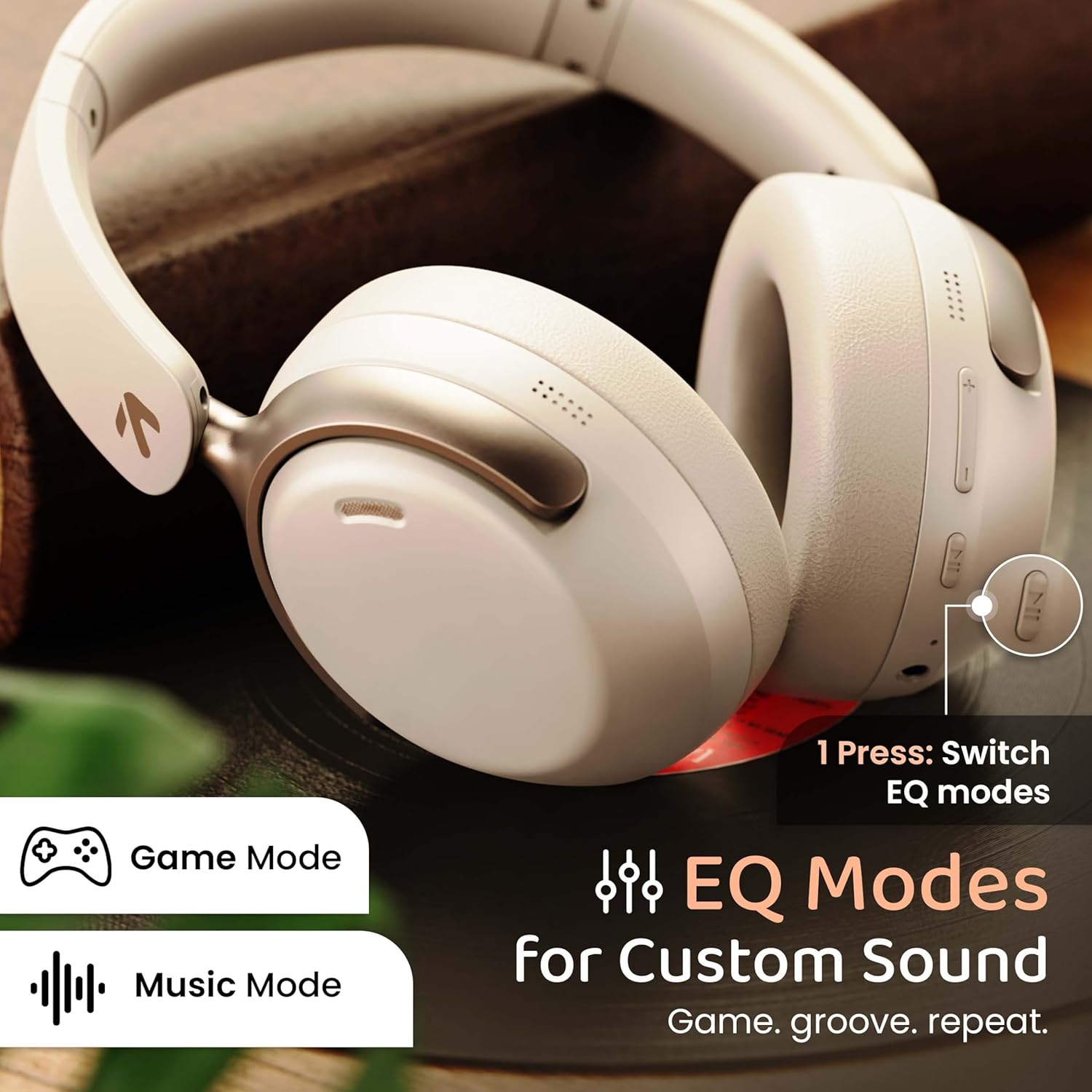
Image: GOBOULT Soniq headphones illustrating the EQ modes for custom sound, including Game Mode and Music Mode.

Image: GOBOULT Soniq headphones highlighting Combat™ Gaming Mode with 60ms ultra-low latency, tailored for mobile gaming and real-time sound accuracy.
3. Dual Device Pairing
The headphones support dual device pairing, allowing you to connect to two devices simultaneously and switch between them seamlessly.
- פֿאַרבינדט די קאָפּהערער מיטן ערשטן דעווייס ווי באַשריבן אין דער "בלוטעט פֿאַרבינדונג" סעקציע.
- דיאַקטיווירן בלועטוט אויף דער ערשטער דעווייס.
- פּאָר די כעדפאָונז מיט די רגע מיטל.
- ווידער אַקטיווירן בלוטוט אויף דער ערשטער דעווייס. די כעדפאָונז זאָלן זיך אויטאָמאַטיש פֿאַרבינדן צו ביידע דעווייסעס.
- Audio will play from the device currently active. To switch, pause audio on the first device and start playing on the second.

Image: GOBOULT Soniq headphones demonstrating dual device connectivity with a laptop and a smartphone.
4. Wired Mode (AUX)
For a wired connection, use a standard 3.5mm AUX cable (not included) to connect the headphones to your audio source. In wired mode, the headphones operate passively, and the built-in microphone will not function.

Image: GOBOULT Soniq headphones showing the option for wireless mode and an optional wired mode via AUX cable, noting that the mic is off in wired mode.
5. ענווייראָנמענטאַל ראַש קאַנסאַליישאַן (ENC) פֿאַר רופן
The Zen™ ENC microphone technology helps reduce ambient noise during calls, ensuring clearer conversations. This feature is automatically active during phone calls.

Image: Close-up of the GOBOULT Soniq headphone earcup highlighting the Zen™ ENC Mic for processed calling, ambient noise isolation, enhanced call experience, and sharper voice clarity.
6. קול אַססיסטאַנט
Activate your device's voice assistant (Google Assistant or Siri) by pressing the multi-function button (or specific button, refer to quick start guide) for approximately 2 seconds.

Image: GOBOULT Soniq headphones with icons for Google Assistant and Siri, indicating personalized AI assistant support.
וישאַלט און זאָרג
- רייניקונג: ווישט די כעדפאָונז מיט אַ ווייכן, טרוקענעם שטאָף. ניצט נישט קיין שרײַבנדיקע רייניגער אָדער סאָלווענטן.
- וואַסער קעגנשטעל: The headphones are IPX5 water resistant, meaning they are protected against splashes, rain, and sweat. Do not submerge them in water or expose them to strong jets of water.
- סטאָרידזש: ווען נישט אין באַנוץ, זאָל מען האַלטן די כעדפאָונז אין אַ קיל, טרוקן אָרט, אַוועק פון דירעקט זונשייַן און עקסטרעמע טעמפּעראַטורן. דער צוזאַמענפאַלטבאַרער פּלאַן ערמעגליכט קאָמפּאַקט סטאָרידזש.
- באַטערי זאָרגן: כדי צו פארלענגערן די לעבן פון די באַטעריע, זאָלט איר נישט אָפט אויסלאָדן די קאָפּהערער. לאָדט זיי אָפט אויף, אפילו אויב זיי ווערן נישט קעסיידער גענוצט.
Image: GOBOULT Soniq headphones illustrating IPX5 water resistance, indicating protection against splash, rain, and sweat.

Image: GOBOULT Soniq headphones showcasing their adjustable headband, foldable design, and movable earcups for maximum comfort and portability.
טראָובלעשאָאָטינג
| פּראָבלעם | מעגלעך לייזונג |
|---|---|
| די קאָפּהערער ווערן נישט אנגעצינדן. | זיכער מאַכן אַז די קאָפּהערער זענען אָנגעלאָדן. פאַרבינדן צו אַ מאַכט מקור ניצן די טיפּ-C קאַבל. |
| קען נישט צופּאַסן מיטן דעווייס. |
|
| קיין קלאַנג אָדער נידעריקע וואָלומען. |
|
| מיקראָפאָן אַרבעט נישט אין דראָט מאָדע. | The built-in microphone is not active when using the AUX wired connection. This is normal operation. |
| אומגעריכטע פֿאַרבינדונג. |
|
ספּעסאַפאַקיישאַנז
| שטריך | דעטאַל |
|---|---|
| מאָדעל נאָמען | AirBass |
| קאַנעקטיוויטי טעכנאָלאָגיע | בלועטוט, מיט ווייערן, ווייערלעס |
| ווירעלעסס קאָמוניקאַציע טעכנאָלאָגיע | בלועטאָאָטה 5.4 |
| בלועטאָאָטה קייט | 10 מעטער |
| אַודיאָ דרייווער גרייס | 40 מילאַמיטערז |
| אַודיאָ דרייווער טיפּ | דינאַמיש דרייווער |
| באַטערי לעבן | 40 שעה |
| טשאַרדזשינג פּאָרט | טיפ-C שנעל טשאַרדזשינג דזשאַק |
| ראַש קאָנטראָל | ענוויראָנמענטאַל ראַש קאַנסאַליישאַן (ENC) |
| וואַסער קעגנשטעל מדרגה | IPX5 (Splash, Rain, Sweat Proof) |
| אַודיאָ לייטאַנס | 60 מיליסעקונדעס (שפּיל מאָדע) |
| עאַרפּיעסע פאָרעם | איבער אויער |
| מאַטעריאַל | Memory Foam (Ear Cushions) |
| פּונקט וואָג | 227 גראַמז |
| פּראָדוקט דימענשאַנז (LxWxH) | 17 X 5.5 X 19 סענטימעטער |
| קאָנטראָללער טיפּ | Button, Google Assistant |
| ימפּידאַנס | 32 אָהמס |
| סענסיטיוויטי | 118 דב |
וואָראַנטי און שטיצן
Your GOBOULT Soniq Over Ear Bluetooth Headphones come with a 1-יאָר פאַבריקאַנט וואָראַנטי from the date of purchase. This warranty covers manufacturing defects and ensures the reliability of your product.
For warranty claims, technical support, or any inquiries, please refer to the contact information provided on the warranty card included in your package or visit the official GOBOULT support webפּלאַץ.
ביטע באַהאַלטן אייער קויף קוויטל ווי אַ באַווייַז פון קויפן פֿאַר וואָראַנטי וואַלידאַציע.


