1. הקדמה
This manual provides detailed instructions for the safe and efficient use of your Gembird TWST-01-W Transparent Bluetooth Earbuds. These earbuds feature a unique transparent design, offering up to 4 hours of listening time per charge. Key functionalities include automatic music muting for incoming calls, an LCD battery indicator, and a color-changing backlight. Please read this manual thoroughly before operating the device.
2. פּעקל אינהאַלט
זיכער מאַכן אַז אַלע די זאכן וואָס זענען אויסגערעכנט אונטן זענען פאַראַן אין דיין פּעקל:
- Gembird TWST-01-W Transparent Bluetooth Earbuds (Left and Right)
- טשאַרדזשינג קאַסע
- Charging Cable or Connector
- ינסטראַקשאַנז מאַנואַל
3. פּראָדוקט איבערview
Familiarize yourself with the components of your Gembird TWST-01-W earbuds.

פיגורע 3.1: The Gembird TWST-01-W Transparent Bluetooth Earbuds shown within their charging case. The case features a clear design, revealing the internal components and an LCD display indicating battery levels for both earbuds (L and R) and the case itself.
שליסל פֿעיִקייטן:
- טראַנספּעראַנט פּלאַן: Unique clear housing for both earbuds and charging case.
- פארלענגערטע צוהערן: Up to 4 hours of continuous listening per charge.
- רופן פאַרוואַלטונג: Automatically mutes music for incoming calls.
- באַטערי ינדיקאַטאָר: LCD display on the charging case shows battery levels.
- דינאַמיש באַקלייט: Charging case features a color-changing backlight.
- ריר קאָנטראָל: Intuitive touch-sensitive controls for various functions.
- וואַסער קעגנשטעליק: Designed to withstand splashes and sweat.
4. סעטאַפּ
4.1 ערשט טשאַרדזשינג
פארן ערשטן באַנוץ, לאָדן די אויערקנעפּלעך און די טשאַרדזשינג קעסטל גאָר אויף.
- שטעלן ביידע עאַרבודז אין די טשאַרדזשינג פאַל.
- Connect the charging cable to the charging port on the case and to a USB power source.
- The LCD display on the case will show the charging status. Allow sufficient time for a full charge.

פיגורע 4.1: זייַט view of the Gembird TWST-01-W charging case, highlighting its transparent construction and the integrated LCD battery display. The charging port is typically located at the bottom or rear of the case.
4.2 בלועטאָאָטה פּערינג
צו פֿאַרבינדן אייערע אויערקנעפּלעך צו אַ דעווייס:
- זיכער מאַכן אַז די אויערקנעפּלעך זענען אויפגעלאָדן און געלייגט אין די טשאַרדזשינג קעסטל.
- עפֿנט דעם טשאַרדזשינג קעסטל. די אויערקנעפּלעך וועלן אויטאָמאַטיש אַרײַן אין פּערינג מאָדע (אָנגעצייגט דורך בלינקנדיקע ליכטלעך אויף די אויערקנעפּלעך).
- אויף אייער דעווייס (סמאַרטפאָן, טאַבלעט, אאז"וו), גייט צו בלועטוט סעטטינגס און אַקטיווירט בלועטוט.
- זוכן פֿאַר available devices and select "Gembird TWST-01-W" from the list.
- אַמאָל פארבונדן, וועלן די אויערקנעפּלעך אָנווייַזן אַ געראָטענע פּאָרינג (למשל, אַ שטימע פּראָמפּט אָדער אַ קאָנסטאַנט ליכט).
- פֿאַר שפּעטערדיקן באַנוץ, וועלן די אויערקנעפּלעך זיך אויטאָמאַטיש פֿאַרבינדן צום לעצטן פֿאַרבונדענעם מיטל ווען זיי ווערן אַרויסגענומען פֿון דער קעסטל.
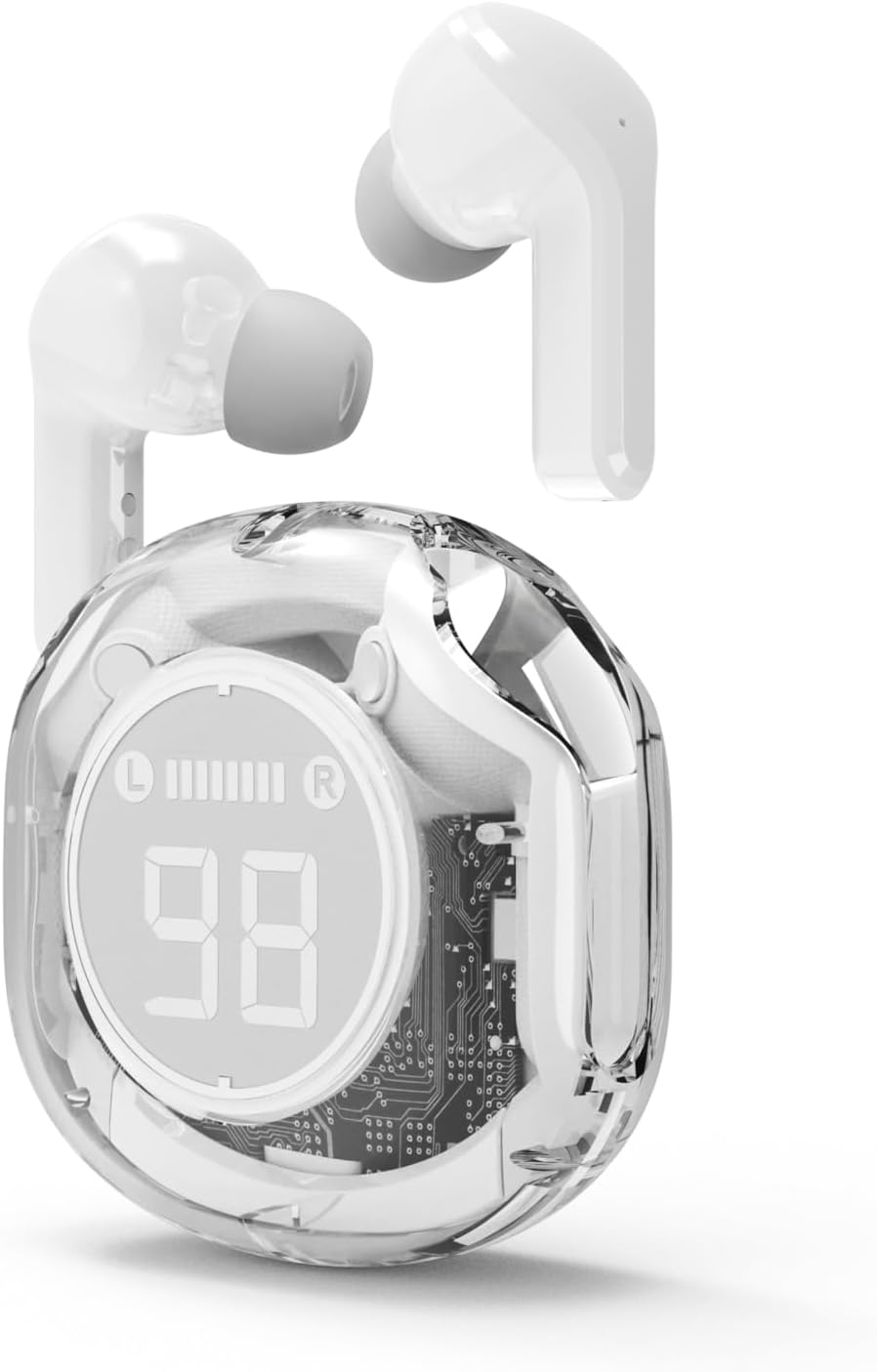
פיגורע 4.2: The Gembird TWST-01-W Transparent Bluetooth Earbuds shown outside their charging case, ready for use or pairing. The transparent design of the earbuds themselves is visible.
5. אַפּערייטינג ינסטרוקטיאָנס
The Gembird TWST-01-W earbuds utilize touch controls. Specific gestures may vary slightly; refer to the quick start guide included in your package for precise commands.
| פֿונקציע | Action (Touch Control) |
|---|---|
| מאַכט אויף | Remove from charging case. |
| מאַכט אַוועק | Place back into charging case. |
| שפּיל / פּויזע מוזיק | איין צאַפּן אויף יעדער עאַרבוד. |
| ווייַטער שפּור | צאַפּ צוויי מאָל אויף די רעכטע אויערקנעפּל. |
| פֿריִערדיקע שפּירט | צאַפּ צוויי מאָל אויף די לינקע אויערקנעפּל. |
| ענטפֿערן / סוף רופן | איין צאַפּ אויף יעדן אויערקנעפּל בעת אַן אינקאַמינג רוף. |
| אָפּוואַרפן רופן | דריק און האלט איינע פון די אויערקנעפל פאר 2 סעקונדעס בעת אן אנקומענדיקן רוף. |
| אַקטאַווייט די קול אַססיסטאַנט | Triple tap on either earbud (functionality depends on device support). |
Note: Touch control sensitivity and specific functions may vary. Experiment to find the optimal touch points.
6. טשאַרדזשינג
6.1 טשאַרדזשינג די עאַרבודז
To charge the earbuds, simply place them into their designated slots within the charging case. Ensure the charging contacts align. The LCD display on the case will show the individual battery levels of the left (L) and right (R) earbuds.
6.2 אויפלאָדן דעם קעסטל
When the charging case battery is low, connect the provided charging cable to the case's charging port and to a standard USB power adapter (not included) or a computer's USB port. The LCD display will show the charging progress of the case. The color-changing backlight indicates active charging.
A full charge for the case typically takes a few hours. The earbuds provide up to 4 hours of listening time, and the fully charged case can provide multiple additional charges, extending total playback time.
7. וישאַלט
7.1 רייניקונג
- ניצט אַ ווייכן, טרוקענעם, לינט-פֿרייע שטאָף צו רייניקן די אויערקנעפּלעך און די טשאַרדזשינג קעסטל.
- ניצט נישט קיין שרײַבנדיקע רייניגער, אַלקאָהאָל, אדער כעמישע סאָלווענטן.
- Gently clean the charging contacts on both the earbuds and the case to ensure proper connection.
7.2 סטאָרידזש
- סטאָר די עאַרבודז אין זייער טשאַרדזשינג פאַל ווען ניט אין נוצן צו באַשיצן זיי און האַלטן זיי טשאַרדזשינג.
- פֿאַרמײַדן אויפֿצוהיטן אין עקסטרעמע טעמפּעראַטורן (הײַס אָדער קאַלט) אָדער אין שטאַרק פֿײַכטע סביבות.
7.3 וואַסער קעגנשטעל
The earbuds are water resistant, meaning they can withstand splashes and sweat. They are not designed for submersion in water. Do not use them while swimming or showering. Ensure the earbuds are dry before placing them back into the charging case to prevent damage.
8. טראָובלעשאָאָטינג
אויב איר טרעפן ישוז, פּרובירן די פאלגענדע סאַלושאַנז:
| פּראָבלעם | לייזונג |
|---|---|
| עאַרבודס נישט פּערינג |
|
| קיין געזונט פון איין עאַרבוד |
|
| טשאַרדזשינג ישוז |
|
| נעבעך אַודיאָ קוואַליטעט |
|
9. ספּעסאַפאַקיישאַנז
| שטריך | דעטאַל |
|---|---|
| מאָדעל | TWST-01-W |
| סאָרט | Gembird |
| מאַטעריאַל | פּלאַסטיק |
| וואָג | 80 ג |
| באַטערי טיפּ | Lithium Ion (1 AAAA battery included) |
| צוגעהערט צייט | אַרויף צו 4 שעה פּער אָפּצאָל |
| קאָנטראָל מעטאָד | ריר |
| רעדנער דיאַמעטער | 5 סענטימעטער |
| וואַסער קעגנשטעל | Water resistant (splash and sweat proof) |
| קאַנעקטיוויטי | Bluetooth (USB for charging) |
| רעקאַמענדיד נוצן | דרינענדיק |
10. וואָראַנטי און שטיצן
Your Gembird TWST-01-W Transparent Bluetooth Earbuds come with a דריי־יאָריקע גאַראַנטיע against manufacturing defects. This warranty covers defects in materials and workmanship under normal use.
For warranty claims or technical support, please contact your retailer or the official Gembird support channels. Keep your proof of purchase for warranty validation.


