1. הקדמה
This manual provides instructions for the proper setup, operation, and maintenance of your A4TECH KR-3330S USB Keyboard and Mouse combo. This product is designed for general-purpose computing tasks, offering a reliable and ergonomic input solution for personal computers and laptops.
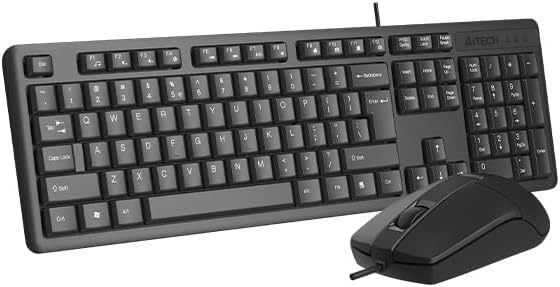
Image 1.1: The A4TECH KR-3330S USB Keyboard and Mouse combo. This image displays the full-size keyboard with a numeric keypad and the accompanying wired mouse, both in black.
2. סעטאַפּ אינסטרוקציעס
The A4TECH KR-3330S keyboard and mouse are designed for simple plug-and-play installation. No additional drivers are typically required for basic functionality.
- אויספּאַקן די דעוויסעס: Carefully remove the keyboard and mouse from their packaging.
- פֿאַרבינדן די קלאַוויאַטור: Locate an available USB port on your computer (desktop PC or laptop). Insert the USB connector of the keyboard firmly into the USB port.
- פאַרבינדן די מויז: Locate another available USB port on your computer. Insert the USB connector of the mouse firmly into the USB port.
- סיסטעם דערקענונג: אייער אָפּערירן סיסטעם זאָל אויטאָמאַטיש דעטעקטירן און אינסטאַלירן די נייטיקע דרייווערס. דער פּראָצעס קען נעמען אַ פּאָר מינוט.
- טעסט פאַנגקשאַנאַליטי: Once installed, test the keyboard by typing in a text editor and test the mouse by moving the cursor and clicking.

Image 2.1: The A4TECH KR-3330S keyboard and mouse, showcasing their wired USB connectivity. Both devices are black and feature a standard layout.
3. אַפּערייטינג ינסטרוקטיאָנס
3.1 קלאַוויאַטור באַניץ
- נאָרמאַל טייפּינג: ניצט די אלפאנומערישע קנעפלעך פאר טעקסט אריינגאבע.
- פונקציע קנעפּלעך (F1-F12): These keys perform various functions depending on the application or operating system.
- נומעריק קיפּאַד: The dedicated numeric keypad on the right provides efficient data entry. Ensure "Num Lock" is active.
- הייסע קיז: The keyboard features 10 hot keys for quick access to common functions. Refer to your operating system or application documentation for specific hot key assignments.
- ערגאָנאָמיק פּלאַן: The keyboard is designed for comfortable use during extended periods. Adjust your seating and desk height for optimal posture.
3.2 מויז באַניץ
- באַוועגונג: באַוועגט די מויז איבער אַ פלאַכער ייבערפלאַך צו קאָנטראָלירן דעם קורסאָר אויף אייער עקראַן. דער אָפּטישער סענסאָר גיט פּינקטלעכע טראַקינג.
- לינק קליקט: געניצט פֿאַר אויסקלייבן זאכן, עפֿענען fileס, און אַקטיווירן פאַנגקשאַנז.
- רעכט גיט: עפֿנט קאָנטעקסט-סענסיטיווע מעניוס.
- סקראָל ראָד: סקראָלן אַרויף אָדער אַראָפּ דורך דאָקומענטן און web pages. The scroll wheel can also function as a middle click button.
- שטיל קליק: The mouse features silent click buttons, reducing audible click noise during use.
- דפּי: The mouse operates at 1200 DPI (Dots Per Inch), providing a balance of speed and precision for general use.
4. וישאַלט
Proper maintenance ensures the longevity and optimal performance of your A4TECH KR-3330S keyboard and mouse.
- רייניקונג די קלאַוויאַטור:
- אָפּשטעקן די קלאַוויאַטור פֿון אייער קאָמפּיוטער איידער איר רייניקט.
- ניצן אַ ווייך, לינט-פֿרייַ שטאָף אַ ביסל דampשווענקט מיט וואַסער אָדער אַ מילדער רייניקונג לייזונג צו ווישן די קלאַוויאַטור און ייבערפלאַך.
- פֿאַרמײַדט צו שפּריצן פֿליסיקייטן גלייך אויף דער קלאַוויאַטור.
- ניצט קאמפרעסט לופט צו באזייטיגן שטויב און שמוץ פון צווישן די קנעפלעך.
- רייניקן די מויז:
- אָפּשטעקן די מויז פֿון אייער קאָמפּיוטער איידער איר רייניגט עס.
- Wipe the surface of the mouse with a soft, lint-free cloth.
- Ensure the optical sensor on the underside of the mouse is clean and free of obstructions for accurate tracking.
- סטאָרידזש: When not in use for extended periods, store the devices in a clean, dry environment away from extreme temperatures.
5. טראָובלעשאָאָטינג
If you encounter issues with your A4TECH KR-3330S keyboard and mouse, refer to the following common troubleshooting steps:
- מיטל ניט דערקענט:
- Ensure the USB cables are securely plugged into the computer's USB ports.
- Try connecting the devices to different USB ports on your computer.
- ריסטאַרט דיין קאָמפּיוטער.
- Test the devices on another computer to determine if the issue is with the devices or your computer's ports.
- Keys Not Responding / Mouse Not Moving:
- Check for any physical obstructions under the keys or around the mouse sensor.
- Ensure the keyboard and mouse are properly connected to the USB ports.
- ריסטאַרט דיין קאָמפּיוטער.
- For the mouse, ensure the optical sensor is clean and not obstructed.
- ינטערמיטאַנט פאַנגקשאַנאַליטי:
- Ensure USB connections are stable and not loose.
- Avoid using the devices on uneven or highly reflective surfaces (for the mouse).
6. ספּעסאַפאַקיישאַנז
| שטריך | דעטאַל |
|---|---|
| סאָרט | A4TECH (also listed as Generic) |
| מאָדעל נומער | KR-3330S (also referred to as KK-3330) |
| קאַנעקטיוויטי טעכנאָלאָגיע | וסב ווייערד |
| קאָליר | שוואַרץ |
| קלאַוויאַטור באַשרייַבונג | Wired keyboard with soft touch keys, 10 hot keys, ergonomic design. |
| מויז באַוועגונג דעטעקציע | אָפּטיש |
| מויז דפּי | 1200 דפּי |
| ספּעציעלע פֿעיִקייטן | Ergonomic design, Silent Click Mouse |
| קאַמפּאַטאַבאַל דעוויסעס | לאַפּטאַפּ, פערזענלעכע קאָמפּיוטער |
| פּונקט וואָג | 0.7 קילאָגראַמס |
| פּעקל דימענשאַנז | 53.3 X 15.8 X 4.5 סענטימעטער |
| באַטעריז פארלאנגט | ניין |
| לאַנד פון אָריגין | כינע |
7. וואָראַנטי און שטיצן
פֿאַר וואָראַנטי אינפֿאָרמאַציע און טעכנישע שטיצע, ביטע זעט די דאָקומענטאַציע וואָס איז צוגעשטעלט געוואָרן מיט אייער קויף אָדער קאָנטאַקטירט דעם הענדלער/פאַבריקאַנט גלייך. האַלט אייער קויף באַווייַז פֿאַר וואָראַנטי קליימז.


