וויכטיק סאַפעטי אינסטרוקציעס
ביטע ליינט און פארשטייט אלע זיכערהייט אינסטרוקציעס איידער איר ניצט דעם פראדוקט. האלט דעם מאנואל פאר שפעטערדיגע רעפערענץ.
- ווענטילאַטיאָן: זיכער מאַכן אַז עס איז גענוג ווענטילאַציע. נישט פֿאַרשטאָפּן קיין ווענטילאַציע עפענונגען.
- וואַסער און נעץ: שטעלט נישט אויס דעם אַפּאַראַט צו רעגן אָדער פייכטקייט. שטעלט נישט קיין זאכן אָנגעפילט מיט פליסיקייטן, ווי וואַזעס, אויף דעם אַפּאַראַט.
- היץ קוואלן: דו זאלסט נישט ינסטאַלירן לעבן קיין היץ קוואלן אַזאַ ווי ראַדיאַטאָרס, היץ רעדזשיסטערז, סטאָוווז אָדער אנדערע אַפּאַראַט (אַרייַנגערעכנט ampליפיערס) וואָס פּראָדוצירן היץ.
- מאַכט קוואלן: Use only power supplies specified by the manufacturer. Ensure the power cord is protected from being walked on or pinched.
- רייניקונג: ריין בלויז מיט אַ טרוקן שטאָף.
- סערוויס: דו זאלסט נישט פּרווון צו דינען דעם פּראָדוקט זיך. קאָנטאַקט אַלע קוואַלאַפייד סערוויס פּערסאַנעל.
פּעקל אינהאַלט
באַשטעטיקט אַז אַלע זאכן וואָס זענען אויסגערעכנט אונטן זענען אַרייַנגערעכנט אין אייער פּעקל:
- Kuephom CD-X2A Boombox
- אַק מאַכט שנור
- באַניצער מאַנואַל (דעם דאָקומענט)
- ווייַט קאָנטראָל
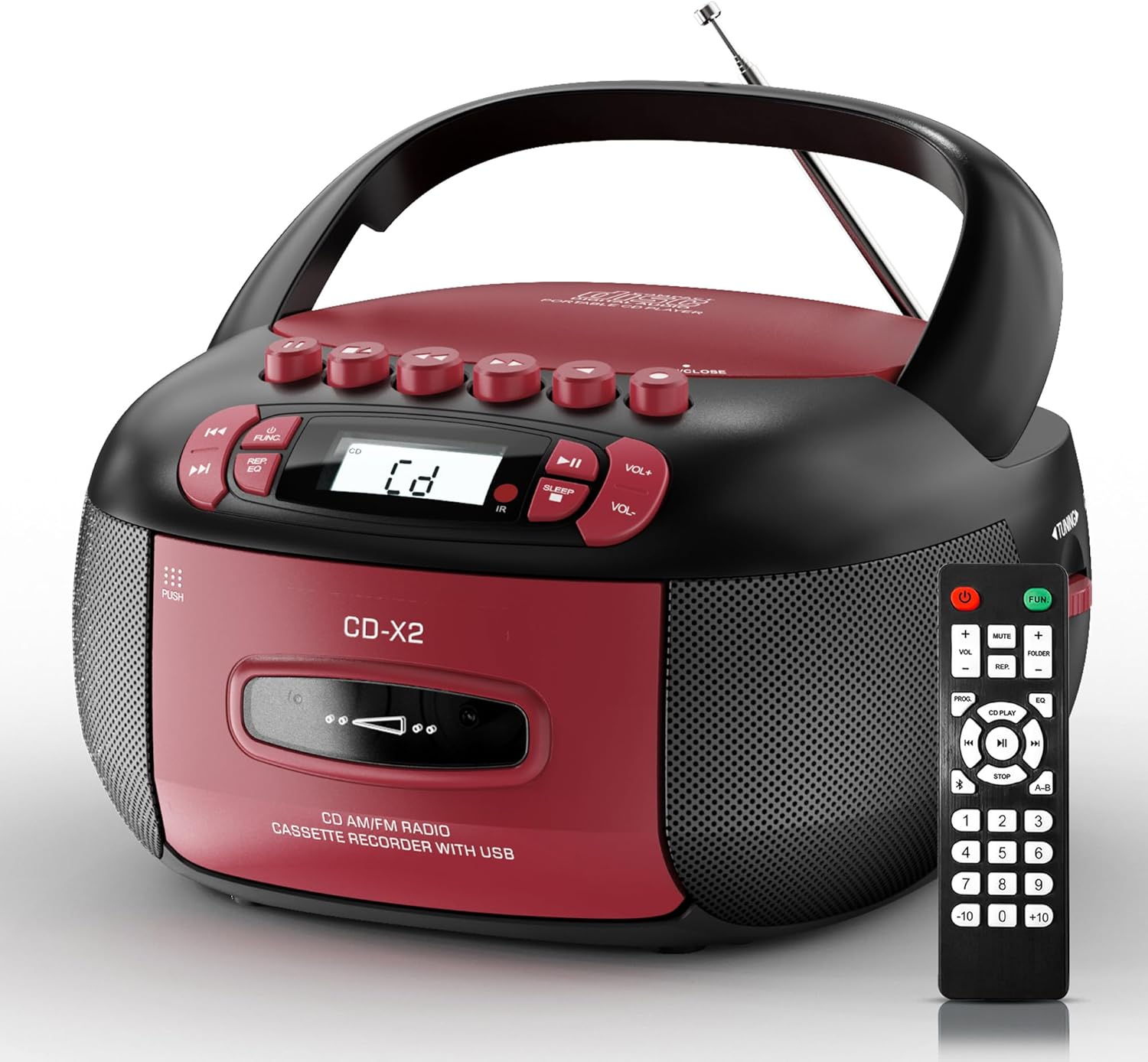
Image: The Kuephom CD-X2A Boombox with its included remote control, showcasing its compact design and red/black color scheme.
פּראָדוקט איבערview
Familiarize yourself with the various components and controls of your Kuephom CD-X2A Boombox.
פראָנט פּאַנעל קאָנטראָלס
- מאַכט / פֿונקציע קנעפּל: Press and hold to power on/off. Press to cycle through modes (CD, USB, Bluetooth, Radio, AUX, Tape).
- באַנד +/- קנעפּלעך: אַדזשאַסטירן די פּלייבאַק באַנד.
- שפּיל / פּויזע קנעפּל: Start or pause playback for CD, USB, Bluetooth, or Tape.
- האַלטן קנעפּל: האַלטן פּלייבאַק.
- איבערשפרינגען/זוכן קנעפּלעך: Navigate between tracks on CD/USB or fast forward/rewind on tape.
- עק קנעפּל: אויסקלייַבן פּרעסעץ יקוואַלייזער.
- שלאָף טיימער קנעפּל: שטעלן די שלאָפן טייַמער.
זייַט פּאַנעל קאָנטראָלס
- טונינג קנעפּל: Manually tune AM/FM radio stations.
- כעדפאָון דזשאַק: פאַרבינדן כעדפאָונז פֿאַר פּריוואַט צוגעהערט.
- AUX-אין פּאָרט: פאַרבינדן פונדרויסנדיק אַודיאָ דעוויסעס.
- וסב פּאָרט: Insert USB drives for MP3/WMA playback.
Top פּאַנעל פֿעיִקייטן
- סי-די קאמפארטמענט: אויבן-לאָודינג אָפּטייל פֿאַר סי-דיס.
- קאַסעטע אָפּטייל: Front-loading compartment for cassette tapes.
- טעלאַסקאָפּיק אַנטענע: Extend for improved radio reception.

Image: The boombox highlighting its multiple functions including CD/MP3, Bluetooth, Type I/II tape, USB, FM/AM Radios, Sleep timer, Remote, Phone jack, AUX, and Tape recording.

בילד: נאָענט-אַרויף views of the boombox's phone jack, top-loading CD player, telescopic antenna, and tape play/record buttons.
סעטאַפּ
מאַכט די בומבאַקס
אַק מאַכט
- Connect the supplied AC power cord to the AC IN jack on the back of the boombox.
- Plug the other end of the power cord into a standard AC wall outlet (120V~60Hz).
באַטאַרייע מאַכט
- Open the battery compartment cover located on the bottom of the boombox.
- Insert 6 x 'C' size batteries (not included), ensuring correct polarity (+/-).
- פאַרמאַכן די באַטאַרייע אָפּטייל דעקן סיקיורלי.
- When operating on battery power, disconnect the AC power cord.

Image: The boombox demonstrating both AC power connection and the use of 6 C-size batteries for portable operation.
ווייַט קאָנטראָל
- Insert 2 x 'AAA' batteries (not included) into the remote control, observing polarity.
- Point the remote control towards the boombox's IR sensor for optimal operation.

Image: An individual comfortably operating the boombox using the remote control from a distance.
אַפּערייטינג ינסטראַקשאַנז
אַלגעמיינע אָפּעראַציע
- מאַכט אויף / אַוועק: Press and hold the Power/Function button to turn the unit on or off.
- פונקציע סעלעקציע: Press the Power/Function button repeatedly to switch between CD, USB, Bluetooth, Radio (AM/FM), AUX, and Tape modes.
קאָמפּאַקטדיסק פּלייַבאַקק
- עפֿנט דעם דעקל פֿונעם סי-די אָפּטייל.
- Place a CD (CD, CD-R, MP3, WMA compatible) onto the spindle with the label side facing up.
- נאָענט די קאָמפּאַקטדיסק אָפּטייל דעקן.
- Press the Power/Function button to select 'CD' mode.
- דריקן די שפּיל / פּויזע קנעפּל צו אָנהייבן פּלייבאַק.
- Use the Skip/Search buttons to navigate tracks.
- Press the Repeat button to repeat a single track, folder, or all tracks.
- Press the Program button to program a custom playback sequence.

Image: The boombox's display showing 'CD' mode, with icons indicating compatibility with CD, CD-R, CD-RW, WMA, and MP3 formats, along with single cycle, repeat folder, repeat all, random play, and play in order options.
קאַסעטע ווידערשפּיל און רעקאָרדירונג
- Press the 'OPEN/CLOSE' button on the cassette compartment to open it.
- אַרייַנלייגן אַ קאַסעט טייפּ.
- נאָענט די קאַסעט אָפּטייל.
- Press the Power/Function button to select 'TAPE' mode.
- דרוק דעם שפּיל קנעפּל צו אָנהייבן פּלייבאַק.
- Use the Fast Forward/Rewind buttons to navigate the tape.
- רעקאָרדינג: In TAPE mode, select the desired source (CD, Bluetooth, USB, or AM/FM radio). Press the Record button to begin recording onto the cassette. The unit features an auto-stop function when the tape reaches its end.

Image: A hand inserting a cassette tape into the boombox's front-loading compartment, with controls for tape operation visible.
AM / FM ראַדיאָ
- Press the Power/Function button to select 'RADIO' mode. Press again to switch between AM and FM bands.
- Extend the telescopic antenna for better FM reception. For AM, rotate the unit for best reception.
- Use the Tuning knob on the side to manually tune to your desired station. The frequency will be displayed on the screen.

Image: A man relaxing on a couch with the boombox, which displays various FM/AM radio frequencies, indicating good reception.
בלועטאָאָטה קאַנעקטיוויטי
- Press the Power/Function button to select 'BT' (Bluetooth) mode. The display will show 'BT' and flash, indicating it's in pairing mode.
- On your mobile device, enable Bluetooth and search for 'CD-X2A'.
- Select 'CD-X2A' to pair. Once paired, the 'BT' indicator will stop flashing.
- איר קענט איצט סטרימען אַודיאָ אָן דראָטן פֿון אייער דעווייס צום בומבאָקס.

Image: A woman in a living room wirelessly streaming audio from her smartphone to the boombox via Bluetooth 5.1, indicating a stable connection.
וסב פּלייַבאַקק
- Insert a USB flash drive into the USB port on the side of the boombox.
- Press the Power/Function button to select 'USB' mode.
- The boombox will automatically detect and play compatible MP3/WMA files.
- Use the Play/Pause, Stop, and Skip/Search buttons to control playback.
AUX ינפּוט
- Connect an external audio device (e.g., smartphone, MP3 player) to the AUX-in port using a 3.5mm audio cable (not included).
- Press the Power/Function button to select 'AUX' mode.
- קאָנטראָליר ווידערשפּיל גלייך פֿון דיין פֿאַרבונדענע עקסטערנע מיטל.
שלאָף טיימער
- While the unit is playing, press the Sleep Timer button.
- Repeatedly press the button to cycle through available sleep timer durations (e.g., 15, 30, 60, 90 minutes).
- The unit will automatically power off after the selected time.

Image: A man sleeping in bed with the boombox on his nightstand, illustrating the sleep timer feature which allows the device to turn off automatically.
וישאַלט
- רייניקונג: Use a soft, dry cloth to clean the exterior of the boombox. Do not use abrasive cleaners or solvents.
- CD באַהאַנדלונג: האַלט אָן סי-דיס ביי די ברעגן. רייניקט שמוציקע סי-דיס מיט אַ ווייכן, לינט-פֿרייעם שטאָף, ווישנדיק פֿון צענטער אַרויס.
- קאַסעטע זאָרג: Keep cassette tapes away from direct sunlight and heat. Periodically clean the tape heads with a specialized cassette head cleaner.
- סטאָרידזש: When not in use for extended periods, disconnect the power cord and remove batteries. Store the unit in a cool, dry place.
טראָובלעשאָאָטינג
אויב איר טרעפט פּראָבלעמען, זעט די טאַבעלע אונטן פֿאַר געוויינטלעכע פּראָבלעמען און לייזונגען.
| פּראָבלעם | מעגלעך סיבה | לייזונג |
|---|---|---|
| קיין מאַכט | AC שנור נישט פארבונדן; באַטעריעס אויסגעשעפט אדער נישט ריכטיג אריינגעשטעלט. | Check AC connection; Replace or correctly insert batteries. |
| קיין געזונט | Volume too low; Incorrect function mode selected; Headphones connected. | Increase volume; Select correct mode; Disconnect headphones. |
| סי-די שפּרינגט איבער אָדער שפּילט נישט | CD dirty or scratched; CD inserted incorrectly; Incompatible CD format. | Clean or replace CD; Insert CD correctly; Ensure CD is compatible (CD, CD-R, MP3, WMA). |
| ראַדיאָ סטאַטיק/שוואַכע אָפּנאַם | אַנטענע נישט אויסגעשטרעקט/פּאַזיציאָנירט; שוואַך סיגנאַל. | Extend and adjust telescopic antenna; Try repositioning the unit. |
| בלועטאָאָטה איז נישט פּערינג | Boombox not in pairing mode; Device Bluetooth off; Device too far. | Ensure boombox is in 'BT' mode and flashing; Enable Bluetooth on device; Move device closer. |
| קאַסעטע שפּילט נישט/רעקאָרדירט נישט | Tape inserted incorrectly; Tape heads dirty; Auto-stop engaged. | Insert tape correctly; Clean tape heads; Check tape end. |
ספּעסאַפאַקיישאַנז
| שטריך | דעטאַל |
|---|---|
| מאָדעל נומער | CD-X2A |
| פּראָדוקט דימענשאַנז (L x W x H) | 8.39 X 4.8 X 8.54 אינטשעס |
| פּונקט וואָג | 3.45 פונט |
| מאַכט מקור | AC 120V~60Hz or 6 x 'C' size batteries |
| קאַנעקטיוויטי טעכנאָלאָגיע | הילפס-פארבינדונג, בלועטוט, יו-עס-בי |
| רעדנער טיפּ | Stereo (2W+2W output) |
| שטיצט דיסק פֿאָרמאַטירונגען | CD, CD-R, MP3, WMA |
| Supported Tape Types | Type I/II Cassette |
| ראַדיאָ באַנדס | AM/FM |
| ספּעציעלע פֿעיִקייטן | Tape Recording, Sleep Timer, Earphone Jack, Remote Control |
וואָראַנטי און שטיצן
Kuephom products are designed for reliability and performance. This product comes with a standard manufacturer's warranty against defects in materials and workmanship under normal use.
For warranty claims, technical assistance, or any questions regarding your Kuephom CD-X2A Boombox, please contact Kuephom customer support. Refer to the contact information provided with your purchase documentation or visit the official Kuephom webפּלאַץ פֿאַר שטיצן דעטאַילס.
We are committed to providing lifetime service support and 7/24 customer assistance for our products.


