1. הקדמה
Thank you for choosing the Dreo 110-Pint Smart Dehumidifier. This appliance is designed to efficiently remove excess moisture from large spaces up to 4500 square feet, such as basements, bedrooms, living rooms, bathrooms, and laundry rooms. Featuring smart controls, multiple operating modes, and dual drainage options, it provides a comfortable and healthy environment by maintaining optimal humidity levels. Please read this manual thoroughly before operation to ensure proper use and maintenance.
2. וויכטיק סאַפעטי אינסטרוקציעס
כדי צו רעדוצירן דעם ריזיקע פון פייער, עלעקטרישן שאק, אדער שאָדן, זאָלט איר שטענדיק נאָכפֿאָלגן די גרונטלעכע זיכערהייט מיטלען ווען איר ניצט דעם אַפּאַראַט.
- לייענט אַלע אינסטרוקציעס איידער איר ניצט דעם לופט-טרוקענער.
- דער מיטל איז בלויז פֿאַר דרינענדיק נוצן.
- פאַרזיכערן די מאַכט צושטעלן שוועבעלעך די וואָלtage ספּעסיפיעד אויף די שאַץ פירמע.
- ניצ נישט דעם לופט-טרוקענער מיט א צעבראכענעם שנור אדער שטעקער.
- Always unplug the unit before cleaning, servicing, or moving.
- דו זאלסט נישט פאַרשפּאַרן לופט ינלעץ אָדער אַוטלעץ.
- Keep the unit upright for at least 24 hours before plugging it in after transport.
- The Dreo Dehumidifier is ETL-certified to meet stringent electrical safety standards, featuring a 90° tilt waterproof design that automatically powers off when tilted, along with comprehensive thermal protection (23°F to 248°F) to prevent overheating and 15A overcurrent protection against power surges.
3. פּראָדוקט איבערview
3.1. קאַמפּאָונאַנץ
The Dreo 110-Pint Smart Dehumidifier is designed for efficient and user-friendly operation. Below are the main components:
- קאָנטראָל פּאַנעל: Located on the top, with touch buttons and a digital display.
- לופט אָוטלעט: Top-mounted for efficient moisture expulsion.
- לופט ינלעט: Rear-mounted for air intake.
- וואַסער טאַנק: Front-loading, 2-gallon (8L) capacity with a visible water level indicator.
- Drain Hose Outlet: Located at the rear for continuous drainage.
- קאַסטער ווהעעלס: 360° smooth-rolling wheels for easy mobility.
- פירן כאַנדאַלז: Integrated on the sides for convenient lifting.
- וואַשעוודיק פילטער: Easily accessible for cleaning to maintain air quality.
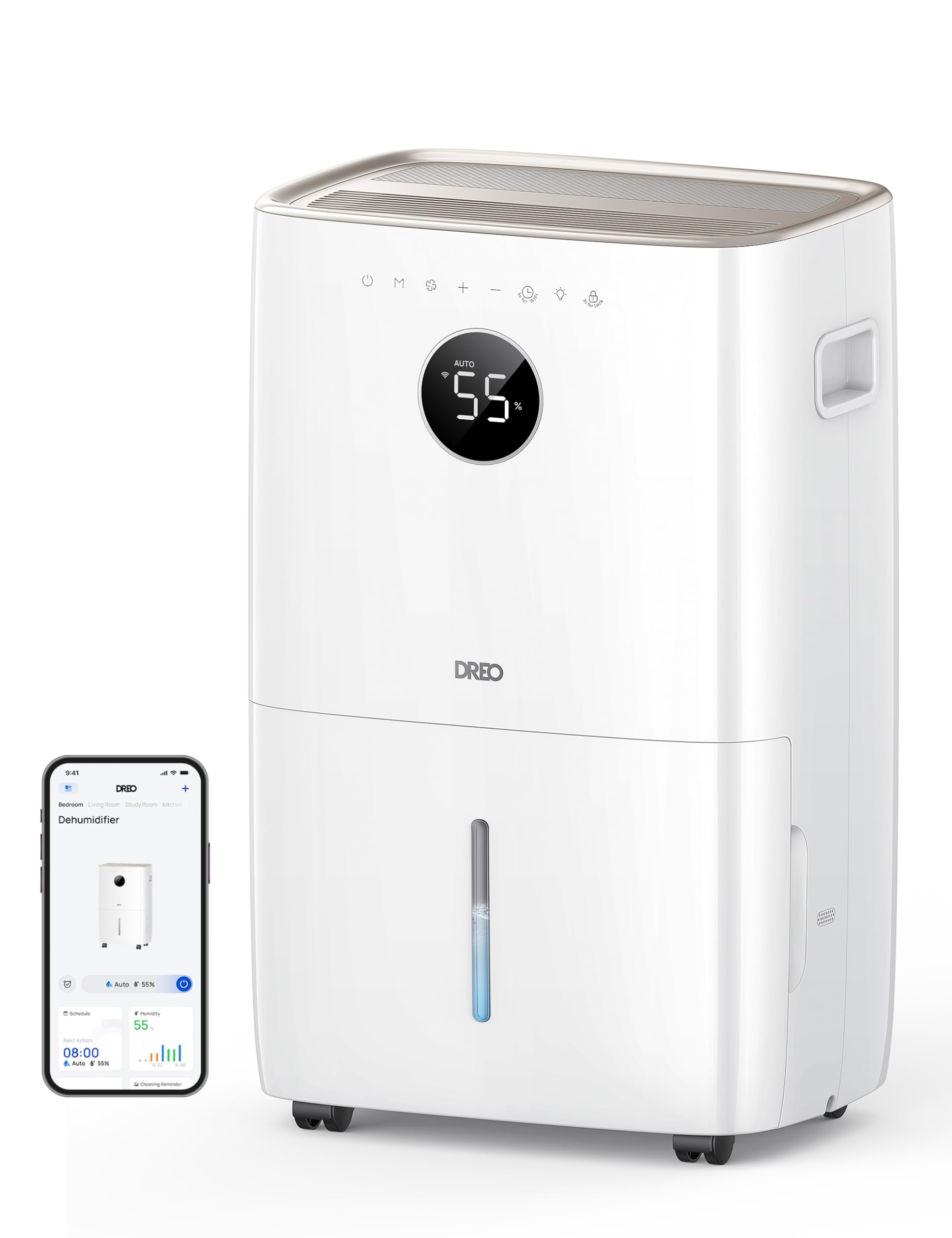
בילד: פראָנט view of the Dreo 110-Pint Smart Dehumidifier, highlighting its compact design and dimensions (11.3"D x 15.4"W x 24.4"H).
3.2. קאָנטראָל פּאַנעל
The intuitive control panel allows for easy operation and monitoring of your dehumidifier.
- מאַכט קנעפּל: טורנס די אַפּאַראַט אויף אָדער אַוועק.
- מאָדע קנעפּל: Cycles through Auto, Comfort, and Continuous modes.
- פאָכער ספּיד קנעפּל: אַדזשאַסטירט די ווענטילאַטאָר גיכקייט (נידעריק, מיטל, הויך).
- הומידיטי אַדזשאַסטמענט קנעפּלעך (+/-): Sets desired humidity level in Auto Mode.
- טיימער קנעפּל: Sets a 24-hour timer for automatic on/off.
- Wi-Fi ינדיקאַטאָר: ווײַזט Wi-Fi פֿאַרבינדונג סטאַטוס.
- קינד לאַק קנעפּל: פארשפארט דעם קאנטראל פאנעל צו פארמיידן אקצידענטעלע ענדערונגען.
- פילטער צוריקשטעלן אינדיקאַטאָר: Lights up when the filter needs cleaning.
- Water Full Alert: Illuminates when the water tank is full, and the unit stops operation.
- דעפראָסט ינדיקאַטאָר: Activates automatically at 41°F (5°C) for optimal performance in cold environments.

Image: Close-up of the dehumidifier's control panel, showing the digital display set to 55% humidity in Auto Mode, with various function icons.
4. סעטאַפּ
4.1. אַנפּאַקינג און פּלייסמאַנט
- נעמט פֿאָרזיכטיק אַרויס דעם לופט-טרוקענער פֿון זײַן פּאַקעט.
- Place the unit upright on a flat, stable surface. Ensure there is at least 8 inches (20 cm) of space around the air inlets and outlets for proper airflow.
- לאָזט דעם אַפּאַראַט שטיין אויפֿרעכט פֿאַר מינדעסטנס 24 שעה איידער איר עס אַרײַנשטעקט אין דעם אינטערנעץ, כּדי דער קילמאַטעריאַל זאָל זיך באַזעצן.
4.2. מאַכט קאַנעקשאַן
Plug the power cord into a grounded electrical outlet. Ensure the outlet meets the electrical requirements of the dehumidifier.
4.3. דריינאַדזש אָפּציעס
The Dreo dehumidifier offers two drainage methods: manual emptying of the water tank or continuous drainage via a hose.

Image: The dehumidifier illustrating both the manual water tank removal and the continuous drainage hose connection.
4.3.1. מאַנואַל דריינאַדזש
- When the water tank is full, the unit will automatically stop and display a "Water Full" alert.
- Carefully pull out the water tank from the front of the unit using the integrated handle.
- ליידיקט אויס דאָס געזאַמלטע וואַסער אין אַ זינק אָדער אָפּגאַנג.
- שטעל צוריק דעם ליידיקן וואַסער טאַנק אין דעם אַפּאַראַט ביז עס קליקט אַרײַן. דער לופט-טרוקענער וועט ווידער אַרבעטן.
4.3.2. קעסיידערדיק דריינאַדזש
- Locate the drain hose outlet at the rear of the dehumidifier.
- Remove the rubber stopper from the outlet.
- Connect the provided drain hose (or a standard garden hose) to the outlet. Ensure the connection is secure to prevent leaks.
- Route the hose to a suitable drain point (e.g., floor drain, sink, or sump pump). Ensure the hose is sloped downwards to allow gravity to drain the water and is free of kinks.
- The dehumidifier will now continuously drain water without needing to empty the tank manually.
5. אַפּערייטינג ינסטרוקטיאָנס
דרוק די מאַכט קנעפּל to turn the dehumidifier on. The unit will start operating in its last used mode and settings.
5.1. אַפּערייטינג מאָדעס
דרוק די מאָדע קנעפּל צו דורכגיין די פארהאן אפערירן מאָדעס:
- אַוטאָ מאָדע: The dehumidifier intelligently adjusts fan speed to maintain your target humidity level within a 5% tolerance. Use the +/- קנעפּלעך to set your desired humidity (e.g., 45-55% is generally recommended).
- Comfort Mode: The unit operates to maintain a comfortable humidity level based on ambient temperature.
- קעסיידערדיק מאָדע: The dehumidifier runs continuously at the selected fan speed, regardless of the ambient humidity. This is ideal for very damp conditions or for continuous drainage.
5.2. פאַן ספּיד אַדזשאַסטמאַנט
In Auto or Continuous mode, press the פאָכער ספּיד קנעפּל to select between Low, Medium, or High fan speeds.
5.3. טייַמער פֿונקציע
דרוק די טיימער קנעפּל to set a desired operating duration (from 1 to 24 hours). The unit will automatically turn on or off after the set time has elapsed.
5.4. Smart Control (DREO App)
The Dreo 110-Pint Smart Dehumidifier can be controlled remotely via the DREO app on your smartphone or through voice assistants like Alexa and Google Home.

Image: A smartphone displaying the DREO app interface, showing remote control capabilities for the dehumidifier.
5.4.1. Connecting to the DREO App
- Download the DREO app from your smartphone's app store (available on iOS and Android).
- שאַפֿן אַ חשבון אָדער קלאָץ אין.
- Follow the in-app instructions to add your Dreo 110-Pint Smart Dehumidifier (Model DH711S). Ensure your phone is connected to a 2.4GHz Wi-Fi network.
Video: This video demonstrates the process of downloading the DREO app and creating a new user account to manage your smart dehumidifier.
Video: This video provides a step-by-step guide on how to connect your Smart Dehumidifier DH711S to the DREO app for remote control and smart features.
5.4.2. אַפּ פֿעיִקייטן
Through the DREO app, you can:
- Monitor real-time humidity levels.
- שטעלן סקעדזשולז און טיימערס.
- Adjust operating modes and fan speeds.
- Receive notifications (e.g., water tank full, filter cleaning reminder).
- Control the unit using voice commands with Alexa or Google Home.
6. וישאַלט
רעגולערע אויפהאלטונג גאראנטירט אפטימאלע פאָרשטעלונג און לענגלעבעדיקייט פון אייער לופט-טרוקענער.
6.1. רייניקונג די לופט פילטער
The filter reset indicator will light up after approximately 250 hours of operation, signaling that the filter needs cleaning.
- נעמט ארויס דעם לופט-טרוקענער פון דער עלעקטרישער ווענטיל.
- אַראָפּנעמען דעם לופט פילטער פֿון דער הינטערשטער טייל פֿון דער אַפּאַראַט.
- וואַשט דעם פילטער מיט ריינעם וואַסער (נישט הייסער ווי 104°F / 40°C) און אַ מילדן וואַשפּולווער.
- Rinse thoroughly and allow it to air dry completely before reinstalling.
- אַמאָל דער פילטער איז צוריק אינסטאַלירט, שטעקט אריין דעם אַפּאַראַט און דריק דעם קנעפּל פילטער באַשטעטיק קנעפּל for 3 seconds to clear the indicator.

Image: A hand removing the washable air filter from the back of the dehumidifier for cleaning.
6.2. רייניקונג פון דעם וואַסער טאַנק
רייניקט דעם וואַסער טאַנק רעגולער צו פאַרמייַדן פורעם און שוועמל וווּקס.
- Remove the water tank as described in the Manual Drainage section.
- וואַשט דעם טאַנק מיט וואַרעם וואַסער און אַ מילד וואַשפּולווער.
- שווענקט גוט אויס און טריקנט גאָר איידער איר לייגט עס צוריק אין דעם אַפּאַראַט.
6.3. אַלגעמיינע רייניקונג
ווישן די יקסטיריער פון די דעהומידיפיער מיט אַ ווייך, דamp שטאָף. דו זאלסט נישט נוצן האַרב קעמיקאַלז אָדער אַברייסיוו קלינערז.
7. טראָובלעשאָאָטינג
אויב איר טרעפט פּראָבלעמען מיט אייער לופט-טרוקענער, זעט די פאלגענדע געוויינטלעכע פּראָבלעמען און לייזונגען:
| פּראָבלעם | מעגלעך סיבה | לייזונג |
|---|---|---|
| דער לופט-טרוקענער צינדט זיך נישט אן. | No power, power cord loose, water tank full. | Check power connection, ensure plug is secure, empty water tank. |
| Unit is not collecting water. | די הומידיטי לעוועל איז צו נידעריג, צימער טעמפעראטור צו נידעריג, לופט פילטער איז פארשטאפט. | Increase target humidity, ensure room temp is above 41°F (5°C), clean air filter. |
| אַפּאַראַט איז טומלדיק. | איינהייט נישט אויף א גלייכער ייבערפלאך, לופט פילטער פארשטאפט. | Place on a flat surface, clean air filter. |
| וואַסער ליקס פון די אַפּאַראַט. | Water tank not properly installed, continuous drain hose is loose or kinked. | Reinstall water tank correctly, check drain hose connection and ensure no kinks. |
| Display shows fluctuating numbers. | Normal adjustment to current humidity. | This is normal operation as the sensor adjusts to ambient conditions. |
| Unit isn't defrosting automatically. | Issue with the condenser. | קאָנטאַקט קונה שטיצן פֿאַר הילף. |
8. ספּעסאַפאַקיישאַנז
| שטריך | דעטאַל |
|---|---|
| סאָרט | דרעאָ |
| מאָדעל נאָמען | DR-HDH001S |
| קאַפּאַציטעט | 110 Pints (at 86°F, RH 90%) / 50 Pints per Day (DOE Standard) |
| קאַווערידזש שטח | אַרויף צו 4500 קוואַדראַט פֿיס |
| וואַסער טאַנק באנד | 2 גאלאנען (8 ל) |
| אָפּעראַציע מאָדעס | Auto, Comfort, Continuous |
| פאָכער ספּידז | 3 (נידעריק, מיטל, הויך) |
| לופט פלאָו קאַפּאַסיטי | 210 קוביק פֿיס פּער מינוט (CFM) |
| הומידיטי קאָנטראָל | Adjustable, with ±5% precision sensor |
| ספּעציעלע פֿעיִקייטן | Smart Control (DREO App, Alexa, Google Home), Auto-Defrost, 90° Tilt Waterproof Design, Thermal Protection, 15A Overcurrent Protection, Washable Filter, 360° Caster Wheels |
| פּראָדוקט דימענשאַנז | 11.3"ד רענטגענ 15.4"וו רענטגענ 24.4"ה |
| פּונקט וואָג | 43.7 פונט |
| מאַטעריאַל | מעטאַל, פּלאַסטיק |
| סערטיפיקאַטיאָנס | ETL-סערטאַפייד |
9. וואָראַנטי און שטיצן
Dreo products come with a standard warranty. For specific warranty details, please refer to the warranty card included in your product packaging or visit the official Dreo webפּלאַץ.
9.1. קונה שטיצן
If you have any questions, concerns, or require assistance with your Dreo 110-Pint Smart Dehumidifier, please contact Dreo Customer Support:
- בליצפּאָסט: support@dreo.com
- Webפּלאַץ: www.dreo.com
Please have your model number (DR-HDH001S) and purchase information ready when contacting support.


