1. הקדמה
The EDIFIER MP330 is a portable Bluetooth speaker designed to deliver a high-quality audio experience with its retro aesthetic and advanced features. It supports Hi-Res audio and offers versatile connectivity options.

Image: The EDIFIER MP330 portable Bluetooth speaker, showcasing its brown finish and integrated leather handle.
2. פּעקל אינהאַלט
ביטע אָפּהאַקן דאָס קעסטל פֿאַר די פֿאָלגנדיקע זאַכן:
- EDIFIER MP330 Speaker x 1
- וסב- C צו וסב- C קאַבלע רענטגענ 1
- שנעל אָנהייב גייד רענטגענ 1
- Important Safety Information x 1

Image: A visual representation of the EDIFIER MP330 speaker and its included accessories: USB-C cable, quick start guide, and safety information.
3. פּראָדוקט איבערview
3.1 קאָנטראָלן און פּאָרטן
The EDIFIER MP330 features intuitive controls and essential ports for various audio sources.
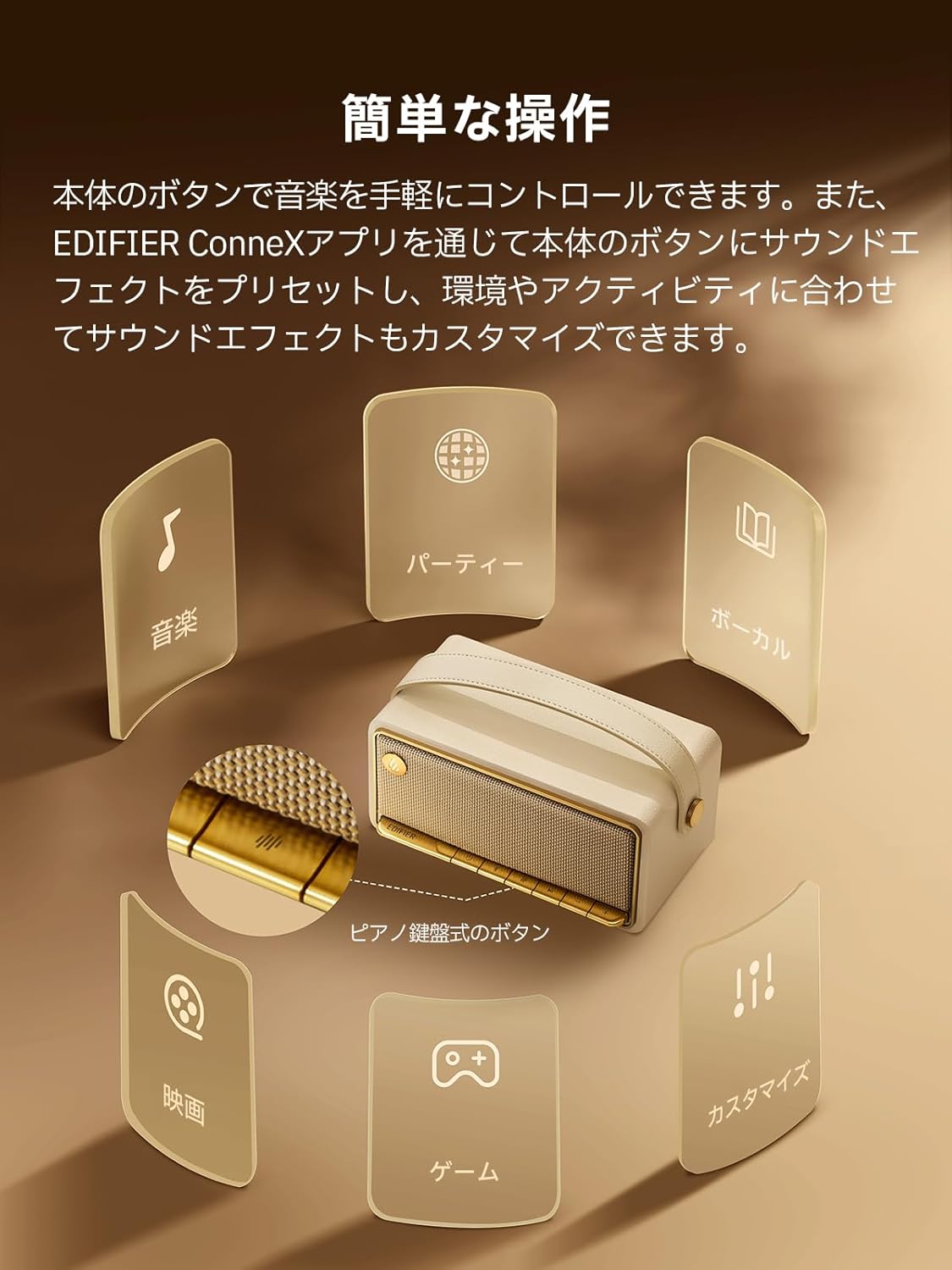
Image: A diagram illustrating the control buttons and indicator lights on the EDIFIER MP330 speaker, showing their functions for power, mode selection, playback, and volume.
- מאַכט קנעפּל: דריקן און האַלטן צו מאַכט אויף / אַוועק.
- מאָדע קנעפּל: Short press to cycle through Bluetooth, USB-C, and microSD card input modes.
- שפּיל / פּויזע קנעפּל: קורץ דריקן צו שפּילן אָדער פּויזירן אַודיאָ.
- באַנד אַרויף/נעקסטע ליד קנעפּל: קורץ דריקן צו פארגרעסערן די קול, לאנג דריקן פארן נעקסטן ליד.
- באַנד אַראָפּ/פֿריִערדיקע ליד קנעפּל: קורץ דריקן צו פארמינערן די קול, לאנג דריקן פארן פריערדיגן ליד.
- וסב- C פּאָרט: For charging and audio input.
- מיקראָסד קאָרט שפּעלטל: פֿאַר שפּילן אַודיאָ files directly from a microSD card.
4. סעטאַפּ
4.1 אויפלאָדן דעם רעדנער
Before first use, fully charge the speaker using the provided USB-C cable and a compatible power adapter (not included). The indicator light will show charging status.
4.2 מאַכט אויף / אַוועק
- צו אנצינדן: דריק און האלט דעם פּאַוער קנעפּל ביז די אינדיקאַטאָר ליכט צינדט זיך אָן.
- אויסצולאָשן: דריק און האַלט דעם פּאַוער קנעפּל ביז די אינדיקאַטאָר ליכט גייט אויס.
4.3 בלועטאָאָטה פּערינג
צו פאַרבינדן דיין מיטל דורך בלועטאָאָטה:
- Power on the MP330 speaker. The Bluetooth indicator will flash, indicating it is in pairing mode.
- אויף אייער דעווייס (סמאַרטפאָן, טאַבלעט, אאז"וו), אַקטיווירט בלועטוט און זוכט פֿאַר פֿאַראַן דעווייסעס.
- Select "EDIFIER MP330" from the list of devices.
- אַמאָל פארבונדן, וועט דער בלועטוט אינדיקאַטאָר בלייבן אָן אויפֿהער.
4.4 מולטיפונקט פֿאַרבינדונג
The MP330 supports connecting to two Bluetooth devices simultaneously. After connecting the first device, put the speaker back into pairing mode and connect the second device. You can then switch between audio sources by pausing playback on one device and starting it on the other.

Image: Two mobile phones displaying music playback interfaces, indicating a multipoint Bluetooth connection to the EDIFIER MP330 speaker.
4.5 סטערעאָ פּערינג (TWS)
For an enhanced stereo sound experience, you can pair two MP330 speakers together:
- Ensure both MP330 speakers are powered on and not connected to any Bluetooth device.
- On one speaker, press and hold the Bluetooth button until it enters TWS pairing mode (indicator light will flash a specific pattern).
- The two speakers will automatically connect to each other. One speaker will become the left channel and the other the right.
- אַמאָל פּערד, פֿאַרבינדט אייער דעווייס צום הויפּט רעדנער דורך בלועטוט ווי באַשריבן אין סעקציע 4.3.

Image: Two EDIFIER MP330 speakers, one black and one ivory, positioned to illustrate stereo pairing, with a Bluetooth logo and arrows indicating connection.
5. אַפּערייטינג ינסטרוקטיאָנס
5.1 Switching Input Modes
Short press the Mode button to switch between Bluetooth, USB-C, and microSD card input modes. The indicator light will change color to reflect the active mode.
5.2 USB-C Audio Playback
Connect the MP330 to your computer using the provided USB-C cable. The speaker will automatically switch to USB-C audio mode. Select "EDIFIER MP330" as the audio output device on your computer.

Image: A diagram showing the EDIFIER MP330 speaker connected to a computer via a USB-C cable, indicating USB-C audio playback.
5.3 microSD Card Playback
אַרייַנלייגן אַ מיקראָסד קאָרט מיט אַודיאָ files into the microSD card slot. The MP330 will automatically switch to microSD card mode and begin playback.

Image: A diagram illustrating how to insert a microSD card into the dedicated slot on the EDIFIER MP330 speaker.
5.4 Using the EDIFIER Connex App
Download the EDIFIER Connex app to unlock extended features and customize your listening experience. The app allows you to:
- באַשטימען אַרייַנשרייַב קוואלן.
- קאָנטראָל פּלייבאַק.
- Customize sound effects (equalizer presets or custom settings).
- Access the electronic user manual and other settings.

Image: Multiple smartphone screens displaying the EDIFIER Connex app interface, highlighting various control and customization options for the speaker.
6. וישאַלט
To ensure the longevity and optimal performance of your EDIFIER MP330 speaker, follow these maintenance guidelines:
- רייניקונג: Use a soft, dry cloth to clean the speaker's surface. Avoid using abrasive cleaners, solvents, or strong chemicals, as they may damage the finish.
- סטאָרידזש: האַלט דעם רעדנער אין אַ קיל, טרוקן אָרט אַוועק פון דירעקט זונשייַן, עקסטרעמע טעמפּעראַטורן און הויכער הומידיטי.
- וואַסער ויסשטעלן: The speaker is not waterproof. Avoid exposing it to water, rain, or excessive moisture.
- האַנדלינג: באַהאַנדלט דעם רעדנער מיט פֿאָרזיכט. פֿאַרמײַדט אים צו לאָזן פֿאַלן אָדער אים אויסשטעלן צו שטאַרקע קלאַפּן.
- באַטערי זאָרגן: For optimal battery life, avoid fully discharging the battery frequently. If storing for an extended period, charge the battery to about 50% every few months.
7. טראָובלעשאָאָטינג
If you encounter issues with your EDIFIER MP330 speaker, refer to the following common troubleshooting steps:
- קיין מאַכט:
- מאַכן זיכער אַז די רעדנער איז גאָר באפוילן.
- Check if the power button is pressed and held correctly to turn on the device.
- קיין קול:
- Verify the volume level on both the speaker and your connected device.
- Ensure the correct input mode (Bluetooth, USB-C, microSD) is selected.
- אויב איר ניצט בלועטוט, זאָרגט אַז דער רעדנער איז ריכטיק געפּאָרט און פארבונדן צו אייער דעווייס.
- If using a microSD card, ensure the card is inserted correctly and contains playable audio files.
- בלועטאָאָטה פּערינג ישוז:
- Make sure the speaker is in Bluetooth pairing mode (flashing indicator light).
- דיאַקטיווירן און ווידער אַקטיווירן בלועטוט אויף דיין מיטל.
- רוקט דעם רעדנער נענטער צו אייער דעווייס און אוועק פון מעגלעכע שטערונג קוועלער.
- פרובירט אפצופּאַרן און ווידער צופּאַרן דעם רעדנער פֿון די בלוטוט סעטטינגס פֿון אייער דעווייס.
- Stereo Pairing Not Working:
- Ensure both speakers are not connected to any other Bluetooth device before initiating TWS pairing.
- Follow the TWS pairing steps carefully (Section 4.5).
- אַפּ קאַנעקטיוויטי ישוז:
- Ensure Bluetooth is enabled and the speaker is connected to your device.
- Update the EDIFIER Connex app to the latest version.
- ריסטאַרט ביידע די רעדנער און דיין מיטל.
If the problem persists after trying these steps, please contact Edifier customer support for further assistance.
8. ספּעסאַפאַקיישאַנז
Detailed technical specifications for the EDIFIER MP330 speaker:

Image: A comparison chart highlighting key specifications of the EDIFIER MP330 and MP230 models, including output power, Bluetooth version, battery capacity, playback time, and Hi-Res audio support.
| שטריך | באַשרייַבונג |
|---|---|
| מאָדעל נאָמען | mp330 |
| רעדנער טיפּ | פּאָרטאַטיוו ספּיקער |
| מאַטעריאַל | האָלץ (MDF) |
| קאָליר | ברוין |
| רעזולטאַט מאַכט | 40W RMS |
| בלועטאָאָטה ווערסיע | 6.0 |
| באַטאַרייע קאַפּאַציטעט | 4800 מאַה |
| פּלייַבאַקק צייט | אַרויף צו 19 שעה (ביי 50% באַנד) |
| אָפטקייַט ענטפער | 53Hz-40KHz |
| הי-רעס אַודיאָ | Supported (up to 24bit/96kHz) |
| קאַנעקטיוויטי | Bluetooth, USB-C, microSD card |
| דימענשאַנז (ב x ד x ה) | 20.7 X 11.6 X 10.1 סענטימעטער |
| וואָג | 1.13 קג |
| קאָנטראָל מעטאָד | אַפּ, דריק קנעפּל |
| סיגנאַל-צו-ראַש פאַרהעלטעניש (S/N) | 85 דב |

Image: A technical drawing showing the dimensions (width, depth, height) and weight of the EDIFIER MP330 speaker.
9. וואָראַנטי און שטיצן
For warranty information, please refer to the warranty card included in your product packaging or visit the official Edifier website. If you require technical support or have questions about your EDIFIER MP330 speaker, please contact Edifier customer service through their official channels.
עדיפייער אפיציעל Webפּלאַץ: www.edifier.com


