הקדמה
The Roborock Q5 Max+ is an advanced robot vacuum designed to provide efficient and hands-free floor cleaning. Featuring powerful 5500 Pa suction, an innovative DuoRoller Brush, and precise PreciSense LiDAR Navigation, it ensures thorough cleaning across various floor types. With its self-empty dock, you can enjoy up to 7 weeks of cleaning without manual dust disposal. This manual provides essential information for setting up, operating, maintaining, and troubleshooting your Roborock Q5 Max+.
1. סעטאַפּ
1.1 וואָס איז אין דער קעסטל
איידער איר הייבט אן, זיכערט זיך אז אלע קאמפאנענטן זענען פאראן אין דער פאקעט:
- Q5 Max+ Robot Vacuum
- אַוטאָ-עמפּטי דאָק
- מאַכט קאַבלע
- מיסט
- Dust Bag x 2 (one pre-installed)
- Side Brush x 1
- באַניצער מאַנואַל (דעם דאָקומענט)
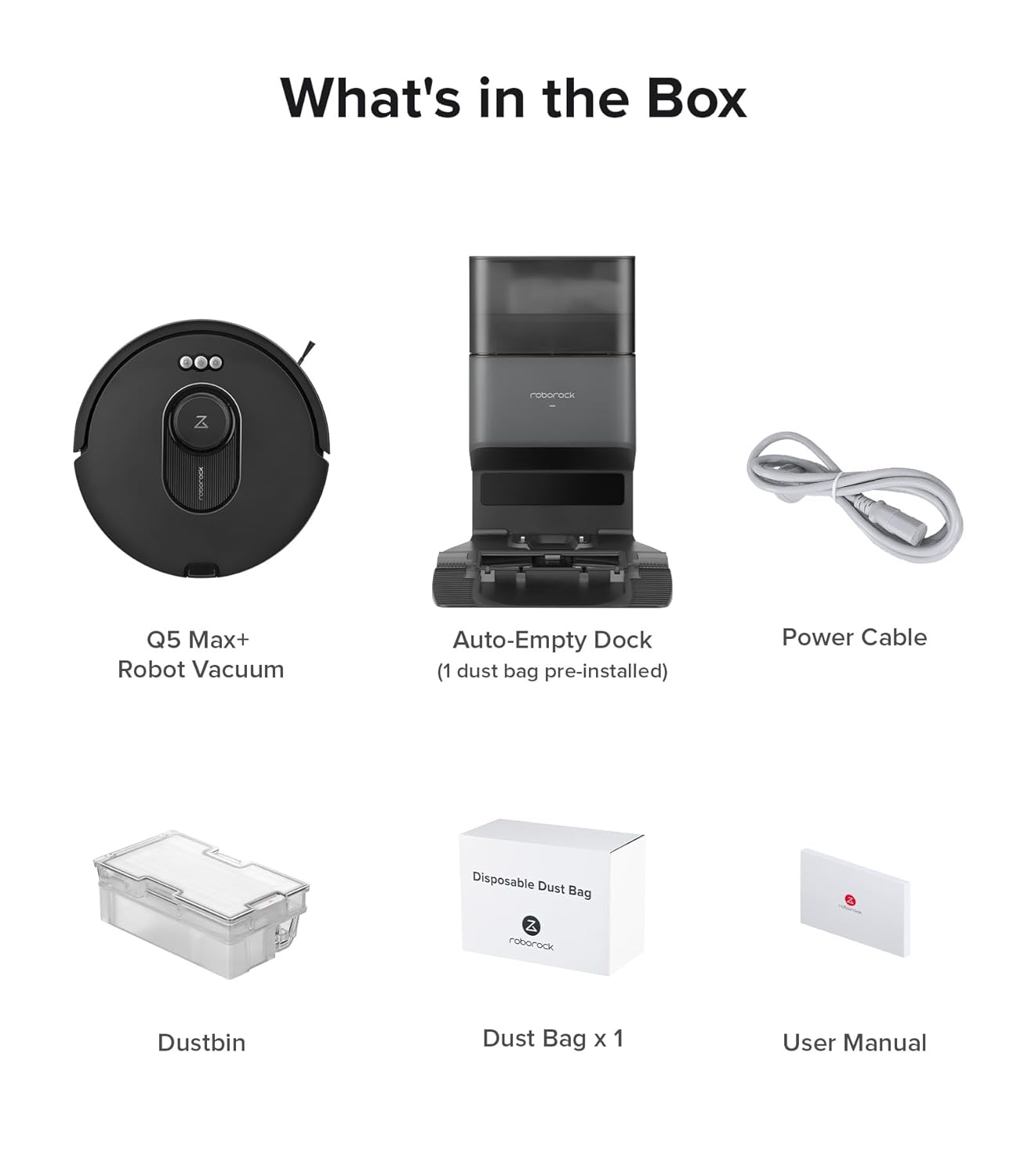
פיגורע 1.1: פּעקל אינהאַלט
1.2 Dock Placement and Initial Setup
Place the Auto-Empty Dock on a hard, level surface against a wall, ensuring there are no obstacles within 0.5 meters (1.6 feet) to either side and 1.5 meters (4.9 feet) in front. Connect the power cable to the dock and plug it into a power outlet. Ensure the robot vacuum is placed on the dock for its initial charge.
וויכטיק באַמערקונג:
- The Roborock Q5 Max+ robot vacuum only supports 2.4G WiFi. Ensure your router uses this frequency. If your home primarily uses a 5 GHz band, consider setting up a dual-band router or switching to a 2.4 GHz network for optimal performance.

Figure 1.2: Robot Vacuum and Dock
1.3 קאַנעקטינג צו די אַפּ
For full functionality and smart features, download the Roborock app and connect your robot vacuum:
- Download the "Roborock" app from your mobile app store.
- Reset WiFi on the robot by pressing and holding the designated buttons until you hear the "Resetting WiFi" alert. The reset is complete when the WiFi indicator flashes slowly.
- Open the app, tap "זוכן פֿאַר device," and follow the in-app instructions to add your Q5 Max+.


פיגור 1.3: אַפּ קאַנעקשאַן טריט
2. אפערירן אייער ראָבאָט וואַקוום
2.1 אָנהייבן און אָפּשטעלן רייניקונג
To start a cleaning cycle, press the Power button on the robot or use the Roborock app. To pause cleaning, press any button on the robot or use the app. To send the robot back to the dock, press the Dock button on the robot or use the app.
2.2 נאַוויגאַציע און מאַפּינג
The Q5 Max+ utilizes PreciSense LiDAR Navigation to create detailed 3D maps of your home. This allows for quick and accurate navigation, ensuring thorough and efficient cleaning. The robot adapts seamlessly to different environments and supports multi-level mapping for homes with multiple floors.

Figure 2.1: Smart LiDAR Navigation in action
2.3 Suction Power and DuoRoller Brush
Equipped with 5500 Pa HyperForce suction power, the Q5 Max+ effectively captures dust and debris from various floor types, including hardwood, tile, and carpet. The advanced DuoRoller Brush efficiently cleans dirt, pet hair, and human hair, with a design that helps reduce tangling.

Figure 2.2: Powerful Suction

Figure 2.3: DuoRoller Brush
2.4 אַפּ און שטימע קאָנטראָל
The Roborock app provides comprehensive control over your Q5 Max+. You can set emptying modes, adjust suction intensity, define smart suggestions for No-Go Zones, schedule cleaning, and create custom routines. The Q5 Max+ also syncs seamlessly with Alexa, Apple Siri, and Google Home, allowing you to initiate cleaning or adjust settings effortlessly using voice commands.

Figure 2.4: Customized Cleaning via App

Figure 2.5: Voice Control for Hands-Free Cleaning
3. וישאַלט
3.1 Self-Emptying Dock and Dust Bag
The Auto-Empty Dock features 2x2.5L dust bags, providing up to 7 weeks of hands-free cleaning. When the dust bag is full, the app will notify you. Replace the dust bag as needed to maintain optimal performance and filtration efficiency.

Figure 3.1: Hassle-Free Self-Emptying
3.2 Cleaning the DuoRoller Brush
Regularly inspect and clean the DuoRoller Brush to remove tangled hair and debris. Use the cleaning tool provided to cut and remove any hair wrapped around the brushes. This ensures consistent cleaning performance.
3.3 רייניקן דעם מיסטקאַסטן און פילטער
Even with the self-empty dock, it is recommended to periodically remove and clean the robot's internal 770ml dustbin. Tap out debris and rinse the dustbin with water if necessary (ensure it is completely dry before reinserting). The filter should also be cleaned regularly by tapping it against a trash can to remove dust. Replace the filter every 3-6 months depending on usage.
4. טראָובלעשאָאָטינג
If you encounter issues with your Roborock Q5 Max+, refer to the following common problems and solutions:
| פּראָבלעם | מעגלעך סיבה | לייזונג |
|---|---|---|
| דער ראָבאָט צינדט זיך נישט אָן און לאָדט זיך נישט אויף. | Low battery; Dock not powered; Poor contact with charging pins. | Ensure the dock is plugged in. Clean charging contacts on both robot and dock. Place robot correctly on dock. |
| ראָבאָט בלייבט אָפט שטעקן. | Obstacles; Loose cables; Dark surfaces. | Clear obstacles. Use No-Go Zones in the app. Ensure sufficient lighting. |
| שלעכטע רייניקונג פאָרשטעלונג. | Full dustbin; Clogged filter; Tangled brush. | Empty dustbin. Clean or replace filter. Clean DuoRoller Brush. |
| קענען ניט פאַרבינדן צו ווי-פי. | Incorrect Wi-Fi band (5GHz); Incorrect password; Router issues. | Ensure 2.4GHz Wi-Fi. Re-enter password. Restart router and robot. |
For more detailed troubleshooting, please refer to the full user manual available on the Roborock support webפּלאַץ.
5. ספּעסאַפאַקיישאַנז
| שטריך | דעטאַל |
|---|---|
| מאָדעל נאָמען | Q5 Max+ |
| סאַקשאַן מאַכט | 5500 פּאַ היפּערפאָרס |
| נאַוויגאַציע סיסטעם | PreciSense LiDAR |
| מיסט קאַסטן קאַפּאַציטעט (ראָבאָט) | 770 מל |
| שטויב זעקל קאַפּאַציטעט (דאָק) | 2.5 L (up to 7 weeks hands-free) |
| Maximum Vacuuming Area | 3,767 סקפט |
| מאַקסימום רונטימע | קסנומקס מינוט |
| באַטערי טיפּ | ליטהיום יאָן (אַרייַנגערעכנט) |
| קאַנעקטיוויטי | 2.4G WiFi, App Control, Voice Control (Alexa, Siri, Google Home) |
| פּראָדוקט דימענסיעס (ראָבאָט) | 13.9 X 13.8 X 3.8 אינטשעס |
| Product Weight (Robot) | 7.5 פונט |

Figure 5.1: Key Performance Metrics
6. וואָראַנטי און שטיצן
Roborock products are designed for reliability and performance. For warranty information, technical support, or service inquiries, please visit the official Roborock webזייטל אדער קאנטאקט זייער קאסטומער סערוויס גלייך. האלט אייער קויף קוויטל אלס באווייז פון קויפן פאר גאראנטיע קליימס.
Official Roborock Webפּלאַץ: www.roborock.com


