1. הקדמה
Thank you for choosing the FLEXISPOT Q4 One-Piece Standing Desk. This manual provides essential information for the safe assembly, operation, and maintenance of your new adjustable height desk. Please read these instructions carefully before use and retain them for future reference.
זיכערקייַט אינפֿאָרמאַציע
- זיכער מאַכן אַז אַלע קאָמפּאָנענטן זענען פאַראַן און נישט געשעדיגט איידער די פֿאַרזאַמלונג.
- האַלט קינדער און חיות אַוועק פון דעם טיש בעת אָפּעראַציע.
- Do not overload the desk. Refer to specifications for maximum weight capacity.
- פֿאַרמײַדן צו שטעלן פֿליסיקייטן גלייך אויף דער קאָנטראָל פּאַנעל אָדער לעבן עלעקטרישע קאָמפּאָנענטן.
- אָפּשטעקן די מאַכט איידער איר רייניקן אָדער דורכפירן וישאַלט.
- דעם שרייַבטיש איז דיזיינד בלויז פֿאַר דרינענדיק נוצן.
2. פּאַקעט אינהאַלט און קאָמפּאָנענטן
The FLEXISPOT Q4 Standing Desk is shipped in two separate packages. Please verify all parts are included before beginning assembly.
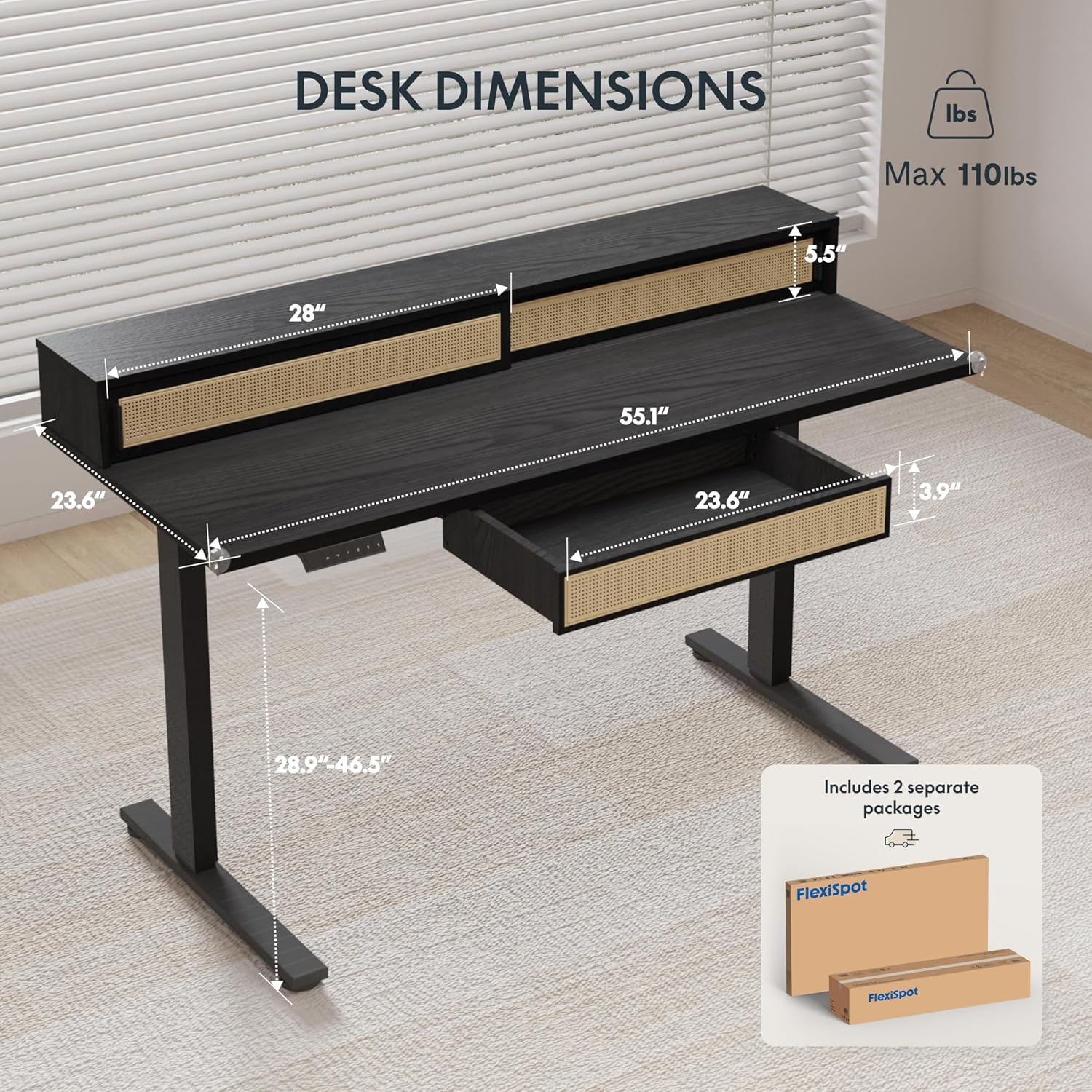
Figure 2.1: Desk dimensions and indication of two separate packages for shipping.
הויפּט קאַמפּאָונאַנץ:
- Desktop with integrated monitor shelf and sliding compartments
- Under-desk drawer
- Desk legs (2)
- פֿיס פּאַדס (2)
- קאָנטראָל פּאַנעל
- מאַכט אַדאַפּטער און קייבאַלז
- פֿאַרזאַמלונג האַרדווער (שרויף, באָלץ, מכשירים)
3. אַסעמבלי אינסטרוקציעס
Assembly typically requires two people due to the size and weight of the desk components. Follow the steps below carefully.
שריט-דורך-סטעפּ אַסעמבלי:
- אָפּלייגן קאַמפּאָונאַנץ: נעמט פֿאָרזיכטיק אַרויס אַלע טיילן פֿון דער פֿאַרפּאַקונג. לייגט זיי אויף אַ ווייכער, ריינער ייבערפֿלאַך כּדי צו פֿאַרמייַדן קראַצן.
- צוטשעפּען טיש פֿיס: Secure the desk legs to the desktop frame using the provided hardware. Ensure all connections are tight and stable.
- אינסטאַלירן פֿוס פּאַדס: Attach the foot pads to the bottom of the desk legs.
- מאָנטירן קאָנטראָל פּאַנעל: Secure the control panel to the underside of the desktop in the designated area.
- פאַרבינדן קאַבלעס: Connect the motor cables from the legs to the control box, and then connect the control panel cable to the control box. Finally, connect the power adapter to the control box and plug it into a power outlet.
- Install Under-Desk Drawer: Slide the under-desk drawer into its designated slot beneath the desktop.
- קאַבלע פאַרוואַלטונג: Utilize the integrated cable management features to organize power and data cables for a tidy workspace.

Figure 3.1: Fully assembled FLEXISPOT Q4 Standing Desk, showcasinג זײַן דיזײַן און פֿונקציאָנאַליטעט.

פיגורע 3.2: נאָענט-אַרויף view of the stable desk frame, highlighting the reinforced structure and junction zone.
4. אַפּערייטינג ינסטרוקטיאָנס
The FLEXISPOT Q4 desk features an electric height adjustment system with a smart control panel.
קאָנטראָל פּאַנעל פאַנגקשאַנז:

Figure 4.1: The smart control panel, illustrating buttons for up/down movement and height memory presets.
- אַרויף/אַראָפּ פײַלן (▲ / ▼): דריק און האלט אן צו פאררעכטן די הייך פון טיש ארויף אדער אראפ. לאזט ארויס דעם קנעפל צו אפשטעלן ביי דער געוואונטשענער הייך.
- Memory Presets (1, 2, T, Person Icon): The desk allows you to save preferred heights for quick adjustments.
- To save a height: Adjust the desk to your desired height, then press and hold one of the preset buttons (1, 2, T, or Person Icon) until you hear a beep or see a confirmation on the display (if available).
- To use a saved height: Simply press the corresponding preset button once, and the desk will automatically move to the saved height.
הייך אַדזשאַסטמאַנט קייט:
The desk smoothly transitions between a minimum height of 28.9 inches and a maximum height of 46.5 inches.

Figure 4.2: Visual representation of the desk's adjustable height range, from minimum to maximum settings.
5. שליסל פֿעיִקייטן
Spacious Storage System
The desk integrates a comprehensive storage system, including sliding-door desktop compartments (55.1"×8.7"×5.5") and a dedicated under-desk drawer (23.6"×11.8"×3.9"). These dual storage solutions are designed to keep your essentials accessible and maximize workspace organization.
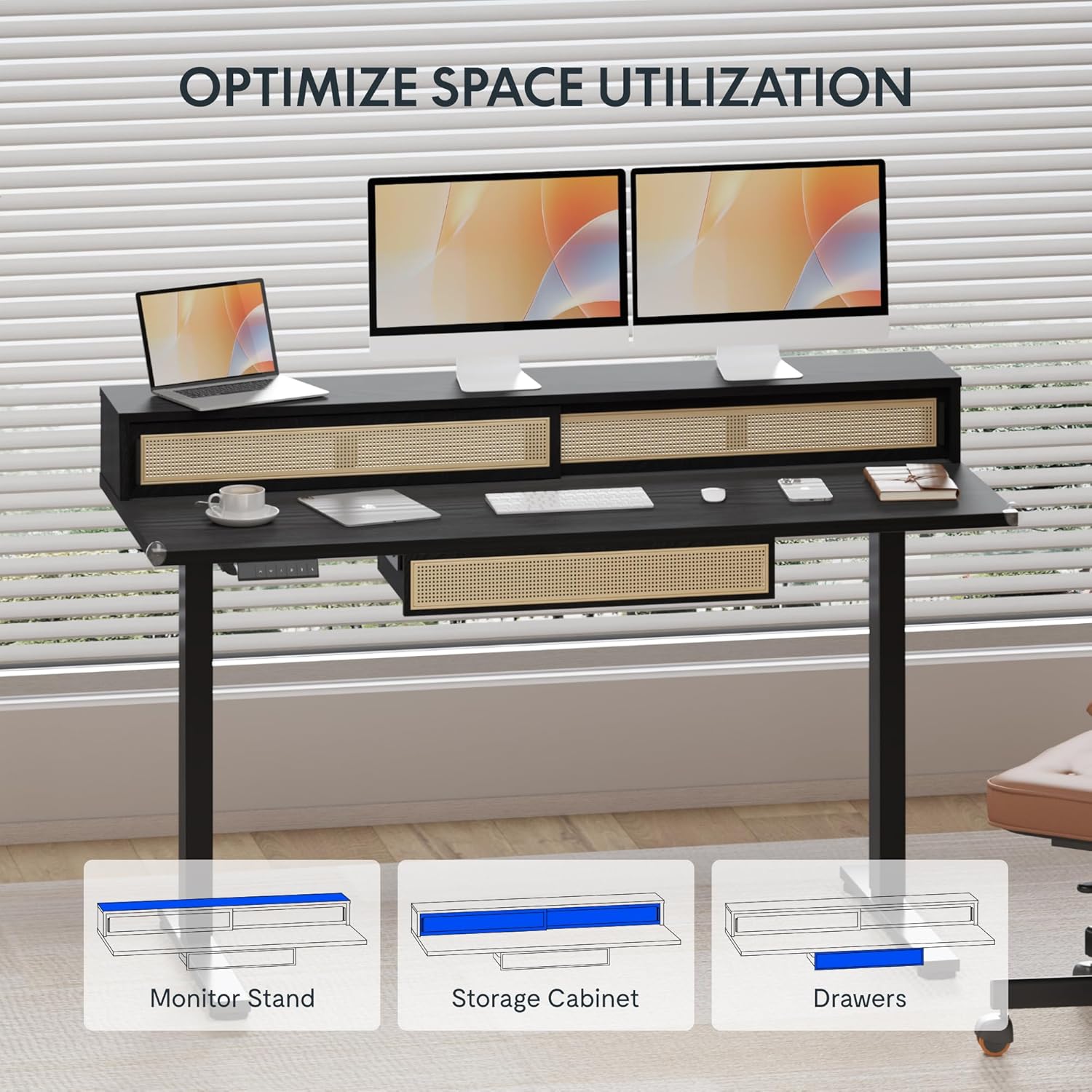
Figure 5.1: Illustration of the desk's integrated storage options, including the monitor stand, storage cabinet, and drawers.
Elegant Rattan Design
The desk features a premium woven rattan texture that enhances interior aesthetics. The seamless desktop design eliminates weak joints, and the scratch-resistant surface is designed to resist daily wear, warping, and stains, maintaining its appearance over time.

פיגורע 5.2: דעטאַילעד view of the desk's rattan design, metal handles, and corner protectors.
Integrated Monitor Shelf
An ergonomically designed monitor shelf elevates screens to eye level, which can help reduce neck strain and back discomfort. This feature promotes proper posture alignment during extended work sessions, whether sitting or standing.
Quiet Electric Height Adjustment
The desk is equipped with a silent motor system (operating at less than 50dB) for smooth transitions between sitting and standing positions. Programmable presets allow for quick adjustments, accommodating multiple users or varying work scenarios.
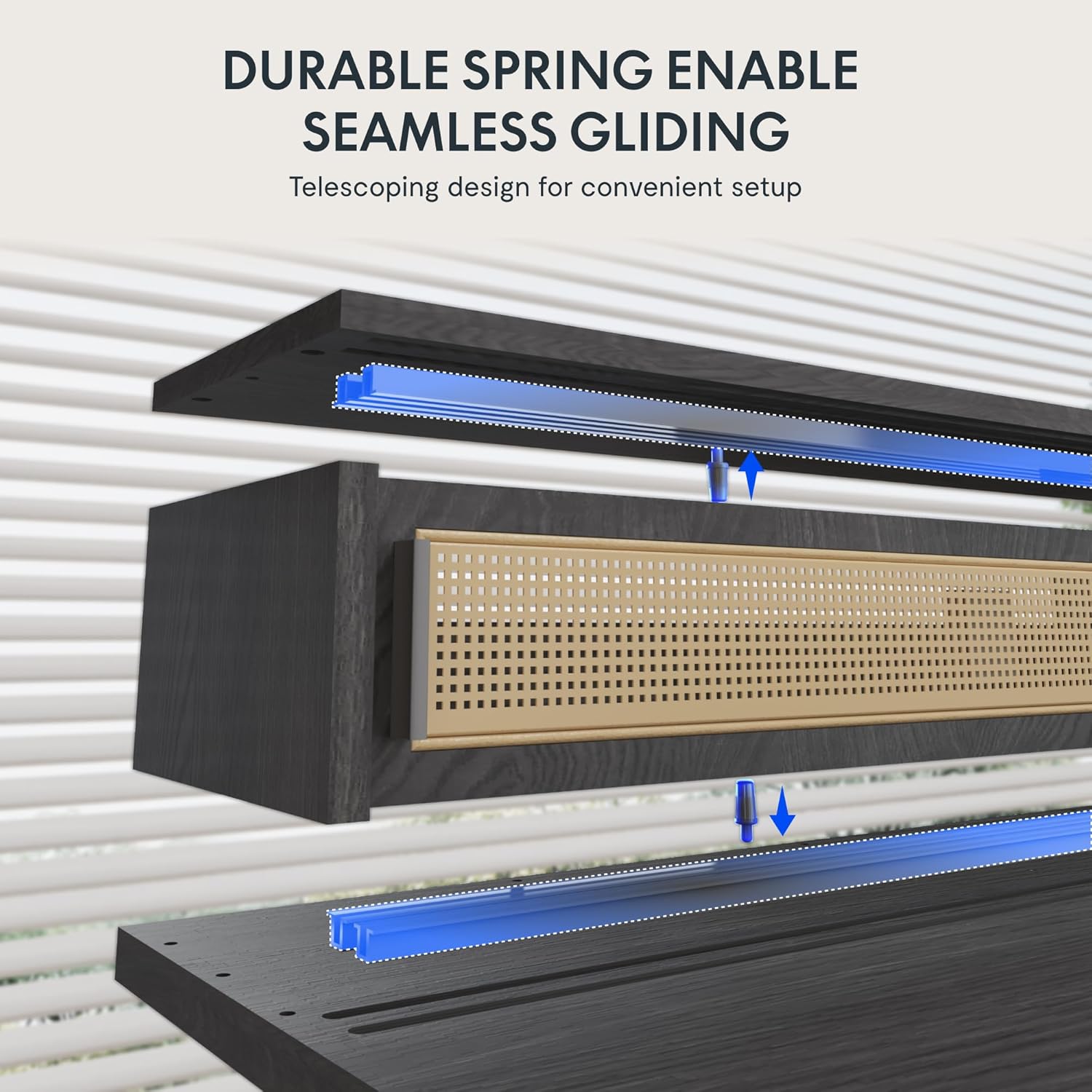
Figure 5.3: Illustration of the durable spring mechanism enabling seamless gliding of desk components.
6. וישאַלט
Regular maintenance ensures the longevity and optimal performance of your FLEXISPOT Q4 Standing Desk.
- רייניקונג: ווישט דעם דעסקטאַפּ און ראַם מיט אַ ווייכן, דamp שטאָף. ויסמיידן אַברייסיוו קלינערז אָדער האַרב קעמיקאַלז וואָס קען שעדיקן די ענדיקן.
- קאַבלע פאַרוואַלטונג: Periodically check and reorganize cables to prevent tangles and ensure smooth operation.
- פאַסטענער טשעק: Occasionally inspect all screws and bolts to ensure they remain tight. Retighten if necessary.
- מאָטאָר קער: The electric motor system is designed for maintenance-free operation. Do not attempt to open or lubricate motor components.
7. טראָובלעשאָאָטינג
If you encounter issues with your FLEXISPOT Q4 Standing Desk, refer to the following common solutions:
| פּראָבלעם | מעגלעך סיבה | לייזונג |
|---|---|---|
| טיש רירט זיך נישט | שטראָם קאַבל אָפּגעטיילט, מאָטאָר קאַבל לויז, איבערלאַסטונג. | Check all cable connections. Ensure the desk is plugged into a working outlet. Reduce weight on the desk. |
| אַניוואַן הייך אַדזשאַסטמאַנט | שטערונג, אומגלייכע וואָג פאַרשפּרייטונג. | Clear any obstructions. Redistribute weight evenly on the desktop. Perform a reset if necessary (refer to control panel instructions). |
| קאָנטראָל טאַפליע ניט ריספּאַנדאַבאַל | פרייַ פֿאַרבינדונג, פּראָבלעם מיט עלעקטריציטעט. | Check the control panel cable connection to the control box. Ensure main power is connected. |
| Desk stops mid-movement | Safety feature activated (anti-collision), motor overheating. | Remove any obstruction. Allow the motor to cool down for 20 minutes before attempting to operate again. |
אויב די פראבלעם בלייבט נאך פרובירן די לייזונגען, ביטע קאנטאקטירט FLEXISPOT קאסטומער סופארט.
8. ספּעסאַפאַקיישאַנז
| שטריך | דעטאַל |
|---|---|
| מאָדעל | Q4 |
| פּראָדוקט דימענשאַנז (ד רענטגענ וו רענטגענ ה) | 23.6" x 55.1" x 29" (Minimum Height) |
| מינימום הייך | 28.9 אינטשעס |
| מאַקסימום הייך | 46.5 אינטשעס |
| שפּיץ מאַטעריאַל טיפּ | האלץ |
| באַזע מאַטעריאַל | אַללוי סטיל |
| קאָליר | שוואַרץ |
| סטאָרידזש אָפּציעס | 1 sliding-door compartment, 1 under-desk drawer |
| נומער פון גאַטקעס | 1 |
| נומער פון שעלוועס | 1 (Monitor Shelf) |
| אַסעמבלי פארלאנגט | יא |
| UPC | 840460464574 |
9. וואָראַנטי און שטיצן
וואָראַנטי שוץ:
The FLEXISPOT Q4 Standing Desk is backed by a comprehensive warranty to ensure your investment security:
- 5-יאָר קאַווערידזש: גילט פארן טיש ראם און מאטאר קאמפאנענטן.
- 2-יאָר קאַווערידזש: Applies to all electronic components.
This warranty covers manufacturing defects and ensures lasting performance under normal use conditions.
קונה שטיצן:
For any questions, assistance with assembly, troubleshooting, or warranty claims, please contact FLEXISPOT customer support through the official website or your purchase platform. Please have your model number (Q4) and proof of purchase ready when contacting support.