1. זיכערקייַט אינפֿאָרמאַציע
Please read all safety instructions carefully before using your iFFALCON TV. Retain this manual for future reference.
- עלעקטריקאַל זיכערקייַט: Do not expose the TV to rain or moisture. Ensure the power cord is securely plugged into a grounded outlet. Do not overload electrical outlets.
- אָרט: Place the TV on a stable, level surface or mount it securely to a wall. Ensure adequate ventilation around the TV to prevent overheating. Do not block ventilation openings.
- רייניקונג: נעמט ארויס דעם טעלעוויזאר פון שטעקער איידער איר רייניגט. ניצט א ווייכן, טרוקענעם טוך. ניצט נישט קיין פליסיגע רייניגער אדער אייראזאל רייניגער.
- קינדער: Supervise children to prevent them from climbing on the TV or stand. Small parts can be a choking hazard.
- סערוויס: פרובירט נישט צו סערוויסן דעם טעלעוויזאר אליין. לאָזט איבער אלע סערוויסינג צו קוואַליפֿיצירטע סערוויס פּערסאָנעל.
2. וואָס איז אין דער קעסטל
באַשטעטיקן אַז אַלע קאָמפּאָנענטן זענען פאַראַן ביים אויספּאַקן:
- iFFALCON 85-Inch U85 Series QD-Mini LED 4K UHD Google Smart TV
- מאַכט קאַבלע
- 2 X AAA באַטעריז פֿאַר ווייַט
- 6 רענטגענ שטייט סקרוז
- Table stands (2 pieces)
- 5 x קאַבל קליפּס
- שנעל אָנהייב גייד
- טעלעוויזיע ווייַט
3. סעטאַפּ
3.1 פיזישע אויפשטעל
Before powering on, ensure the TV is securely placed or mounted.
- סטאַנדאַרט ינסטאַלירונג: If using the table stands, carefully attach them to the designated slots at the bottom of the TV using the provided stand screws. Ensure they are tightened securely.
- וואַנט מאָונטינג: If wall mounting, follow the instructions provided with your wall mount kit. Ensure the mount is compatible with VESA standards for the 85U85 model.
- מאַכט קשר: פֿאַרבינדט דעם מאַכט קאַבל צום טעלעוויזאָרס מאַכט אַרייַנגאַנג און דערנאָך צו אַ וואַנט אַוטלעט.
- פונדרויסנדיק דעוויסעס: Connect any external devices (e.g., cable box, gaming console, Blu-ray player) to the appropriate HDMI or other input ports on the TV.

Image: The iFFALCON 85-Inch U85 Series TV, showcasinזײַן שלאַנקן דיזײַן און לעבעדיקן אַרויסווייַז.
3.2 ערשטע איינשטראָם און גוגל טיווי סעטאַפּ
After connecting power, press the power button on the remote control or TV to turn it on.
- רימאָוט קאָנטראָל פּאָרינג: If the remote does not respond, insert the AAA batteries and follow on-screen instructions to pair it via Bluetooth.
- שפּראַך סעלעקציע: קלייַבן דיין בילכער שפּראַך.
- נעץ קאַנעקשאַן: Select your Wi-Fi network and enter the password. A stable internet connection is required for Google TV features.
- גוגל אקאונט אריינלאגירן: Sign in with your Google account to access Google TV features, personalized recommendations, and app downloads.
- Google Assistant Setup: Follow prompts to set up Google Assistant for voice control.

Image: A user interacting with the iFFALCON TV using hands-free voice control, demonstrating the integrated Google TV interface.
4. אַפּערייטינג דיין טעלעוויזיע
4.1 רימאָוט קאָנטראָל פאַנגקשאַנז
The provided remote control allows full navigation and control of your iFFALCON TV.
- מאַכט קנעפּל: טורנס די טעלעוויזיע אויף אָדער אַוועק.
- נאַוויגאַציע פּאַד: Use the directional buttons to move through menus and the OK button to select.
- באנד +/-: אַדזשאַסץ די באַנד מדרגה.
- קאַנאַל +/-: טוישט טעלעוויזיע קאַנאַלן.
- אַרייַנשרייַב: סעלעקטירט די אינפוט מקור (HDMI 1, HDMI 2, אאז"וו).
- גוגל אַסיסטאַנט קנעפּל: Activates voice control. Press and speak your command.
- היים קנעפּל: קערט צוריק צום גוגל טיווי היים עקראַן.
- אַפּ קורץ-וועג קנעפּלעך: שנעלער צוטריט צו פּאָפּולערע סטרימינג סערוויסעס.
4.2 Smart Features and Google TV
Your iFFALCON U85 Series TV runs on Google TV, offering a personalized and integrated smart experience.
- Google TV Home Screen: Provides access to movies, shows, and apps from all your subscriptions, organized for easy discovery.
- קול קאָנטראָל: Use Google Assistant or Alexa (via compatible devices) to search for content, control smart home devices, and manage TV settings hands-free.
- אַפּ ביבליאָטעק: דאַונלאָוד און ינסטאַלירן אַ ברייטע קייט פון אַפּליקאַציעס פֿון די גוגל פּליי סטאָר.
- Chromecast Built-in: וואַרפט אינהאַלט פֿון אייער קאָמפּאַטיבלן סמאַרטפאָון, טאַבלעט אָדער קאָמפּיוטער גלייך צום טעלעוויזיע.
4.3 בילד און קלאַנג סעטטינגס
קאַסטאַמייז דיין viewהערן און הערן דערפאַרונג דורך די טעלעוויזיע ס סעטטינגס מעניו.
- בילד מאָדעס: אויסקלייבן פון פארשידענע פארגעשטעלטע בילד מאָדעס (למשל, סטאַנדאַרד, לעבעדיק, פֿילם, שפּיל) אדער קאַסטאַמייז סעטטינגס ווי ברייטקייט, קאָנטראַסט, קאָליר און שאַרפֿקייט.
- Mini LED Precision: The TV features 352 local dimming zones and 1000 nits peak brightness for enhanced contrast and detail.
- Dolby Vision IQ: Automatically adjusts HDR brightness based on the room's ambient light for optimal viewing.
- געזונט מאָדעס: Choose from sound presets (e.g., Standard, Music, Movie, Speech) or adjust equalizer settings.
- Dolby Atmos & DTS Virtual X: Experience immersive spatial audio with the integrated 2.1-channel 50W sound system.

Image: Visual comparison illustrating the superior contrast and detail of Mini LED technology compared to conventional TVs.

Image: Depiction of the immersive audio experience with the TV's 2.1 speaker system and Dolby Atmos technology.
4.4 גיימינג פֿעיִטשערס
The iFFALCON U85 Series TV is equipped with features designed for an enhanced gaming experience.
- 144Hz שפּיל מאָדע פּראָ: Provides a high refresh rate for smooth, responsive gameplay.
- 288Hz DLG Acceleration: Further enhances motion clarity for competitive gaming.
- פריסינק פּרעמיום פּראָ: רעדוצירט סקרין טיערן און שטאַמלען פֿאַר גלאַט וויזשוואַלז.
- אַוטאָ נידעריק לייטאַנס מאָדע (ALLM): Automatically switches to a low-latency mode when a gaming console is detected.
- שפּיל באַר: Access and adjust key gaming settings quickly during gameplay.
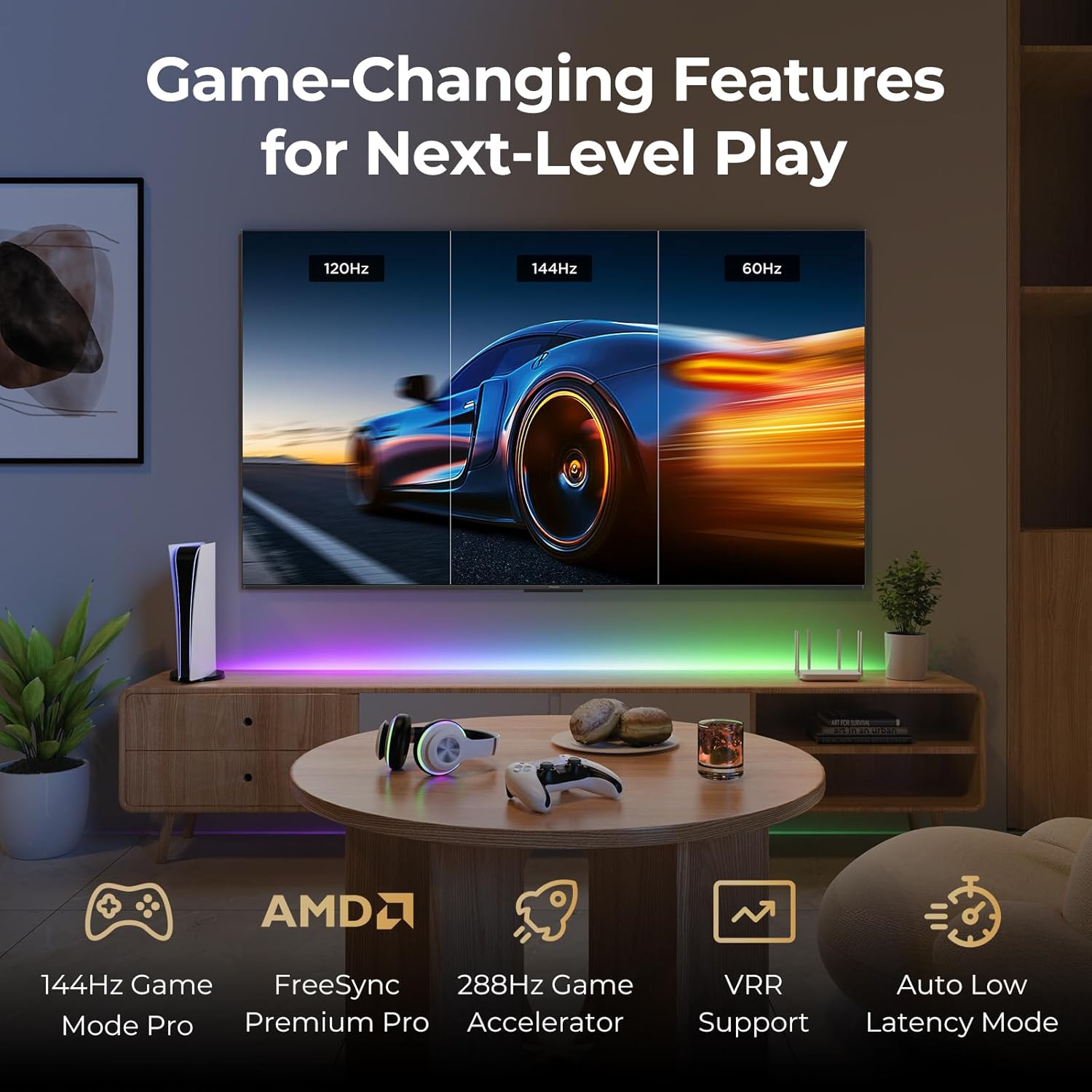
Image: A gaming setup featuring the iFFALCON TV, illustrating its high refresh rate and gaming-specific features for an optimized experience.
5. וישאַלט
5.1 רייניקן דעם טעלעוויזאר
רעגולערע רייניקונג העלפט אויפהאלטן דעם טעלעוויזיע'ס אויסזען און פאָרשטעלונג.
- פאַרשטעלן: ווישט אָפּ דעם עקראַן מיט אַ ווייכן, לינט-פֿרײַעם שטאָף. פֿאַר שווערע פֿלעקן, ווישט לײַכט.ampווישט דעם שטאָף מיט וואַסער אָדער אַ רייניקונג לייזונג ספּעציפֿיש פֿאַרן עקראַן (שפּריצט נישט גלייך אויפן עקראַן).
- גוף: Use a soft, dry cloth to wipe the TV's frame and back panel. Avoid abrasive materials or harsh chemicals.
- פּאָרץ: Ensure ports are free of dust. Use compressed air if necessary, holding the can upright.
5.2 ווייכווארג דערהייַנטיקונגען
Your TV may receive automatic software updates to improve performance and add new features. Ensure your TV is connected to the internet for these updates.
- You can check for updates manually in the TV's settings menu under System > About > System update.
6. טראָובלעשאָאָטינג
If you encounter issues, try these common solutions before contacting support.
- קיין מאַכט: זיכער מאַכן אַז דער שטראָם קאַבל איז זיכער אַרײַנגעשטעקט אין ביידע דעם טעלעוויזאָר און דעם וואַנט אַוטלעט. פּרוביר דעם אַוטלעט מיט אַן אַנדער מיטל.
- קיין בילד/קלאַנג: Check the selected input source. Ensure all cables to external devices are connected correctly. Restart the TV and connected devices.
- ווייַט ניט ארבעטן: Replace the batteries. Ensure there are no obstructions between the remote and the TV. Re-pair the remote if it uses Bluetooth.
- נעץ פֿאַרבינדונג פּראָבלעמען: Restart your Wi-Fi router. Check TV network settings to ensure correct Wi-Fi password and connection.
- בילד קוואַליטעט פּראָבלעמען: צופּאַסן בילד סעטטינגס (ברייטקייט, קאָנטראַסט, קאָליר). זיכער מאַכן אַז די אינהאַלט מקור איז הויך קוואַליטעט.
- פאַבריק באַשטעטיק: If problems persist, a factory reset can resolve many software-related issues. Navigate to Settings > System > About > Reset. ווארענונג: This will erase all personal data and settings.
7. ספּעסאַפאַקיישאַנז
| שטריך | באַשרייַבונג |
|---|---|
| סאָרט | iFFALCON |
| מאָדעל נומער | 85U85 |
| פאַרשטעלן גרייס | 85 אינטשעס |
| ווייַז טעכנאָלאָגיע | קד-מיני געפירט |
| האַכלאָטע | 4 ק והד (3840 רענטגענ 2160) |
| דערפרישן קורס | 144 Hz (Native), 288Hz DLG |
| שפּיץ ברייטנאַס | אַרויף צו 1000 ניץ |
| קאַנטראַסט פאַרהעלטעניש | אַרויף צו 6500:1 |
| לאקאלע דימינג זאָנעס | 352 |
| פּראַסעסער | AiPQ פּראָ פּראַסעסער |
| אָפּערייטינג סיסטעם | גוגל טעלעוויזיע |
| קול אַססיסטאַנט | Google Assistant, Alexa compatible |
| אַודיאָ סיסטעם | 2.1-channel 50W, Dolby Atmos, DTS Virtual X |
| HDR שטיצן | HDR10+, Dolby Vision IQ |
| גיימינג פֿעיִקייטן | 144Hz VRR, FreeSync Premium Pro, ALLM, Game Bar |
| קאַנעקטיוויטי | בלועטאָאָטה, ווי-פי |
| פּראָדוקט דימענשאַנז (ד רענטגענ וו רענטגענ ה) | 15.2 X 74.4 X 45.5 אינטשעס |
| פּונקט וואָג | 76.7 פונט |
8. וואָראַנטי און שטיצן
Your iFFALCON U85 Series TV is covered by a manufacturer's warranty. Please refer to the warranty card included with your product for specific terms and conditions.
For technical support, service inquiries, or additional information, please visit the official iFFALCON support website or contact their customer service. Keep your purchase receipt and product serial number handy for warranty claims.
איר קענט געפֿינען מער אינפֿאָרמאַציע און שטיצע רעסורסן דורך באַזוכן די iFFALCON Store on Amazon.


