הקדמה
Welcome to the HONOR 400 Lite 5G Smartphone user manual. This guide provides essential information for setting up, operating, maintaining, and troubleshooting your new device. Please read this manual thoroughly to ensure optimal performance and longevity of your smartphone.
וואָס איז אין די קעסטל
Upon unboxing your HONOR 400 Lite, you should find the following items:
- HONOR 400 Lite 5G סמאַרטפאָנע
- וסב קאַבלע
- סים עדזשעקטאָר טול
- שנעל אָנהייב גייד
- וואָראַנטי קאַרד
Note: The specific contents may vary by region.
מיטל איבערview
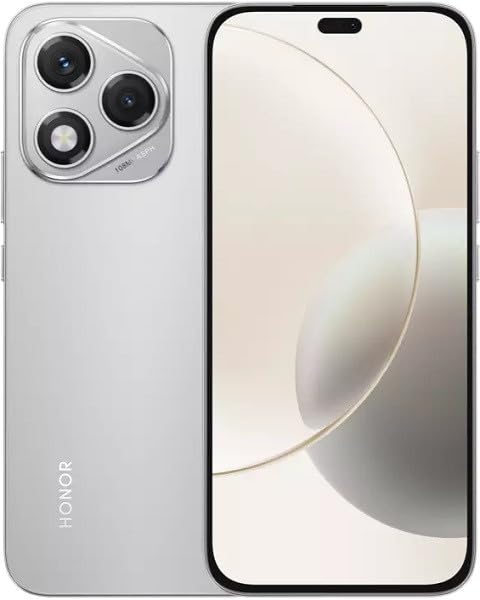
Image: The HONOR 400 Lite 5G Smartphone in Velvet Grey, showcasing its sleek design and camera module on the rear.
The HONOR 400 Lite features a 6.7-inch AMOLED display with a resolution of 1080 x 2412 pixels. The device is equipped with a powerful camera system, including a 108 MP main sensor. Its ergonomic design ensures a comfortable grip and easy access to all physical buttons and ports.
סעטאַפּ
1. סים קאָרט ינסטאַלירונג
- געפינט די סים קארטל טאַץ אויף דער זייט פון אייער דעווייס.
- שטעקט אריין דעם סים אויסווארף געצייג אין דעם קליינעם לאך לעבן דעם טרעי און דריקט פעסט ביז דער טרעי קומט ארויס.
- Place your Nano-SIM card(s) and/or eSIM (if applicable) into the tray with the gold contacts facing down, ensuring they are correctly aligned.
- קערפאַלי שטופּן די טאַץ צוריק אין די מיטל ביז עס קליקס אין פּלאַץ.
וויכטיק: This smartphone is designed for GSM networks only and is not compatible with CDMA networks (e.g., Verizon, Sprint, US Cellular in the USA). Please verify network compatibility with your service provider before use.
2. ערשטע איינשאַלטונג
- Press and hold the Power button (usually on the right side) until the HONOR logo appears.
- פֿאָלגט די אינסטרוקציעס אויף דעם עקראַן צו פֿאַרענדיקן די ערשטע סעטאַפּ, אַרייַנגערעכנט שפּראַך אויסוואַל, Wi-Fi פֿאַרבינדונג און Google חשבון סעטאַפּ.
אַפּערייטינג דיין מיטל
ווייַז פֿעיִקייטן
The 6.7-inch AMOLED display offers vibrant colors and deep blacks. Utilize gestures for navigation, access quick settings by swiping down from the top, and customize your home screen layout and widgets to personalize your experience.
קאַמעראַ באַניץ
Your HONOR 400 Lite is equipped with a high-resolution 108 MP main camera. Open the Camera app to access various modes such as Photo, Video, Portrait, and more. Tap on the screen to focus and use the on-screen shutter button to capture images or start recording videos. Explore settings for advanced options like HDR and AI enhancements.
באַטאַרייע און טשאַרדזשינג
The device is powered by a 5230mAh non-removable battery. Use the provided USB cable to charge your device. Connect the USB-C end to your phone and the USB-A end to a compatible power adapter (not always included, check box contents) or computer USB port. For optimal charging speed, use a compatible fast charger.
וישאַלט
- ווייכווארג דערהייַנטיקונגען: Regularly check for and install system updates to ensure your device has the latest features, security patches, and performance improvements. Go to Settings > System & updates > Software update.
- רייניקונג: ניצט אַ ווייכע, לינט-פֿרייע שטאָף צו רייניקן דעם עקראַן און קערפּער פֿון אייער טעלעפֿאָן. פֿאַרמייַדט שטרענגע כעמיקאַלן אָדער אַברייסיוו מאַטעריאַלן.
- סטאָרידזש פאַרוואַלטונג: פּעריִאָדיש אויסמעקן נישט-נייטיקע files and apps to free up storage space and maintain optimal performance.
טראָובלעשאָאָטינג
If you encounter issues with your HONOR 400 Lite, try the following common troubleshooting steps:
- מיטל ניט ריספּאַנדאַבאַל: דריק און האלט דעם פּאַוער קנעפּל פֿאַר אַרום 10 סעקונדעס צו צווינגען אַ ריסטאַרט.
- אַפּ קראַשט: Clear the app's cache and data (Settings > Apps > [App Name] > Storage > Clear cache/Clear data) or reinstall the app.
- באַטערי דריין: Check battery usage in Settings to identify power-hungry apps. Reduce screen brightness and disable unnecessary features like GPS or Wi-Fi when not in use.
- נעץ ישוז: Ensure your SIM card is correctly inserted. Try toggling Airplane Mode on and off. If issues persist, contact your network provider.
ספּעסאַפאַקיישאַנז
| מאָדעל נאָמען | Honor 400 Lite |
| ווייַז | 6.7 inches AMOLED, 1080 x 2412 pixels |
| פּראַסעסער | Mediatek Dimensity 7025 Ultra (6 nm), Octa-core (2x2.5 GHz Cortex-A78 & 6x2.0 GHz Cortex-A55) |
| באַראַן | 12 גיגאבייט |
| אינערלעכער סטאָרידזש | 256 גיגאבייט (נישט אויסברייטבאר) |
| דערציען אַפּאַראַט | 108 MP, f/1.8, (wide), 1/1.67", PDAF; 16 MP, f/2.5, (wide) |
| אָפּערייטינג סיסטעם | אַנדרויד 15 |
| באַטערי | 5230mAh, non-removable |
| נעץ קאַמפּאַטאַבילאַטי | 2G, 3G, 4G, 5G (נאָר GSM) |
| קאָליר | Velvet Grey |
| ספּעציעלע פֿעיִקייטן | צווייענדיק סים |
וואָראַנטי און שטיצן
Your HONOR 400 Lite smartphone comes with a standard manufacturer's warranty. Please refer to the included Warranty Card for detailed terms and conditions, including coverage period and service procedures. For technical support or further assistance, please visit the official HONOR support webפּלאַץ אָדער קאָנטאַקט זייער קונה דינסט.
האַלטן דיין דערווייַז פון קויפן פֿאַר וואָראַנטי קליימז.