1. הקדמה
The GEARELEC S3 is an advanced motorcycle helmet Bluetooth headset integrated with a 1080P HD camera. Designed for enhanced communication and recording during rides, it supports full-duplex intercom for up to 8 riders, features G-Sensor collision detection, and offers various audio functionalities including music sharing and FM radio. This manual provides detailed instructions for the proper setup, operation, and maintenance of your S3 unit.
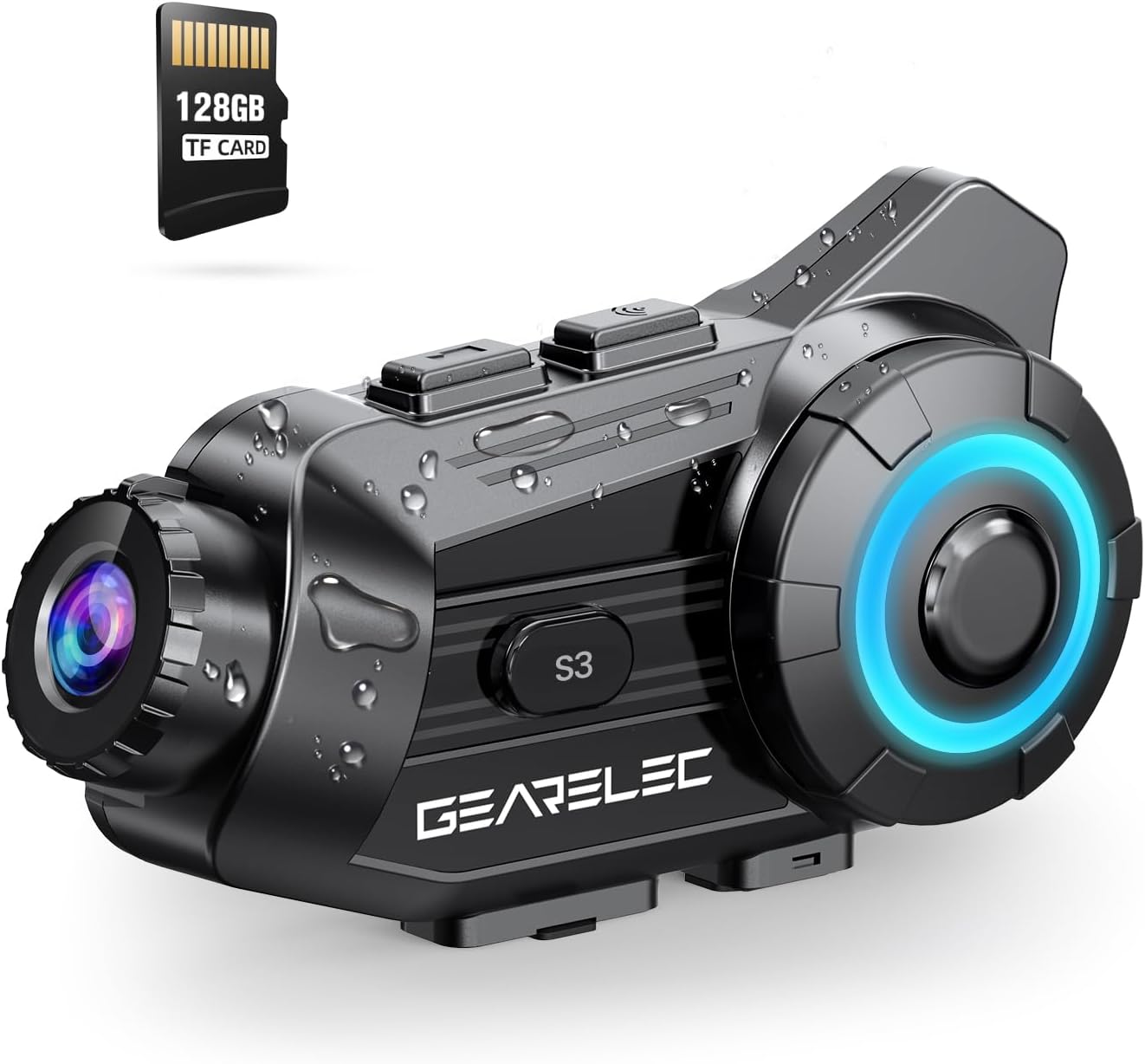
Figure 1.1: GEARELEC S3 Unit Overview. This image displays the compact design of the S3 unit, highlighting its integrated camera lens and control buttons, along with an included 128GB TF card.
2. זיכערקייַט אינפֿאָרמאַציע
- שטענדיק געבן א פריאריטעט פאר וועג זיכערהייט. ניצט נישט דעם אפאראט אויף א וועג וואס וועט אייך אפlenken פון פארן.
- Ensure the unit is securely mounted to your helmet before riding.
- פרובירט נישט צו צענעמען אדער מאדיפיצירן דעם איינהייט. דאס קען בטל מאכן די גאראנטיע און שאפן שאדן.
- האַלט דעם אַפּאַראַט אַוועק פון עקסטרעמע טעמפּעראַטורן און דירעקטער זון פֿאַר לענגערע פּעריאָדן.
- ניצט נאָר דעם צוגעשטעלטן טשאַרדזשינג קאַבל און אַקסעסאָריעס.
3. פּעקל אינהאַלט
ביטע טשעק די אינהאַלט פון די פּאַקעט ווען איר עפֿנט עס אויס:
- GEARELEC S3 Main Unit
- Helmet Mounting Bracket
- רעדנער און מיקראָפאָן קיט
- וסב טשאַרדזשינג קאַבלע
- 128 גב טף קאַרד
- באַניצער מאַנואַל
4. סעטאַפּ
4.1 ערשט טשאַרדזשינג
Before first use, fully charge the S3 unit. The 2000mAh battery provides extended usage times.
- Connect the provided USB charging cable to the charging port on the S3 unit.
- פֿאַרבינדט דעם אַנדערן עק פֿונעם קאַבל צו אַ USB מאַכט אַדאַפּטער (נישט אַרייַנגערעכנט) אָדער אַ קאָמפּיוטער USB פּאָרט.
- די טשאַרדזשינג אינדיקאַטאָר ליכט וועט זיך אָנצינדן. אַמאָל גאָר אָנגעלאָדן (אומגעפער 3 שעה), וועט די ליכט זיך טוישן אָדער אויסלעשן.

Figure 4.1: Battery Capacity and Charging. This image illustrates the 2000mAh battery capacity, showing a 3-hour charging time and various usage durations like 100 hours music time and 7 hours video recording.
4.2 אריינשטעלן די TF קארטל
The S3 unit supports up to 128GB TF cards for video recording. A 128GB TF card is included.
- Locate the TF card slot on the S3 unit.
- Gently insert the TF card into the slot until it clicks into place. Ensure the card is oriented correctly.
- צו אַרויסנעמען, דריק די קאַרטל אַרײַן ביז זי שפּרינגט אַרויס.
4.3 Mounting the Unit to Your Helmet
Securely attach the S3 unit to your helmet using the provided mounting bracket.
- Choose a suitable location on the side of your helmet for optimal camera view און אַקסעסאַביליטי.
- Attach the mounting bracket firmly to the helmet. Ensure it is stable and does not obstruct your vision.
- Slide the S3 main unit onto the mounting bracket until it locks securely.
- Connect the speaker and microphone kit to the S3 unit and position them inside your helmet for clear audio.
5. אַפּערייטינג ינסטרוקטיאָנס
5.1 מאַכט אויף / אַוועק
- מאַכט אויף: Press and hold the Power button for approximately 3 seconds until the indicator light illuminates and you hear a power-on prompt.
- מאַכט אַוועק: Press and hold the Power button for approximately 3 seconds until the indicator light turns off and you hear a power-off prompt.
5.2 בלועטאָאָטה פּערינג
Pair your S3 unit with your mobile phone or other Bluetooth devices.
- With the S3 unit powered off, press and hold the Power button for about 5-7 seconds until the indicator light flashes rapidly, indicating pairing mode.
- אויף אייער מאָביל טעלעפאָן, אַקטיוויזירט בלועטוט און זוכט פֿאַר פֿאַראַן דעוויסעס.
- Select "GEARELEC S3" from the list of devices to connect.
- Once connected, the indicator light will change to a slow flash.
5.3 אינטערקאם קאָמוניקאַציע
The S3 supports full-duplex communication for 2-8 riders within a 2000-meter range.

Figure 5.1: Multi-Rider Intercom. This image depicts multiple riders communicating via the S3 intercom system, illustrating the 6500ft (approx. 2000m) range for group communication.
- Initiating Intercom: After pairing multiple S3 units, short press the Intercom button on your unit to initiate a connection with another paired unit.
- Joining a Group: Follow the pairing instructions for each unit to create a group intercom. The system automatically connects to available units within range.
- ענדיקן אינטערקאם: Short press the Intercom button again to end the communication.
5.4 קאַמעראַ פונקציעס
The integrated 1080P HD camera offers various recording features.

Figure 5.2: 1080P HD Lens Capability. This image compares 720P and 1080P video quality, demonstrating the S3's clear shooting capabilities and its 20° lens rotation feature.
- אָנהייב / האַלטן רעקאָרדינג: דריק דעם קאַמעראַ קנעפּל איין מאָל צו אָנהייבן רעקאָרדירן. דריק עס ווידער צו האַלטן.
- ראָוטיישאַן פון די אָביעקטיוו: The lens supports 20° rotation for adjusting the shooting angle.
- G-Sensor Lock: In case of a collision, the built-in G-Sensor automatically locks the current video footage צו פאַרהיטן עס פון ווערן איבערגעשריבן.
- שלייף רעקאָרדינג: When the TF card is full, the system automatically overwrites the oldest unprotected files, ensuring continuous recording.

Figure 5.3: Intelligent Gravity Sensor. This image illustrates the G-Sensor feature, showing how it automatically locks video footage in the event of a collision, securing it as evidence.
5.5 App Connection (RoadCam)
Use the "RoadCam" application to view and manage recorded videos and photos.

Figure 5.4: Built-in WiFi Hotspot and App Control. This image shows a rider using the 'RoadCam' app on a smartphone to view recorded videos and images, highlighting the convenience of the built-in WiFi hotspot.
- Download the "RoadCam" app from your device's app store (available on Google Play and App Store).
- Turn on the S3 unit's Wi-Fi hotspot (refer to the device's specific Wi-Fi activation instructions).
- Connect your smartphone to the S3 unit's Wi-Fi network.
- Open the RoadCam app to access recorded content.
5.6 אַודיאָ פֿעיִקייטן
Enjoy high-quality audio for music, calls, and FM radio.

Figure 5.5: Stereo and Crystal-Clear Sound. This diagram illustrates the internal structure of the 40mm HiFi speaker, emphasizing its design for strong bass and clear audio output.
- מוזיק פּלייבאַק: Once paired with your phone, play music through your helmet speakers.
- מוזיק ייַנטיילונג: Share music with another S3 user within 30-50 meters.
- עפעם ראַדיאָ: Activate the FM radio function to listen to local stations.
- ראַש רעדוקציע: The S3 features DSP & CVC noise reduction and a windproof microphone for clear audio even at high speeds.

Figure 5.6: Triple Noise Reduction Technology. This image highlights the three components of the S3's noise reduction system: a windproof microphone, DSP noise reduction, and CVC noise-canceling technology, ensuring clear audio at speeds up to 80mph.
6. וישאַלט
- רייניקונג: ניצן אַ ווייך, דamp א שטאָף צו רייניקן די אויסערלעכע זייט פון דעם אַפּאַראַט. ניצט נישט קיין שטרענגע כעמיקאַלן אדער שרײַבנדיקע רייניגער.
- Lens Care: Gently wipe the camera lens with a microfiber cloth to avoid scratches.
- סטאָרידזש: Store the unit in a cool, dry place when not in use. If storing for extended periods, charge the battery to about 50% to prolong its lifespan.
- וואַסער קעגנשטעל: The S3 has an IP65 protection level, making it suitable for outdoor use in rain or snow. However, avoid submerging the unit in water.
7. טראָובלעשאָאָטינג
זעט די טאבעלע אונטן פאר אלגעמיינע פראבלעמען און זייערע לייזונגען.
| פּראָבלעם | מעגלעך סיבה | לייזונג |
|---|---|---|
| דער אַפּאַראַט טוט נישט מאַכט אויף | נידעריק באַטאַרייע | לאָדט דעם אַפּאַראַט גאָר אויף. |
| קען נישט צוזאמענשטעלן מיטן טעלעפאן | Not in pairing mode / Bluetooth off on phone | Ensure S3 is in pairing mode (rapid flashing light). Turn on phone's Bluetooth and retry. |
| אינטערקאם פארבינדט זיך נישט | Units out of range / Not properly paired | Move closer to other units. Re-pair all units in the group. |
| ווידעא רעקאָרדינג ישוז | TF card full / TF card error | Check TF card storage. Format or replace TF card if corrupted. |
| נעבעך אַודיאָ קוואַליטעט | Microphone/speakers improperly positioned / High wind noise | Adjust microphone and speaker placement. Ensure microphone is not directly exposed to wind. |
8. ספּעסאַפאַקיישאַנז
| שטריך | דעטאַל |
|---|---|
| מאָדעל נאָמען | S3 |
| ווידעא קאַפּטורע רעסאָלוטיאָן | 1080 פּ |
| ווידעא קאַפּטורע פֿאָרמאַט | mp4 |
| פאָטאָ סענסאָר טעכנאָלאָגיע | קמאָס |
| מאַקסימום עפענונג | 1.8 מילאַמיטערז |
| אָביעקטיוו ווינקל | 135° ברייט ווינקל |
| אָביעקטיוו ראָוטיישאַן | 20° |
| ינטערקאָם קייט | Up to 2000 meters (2-8 riders) |
| באַטאַרייע קאַפּאַציטעט | 2000 מאַה |
| טשאַרדזשינג צייט | בעערעך. 3 שעה |
| מוזיק צייט | אַרויף צו 100 שעה |
| ווידעא רעקאָרדינג צייט | אַרויף צו 7 שעה |
| וואָטערפּרוף רייטינג | IP65 |
| קאַנעקטיוויטי טעכנאָלאָגיע | Wireless (Bluetooth 5.1, Wi-Fi) |
| ספּעציעלע פֿעיִקייטן | G-Sensor Lock, Loop Recording, Music Sharing, FM Radio, DSP & CVC Noise Reduction |
| פּונקט וואָג | 15.2 אונסעס |
9. וואָראַנטי און שטיצן
GEARELEC products are designed for reliability and performance. For any questions or assistance, please contact our customer support team.
- קונה שטיצן: If you have any questions or require technical support, please reach out to "RuiSi Elctric" via the Amazon platform's "ASK A QUESTION" feature. Our team aims to reply within 6 hours.
- וואָראַנטי אינפֿאָרמאַציע: Please refer to the product packaging or your purchase receipt for specific warranty terms and conditions.


