1. הקדמה
The ANBERNIC RG34XXSP is a portable retro handheld game console designed for an immersive gaming experience. Featuring a flip design, a 3.4-inch IPS screen, and a powerful H700 quad-core processor, it supports a wide range of classic game formats. This manual provides essential information for setting up, operating, and maintaining your device.
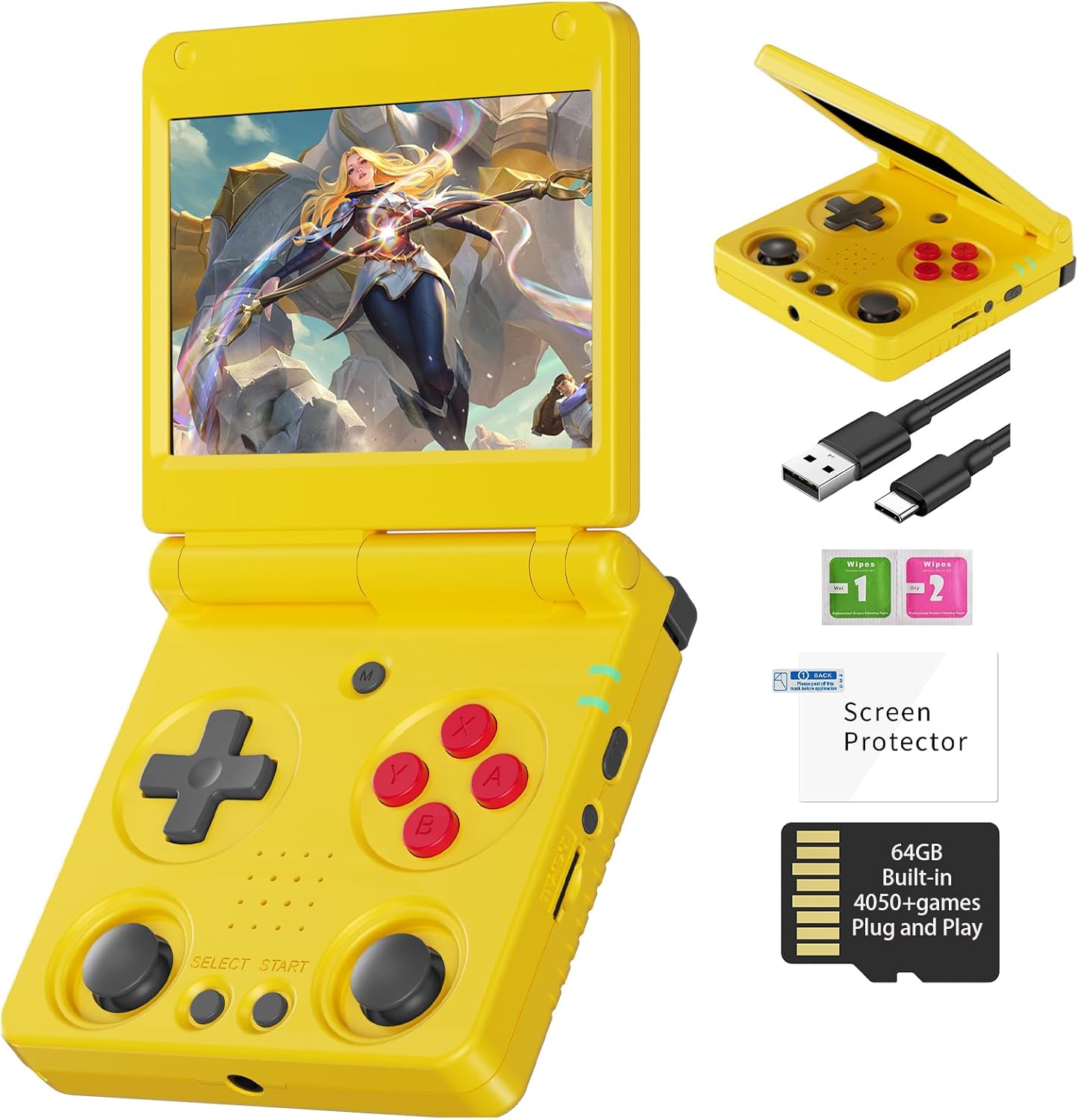
Image 1.1: The ANBERNIC RG34XXSP Retro Handheld Game Console in yellow.
2. זיכערקייַט אינפֿאָרמאַציע
- האַלטן די מיטל אַוועק פון וואַסער און נעץ.
- ויסמיידן עקסטרעם טעמפּעראַטורעס און דירעקט זונשייַן.
- דו זאלסט נישט פּרווון צו דיסאַסעמבאַל אָדער פאַרריכטן די מיטל זיך. קאָנטאַקט קונה שטיצן פֿאַר הילף.
- Use only the provided charging cable or a certified USB Type-C charger.
- האַלטן אַוועק פון קליינע קינדער צוליב קליינע טיילן.
- Prolonged use at high volume may cause hearing damage.
3. פּעקל אינהאַלט
באַשטעטיקן אַז אַלע זאכן זענען פאַראַן אין פּעקל:
- RG34XXSP Game Console
- וסב טשאַרדזשינג קאַבלע
- סקרין פּראָטעקטאָר
- באַניצער מאַנואַל
- טאַלאַנט באָקס

Image 3.1: Included accessories with the RG34XXSP console.
4. מיטל אויסלייג
Familiarize yourself with the buttons, ports, and features of your RG34XXSP console.
Image 4.1: Detailed diagram of the RG34XXSP console layout.
- ד-פּאַד: Directional input for navigation and gameplay.
- Game Keys (A, B, X, Y): הויפּט קאַמף קנעפּלעך.
- Left/Right Joysticks: Analog input for movement and camera control in supported games.
- אויסקלייבן/אָנהייבן קנעפּלעך: Game-specific functions, menu navigation.
- MENU קנעפּל: Accesses the console's main menu or in-game options.
- מאַכט שליסל: Turns the console on/off.
- ינדיקאַטאָר ליכט: ווײַזט מאַכט און טשאַרדזשינג סטאַטוס.
- TF1/INT. Slot: Main TF card slot for system and games.
- TF2/EXT. Slot: Secondary TF card slot for additional storage.
- VOL+/- קנעפּלעך: אַדדזשוסץ באַנד.
- OTG/USB Port: For connecting external devices or charging.
- הדמי פּאָרט: Connects to a TV or external display.
- L1/L2/R1/R2 Shoulder Buttons: Additional action buttons, typically used for triggers or modifiers.
5. סעטאַפּ
- Unpack the Console: Carefully remove the RG34XXSP console and all accessories from its packaging.
- Charge the Console: Connect the provided USB Type-C cable to the console's charging port and a compatible USB power adapter (not included). Charge the console until the battery indicator shows full. The 3300mAh Li-Polymer battery provides approximately 7-8 hours of gameplay on a full charge.
- אַריינשטעלן TF קאַרטל: The console comes with a 64GB TF card pre-installed in the TF1/INT. slot. This card contains the operating system and pre-loaded games. If you wish to expand storage, insert an additional TF card (up to 512GB) into the TF2/EXT. slot.
- מאַכט אויף: Open the console by flipping the upper cover. The magnetic suction function will hold it open. Press and hold the Power Key until the screen illuminates.
- Initial Navigation: Upon startup, use the D-Pad or joysticks to navigate the main menu. Press the 'A' button to select options and 'B' to go back.
6. אַפּערייטינג ינסטרוקטיאָנס
6.1 יקערדיק אָפּעראַציע
- קערן אויף / אַוועק: Press and hold the Power Key to turn the console on or off.
- שלאָפן מאָדע: Closing the console's lid will activate sleep mode, thanks to the built-in Hall switch chip. Opening the lid will resume operation.
- באַנד אַדזשאַסטמאַנט: Use the VOL+/- buttons on the side of the console.
- מעניו נאַוויגאַציע: Use the D-Pad or joysticks to move through menu options. Press 'A' to confirm, 'B' to cancel or go back.
6.2 שפּילן שפּילן
- From the main menu, navigate to the desired emulator or game list.
- Select a game using the 'A' button.
- Once the game loads, use the D-Pad, joysticks, and game keys (A, B, X, Y, L1, L2, R1, R2) to play. Refer to the game's specific controls if available.
- To exit a game or access in-game options, press the MENU button.
6.3 In-Game Menu Shortcuts
The RG34XXSP supports various in-game shortcuts for enhanced control:
- מעניו: Accesses the in-game menu.
- Menu + R2: שנעל פֿאָרווערטס.
- Menu + L2: Slow Motion.
- Menu + R1: Save State.
- Menu + L1: Load State.
- Menu + Y: Display Frame Rate.
- Menu + B: סקרעענשאָט.
- Menu + X: פּויזע.
- Menu + START: Quit Game.
- Menu + VOL+: Adjust Brightness.
- Menu + Left/Right Direction: Select Save State Slot.
7. Game Management
The RG34XXSP supports over 30 game formats. You can add more games by transferring compatible ROM files to the TF card. The console supports dual card slots and TF card expansion up to 512GB.
7.1 Adding Games
- מאַכט אַוועק די קאַנסאָול.
- Carefully remove the TF card (TF1/INT. or TF2/EXT.) from its slot.
- Insert the TF card into a computer's card reader.
- Locate the appropriate emulator folder (e.g., 'GBA', 'PS1', 'PSP') on the TF card.
- Copy your game ROM files into the respective folders. Ensure the ROMs are in compatible formats.
- Safely eject the TF card from your computer and reinsert it into the console.
- Power on the console. The new games should now appear in the corresponding emulator's game list.
The console is compatible with third-party software like RixeIHK, which allows for one-click game downloads and management.

Image 7.1: Supported game formats and console models.
8. קאַנעקטיוויטי
The RG34XXSP offers multiple connectivity options for enhanced gaming and entertainment.
8.1 ווי-פי און בלועטאָאָטה
- Wi-Fi (2.4G/5G 802.11a/b/g/n/ac): Connect to a wireless network for online multiplayer games, streaming, and system updates.
- Bluetooth (Bluetooth 4.2): Connect wireless controllers or other Bluetooth-enabled accessories.
8.2 TV Output (HDMI)
Connect your RG34XXSP to a TV or monitor using an HDMI cable (not included) for a larger screen gaming experience. This mode is ideal for family gatherings or parties.

Image 8.1: RG34XXSP connected to a TV for screen casting.
8.3 External Controllers
The console supports 2.4G wireless controllers and wired controllers, as well as Bluetooth controllers, for versatile gameplay options.
9. וישאַלט
- רייניקונג: Use a soft, dry cloth to clean the console's exterior. Do not use liquid cleaners or abrasive materials.
- סקרין זאָרגן: Apply the included screen protector to prevent scratches. Clean the screen with a microfiber cloth.
- סטאָרידזש: When not in use, close the console's lid to protect the screen. Store in a cool, dry place away from direct sunlight.
- באַטערי: To prolong battery life, avoid fully discharging the battery frequently. Charge regularly, even if not in active use.
10. טראָובלעשאָאָטינג
- קאנסאל טוט זיך נישט אן: Ensure the battery is charged. Connect the charger and try again. If the issue persists, perform a hard reset by pressing the reset button (if available) or holding the power button for an extended period.
- שפילן לאדן זיך נישט: Verify that the TF card is properly inserted. Check if the game ROM file is in a supported format and placed in the correct emulator folder.
- פּראָבלעמען מיטן עקראַן (פֿליקערנדיק, קיין עקראַן): Ensure the console is fully open and the screen connection is stable. If connected to a TV, check the HDMI cable and TV input.
- געזונט ישוז: Check the volume level using the VOL+/- buttons. Ensure headphones are properly connected if in use.
- קאָנטראָלס רעאַגירן נישט: Restart the console. If using external controllers, ensure they are properly paired via Bluetooth or connected via USB.
11. ספּעסאַפאַקיישאַנז
| שטריך | דעטאַל |
|---|---|
| מאָדעל נומער | RG34XXSP |
| דימענשאַנז | 3.45"ל x 2.49"בר x 0.71"ה |
| וואָג | 0.28 קילאָגראַמס (9.9 אונסעס) |
| פאַרשטעלן גרייס | 3.4 Inches IPS Full Viewing Angle, OCA Full Lamination |
| פאַרשטעלן האַכלאָטע | 720*480 |
| קפּו | H700 Quad-core ARM Cortex-A53, 1.5GHz |
| גפּו | Dual-core G31 MP2 |
| באַראַן | LPDDR4 2GB |
| סטאָרידזש | 64GB TF/MicroSD (expandable up to 512GB) |
| אָפּערייטינג סיסטעם | לינוקס 64-ביסל |
| ווי-פי | 2.4G/5G 802.11a/b/g/n/ac |
| בלועטאָאָטה | בלועטאָאָטה 4.2 |
| באַטערי | 3300mAh Li-Polymer, up to 8 hours battery life |
| טשאַרדזשינג | USB Type-C (5V/1.5A, supports C2C charger) |
| קאַנעקטיוויטי | HDMI Output, USB OTG |
| קאָנטראָללער טיפּ | Joystick, D-Pad, Buttons |
| מאַטעריאַל | פּלאַסטיק |
| רעקאַמענדיד עלטער | 15 יאר און העכער |
12. אפיציעלע פּראָדוקט ווידעאָ
ווידעא 12.1: אן אפיציעלע פראדוקט ווידעא ווייַזונגasing the ANBERNIC RG34XXSP handheld gaming console and its features.
13. וואָראַנטי און שטיצן
For warranty information, technical support, or service inquiries, please refer to the warranty card included in your package or contact the retailer where you purchased the product. You may also visit the official ANBERNIC website for further assistance and updated support resources.
ביטע באַהאַלטן אייער קויפן-באַווייַז פֿאַר יעדע וואָראַנטי-פאָדערונג.


