1. פּראָדוקט איבערview
The DOOGEE Tab A9 is a 10.1-inch Android 15 tablet designed for versatile use, from productivity to entertainment. It features a quad-core processor, ample memory, and a high-capacity battery, complemented by a suite of accessories for enhanced functionality.
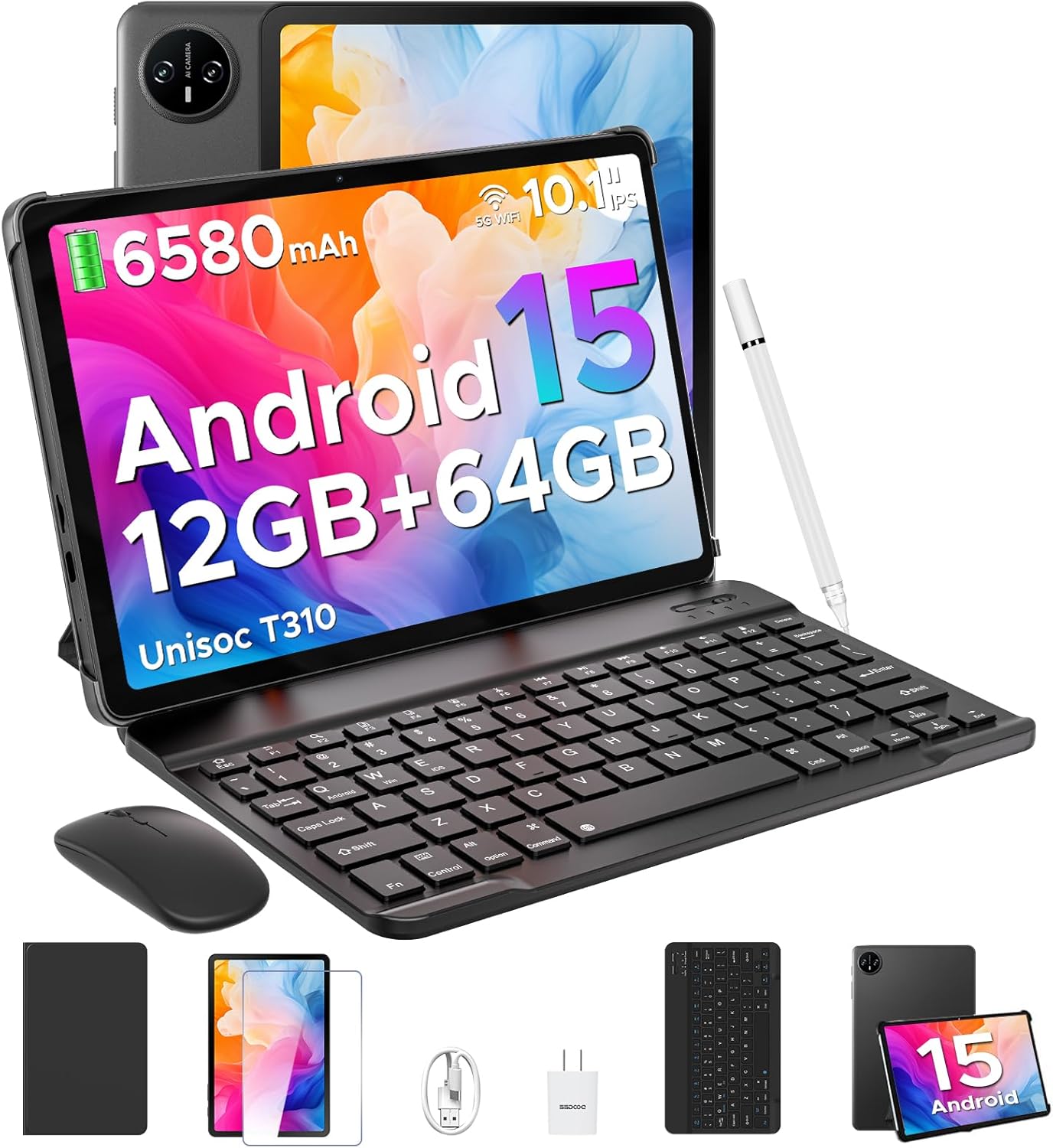
Image 1.1: DOOGEE Tab A9 tablet with its complete accessory kit.
שליסל פֿעיִקייטן:
- אַפּערייטינג סיסטעם: Android 15 for enhanced performance and privacy.
- פּראַסעסער: Unisoc T310 Quad-Core, 2.0GHz.
- זכּרון און סטאָרידזש: 12GB RAM (3GB physical + 9GB virtual) and 64GB internal storage, expandable up to 2TB via microSD.
- ווייַז: 10.1-inch IPS HD (1280x800) touchscreen.
- באַטערי: 6580mAh for extended use.
- קאַמעראַס: 8MP הינטערשטע קאַמעראַ און 5MP פראָנט קאַמעראַ.
- קאַנעקטיוויטי: 2.4G/5G Dual-band WiFi, Bluetooth 5.0.
- זיכערהייט: פּנים אַנלאַק.
- אַודיאָ: Dual speakers and 3.5mm headphone jack.
2. וואָס איז אַרייַנגערעכנט
Your DOOGEE Tab A9 package includes the following items:

Image 2.1: Contents of the DOOGEE Tab A9 package.
- DOOGEE Tab A9 Tablet
- בלועטאָאָטה קיבאָרד
- בלועטאָאָטה מאַוס
- סטילוס פּען
- סקרין פּראָטעקטאָר
- פּראַטעקטיוו קאַסע
- טשאַרדזשער
- וסב טיפּע- C קאַבלע
- באַניצער מאַנואַל
3. סעטאַפּ
3.1 ערשט טשאַרדזשינג
Before first use, fully charge your tablet using the provided charger and USB Type-C cable. Connect the cable to the tablet's charging port and the charger to a power outlet. The battery indicator on the screen will show charging status.
3.2 מאַכט אויף / אַוועק
- צו מאַכט אויף: Press and hold the Power button (located on the side of the tablet) until the DOOGEE logo appears.
- צו מאַכט אַוועק: דריק און האלט דעם פּאַוער קנעפּל, און דערנאָך סעלעקטיר "פּאַוער אויס" פֿון די אָפּציעס וואָס דערשייַנען אויף דעם עקראַן.
- צו ריסטאַרט: דריק און האלט דעם פּאַוער קנעפּל, און דערנאָך סעלעקטיר "ריסטאַרט" פֿון די אָפּציעס.
3.3 Connecting Accessories (Keyboard & Mouse)
The included keyboard and mouse connect via Bluetooth:
- זייט זיכער אַז די קלאַוויאַטור/מויז איז אויפגעלאָדן און אנגעצונדן.
- אויף אייער טאַבלעט, גייט צו סעטטינגס > פארבונדענע דעווייסעס > בלועטוט.
- צינד אן בלועטוט און סקען פאר פארהאן דעווייסעס.
- Select the keyboard or mouse from the list and follow any on-screen pairing instructions.
3.4 אריינשטעלן א מיקראָSD קאַרטל
To expand storage, insert a microSD card (up to 2TB, sold separately):
- געפינט די SIM/microSD קאַרטל טאַץ אויף דער זייט פון דער טאַבלעט.
- ניצט דעם צוגעשטעלטן סים ארויסווארפער געצייג צו עפענען דעם טאץ.
- לייגט די microSD קאַרטל אין דעם באַשטימטן שפּאַלט אויף דער טאַץ.
- פֿאָרזיכטיק צוריקשטעלט דעם טאַץ אין דער טאַבלעט.
4. אַפּערייטינג ינסטרוקטיאָנס
4.1 אַנדרויד 15 סיסטעם
Your DOOGEE Tab A9 runs on Android 15, offering improved app launch speeds, system smoothness, and enhanced privacy controls. Explore the intuitive interface and customize settings to your preference.
ווידעא 4.1: איבערview of the DOOGEE Tab A9 tablet's features, including its display, speakers, and connectivity.

Image 4.1: The Android 15 system logo, highlighting its intelligent, seamless, and secure features.
4.2 ווייַז סעטטינגס
The 10.1-inch IPS HD display offers clear visuals. You can adjust display settings for comfort:
- אויג זאָרג מאָדע: Reduces blue light to minimize eye strain. Activate it in Settings > Display > Eye Care Mode.
- טונקל מאָדע: Changes the system theme to a darker palette, ideal for low-light environments. Activate it in Settings > Display > Dark Mode.

Image 4.2: Visual representation of the tablet's 10.1-inch IPS HD display and its key specifications.
4.3 קאַמעראַ באַניץ
Capture photos and videos with the tablet's cameras:
- הינטערשטע קאַמעראַ (8MP): Suitable for general photography.
- פראָנט קאַמעראַ (5MP): אידעאל פֿאַר ווידעאָ רופן און סעלפֿיז.
Open the Camera app from the home screen or app drawer to start. Tap the shutter button to take a photo or switch to video mode to record.

בילד 4.3: עקס.amples of photos taken with the 8MP main camera.

Image 4.4: The 5MP front camera is suitable for clear video calls.
4.4 אַודיאָ פֿעיִקייטן
The tablet is equipped with dual speakers for clear audio output and a 3.5mm audio jack for private listening with headphones.

Image 4.5: Illustration of the tablet's dual speaker system for enhanced audio.
4.5 קאַנעקטיוויטי
- ווי-פי: Supports 2.4G and 5G dual-band Wi-Fi for stable and fast internet access. Connect via סעטטינגס > נעץ און אינטערנעט > Wi-Fi.
- בלועטאָאָטה 5.0: For connecting wireless peripherals like headphones, speakers, and the included keyboard and mouse. Manage connections in סעטטינגס > פארבונדענע דעווייסעס > בלועטוט.

Image 4.6: Features of the tablet's WiFi 5 connectivity.
4.6 פּנים ופשליסן
For convenient and secure access, set up Face Unlock:
- גיין צו סעטטינגס > זיכערהייט און פּריוואַטקייט > פּנים אַנלאָק.
- גיי די ינסטראַקשאַנז אויף דעם עקראַן צו פאַרשרייַבן דיין פּנים.
- Ensure you are in a well-lit area during registration for optimal performance.

Image 4.7: The tablet's facial recognition unlock feature in action.
4.7 Multitasking with Split-Screen
Utilize the split-screen feature to run two apps simultaneously:
- Open the first application.
- סווייפּ אַרויף פֿון דער אונטערשטער טייל פֿון עקראַן און האַלט צו צוטריט די לעצטע אַפּפּס.
- Tap the app icon at the top of the first app's card and select "Split screen".
- קלייַבט אויס די צווייטע אַפּ פֿון אייַערע לעצטע אַפּפּס אָדער אַפּ שופלאָד צו פֿילן די אַנדערע העלפט פֿונעם עקראַן.

Image 4.8: Demonstrating efficient split-screen multitasking on the tablet.
4.8 פאָרשטעלונג און סטאָרידזש
The Unisoc T310 Quad-Core processor and 12GB RAM (3GB physical + 9GB virtual) ensure smooth operation for daily tasks and multitasking. The 64GB internal storage provides space for essential apps and files, with expandable storage up to 2TB via microSD card.
Video 4.2: Highlights of the DOOGEE Tab A9's processor, RAM, and storage capabilities.

Image 4.9: Visual representation of the Unisoc T310 Quad-Core processor.

Image 4.10: Illustrates the tablet's memory and storage capacity, including expandable memory.
4.9 באַטאַרייע לעבן
The 6580mAh battery, combined with smart battery management, provides all-day usage. Actual battery life may vary based on usage patterns and settings.

Image 4.11: Details on the 6580mAh battery capacity and estimated usage times.
5. וישאַלט
- ווייכווארג דערהייַנטיקונגען: קאָנטראָלירט און אינסטאַלירט רעגולער סיסטעם דערהייַנטיקונגען צו זיכער מאַכן אָפּטימאַלע פאָרשטעלונג און זיכערהייט. גייט צו סעטטינגס > סיסטעם > סיסטעם דערהייַנטיקונג.
- רייניקונג: ניצט אַ ווייכע, לינט-פֿרייע שטאָף צו רייניקן דעם עקראַן און קערפּער פֿון דער טאַבלעט. פֿאַרמייַדט אַברייסיוו מאַטעריאַלן אָדער שאַרפֿע כעמיקאַלן.
- באַטערי זאָרגן: כדי צו פארלענגערן די לעבן פון די באַטעריע, זאָלט איר אויסמיידן עקסטרעמע טעמפּעראַטורן און נישט לאָזן די באַטעריע זיך אָפט גאָר אויסלאָדן.
- סטאָרידזש פאַרוואַלטונג: פּעריִאָדיש אויסמעקן נישט-נייטיקע files and apps to maintain system speed.
6. טראָובלעשאָאָטינג
זעט די טאבעלע אונטן פאר אלגעמיינע פראבלעמען און זייערע לייזונגען:
| אַרויסגעבן | מעגלעך לייזונג |
|---|---|
| טאַבלעט טוט זיך נישט אָן | זיכער מאַכן אַז די באַטאַרייע איז אויפגעלאָדן. פֿאַרבינדט דעם טשאַרדזשער און פּרוּווט ווידער. אויב עס רעאַגירט נישט, דריק און האַלט דעם פּאַוער קנעפּל פֿאַר 10-15 סעקונדעס צו צווינגען אַ ריסטאַרט. |
| ווי-פי קשר ישוז | Restart the tablet and your Wi-Fi router. Check Wi-Fi settings to ensure the correct network is selected and the password is entered correctly. |
| בלועטאָאָטה מיטל איז נישט פּערינג | Ensure the Bluetooth device is in pairing mode and within range. Restart both the tablet and the Bluetooth device. Check tablet's Bluetooth settings. |
| פּאַמעלעך פאָרשטעלונג | Close unused applications. Clear cache and temporary files. Consider uninstalling rarely used apps. Perform a system update if available. |
| פאַרשטעלן ניט ריספּאַנדאַבאַל | ריסטאַרט די טאַבלעט. אויב די פּראָבלעם בלייבט, זאָרגט אַז דער עקראַן איז ריין און פריי פון שמוץ. |
7. ספּעסאַפאַקיישאַנז
| שטריך | דעטאַל |
|---|---|
| מאָדעל נאָמען | קוויטל A9 |
| אָפּערייטינג סיסטעם | אַנדרויד 15 |
| פּראַסעסער | Unisoc T310 Quad-Core, 2 GHz |
| באַראַן | 12 גיגאבייט (3 גיגאבייט פיזיש + 9 גיגאבייט ווירטועל) |
| אינערלעכער סטאָרידזש | 64 גיגאבייט |
| יקספּאַנדאַבאַל סטאָרידזש | ביז 2TB דורך MicroSD קאַרטל |
| פאַרשטעלן גרייס | 10.1 אינטשעס |
| פאַרשטעלן האַכלאָטע | 1280 x 800 pixels (IPS HD) |
| דערציען אַפּאַראַט | 8 מפּ |
| פראָנט אַפּאַראַט | 5 מפּ |
| באַטאַרייע קאַפּאַציטעט | 6580 מאַה |
| ווירעלעסס טיפּ | 802.11ac, 802.11b, 802.11g, 802.11n (2.4G/5G WiFi) |
| בלועטאָאָטה | בלועטאָאָטה 5.0 |
| דימענשאַנז (LxWxH) | 9.54 X 6.33 X 0.38 אינטשעס |
| פּונקט וואָג | 1.12 פונט |
8. וואָראַנטי און שטיצן
Your DOOGEE Tab A9 tablet comes with a 2 יאָר וואָראַנטי און לעבן טעכניש שטיצן. For any questions, issues, or support needs, please contact DOOGEE customer service. Refer to the warranty card included in your package for specific terms and conditions.


