הקדמה
דאנק איר פֿאַר טשוזינג די שווארצעview W50PRO Smartwatch. This manual provides essential information for setting up, operating, and maintaining your device. Please read it carefully to ensure optimal performance and a safe user experience. Keep this manual for future reference.
פּעקל אינהאַלט
באַשטעטיקן אַז אַלע זאכן זענען פאַראַן אין דיין פּעקל:
- שוואַרץview W50PRO Smartwatch
- סיליקאָנע רימען
- Replacement Nylon Braided Strap
- מאַגנעטיק טשאַרדזשינג קאַבלע
- באַניצער מאַנואַל (דעם דאָקומענט)

Image: Package contents and product dimensions.
פּראָדוקט איבערview
די שווארצעview W50PRO Smartwatch features a 1.45-inch HD touchscreen display, function buttons, a powerful flashlight, and a comfortable silicone strap. Its robust design is suitable for various activities.

בילד: שוואַרץview W50PRO Smartwatch with its key features labeled.
סעטאַפּ
1. טשאַרדזשינג די מיטל
Before first use, fully charge your smartwatch. Connect the magnetic charging cable to the charging points on the back of the watch and plug the USB end into a power adapter (not included) or a computer's USB port. The watch will display a charging indicator.
- א פולע אָפּלאָד נעמט געוויינטלעך אַרום 3 שעה.
- The 960mAh battery provides up to 30 days of typical use and 100 days of standby time.

Image: Battery capacity and charging information.
2. אַפּ ינסטאַללאַטיאָן
אָפּלאָדירן און ינסטאַלירן די "Da Fit" application on your smartphone. You can find it in the App Store (iOS) or Google Play Store (Android).
3. Device Pairing and Bluetooth Calls
To connect your smartwatch and enable Bluetooth calling:
- Download the Da Fit app from your phone's app store.
- געבן בלועטאָאָטה אויף דיין סמאַרטפאָנע.
- Open the Da Fit app and add your device.
- Confirm the pairing request on your phone and watch.
- Grant necessary notification permissions within the Da Fit app for calls and messages.
- Once paired, you can make and receive calls directly from your watch.

Image: Connection and calling setup guide.
אַפּערייטינג ינסטראַקשאַנז
1. יקערדיק נאַוויגאַציע
- טאָוטשסקרעען: Swipe left/right, up/down to navigate menus and access features. Tap to select.
- פונקציע קנעפּלעך: Use the physical buttons on the side of the watch for quick access to specific functions or to return to the home screen.
2. Flashlight and Compass
The W50PRO includes a built-in flashlight and compass for outdoor activities.
- פלאַשליגהט: Activate the flashlight feature from the watch's menu. It offers fixed and intermittent modes for various situations.
- קאָמפּאַס: Access the compass feature from the watch's menu for accurate directional guidance.
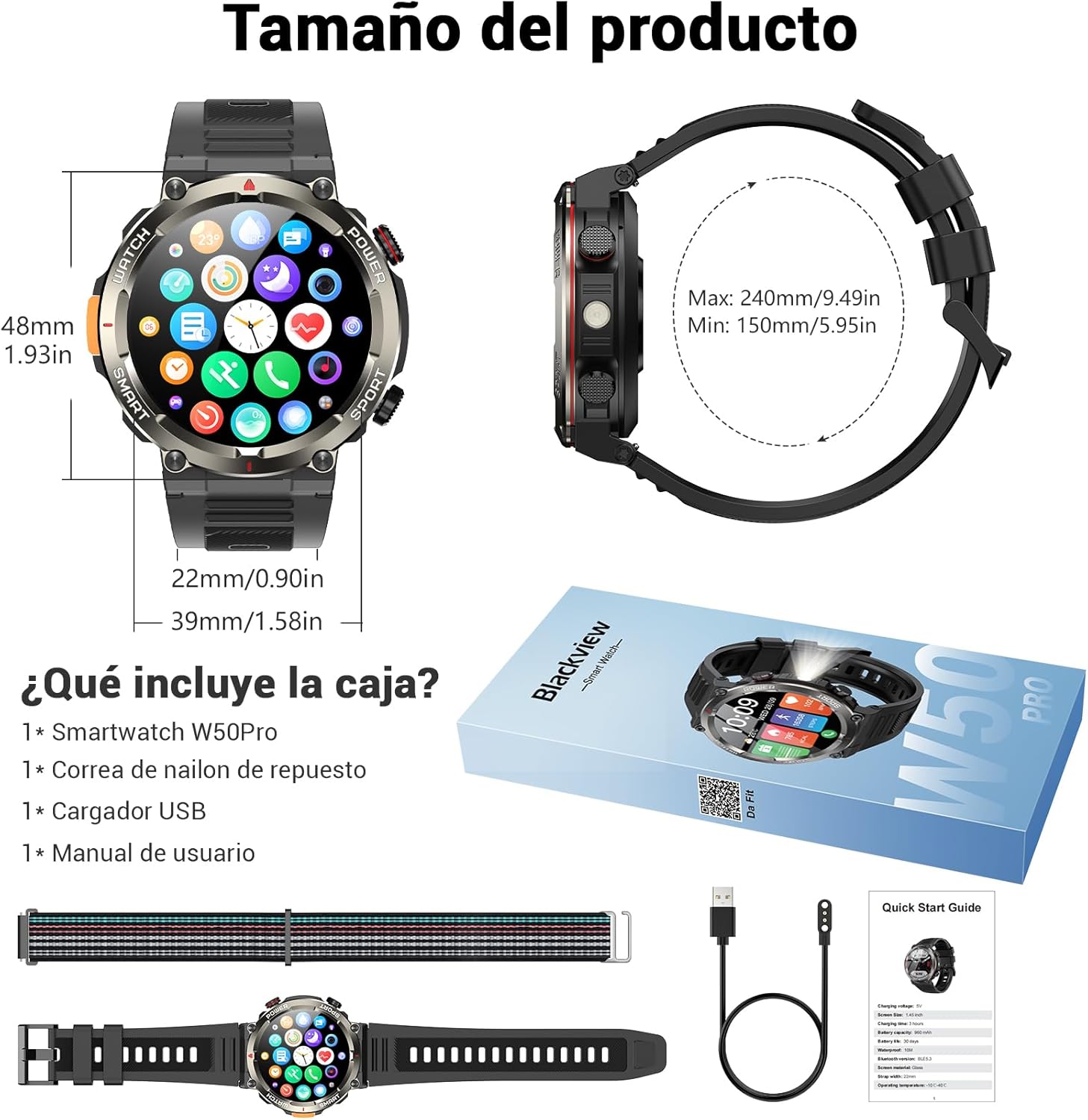
Image: Compass feature for outdoor navigation.

Image: Powerful LED flashlight in action.
3. Bluetooth Calling and Notifications
Once paired with your smartphone, the W50PRO allows you to manage calls and notifications directly from your wrist.
- Make/Receive Calls: Use the integrated speaker and microphone to make or answer calls.
- נאָטיפיקאַטיאָנס: Receive real-time alerts for text messages, emails, and social media apps.
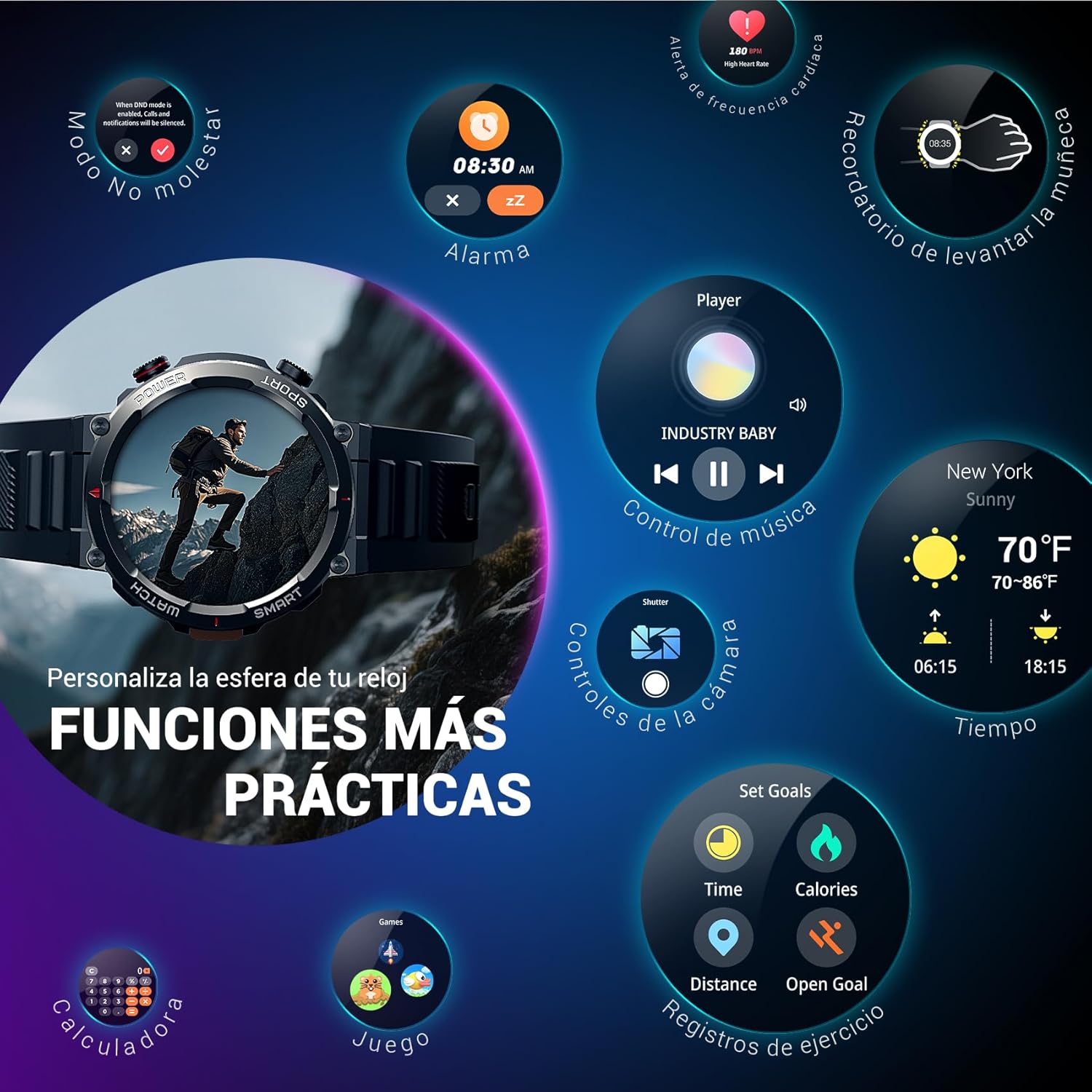
Image: Bluetooth calling and notification features.
4. געזונט מאָניטאָרינג
The smartwatch is equipped with high-precision sensors to monitor various health indicators:
- הארץ ראטע: רעאַל-צייט האַרץ קורס מאָניטאָרינג.
- בלוט זויערשטאָף (SpO2): מאָניטאָר דיין בלוט זויערשטאָף לעוועלס.
- שלאָף מאָניטאָר: Tracks sleep quality and patterns.
- סטרעס לעוועלס: גיט איינבליקן אין אייערע סטרעס לעוועלס.
All health data synchronizes with the Da Fit app for detailed analysis and trend tracking.

Image: Real-time health monitoring features.
5. ספּאָרט מאָדעס
The W50PRO offers over 100 integrated sports modes, including running, cycling, climbing, rope skipping, football, and basketball. It accurately records exercise time, distance, steps, calorie consumption, and heart rate changes, providing clear and intuitive performance data. Detailed data can be viewעד אין די דאַ פיט אַפּ.

בילד: איבערview of 100+ sports modes.
6. קאַסטאַמייזן זייגער פּנים
The Da Fit app provides a wide selection of watch faces to suit various styles. You can also upload personal photos as wallpaper and adjust text color and widget layout to create a unique watch interface.

Image: Customizable watch faces.
7. Other Practical Functions
די שווארצעview W50PRO includes additional features for daily convenience:
- וועטער פאָרעקאַסט
- מוזיק קאָנטראָל
- אַפּאַראַט רימאָוט קאָנטראָל
- אַלאַרמס
- זיציק דערמאָנונג
- טרינקען וואַסער דערמאָנונג
- סטאַפּוואַטש
- קאָונטדאָוון טיימער
- געפֿינען פאָון
- קאַלקולאַטאָר
- גאַמעס
- ברייטנאַס אַדזשאַסטמאַנט

Image: Multiple smart functions available on the smartwatch.
וישאַלט
1. רייניקונג
Regularly clean your smartwatch and strap to prevent skin irritation and maintain device functionality. Use a soft, damp שטאָף צו ווישן דעם עקראַן און גasing. For the strap, follow the manufacturer's cleaning recommendations based on the material (silicone or nylon).
2. וואַסער קעגנשטעל
די שווארצעview W50PRO Smartwatch features an IP68 water resistance rating. This means it is protected against dust ingress and can withstand immersion in water up to 1.5 meters for up to 30 minutes. It is suitable for daily use, such as hand washing or light rain. Avoid using it in hot water, saunas, or during diving, as steam and high pressure can compromise the seals.

Image: Durability features including IP68 water resistance.
3. באַטערי קער
צו פאַרלענגערן די באַטאַרייע לעבן:
- ויסמיידן עקסטרעם טעמפּעראַטורעס.
- לאָזט נישט די באַטאַרייע גאָר אויסליידיקן אָפט.
- Charge the device using the provided magnetic charging cable.
טראָובלעשאָאָטינג
If you encounter issues with your Blackview W50PRO Smartwatch, try the following:
- מיטל נישט קער אויף: מאַכן זיכער אַז די וואַך איז גאָר באפוילן.
- קען נישט צוזאמענשטעלן מיטן טעלעפאן: Check if Bluetooth is enabled on both devices. Restart both the watch and phone. Ensure the Da Fit app has necessary permissions.
- נישט פּינקטלעכע געזונט דאַטן: זייט זיכער אז די זייגער טראָגט זיך גוט אויף אייער האַנטגעלענק. רייניקט די סענסאָרן רעגולער.
- מעלדונגען נישט באקומען: Verify that notification permissions are granted in the Da Fit app and your phone's settings. Ensure the app is running in the background.
- קורץ באַטאַרייע לעבן: Reduce screen brightness, disable unnecessary features, and limit frequent heart rate monitoring.
For persistent issues, refer to the Da Fit app's help section or contact customer support.
ספּעסאַפאַקיישאַנז
| שטריך | באַשרייַבונג |
|---|---|
| סאָרט | שוואַרץview |
| מאָדעל | W50PRO |
| ווייַז גרייס | 1.45 אינטשעס |
| ווייַז טיפּ | לקד |
| האַכלאָטע | 360 X 360 בילדצעלן |
| באַטאַרייע קאַפּאַציטעט | 960 מאַה |
| טיפּיש באַטערי לעבן | אַרויף צו 30 טעג |
| סטאַנדביי צייט | אַרויף צו 100 טעג |
| טשאַרדזשינג צייט | בעערעך. 3 שעה |
| קאַנעקטיוויטי | בלועטאָאָטה |
| מענטש צובינד אַרייַנשרייַב | Buttons, Microphone |
| וואַסער קעגנשטעל | IP68 |
| קאַמפּאַטאַבאַל טעלעפאָן מאָדעלס | יאָס און אַנדרויד |
| פּראָדוקט דימענשאַנז | 8.8 X 2.2 X 18.1 סענטימעטער |
| פּראָדוקט וואָג | 136 ג |
וואָראַנטי און שטיצן
For warranty information and technical support, please refer to the documentation included with your purchase or visit the official Blackview webזייטל. האַלט דיין קויפן באַווייַז פֿאַר וואָראַנטי קליימז.


