1. פּראָדוקט איבערview
The VOSFEEL M01 Rechargeable Camping Fan is a versatile and portable device designed to provide cooling and illumination in various indoor and outdoor settings. It features a high-capacity battery, multiple fan speeds, an LED lantern, and convenient charging capabilities for other devices.
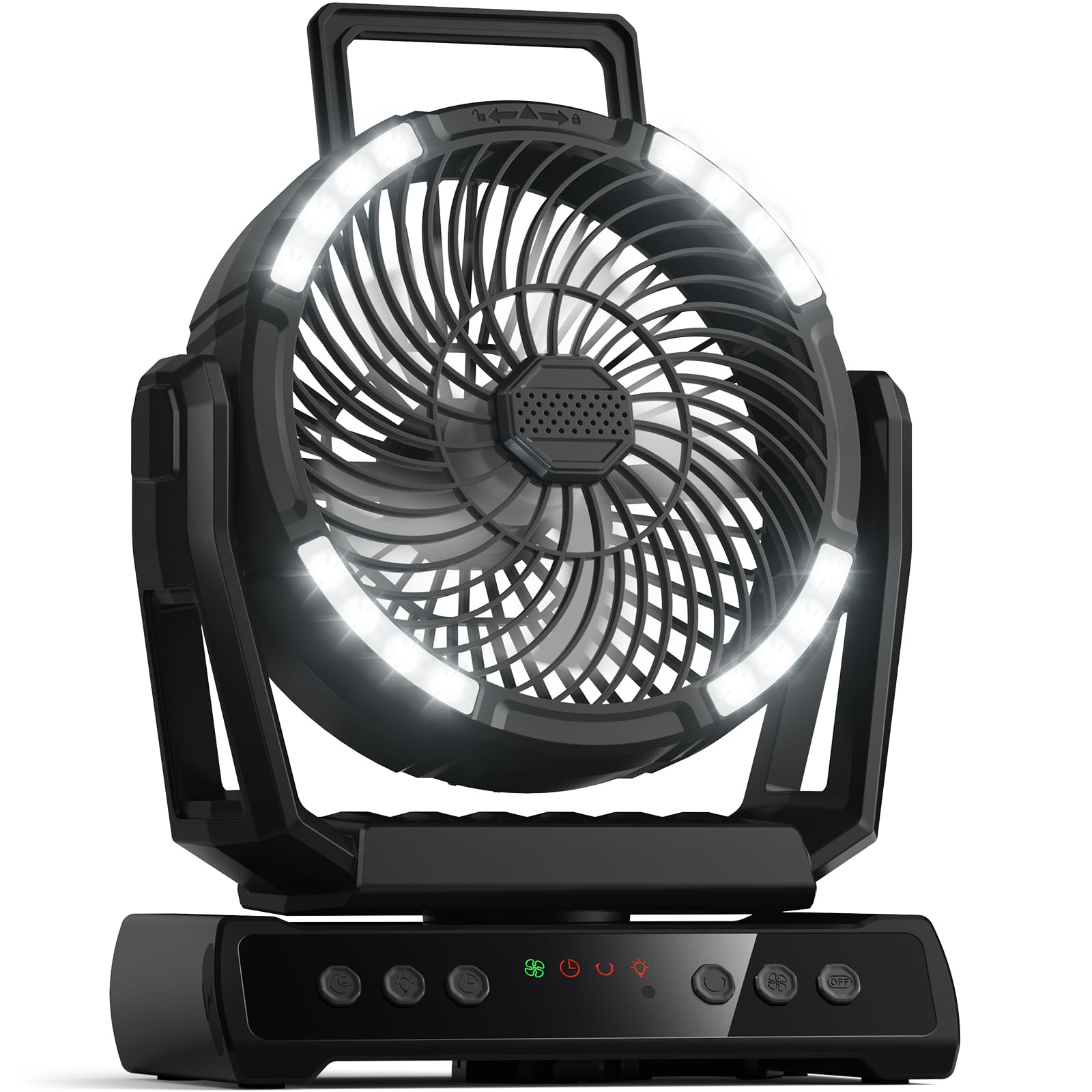
בילד 1.1: The VOSFEEL M01 Rechargeable Camping Fan in use, demonstrating its fan, LED light, and device charging capabilities.
2. פּעקל אינהאַלט
- VOSFEEL M01 Rechargeable Campינג פאַן
- ווייַט קאָנטראָל
- וסב-C טשאַרדזשינג קאַבלע
- באַניצער מאַנואַל
3. סעטאַפּ
3.1 ערשט טשאַרדזשינג
- Connect the provided USB-C charging cable to the fan's charging port.
- שטעקט אריין דעם אנדערן עק פונעם קאבל אין א קאמפאטיבלן USB פאוער אדאפטער (נישט אריינגערעכנט).
- The LED display will show the charging progress. Fully charge the fan before first use for optimal battery life.
3.2 רימאָוט קאָנטראָל סעטאַפּ
The remote control comes with batteries pre-installed. Simply remove any plastic tab protecting the battery to activate it.
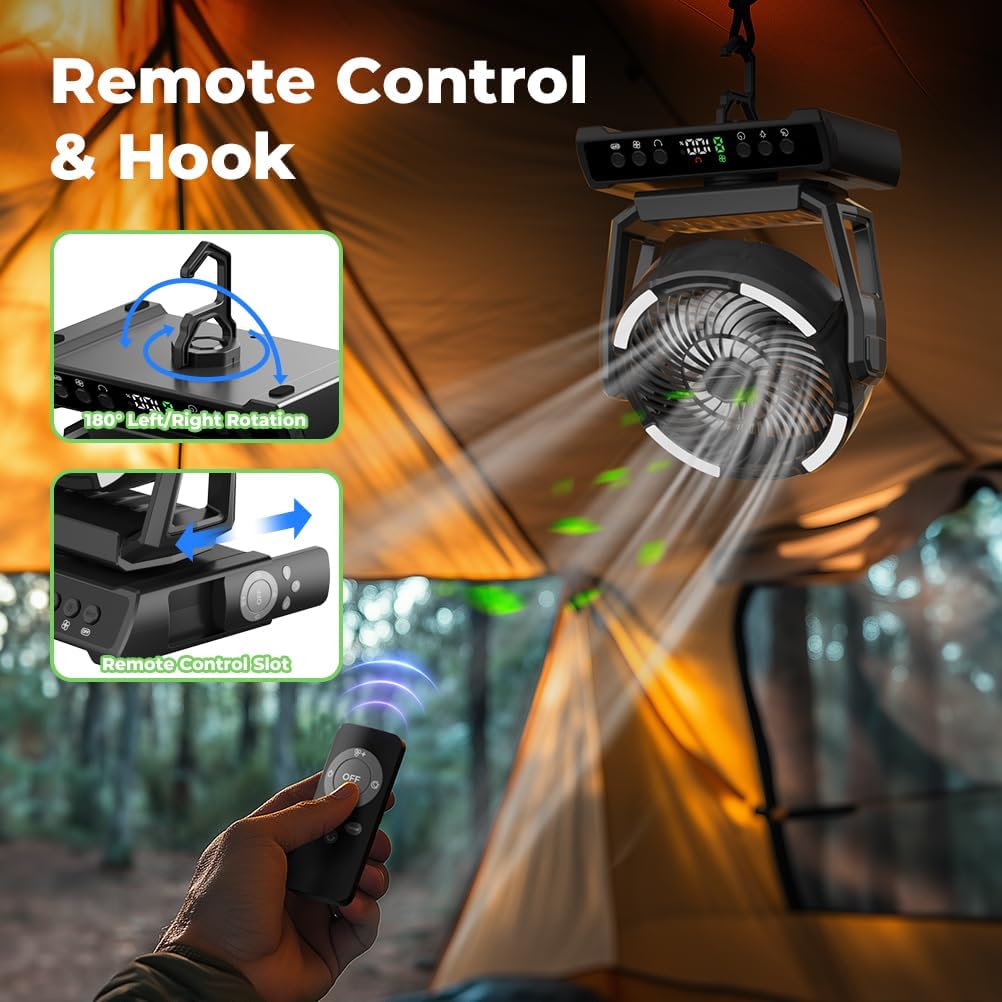
בילד 3.1: The fan hanging from a tent, illustrating the remote control and its storage slot.
4. אַפּערייטינג ינסטרוקטיאָנס
4.1 מאַכט אויף / אַוועק
- דרוק די מאַכט קנעפּל on the fan's control panel or the remote control to turn the fan on.
- To turn off all functions (fan, light, oscillation), press the Master OFF Button on the control panel or remote.
4.2 ווענטילאַטאָר גיכקייט אַדזשאַסטמענט
The fan offers 9 wind speeds, including a natural wind mode. Use the פאָכער ספּיד קנעפּלעך (+ / -) on the control panel or remote to cycle through speeds 1-8. The 'F' setting indicates natural wind mode.

בילד 4.1: Visual representation of the 9 wind speed settings.
4.3 LED לאַנטערן אָפּעראַציע
The integrated LED lantern has 3 adjustable brightness levels. Press the ליכט קנעפּל on the fan or remote to cycle through Low, Medium, and High brightness. A dedicated נאַכט מאָדע קנעפּל can dim or turn off the display light for undisturbed sleep.

בילד 4.2: The fan's LED lantern demonstrating its three brightness levels.
4.4 Oscillation and Rotation
- דרוק די אָסילאַטיאָן קנעפּל on the fan or remote to activate automatic 45° to 90° left/right rotation.
- The fan head can be manually rotated 270° up and down to direct airflow precisely.
4.5 טייַמער פֿונקציע
Set a timer for 1 to 9 hours using the טיימער קנעפּל. The fan will automatically turn off after the set duration.
4.6 פּאַוער באַנק פונקציע
The fan is equipped with two USB output ports, allowing you to charge up to two external devices simultaneously. Connect your device's charging cable to the USB output port on the fan.
ווידעא 4.1: A demonstration of the VOSFEEL Portable Camping Fan's features, including fan speeds, oscillation, and charging capabilities.
4.7 אַראָמאַ פונקציע
To use the aromatherapy feature, gently twist and remove the aroma tablet cover located at the center of the fan grille. Insert an aromatherapy tablet or a few drops of essential oil onto the pad, then replace the cover. The fan will then disperse the aroma.

בילד 4.3: Instructions for using the fan's aroma function.
5. וישאַלט
5.1 Cleaning the Fan Blades
- פאַרזיכערן אַז די פאָכער איז אויסגעדרייט אַוועק און אַנפּלאַגד איידער רייניקונג.
- Gently twist the front cover counter-clockwise to remove it.
- Wipe the fan blades and interior surfaces with a soft, damp cloth. Do not use abrasive cleaners or immerse the fan in water.
- Align the notches and twist the front cover clockwise to reattach it securely.

בילד 5.1: Steps for easy cleaning of the fan blades.
6. טראָובלעשאָאָטינג
- פען טוט זיך נישט אן: Ensure the battery is charged. Connect the fan to a power source using the USB-C cable.
- שוואַך לופט לויפן: Check the fan speed setting and increase if necessary. Ensure the fan blades are clean and free from obstructions.
- LED ליכט אַרבעט נישט: Press the Light Button to cycle through brightness levels. Ensure the fan has sufficient battery charge.
- ווײַטקאָנטראָל רעאַגירט נישט: Check if the remote control batteries are properly inserted and functional. Ensure there are no obstructions between the remote and the fan.
- Device not charging via USB: Ensure the fan has sufficient battery charge. Verify that the USB cable and the device being charged are functioning correctly.
7. ספּעסאַפאַקיישאַנז
| שטריך | באַשרייַבונג |
|---|---|
| סאָרט | וואָספיל |
| מאָדעל נאָמען | M01 |
| באַטאַרייע קאַפּאַציטעט | 30000 מאַה |
| פאָכער ספּידז | 9 (including natural wind mode) |
| געפירט ליכט לעוועלס | 3 |
| אַסאַליישאַן | 45°-90° Left/Right Auto Rotation |
| מאַנואַל ראָוטיישאַן | 270° Up/Down |
| טייַמער פֿונקציע | 1-9 שעה |
| מאַכט מקור | באַטאַרייע פּאַוערד (קריקאָנלאָדלעך) |
| קאָנטראָל מעטאָד | דרוק קנעפּל, ווייַט |
| פּראָדוקט דימענשאַנז | 8.3"ד רענטגענ 5.3"וו רענטגענ 10.8"ה |
| פּונקט וואָג | 2.81 פונט |
| ראַש מדרגה | 29 דעציבעלן |
8. וואָראַנטי און שטיצן
For warranty information and customer support, please refer to the contact details provided on the product packaging or the official VOSFEEL webפּלאַץ. האַלטן דיין קויפן קאַבאָלע פֿאַר וואָראַנטי קליימז.


