
הקדמה
Welcome to the Parsonver SR2 Smart Watch user manual. This guide provides detailed instructions on how to set up, operate, maintain, and troubleshoot your new smart watch. Please read this manual thoroughly to ensure optimal performance and longevity of your device.

Image: The Parsonver SR2 Smart Watch, showcasing its display with time, date, steps, and heart rate, alongside a smaller inset of its GPS tracking feature.
1. סעטאַפּ
1.1 פּעקל אינהאַלט
איידער איר הייבט אן, ביטע זיכער מאכן אז אלע זאכן זענען פאראן אין אייער פעקל:
- Parsonver SR2 סמאַרט וואַך
- טשאַרדזשינג קאַבלע
- באַניצער מאַנואַל (דעם דאָקומענט)

Image: An illustration showing the Parsonver SR2 Smart Watch, its magnetic charging cable, and the included user manual.
1.2 טשאַרדזשינג די מיטל
Upon first use, fully charge your smart watch. Connect the magnetic charging cable to the charging contacts on the back of the watch and plug the USB end into a power adapter (not included) or a computer's USB port. A full charge typically takes approximately 2 hours.
Image: The Parsonver SR2 Smart Watch connected to its magnetic charging cable, displaying a 100% charge indicator.
1.3 אַפּ אינסטאַלאַציע און פּערינג
To unlock the full functionality of your Parsonver SR2 Smart Watch, download and install the companion application on your smartphone.
- Scan the QR code in the manual or search for the 'Parsonver' app in your phone's app store (Google Play Store for Android, Apple App Store for iPhone).
- Install the application and create an account or log in.
- מאַכן זיכער אַז בלועטאָאָטה איז ענייבאַלד אויף דיין סמאַרטפאָנע.
- Open the Parsonver app, navigate to the device section, and follow the on-screen instructions to pair your SR2 Smart Watch.
- Grant all necessary permissions requested by the app for full functionality, including notifications and location services.
2. אפערירן אייער סמאַרט וואַך
2.1 יקערדיק נאַוויגאַציע
The Parsonver SR2 Smart Watch features a responsive touchscreen and dual physical buttons for intuitive control.
- טאָוטשסקרעען: סווייפּ לינקס/רעכטס, אַרויף/אַראָפּ צו נאַוויגירן דורך מעניוז און פֿעיִקייטן. צאַפּן צו סעלעקטירן.
- אויבערשטער קנעפּל: Typically used to return to the home screen or wake the device.
- נידעריקער קנעפּל: Customizable. Can be set to quickly access workout modes or frequently used applications via the companion app.

Image: A close-up of the Parsonver SR2 Smart Watch highlighting its dual button design and a menu showing 'Exercise', 'Walking', and 'Treadmill' options.
2.2 Bluetooth Calling & Smart Notifications
The SR2 Smart Watch supports Bluetooth 5.3 for stable connectivity, allowing you to answer and make calls directly from your wrist and receive smart notifications.
- ענטפֿערן/מאַכן רופֿן: Once paired, incoming calls will display on your watch. You can answer or reject them. Use the integrated microphone and speaker for conversations.
- סמאַרט נאָוטאַפאַקיישאַנז: Receive alerts for calls, SMS, and various social media applications directly on your watch. Ensure app permissions are granted for notifications.
- Quick Call Replies: (Android only) Respond instantly to calls with pre-set messages.

Image: A person interacting with the Parsonver SR2 Smart Watch, showing a call screen with a dial pad and contact list, along with icons for various social media notifications.
2.3 Sports Modes & Built-in GPS
Track your fitness activities with over 100 sports modes and accurate built-in GPS.
- 100+ ספּאָרט מאָדעס: Select your activity from a wide range of sports to get precise tracking of duration, distance, calories burned, and heart rate zones.
- געבויט-אין GPS: Accurately record your workout routes without needing your phone. View detailed maps and statistics in the companion app after your activity.
- קלוג דעטעקשאַן: The watch can automatically recognize when you are running, walking, or using a treadmill.

Image: A person running outdoors, with the Parsonver SR2 Smart Watch displaying a GPS-tracked route on its screen and a smartphone app showing detailed workout data including distance and time.
2.4 24-Hour Health Monitoring
Monitor your health metrics continuously with the SR2 Smart Watch.
- האַרץ קורס מאָניטאָרינג: Tracks your heart rate throughout the day. Set custom alerts for high or low readings.
- שלאָף מאָניטאָרינג: Analyzes your sleep patterns (deep sleep, light sleep, REM, awake time, sporadic naps) to provide insights into your sleep quality.
- מאָניטאָרינג פון בלוט זויערשטאָף (SpO2): Measures your blood oxygen levels, providing clear trends and real-time tracking.
- דרוק מאָניטאָרינג: Understand your emotional fluctuations through data-driven body-mind analysis.
- Women's Health Companion: Provides data-driven cycle management features.

Image: A person sleeping, wearing the Parsonver SR2 Smart Watch, with graphics illustrating sleep monitoring, heart rate monitoring, stress monitoring, and blood oxygen monitoring features.
2.5 Watch Faces & DIY
Personalize your watch with a variety of watch faces or create your own.
- 100+ וואַך פנימער: Choose from a wide selection of pre-installed watch faces to match your style.
- DIY Watch Faces: Use the companion app to upload your own photos and customize your watch face.

Image: The Parsonver SR2 Smart Watch displaying a custom watch face with a photo, surrounded by various other watch face designs and a smartphone screen showing the watch face synchronization interface.
2.6 נאָך פֿעיִקייטן
The SR2 Smart Watch offers a range of other useful functions:
- וועלט זייגער
- ברייטנאַס אַדזשאַסטמאַנט
- שרעק
- קאַלקולאַטאָר
- טיימער
- געפֿינען מיין טעלעפאָן
- Lift-to-wake
- סטאַפּוואַטש
- מוזיק קאָנטראָל
- Remote Camera Trigger
- ברידינג עקסערסייזיז
- Reminders (Handwashing, Medication, Event, Drinking, Standing)

Image: The Parsonver SR2 Smart Watch screen surrounded by icons representing various features like weather, music, camera control, alarm, and more.
3. וישאַלט
3.1 וואַסערפּרוף שאַץ (IP68)
The Parsonver SR2 Smart Watch is rated IP68 waterproof, meaning it is rigorously tested to withstand splashes, hand washing, face washing, and intense sweat. It is suitable for daily use and light water exposure.
Note: Avoid using the watch while showering, in saunas, or swimming, as hot water, steam, or prolonged submersion can compromise the seal and cause damage.

Image: A man kayaking on a river, wearing the Parsonver SR2 Smart Watch, illustrating its IP68 waterproof capability against splashes.
3.2 רייניקונג און זאָרגן
- רעגולער רייניקט אייער זייגער און רימען מיט א ווייכן, טרוקענעם שטאָףamp שטאָף.
- ויסמיידן ניצן שטרענגע כעמיקאַלן, אַברייסיוו רייניגער, אָדער סאָלוואַנץ.
- זיכער מאַכן אַז די טשאַרדזשינג קאָנטאַקטן זענען ריין און טרוקן איידער טשאַרדזשינג צו פאַרמייַדן קעראָוזשאַן.
3.3 באַטערי קער
- Charge the watch regularly, avoiding complete discharge for extended periods.
- האַלט די זייגער אין אַ קיל, טרוקן אָרט ווען נישט אין באַנוץ.
- Typical battery life is 5-7 days with normal use, and up to 40 days in standby mode. Actual battery life may vary based on usage.
4. טראָובלעשאָאָטינג
If you encounter issues with your Parsonver SR2 Smart Watch, please refer to the following common solutions:
| אַרויסגעבן | מעגלעך לייזונג |
|---|---|
| וואַך נישט אויסגעדרייט אויף | זיכער מאַכן אַז די זייגער איז גאָר אויפגעלאָדן. פֿאַרבינדט עס צום טשאַרדזשער פֿאַר לפּחות 30 מינוט. |
| קען נישט צוזאמענשטעלן מיטן טעלעפאן | Ensure Bluetooth is enabled on your phone. Restart both the watch and phone. Make sure the watch is within Bluetooth range. Check app permissions. |
| נאָוטאַפאַקיישאַנז ניט באקומען | Verify that notification permissions are granted in the Parsonver app and your phone's settings. Ensure the app is running in the background. |
| אומגענויע געזונטהייט דאַטן | זייט זיכער אז די זייגער טראָגט זיך גוט אויף אייער האַנטגעלענק, נישט צו ענג אדער צו לויז. רייניקט דעם סענסאָר אויף דער הינטערשטער זייגער. פֿאַרמייַדט איבערגעטריבענע באַוועגונג בעת מעסטונגען. |
| דזשי-פי-עס טרעקט נישט | זייט זיכער אז איר זענט אין אן אפענעם דרויסנדיקן שטח מיט א קלארן view of the sky. Wait for the watch to acquire a GPS signal before starting your activity. |
| קורץ באַטאַרייע לעבן | Reduce screen brightness, disable 'Lift-to-wake' if not needed, limit continuous heart rate monitoring, and close unused apps on the watch. |
אויב די אַרויסגעבן בלייַבט, ביטע קאָנטאַקט קונה שטיצן פֿאַר ווייַטער הילף.
5. ספּעסאַפאַקיישאַנז
| שטריך | דעטאַל |
|---|---|
| מאָדעל נומער | SR2 |
| פּראָדוקט דימענשאַנז | 9.84 X 1.69 X 0.46 אינטשעס |
| פּונקט וואָג | 1.41 אונסעס (40 גראַם) |
| פאַרשטעלן גרייס | 1.27 אינטשעס (שטייענדיקער עקראַן גרייס) |
| קענטיק סקרין דיאַגאָנאַל | 2" / 4 ס״מ |
| זכּרון סטאָרידזש קאַפּאַסיטי | 256 מב |
| ווירעלעסס קאָמוניקאַציע | בלועטאָאָטה 5.3 |
| מענטש צובינד אַרייַנשרייַב | טאָוטשסקרעען |
| אינטערנאַציאָנאַלע פּראַטעקשאַן שאַץ | IP68 |
| באַטערי | 1 C באַטעריע פארלאנגט (אריינגערעכנט) |
| פאַבריקאַנט | פּאַרסאָנווער |
| ערשטער בנימצא טאָג | אקטאבער 12, 2025 |
6. וואָראַנטי & שטיצן
6.1 פּראָדוקט וואָראַנטי
Parsonver products are designed and manufactured to the highest quality standards. This product is covered by a limited warranty against defects in materials and workmanship. Please refer to the warranty card included in your package or contact Parsonver customer support for specific warranty terms and conditions.
6.2 קונה שטיצן
For any questions, technical assistance, or support needs, please contact Parsonver customer service. Our support team is available 24/7 to assist you.
- אָנליין שטיצן: Visit the official Parsonver website or contact us through the companion app for online assistance.
- E- בריוו שטיצן: Refer to your warranty card or product packaging for email contact information.
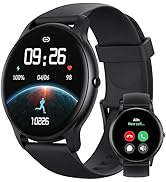
Image: An icon representing 24/7 online customer support, featuring a headset and chat bubbles.


