1. הקדמה
This manual provides detailed instructions for the installation, operation, and maintenance of your GIGABYTE GA-B760M D3HP WIFI6 motherboard. Designed for optimal performance and reliability, this motherboard supports Intel Core 14th, 13th, and 12th generation CPUs and features DDR5 memory support, PCIe 4.0 M.2 connectors, and Wi-Fi 6 connectivity. Please read this manual thoroughly before beginning installation to ensure proper setup and to maximize the lifespan of your product.
2. שליסל פֿעיִקייטן
- CPU שטיצן: Compatible with Intel Core 14th, 13th, and 12th generation processors.
- מאַכט פּלאַן: Features a 4+1+1 phase hybrid digital VRM solution for stable power delivery.
- זכּרון: Supports Dual Channel DDR5 memory with 4 DIMM slots and XMP memory module support.
- סטאָרידזש: Equipped with 2 PCIe 4.0 x4 M.2 connectors for high-speed storage.
- נעטוואָרקינג: Includes GbE LAN and Wi-Fi 6 802.11ax for fast and reliable network connectivity.
3. סעטאַפּ און ייַנמאָנטירונג
Before installing the motherboard, ensure your system is powered off and disconnected from the power source. Handle the motherboard by its edges to avoid static discharge.
3.1 מאָטהערבאָאַרד אויסלייג
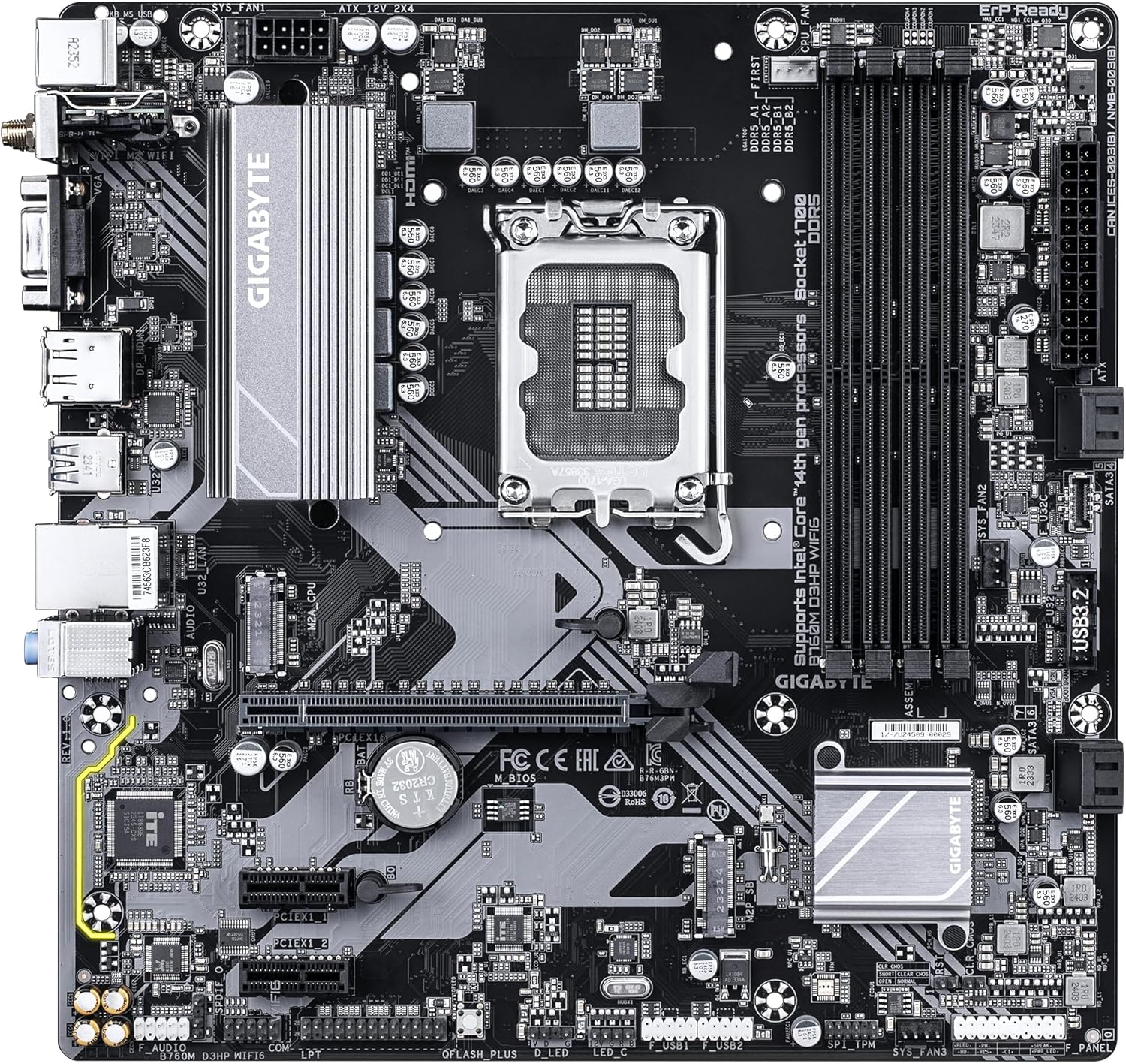
Familiarize yourself with the layout of the motherboard components before proceeding with installation.

פיגורע 1: Top-down view of the GIGABYTE GA-B760M D3HP WIFI6 motherboard, showing the CPU socket, DIMM slots, PCIe slots, and various headers.
פיגורע 2: אַנגגאַלד view of the GIGABYTE GA-B760M D3HP WIFI6 motherboard, highlighting the heatsinks and overall component placement.
3.2 קפּו ינסטאַלירונג
- געפינט די LGA 1700 CPU סאָקעט אויף די מאָטהערבאָאַרד.
- עפֿנט דעם CPU סאָקעט הייבער און הייבט אויף די לאָוד פּלאַטע.
- פֿאָרזיכטיק גלייכט אויס די CPU מיטן סאָקעט, און מאַכט זיכער אַז די דרייעקיקע צייכן אויפן CPU פּאַסט צום צייכן אויפן סאָקעט. שטעקט נישט די CPU אַרײַן אין סאָקעט מיט צווינג.
- לאָזט אַראָפּ די לאַסט־פּלאַטע און זיכערט עס מיטן הייבער.
- טראָגט אויף טערמישע פּאַסטע אויף די סי-פּי-יו און אינסטאַלירט דעם סי-פּי-יו קולער לויט די אינסטרוקציעס פון זיין פאַבריקאַנט.
3.3 זכּרון (RAM) אינסטאַלאַציע
- Locate the four DDR5 DIMM slots.
- עפֿנט די קליפּס ביי ביידע עקן פֿון דעם DIMM סלאָט.
- גלייכט אויס דעם קערב אויפן DDR5 זכּרון מאָדול מיטן שליסל אין דעם DIMM סלאָט.
- שטעקט אריין דעם זכּרון מאָדול פעסט אין דעם סלאָט ביז די קליפס קלאַפּן זיך איין. מאַכט זיכער אַז ביידע קליפס זענען פֿאַרמאַכט.
- פֿאַר צוויי-קאַנאַל קאָנפיגוראַציע, זעט דעם ספּעציפֿישן מאַנואַל פֿון דער מוטערבאָרד פֿאַר רעקאָמענדירטע סלאָט פּערינג.
3.4 Storage Device Installation (M.2 SSDs and SATA Drives)
- M.2 SSD: Locate the M.2 connectors. Remove the M.2 screw/standoff. Insert the M.2 SSD into the slot at a 30-degree angle. Push down the SSD and secure it with the screw/standoff.
- SATA דרייווס: פֿאַרבינדט SATA דאַטן קייבלס פֿון אייערע סטאָרידזש דרייווס (HDDs/SSDs) צו די SATA פּאָרטן אויף דער מוטערבאָרד. פֿאַרבינדט מאַכט קייבלס פֿון אייער מאַכט צושטעל צו די דרייווס.
3.5 מאַכט קאַנעקשאַנז
- פֿאַרבינדט דעם 24-פּין ATX הויפּט מאַכט קאַנעקטאָר פֿון אייער מאַכט צושטעל צום קאָרעספּאָנדירנדיקן פּאָרט אויף דער מוטערבאָרד.
- Connect the 8-pin ATX 12V CPU power connector to the port near the CPU socket.
3.6 פראָנט פּאַנעל און פּעריפערישע קאַנעקשאַנז
Connect your case's front panel connectors (power button, reset button, USB ports, audio jacks, LED indicators) to the corresponding headers on the motherboard. Refer to the motherboard's detailed manual for exact pin layouts.

פיגורע 3: Rear I/O panel of the GIGABYTE GA-B760M D3HP WIFI6 motherboard, showing USB ports, display outputs, audio jacks, Ethernet, and Wi-Fi antenna connectors.
4. אַפּערייטינג ינסטרוקטיאָנס
4.1 בייאָוס סעטאַפּ
Upon first boot, you may need to enter the BIOS (Basic Input/Output System) to configure settings such as boot order, date/time, and enable specific features. To enter BIOS, press the DEL key repeatedly during startup. The GIGABYTE UEFI BIOS provides an intuitive graphical interface for configuration.
4.2 דרייווער ינסטאַלירונג
After installing your operating system, install the necessary drivers for the motherboard's components (chipset, audio, LAN, Wi-Fi, etc.). These drivers are typically provided on a support DVD or can be downloaded from the official GIGABYTE webוועבזייטל פֿאַר דיין ספּעציפֿישן מאַדערבאָרד מאָדעל.
5. וישאַלט
- רייניקונג: רעגולער רייניקט שטויב פון די מאַדערבאָרד און קעיס פאַנס מיט קאָמפּרעסירטע לופט. זיכערט זיך אז די סיסטעם איז אויסגעלאָשן און נישט אריינגעשטעקט פון די פלעגער איידער איר רייניגט.
- בייאָוס דערהייַנטיקונגען: טשעקט פּעריִאָדיש די גיגאַבייט website for BIOS updates. BIOS updates can improve system stability, compatibility, and performance. Follow the instructions provided by GIGABYTE carefully when updating the BIOS.
- דרייווער דערהייַנטיקונגען: האַלט אייערע דרייווערס אַפּדייטיד צו ענשור אָפּטימאַל פאָרשטעלונג און קאָמפּאַטאַבילאַטי מיט נייַ ווייכווארג און האַרדווער.
6. טראָובלעשאָאָטינג
- קיין מאַכט:
- קאָנטראָלירט אַלע מאַכט קאַנעקשאַנז (24-פּין ATX, 8-פּין CPU).
- ענשור אַז די מאַכט צושטעלן איז סוויטשט אויף.
- טעסט די מאַכט צושטעל מיט אַן אַנדער סיסטעם אָדער אַ מאַכט צושטעל טעסטער.
- קיין ווייַז:
- Ensure the monitor is connected to the graphics card (or integrated graphics port if no discrete GPU is used).
- לייג צוריק די גראַפיקס קאַרטל און זכּרון מאָדולן.
- פרובירט צו בוטן מיט נאר איין ראַם סטיק.
- סיסטעם אינסטאביליטעט/קראכן:
- טשעק די CPU און GPU טעמפּעראַטורן.
- Ensure all components are properly seated.
- לויפט זכּרון דיאַגנאָסטיק מכשירים צו קאָנטראָלירן פֿאַר ראַם ערראָרס.
- Update BIOS and drivers.
- נעץ קאָנעקטיוויטי פּראָבלעמען:
- For wired LAN, check the Ethernet cable and router connection.
- For Wi-Fi, ensure antennas are securely attached and drivers are installed.
- Verify network settings in the operating system.
7. ספּעסאַפאַקיישאַנז
| שטריך | דעטאַל |
|---|---|
| סאָרט | GIGABYTE |
| מאָדעל נאָמען | B760M D3HP WIFI6 |
| קפּו סאָקקעט | LGA 1700 |
| קאָמפּאַטיבלע פּראַסעסאָרן | Intel Core 14th Gen, Intel Core 13th Gen, Intel Core 12th Gen |
| טשיפּסעט טיפּ | Intel B760 |
| ראַם זכּרון טעכנאָלאָגיע | דדר5 |
| זכּרון זייגער ספּיד | 5600 מהז |
| קאַמפּאַטאַבאַל דעוויסעס | Personal Computer, Desktop Computer |
| פּלאַטפאָרמע | Windows 10, Windows 11 |
| פּראָדוקט דימענשאַנז | 9.61 X 9.61 X 1.38 אינטשעס |
| פּונקט וואָג | 2.2 פונט |
8. וואָראַנטי און שטיצן
פֿאַר וואָראַנטי אינפֿאָרמאַציע און טעכנישע שטיצע, ביטע זען די באַאַמטער GIGABYTE webזייטל אדער קאנטאקטירן GIGABYTE קאסטומער סערוויס. האלט אייער באווייז פון קויפן פאר גאראנטיע פארלאנגען.
גיגאבייט אפיציעל Webפּלאַץ: www.gigabyte.com


