הקדמה
This user manual provides detailed instructions for the FREEWOLF T96 Smart Display Wireless Gaming Keyboard and Mouse Combo. This combo is designed for a seamless and responsive experience across various devices and applications, from gaming to office work.
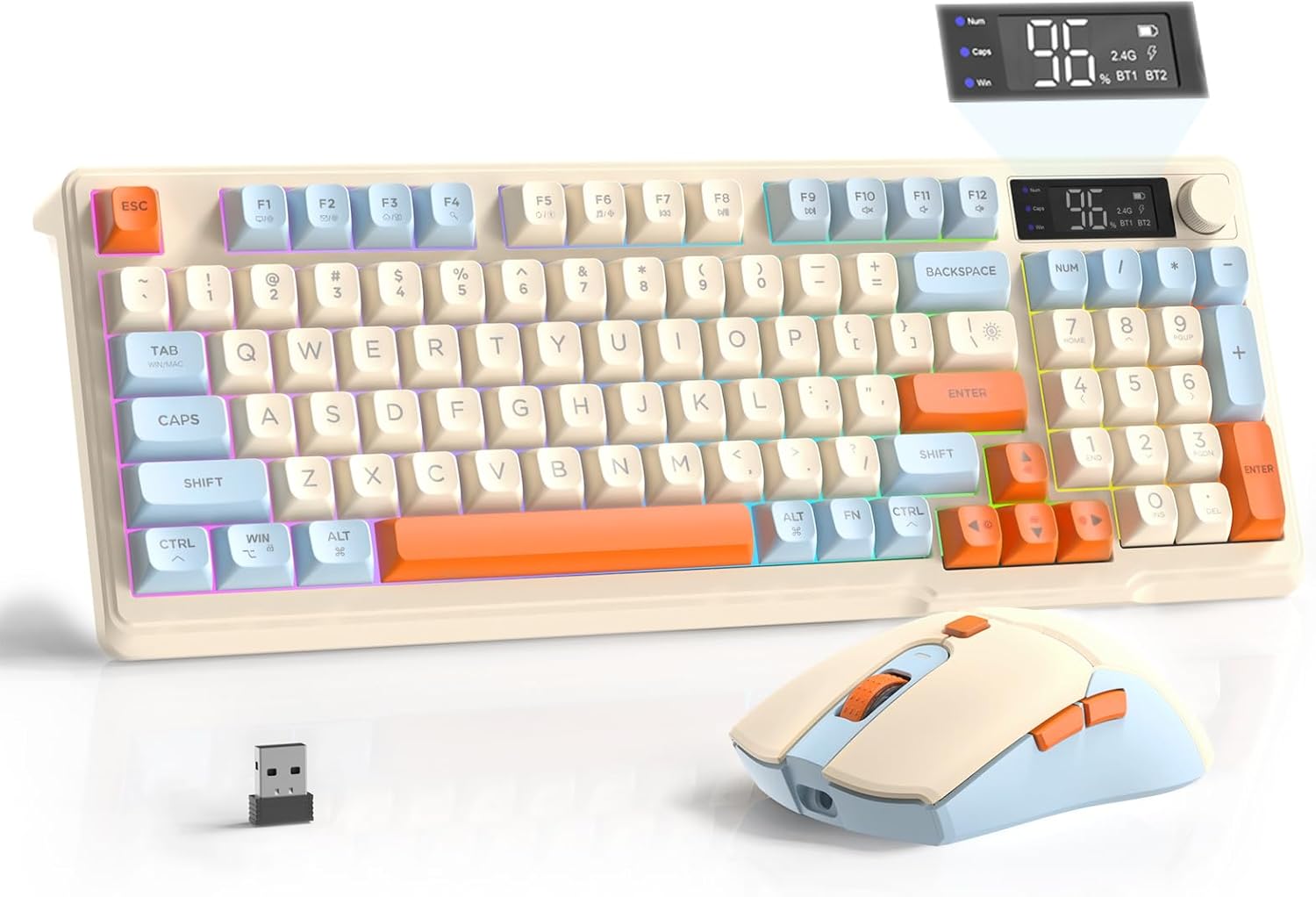
Image: The FREEWOLF T96 Wireless Gaming Keyboard and Mouse Combo, featuring the keyboard, mouse, and USB receiver.
פּעקל אינהאַלט
זיכער מאַכן אַז אַלע זאכן זענען פאַראַן אין פּעקל:
- 1 x T96 Membrane Keyboard
- 1 x T96 Wireless Mouse
- 1 קס וסב-C קאַבלע
- 1 x USB Receiver (stored in mouse bottom slot)
- 1 x באַניצער מאַנואַל
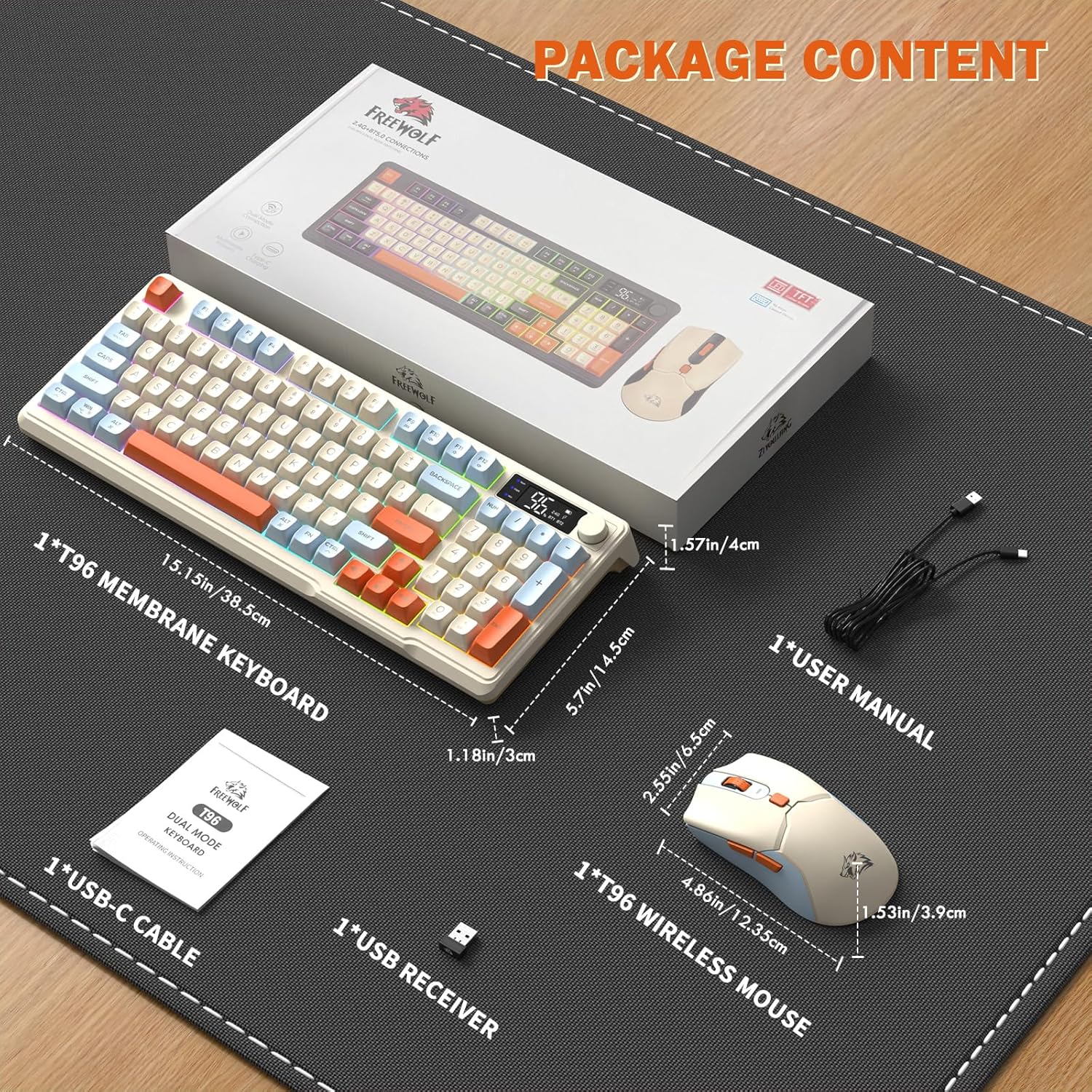
Image: A visual representation of the package contents, including the keyboard, mouse, USB-C cable, USB receiver, and user manual.
סעטאַפּ
קאַנעקטיוויטי אָפּציעס
The T96 combo supports dual-mode wireless connectivity:
- 2.4G ווירעלעסס קאַנעקשאַן: Utilizes the included USB receiver for a stable, plug-and-play connection.
- Bluetooth Connections (BT1/BT2): Allows pairing with up to two Bluetooth-enabled devices, enabling seamless switching.
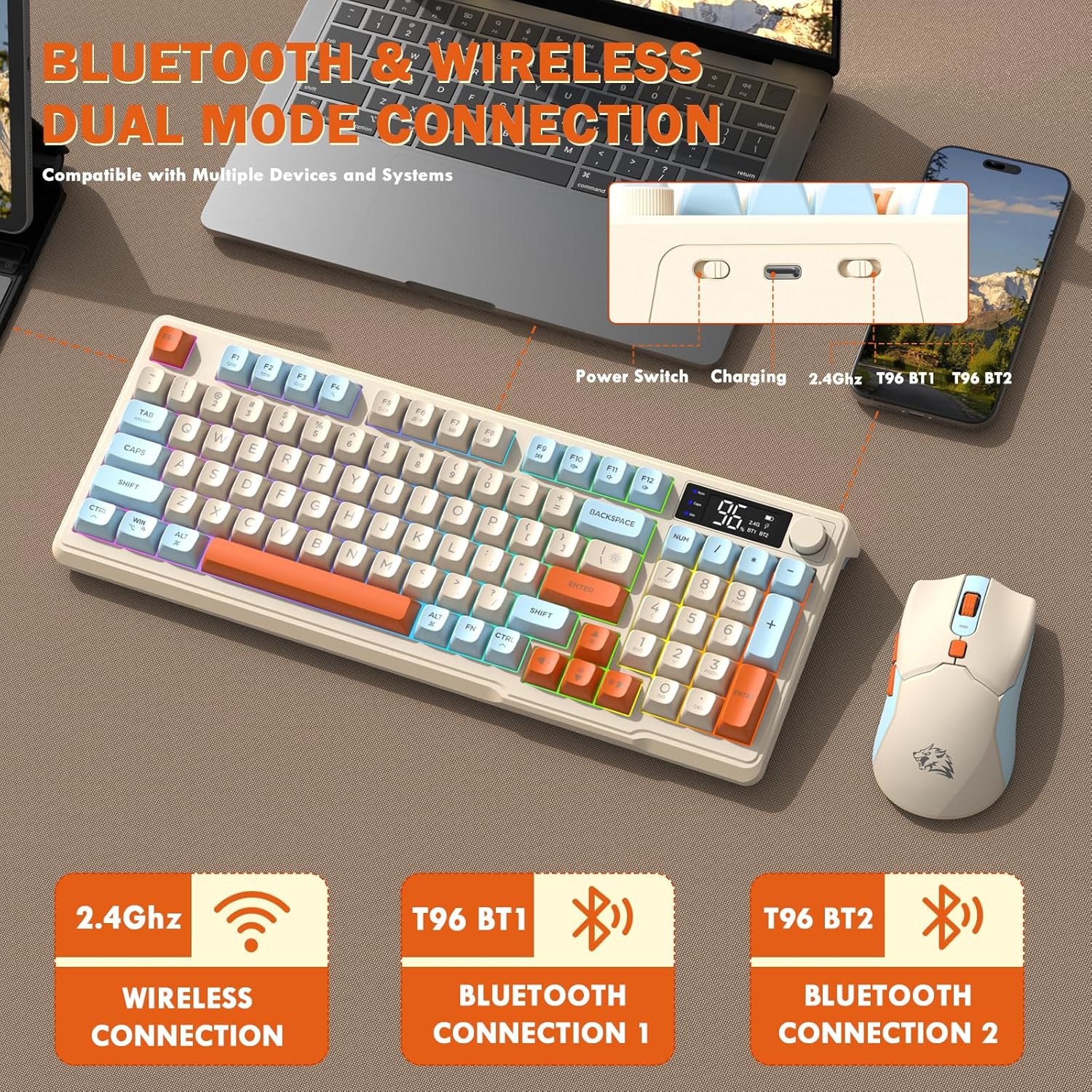
Image: Diagram illustrating the dual-mode connection options (2.4GHz, Bluetooth 1, Bluetooth 2) and the location of the power switch, charging port, and connection indicators on the keyboard.
ערשטע סעטאַפּ טריט
- טשאַרדזשינג דעוויסעס: Before first use, fully charge both the keyboard and mouse using the provided USB-C cable. The keyboard has a 2000mAh battery, and the mouse has a 500mAh battery. The smart display on the keyboard will show charging progress.
- געפינען די USB ריסיווער: The USB receiver for 2.4G wireless connection is stored in a slot on the bottom of the mouse. Remove it for use.
- מאַכט אויף: צינדט אָן די קלאַוויאַטור און מויז מיט זייערע ריספּעקטיווע מאַכט סוויטשיז.
- Connect via 2.4G Wireless:
- אַרייַנלייגן די וסב ופנעמער אין אַ בנימצא וסב פּאָרט אויף דיין קאָמפּיוטער.
- Ensure the keyboard and mouse are set to 2.4G mode (indicated on the keyboard's smart display). They should connect automatically.
- פאַרבינדן דורך בלועטאָאָטה:
- Switch the keyboard and mouse to BT1 or BT2 mode.
- On your device (PC, laptop, tablet, smartphone), open Bluetooth settings.
- זוכן פֿאַר "T96 Keyboard" and "T96 Mouse" in the list of available devices and pair them.
- The smart display will indicate the active Bluetooth connection (BT1 or BT2).
אַפּערייטינג ינסטראַקשאַנז
קלאַוויאַטור אָפּעראַציע
The T96 keyboard features a 94-key compact layout with various functions to enhance your experience.
קלוגע דיספּליי פונקציעס
The intelligent LED display provides real-time information:
- באַטערי סטאַטוס: ווייזט די פארבליבענע באַטעריע פּראָצענטtage.
- קשר מאָדע: Indicates active connection (2.4G, BT1, BT2).
- טשאַרדזשינג פּראָגרעס: Displays charging status when connected to power.
- Caps Lock/Num Lock/Win Lock Indicators: Shows status of these keys.
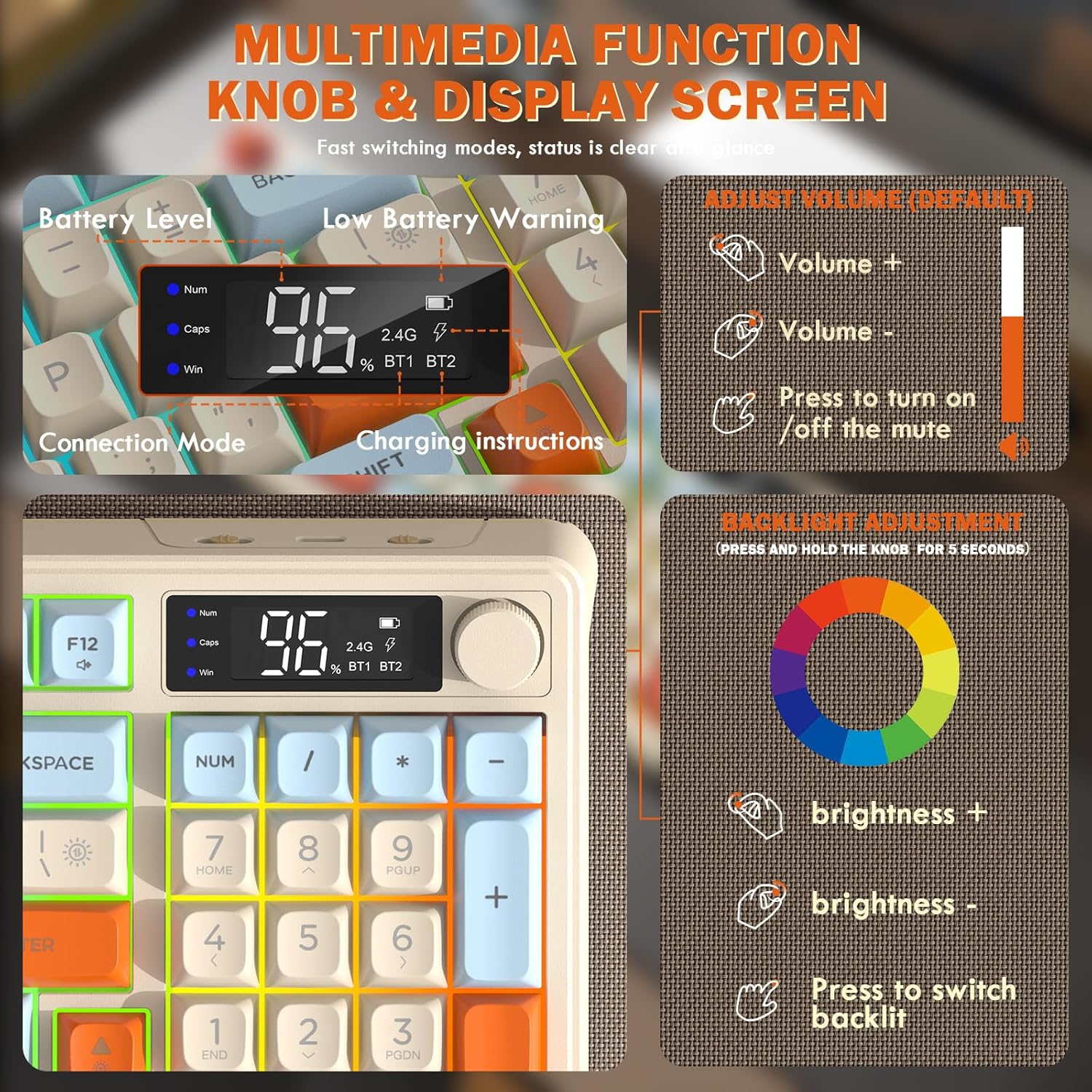
Image: Close-up of the keyboard's smart display showing battery level, connection mode, and charging instructions. Also details the multimedia knob's functions for volume and backlight control.
מולטימעדיאַ קאָנטראָל קנעפּל
Located on the top right of the keyboard, this knob offers quick control:
- דרייען: Adjusts system volume (clockwise for volume up, counter-clockwise for volume down).
- דרוק: Toggles mute on/off.
- דריקן און האַלטן (5 סעקונדעס): Activates backlight adjustment mode. Rotate to change brightness, press to switch light effects.
Multimedia Hotkeys (FN Combinations)
The keyboard includes 12 dedicated multimedia hotkeys accessible via the FN שליסל:
- FN + F1-F12: Access various multimedia and system functions (e.g., media playback, volume, browser, email). Refer to keycap legends for specific functions.
באַקלייט קאָנטראָל
The keyboard features vibrant rainbow LED backlighting. Control it using the following combinations:
- FN + אַרויף פייַל: פֿאַרגרעסערן די ברייטקייט פֿון דער באַקלייט.
- FN + אַראָפּ פייַל: פֿאַרקלענערן די ברייטקייט פֿון דער באַקלייט.
- FN + רעכט פייַל: פֿאַרגרעסערן באַקלייט גיכקייט
- FN + לינקער פײַל: פאַרמינערן באַקלייט גיכקייַט.
- FN + \|: Switch between different lighting modes (e.g., always on, breathing, off).
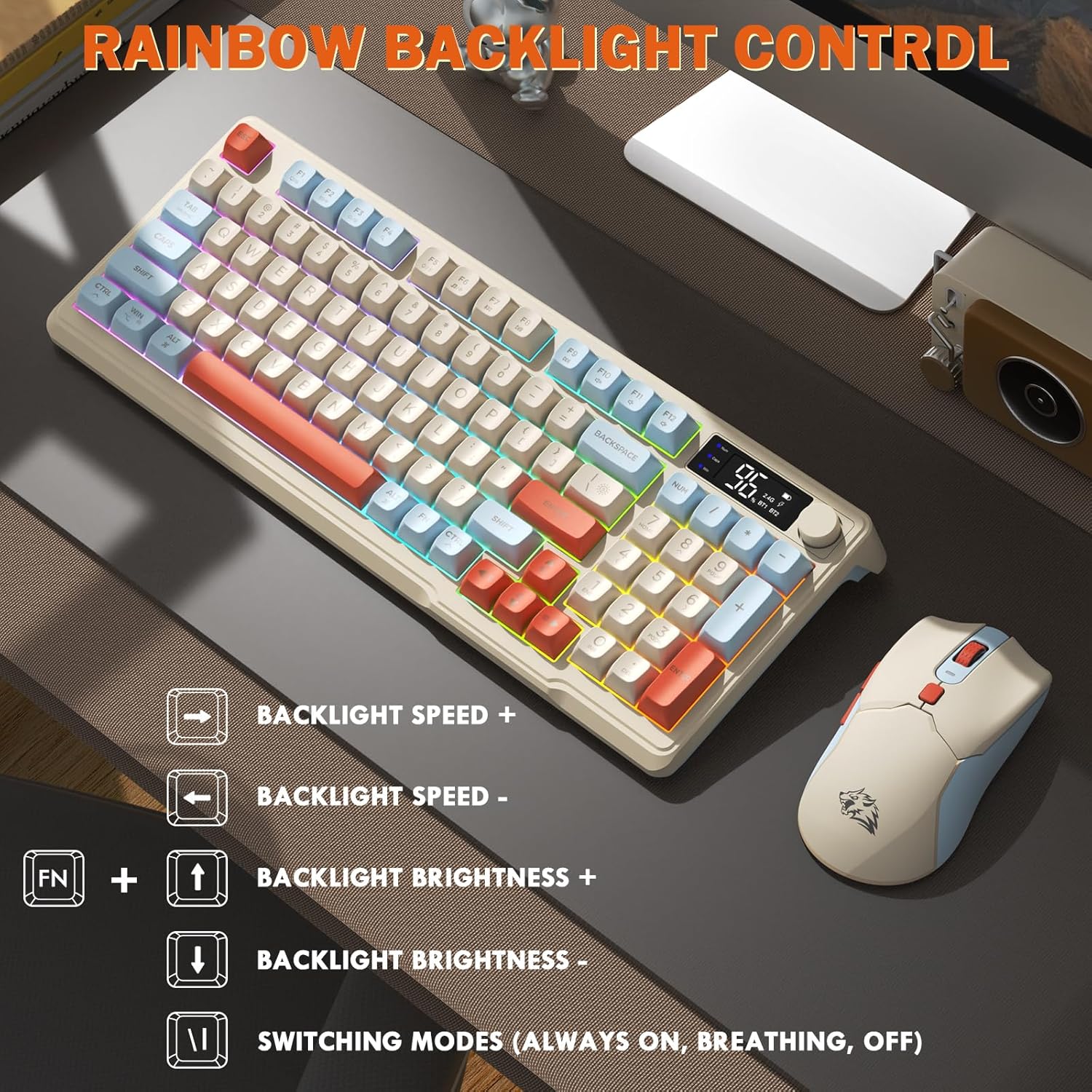
Image: Visual guide for controlling the rainbow LED backlight, showing key combinations for brightness, speed, and mode switching.
אַנטי-גהאָסטינג
The keyboard supports 26-key rollover anti-ghosting technology, ensuring accurate registration of multiple simultaneous key presses, crucial for gaming.
מויז אָפּעראַציע
The T96 gaming mouse is designed for precision and comfort.
דפּי אַדזשאַסטמאַנט
Adjust the mouse sensitivity (DPI) to suit your preference:
- דרוק די דפּי קנעפּל (located behind the scroll wheel) to cycle through available DPI settings: 800 / 1600 / 2400 / 4000 DPI.
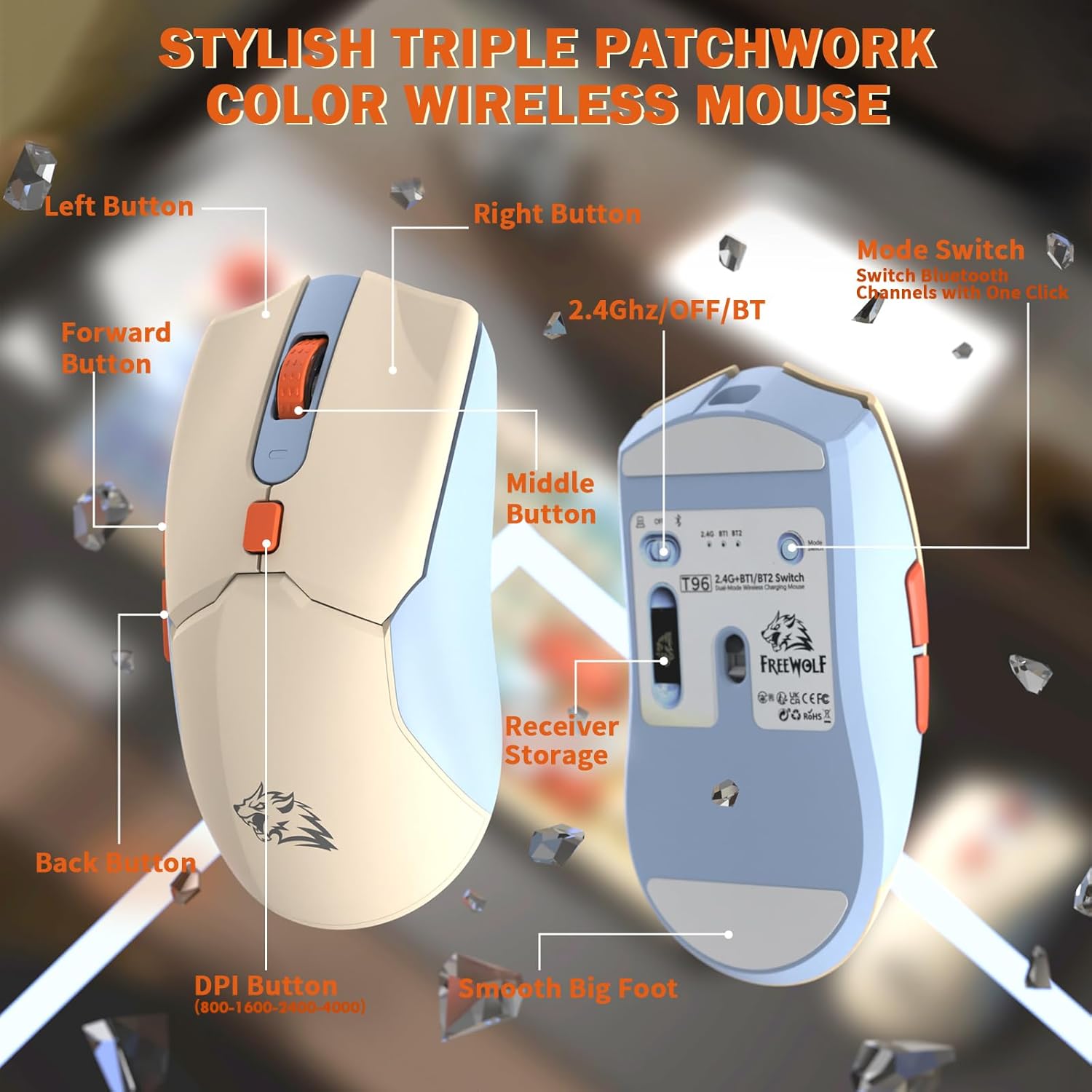
בילד: דעטאַלירט view of the T96 wireless mouse, highlighting its buttons (Left, Right, Middle, Forward, Back, DPI) and the receiver storage compartment on the bottom.
פּראָגראַממאַבלע קנעפּלעך
The mouse features six programmable buttons. Refer to specific software (if applicable, not mentioned in data) or operating system settings for customization options.
פּאָללינג ראַטעס
The mouse operates at different polling rates depending on the connection mode:
- בלועטאָאָטה (BT): 115 הז
- 2.4G ווירעלעס: 125 הז
וישאַלט
רייניקונג
- Use a soft, dry cloth to clean the surfaces of the keyboard and mouse.
- פֿאַר שווערן שמוץ, אַ ביסל דampyi די שטאָף מיט וואַסער אָדער אַ מילד, ניט-אַברייסיוו רייניקונג.
- פֿאַרמײַדן ניצן שאַרפֿע כעמיקאַלן, סאָלווענטן אָדער אַברייסיוו מאַטעריאַלן, ווײַל די קענען שאַטן די ענדיקונג.
- טונקט נישט די דעווייסעס אין וואַסער אָדער קיין פליסיקייט.
באַטערי קער
צו מאַקסאַמיזירן באַטאַרייע לעבן און פאָרשטעלונג:
- Recharge the devices when the low battery indicator appears on the keyboard's smart display.
- פֿאַרמײַדט אָפֿט גאָר אויסצוליידיקן די באַטעריע.
- Store the devices in a cool, dry place when not in use for extended periods.
- The devices feature smart power-saving modes: the keyboard enters sleep mode after 3 minutes of inactivity, and the mouse after 2 minutes. They wake instantly upon touch.

Image: Illustration showing the 2000mAh battery capacity of the keyboard and 500mAh battery capacity of the mouse, emphasizing long-lasting power.
טראָובלעשאָאָטינג
If you encounter issues with your T96 combo, refer to the following common solutions:
| פּראָבלעם | מעגלעך סיבה | לייזונג |
|---|---|---|
| קלאַוויאַטור/מויז רעאַגירט נישט | Low battery; Incorrect connection mode; USB receiver not connected (2.4G); Bluetooth not paired. |
|
| פאַרהאַלטונג אָדער ינטערמיטאַנט פֿאַרבינדונג | Interference; Distance from receiver/device; Low battery. |
|
| באַקלייט אַרבעט נישט אָדער איז טונקל | Backlight turned off; Brightness set too low; Low battery. |
|
| Mouse DPI not changing | די DPI קנעפּל נישט ריכטיק געדריקט. |
|
ספּעסאַפאַקיישאַנז
| שטריך | דעטאַל |
|---|---|
| סאָרט | פרייוואָלף |
| מאָדעל | T96 |
| קאַנעקטיוויטי טעכנאָלאָגיע | 2.4Ghz Wireless, Bluetooth (BT1, BT2) |
| קלאַוויאַטור טיפּ | Membrane, 94-Key Compact Layout |
| קייקאַפּס | PBT Triple-Tone Spherical Keycaps |
| באַקלייט | Rainbow LED Backlight |
| אַנטי-גהאָסטינג | 26-שליסל ראָולאָוווער |
| קלאַוויאַטור באַטאַרייע קאַפּאַציטעט | 2000 מאַה |
| מויז דפּי | 800 / 1600 / 2400 / 4000 DPI (אַדזשאַסטאַבאַל) |
| Mouse Polling Rate (BT) | 115 הז |
| Mouse Polling Rate (2.4G) | 125 הז |
| מויז באַטערי קאַפּאַסיטי | 500 מאַה |
| קאַמפּאַטאַבאַל דעוויסעס | לאַפּטאָפּ, גיימינג קאַנסאָול, פּיסי, טאַבלעט, סמאַרטפאָון |
| אַפּערייטינג סיסטעמס | ווינדאָוס, מאַקאָס, לינוקס, יאָס, אַנדרויד |
| פּונקט וואָג | 2.12 פונט (אומגעפער 0.96 ק"ג) |
| פּעקל דימענשאַנז | 16.26 x 8.78 x 1.85 אינטשעס (אומגעפער 41.3 x 22.3 x 4.7 ס״מ) |
וואָראַנטי און שטיצן
Information regarding product warranty and customer support was not provided in the available data. Please refer to the product packaging or the manufacturer's official webזייטל פֿאַר פרטים וועגן וואָראַנטי קאַווערידזש און ווי צו קאָנטאַקט קונה שטיצע פֿאַר הילף.