1. הקדמה
This manual provides essential instructions for the proper setup, operation, and maintenance of your SUMREDA G38 RGB Mechanical Keyboard. Please read this manual thoroughly before using the product to ensure optimal performance and longevity.
2. פּעקל אינהאַלט
ביים אויספּאַקן דעם קעסטל, ביטע באַשטעטיקן אַז אַלע זאכן וואָס זענען ליסטעד אונטן זענען פאַראַן און אין גוטן צושטאַנד:
- SUMREDA G38 RGB Mechanical Keyboard (82-key layout)
- טיפּ- C וסב קאַבלע
- באַניצער מאַנואַל (דעם דאָקומענט)
If any items are missing or damaged, please contact your retailer or SUMREDA customer support.
3. סעטאַפּ
3.1 פֿאַרבינדן די קלאַוויאַטור
- Locate the Type-C port on the back or side of your SUMREDA G38 keyboard.
- Insert one end of the provided Type-C USB cable into the keyboard's Type-C port.
- Insert the other end of the USB cable into an available USB port on your computer.
- The keyboard will be automatically recognized by your operating system (Windows, macOS, Linux). No additional drivers are typically required for basic functionality.
The keyboard's RGB lighting should illuminate upon successful connection, indicating it is powered on and ready for use.
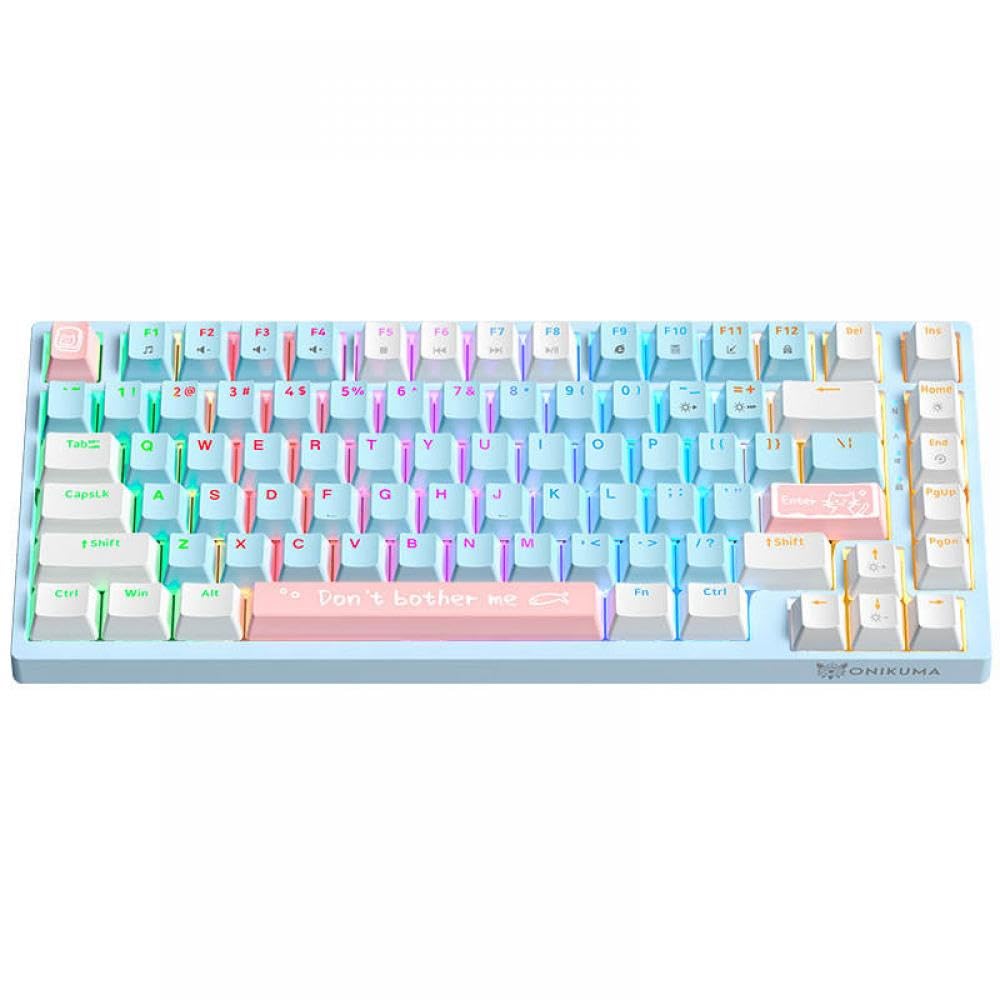
Image: The SUMREDA G38 RGB Mechanical Keyboard, showcasing its compact 82-key layout and the Type-C connection port.
4. אַפּערייטינג ינסטרוקטיאָנס
4.1 גרונטלעכע קלאַוויאַטור פונקציעס
The SUMREDA G38 functions as a standard 82-key mechanical keyboard. All keys perform their labeled functions. For special characters or functions typically accessed via a full-sized keyboard's number pad, refer to your operating system's character map or on-screen keyboard.
4.2 RGB לייטינג קאָנטראָל
The G38 keyboard features customizable RGB backlighting. Use the following key combinations to adjust the lighting effects:
- פֿן + \ |: Cycle through different RGB lighting modes.
- פֿן + [ {: פֿאַרקלענערן די ברייטקייט פֿון דער הינטערליכט.
- פֿן + ] }: פֿאַרגרעסערן די ברייטקייט פֿון דער הינטערליכטונג.
- Fn + ; :: Decrease lighting effect speed.
- פֿין + ' ": Increase lighting effect speed.
- Fn + לינקס עראָו: Change backlight color (in certain modes).
- Fn + רעכט עראָו: Change backlight color (in certain modes).
Note: Specific lighting effects and color options may vary depending on the selected mode.
5. וישאַלט
5.1 רייניקן די קלאַוויאַטור
רעגולערע רייניקונג העלפט אויפהאלטן די קלאַוויאַטור'ס אויסזען און פאַנגקשאַנאַליטעט.
- דיסקאַנעקט מאַכט: שטענדיק ארויסנעמען די קלאַוויאַטור פֿון אייער קאָמפּיוטער איידער איר רייניקט.
- באַזייַטיקונג פון שטויב: ניצט אַ קאַן מיט קאָמפּרעסירטע לופט צו בלאָזן אַוועק שטויב און שמוץ פון צווישן די קלאַוויאַטור קאַפּס. האַלט די קאַן גלייך צו פאַרמייַדן טרייבשטאָף אַרויסלאָזן.
- ייבערפלאַך רייניקונג: ווישט אָפּ די קלאַוויאַטור און די קלאַוויאַטור־איבערפֿלאַך מיט אַ ווייכן, לינט־פֿרײַעם שטאָף, לײַכט אָפּווישן.ampגעוואשן מיט וואַסער אָדער אַ מילדער, נישט-שרייַבנדיקער רייניקונג לייזונג. פֿאַרמייַדן איבעריקע פֿײַכטקייט.
- דרייינג: זייט זיכער אז די קלאַוויאַטור איז גאָר טרוקן איידער איר עס ווידער פֿאַרבינדט צום קאָמפּיוטער.
Do not immerse the keyboard in water or use harsh chemicals, as this can damage the electronic components.
5.2 סטאָרידזש
ווען נישט אין באַנוץ פֿאַר לענגערע פּעריאָדן, האַלט די קלאַוויאַטור אין אַ קיל, טרוקן אָרט אַוועק פון דירעקט זונשייַן און עקסטרעמע טעמפּעראַטורן.
6. טראָובלעשאָאָטינג
If you encounter issues with your SUMREDA G38 keyboard, please refer to the following common solutions:
| פּראָבלעם | מעגלעך סיבה | לייזונג |
|---|---|---|
| קלאַוויאַטור ניט ריספּאַנדינג | Loose cable connection, faulty USB port, system driver issue. |
|
| RGB לייטינג ארבעט נישט אדער איז פארשטאפט | Incorrect lighting mode selected, software conflict, power issue. |
|
| שליסלען רעגיסטרירן זיך נישט אדער טייפן זיך צוויי מאל | Dust/debris under keycap, switch malfunction. |
|
If the problem persists after attempting these solutions, please contact SUMREDA customer support for further assistance.
7. ספּעסאַפאַקיישאַנז
| שטריך | דעטאַל |
|---|---|
| סאָרט | SUMREDA (Manufacturer: YTbHXE) |
| מאָדעל נאָמען | G38 |
| מאָדעל נומער | YTbHXE996 |
| קאַנעקטיוויטי | Wired, Type-C USB |
| שליסל אויסלייג | 82 קיז |
| קלאַוויאַטור טיפּ | מעטשאַניקאַל |
| באַקלייט | RGB, קאַסטאַמייזאַבאַל |
| דימענסיעס (בעערעך) | 3 x 2 x 1 cm (Parcel Dimensions, actual product dimensions may vary slightly) |
| וואָג (בעערעך) | 400 g (Parcel Weight, actual product weight may vary slightly) |
| קאָליר | Blue (82 keys variant) |
| אָריגין | כינע |
באַמערקונג: ספּעסאַפאַקיישאַנז זענען אונטערטעניק צו טוישן אָן פריערדיק באַמערקן.
8. וואָראַנטי און שטיצן
8.1 פּראָדוקט וואָראַנטי
Specific warranty terms and conditions for the SUMREDA G38 RGB Mechanical Keyboard are provided by the retailer or manufacturer at the time of purchase. Please retain your proof of purchase for warranty claims. For detailed warranty information, refer to the documentation included with your product or contact your point of purchase.
8.2 קונה שטיצן
For technical assistance, troubleshooting, or inquiries regarding your SUMREDA G38 keyboard, please contact the seller or the manufacturer, YTbHXE. Contact information can typically be found on the product packaging or the retailer's webפּלאַץ.


