1. הקדמה
This manual provides essential information for the installation, operation, and maintenance of your FSP VITA GM 650W ATX 3.1 PC Power Supply. Please read this manual thoroughly before installation to ensure proper and safe usage of the product. The FSP VITA GM 650W is designed to deliver stable and efficient power to your computer system, adhering to the ATX 3.1 and PCIe Gen 5.1 specifications.
2. זיכערקייַט אינפֿאָרמאַציע
Always observe the following safety precautions to prevent injury or damage to your equipment:
- עפֿנט נישט די מאַכט-צושטעל אַפּאַראַט. הויך וואָלומעןtages are present inside, and opening the casinג מאַכט די וואָראַנטי בטל און שטעלט אַ ריזיקע פון עלעקטרישן שאָק.
- אינסטאלירט די מאַכט צושטעל אין אַ גוט-ווענטילאַטעד אָרט, אַוועק פון היץ קוועלער, דירעקט זונשייַן און נעץ.
- Ensure the power supply is correctly installed and secured in your PC case.
- Use only the modular cables provided with the power supply. Using incompatible cables can cause damage.
- Connect the power supply to a grounded electrical outlet.
- Disconnect the AC power cord from the wall outlet before installing or removing the power supply or any other components.
- Avoid placing heavy objects on the power supply or its cables.
- If the power supply is damaged or malfunctioning, discontinue use immediately and contact FSP support.
3. פּעקל אינהאַלט
באַשטעטיקן אַז אַלע זאכן זענען פאַראַן אין דיין פּעקל:
- FSP VITA GM 650W ATX 3.1 PC Power Supply
- Modular Cable Set (Motherboard, CPU, PCIe, SATA, Peripheral)
- אַק מאַכט שנור
- מאַונטינג סקרוז
- באַניצער מאַנואַל (דעם דאָקומענט)
4. פּראָדוקט איבערview
The FSP VITA GM 650W is a high-efficiency power supply designed for modern PC systems. It features:
- ATX 3.1 קאָנפאָרמאַטי: Designed to meet the latest Intel Power Design Guide ATX 3.1 specifications, ensuring compatibility with future hardware.
- PCIe Gen 5.1 Support: Ready for next-generation graphics cards.
- 80 PLUS Gold Certification: Achieves high efficiency, reducing power dissipation, heat, and noise.
- Synchronous Rectifier LLC Resonance Converter Topology: Reduces switching loss and enhances efficiency.
- +5V & 3.3V DC to DC Circuit Design: Improves efficiency and stabilizes output voltage.
- 105°C Japanese Bulk Capacitor: Ensures reliability and extended lifespan.

פיגור 4.1: פראָנט-זייט view of the FSP VITA GM 650W Power Supply, showcasing its compact design and fan grille.
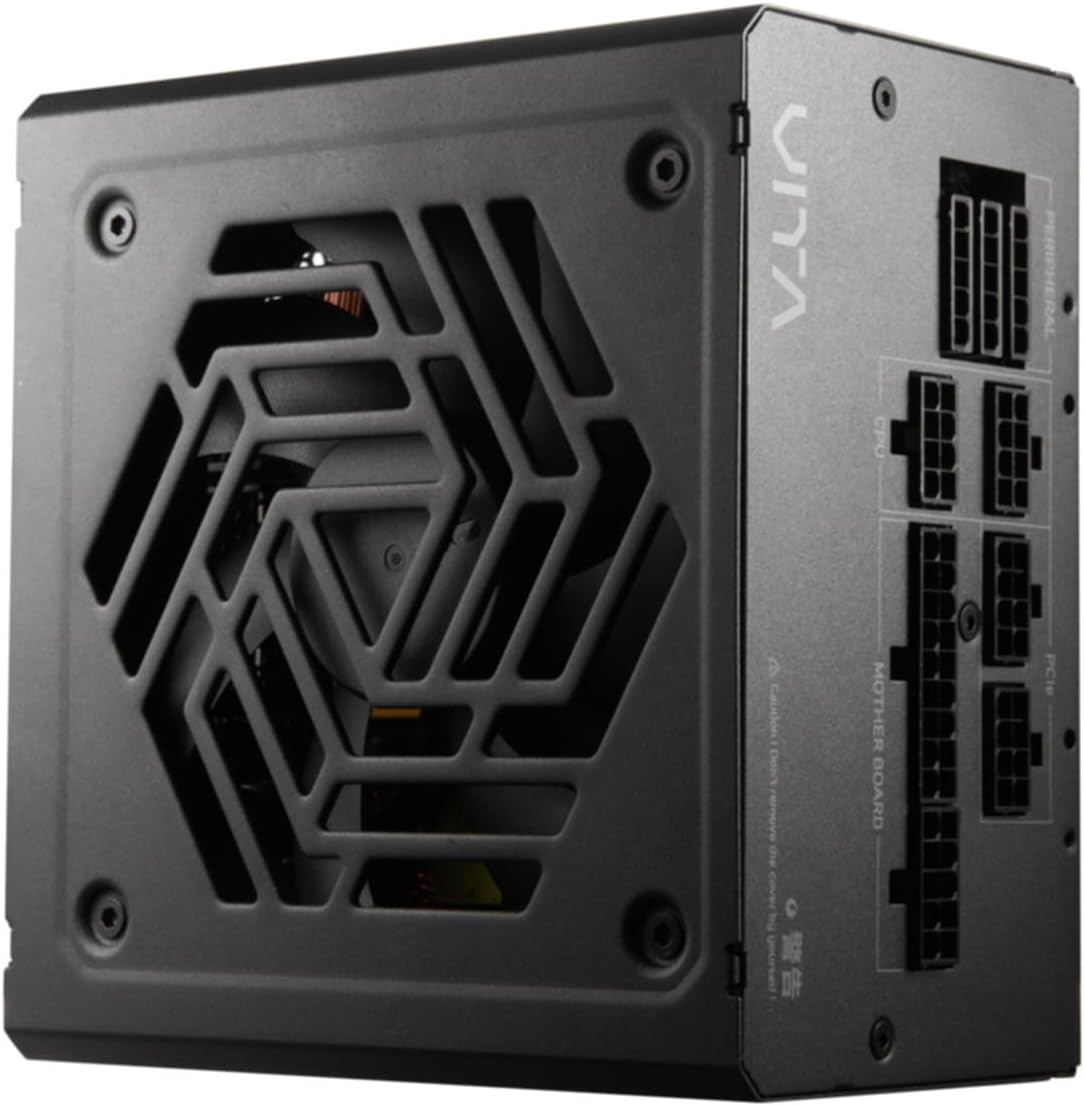
פיגור 4.2: פון אויבן אַראָפּ view of the FSP VITA GM 650W Power Supply, highlighting the fan and ventilation design.

פיגורע 4.3: זייַט view of the FSP VITA GM 650W Power Supply, showing the FSP branding and VITA model name.
5. סעטאַפּ און ייַנמאָנטירונג
Follow these steps to install your FSP VITA GM 650W power supply:
- צוגרייטונג:
- מאַכט אויס אייער קאָמפּיוטער און טרענט אָפּ דעם AC מאַכט שנור פֿון דער וואַנט אַוטלעט.
- עפענען דיין קאָמפּיוטער קאַסטן.
- אויב איר פאַרבייט אַן עקסיסטירנדיקע מאַכט צושטעל, דיסקאַנעקט אַלע קייבאַלז פון די אַלטע PSU און אַרויסנעמען עס פון די קעסטל.
- מאָנטירן די פּסו:
- Carefully place the FSP VITA GM 650W into the power supply bay of your PC case.
- Align the screw holes on the PSU with those on the case.
- באַוואָרענען די מאַכט צושטעלן מיט די צוגעשטעלט מאַונטינג סקרוז.
- פֿאַרבינדן מאָדולאַר קייבאַלז:
The FSP VITA GM 650W is a modular power supply. Connect only the cables required for your system components.

Figure 5.1: Modular cable connection panel. Ensure cables are firmly seated.
- מאַדערבאָרד מאַכט: פאַרבינדן די 24-שפּילקע אַטקס קאַבלע צו די מאָטהערבאָאַרד.
- CPU מאַכט: Connect the 4+4-pin or 8-pin EPS/ATX12V cable(s) to the CPU power connector(s) on your motherboard.
- PCIe מאַכט: Connect the 6+2-pin PCIe cables to your graphics card(s).
- SATA מאַכט: Connect SATA power cables to SSDs, HDDs, and optical drives.
- פּעריפערישע מאַכט: Connect 4-pin Molex cables to other peripherals as needed.
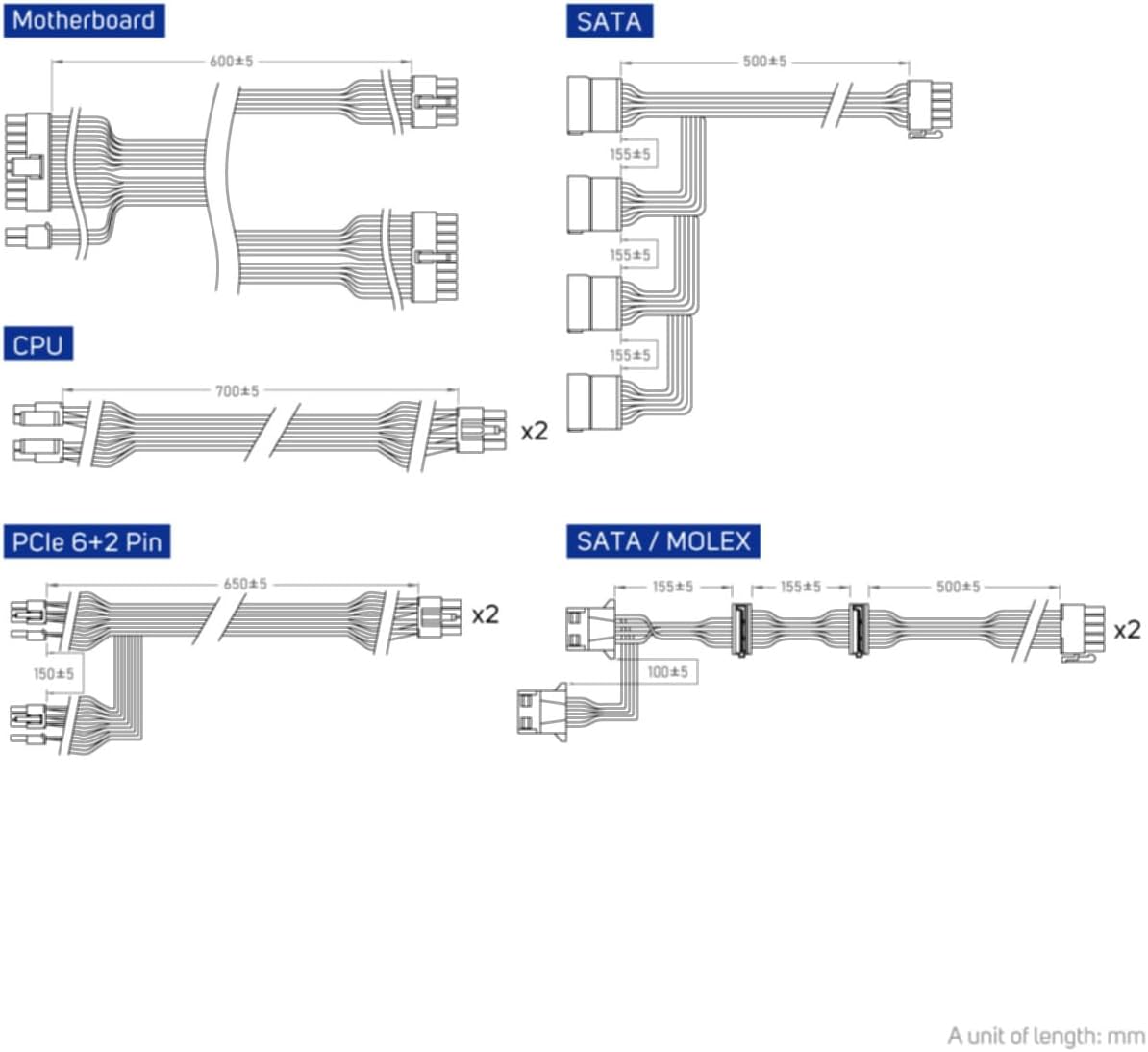
Figure 5.2: Diagram illustrating the various modular cables included and their approximate lengths (in mm).
- לעצט טשעקס:
- זיכער מאַכן אַז אַלע קייבלס זענען זיכער פארבונדן און געפירט צו ויסמיידן שטערן די לופט לויפן.
- נאָענט דיין קאָמפּיוטער פאַל.
- פֿאַרבינדט דעם AC מאַכט שנור צום מאַכט צושטעל און דערנאָך צו אַ געערדטע וואַנט ווענטיל.
6. אַפּערייטינג ינסטרוקטיאָנס
After installation, you can power on your system:
- Ensure the power switch on the back of the power supply is in the "ON" (I) position.
- דריק דעם פּאַוער קנעפּל אויף אייער קאָמפּיוטער קעסטל.
- The power supply will provide stable power to your components.

פיגורע 6.1: דערציען view of the power supply, showing the AC power input and the main power switch.
Bridge Time Importance: The FSP VITA GM 650W adheres to the recommended ATX 3.1 bridge time values. This feature ensures the power supply can maintain a stable output voltage for a critical duration after a power interruption, preventing system instability or damage during sudden power fluctuations or outages.
7. וישאַלט
כדי צו זיכער מאַכן אָפּטימאַלע פאָרשטעלונג און לאַנגלעבעדיקייט פון דיין מאַכט צושטעלן:
- שטויב רייניקונג: רייניקט פּעריִאָדיש שטויב פֿון דער מאַכט-צושטעל'ס ווענטילאַטאָר גריל און ווענץ מיט קאָמפּרעסירטע לופֿט. מאַכט זיכער אַז די סיסטעם איז אויסגעלאָשן און אַרויסגעטראָגן פֿון דער פּלאַטע איידער איר רייניקט.
- קאַבלע פאַרוואַלטונג: Maintain good cable management inside your PC case to ensure proper airflow and prevent overheating.
- ינווייראַנמענאַל טנאָים: אַפּערירט די מאַכט צושטעל אין די רעקאָמענדירטע טעמפּעראַטור און הומידיטי ריינדזשאַז.
8. טראָובלעשאָאָטינג
If you encounter issues with your FSP VITA GM 650W power supply, refer to the following common problems and solutions:
| פּראָבלעם | מעגלעך סיבה | לייזונג |
|---|---|---|
| סיסטעם טוט נישט מאַכט אויף. |
|
|
| סיסטעם צינדט זיך אן אבער שליסט זיך אפ גלייך. |
|
|
| Unusual noises from PSU. |
|
|
If the problem persists after trying these solutions, please contact FSP customer support for further assistance.
9. ספּעסאַפאַקיישאַנז
| שטריך | דעטאַל |
|---|---|
| מאָדעל נומער | 790980 |
| סאָרט | FSP |
| וואָסtage | 650 וו |
| אַטקס ווערסיע | 3.1 |
| עפעקטיווקייט סערטיפיקאציע | 80 פּלוס גאָלד |
| פּונקט וואָג | 2.72 קילאָגראַמס (5.98 פונט) |
| פאַבריקאַנט | FSP |
| ערשטער דאַטע בנימצא | 15 אויגוסט 2024 |
10. וואָראַנטי און שטיצן
For warranty information, technical support, or service inquiries, please refer to the official FSP webזייטל אדער קאנטאקט זייער קאסטומער סערוויס דעפארטמענט. האלט אייער באווייז פון קויפן פאר גאראנטיע טענות.
FSP Official Webפּלאַץ: www.fsp-group.com
11. ריסייקלינג און באַזייַטיקונג
Please dispose of this product responsibly. Electronic waste should not be disposed of with household waste. Contact your local authorities or recycling center for information on proper disposal methods for electronic components.


