הקדמה
Welcome to the Macally family. Thank you for purchasing the ACEBTKEY series keyboard. Our mission is to provide visually appealing, high-quality, and affordable peripherals and accessories to satisfy our customers. To achieve this, we create innovative and practical products, prioritizing ease of use above all else.
This manual provides comprehensive instructions for setting up, operating, and maintaining your new Macally BTZKEYA Bluetooth Wireless Keyboard. Please read it thoroughly to ensure optimal performance and longevity of your device.
פּעקל אינהאַלט
- Macally BTZKEYA Bluetooth Wireless Keyboard
- USB-C צו USB-A טשאַרדזשינג קאַבלע
- באַניצער גייד
סיסטעם רעקווירעמענץ
- Bluetooth-enabled computer, laptop, smartphone, or tablet.
- Mac OS X or later.
- A USB-A port on your laptop or desktop PC for charging the keyboard.
- If your laptop or desktop PC only has USB-C ports, a USB-C to USB-A hub or adapter is required for charging.
פּראָדוקט איבערview
The Macally BTZKEYA keyboard is designed for efficiency and comfort, featuring a full-size layout with a numeric keypad and dedicated macOS shortcut keys. Its slim profile and scissor-switch keys provide a quiet and responsive typing experience.

פיגורע 1: The Macally BTZKEYA keyboard's slim profile and integrated kickstand. The keyboard is only 0.8 inches (approx. 2cm) thick.

פיגורע 2: The keyboard features 111 scissor-switch keys and 14 dedicated shortcut keys for macOS, enhancing productivity.

פיגורע 3: Scissor-switch keycaps provide a smooth, tactile, and quiet typing experience.

פיגורע 4: The keyboard supports multi-sync Bluetooth, allowing pairing with up to three devices like MacBook, iMac, iPad, and iPhone, with a wireless range of 30 feet.
סעטאַפּ
טשאַרדזשינג די קלאַוויאַטור
Before initial use, ensure the keyboard is fully charged. The built-in rechargeable battery provides extended usage.
- Connect the USB-A end of the included cable to a USB-A port on your computer, laptop, or a USB-compatible AC adapter.
- Connect the USB-C end to the USB-C charging port located on the side of the keyboard.
- באַמערקונג: This cable is for charging only. The keyboard will not function as a wired device when connected via this cable.
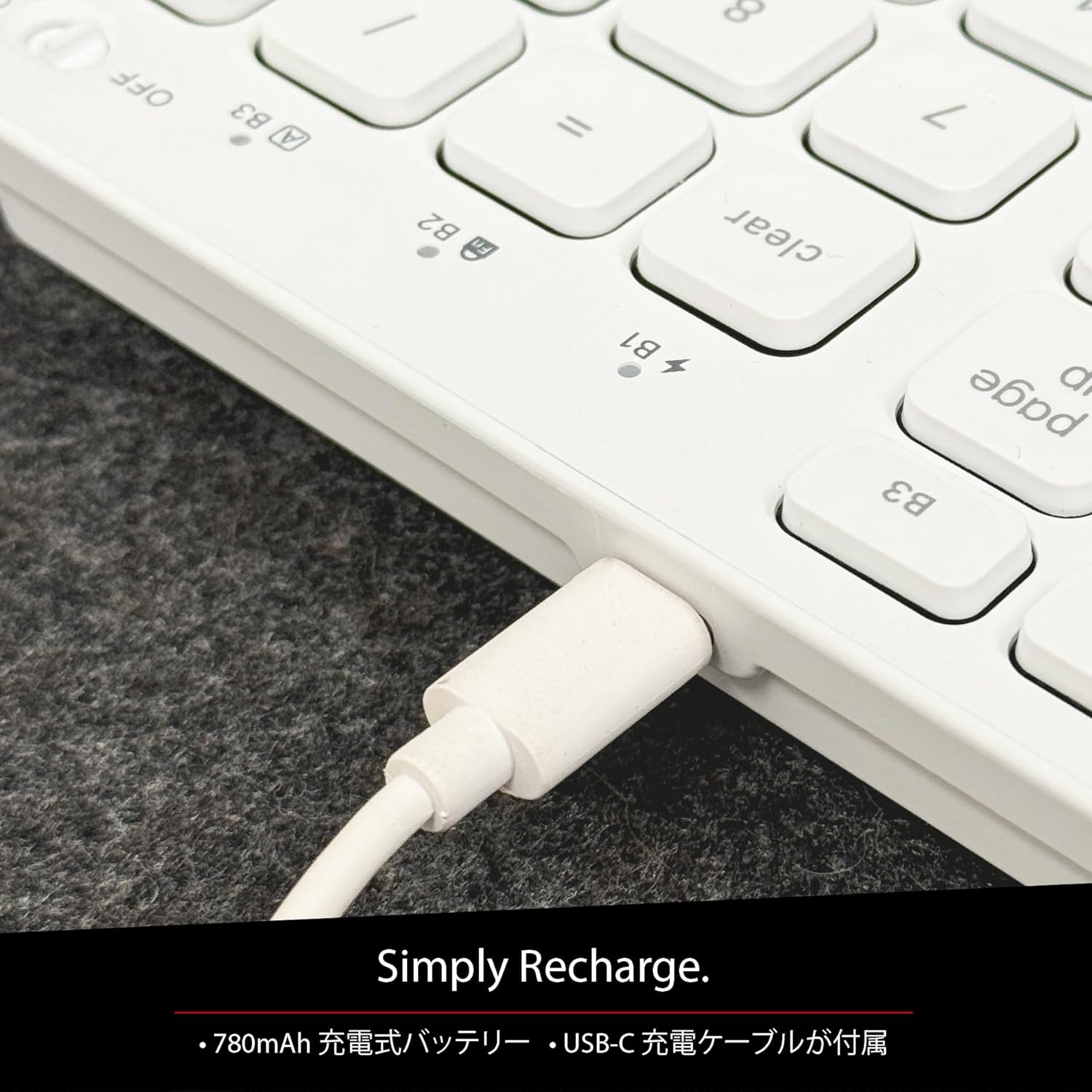
פיגורע 5: The USB-C charging port for easy recharging. The keyboard includes a 780mAh rechargeable battery.
טשאַרדזשינג געפירט ינדיקאַטאָרס:
- רויט געפירט: טשאַרדזשינג אין פּראָגרעס.
- גרין געפירט: גאָר באפוילן.
- All Bluetooth Channel LEDs flashing: די באַטאַרייע איז נידעריק.
בלועטאָאָטה פּערינג פּראָצעדור
The keyboard can be paired with up to three Bluetooth-enabled devices. The number keys 1, 2, and 3 on the top row (not the numeric keypad) are labeled B1, B2, and B3, representing the Bluetooth channels.
Ensure the keyboard is powered on and sufficiently charged before starting the pairing process. The power switch is a slide button located on the side of the keyboard (Red for Off, Green for On).
Steps to Pair (using Bluetooth Channel 1 (B1) as an exampלאַ):
- On the device you wish to connect (laptop, desktop, tablet, smartphone, etc.), open the Bluetooth settings screen.
- אויף דער קלאַוויאַטור, דריק און האַלט די קנעפּל fn שליסל, און דריקן די 1 key (B1) to select Bluetooth Channel 1.
- Next, press and hold the fn key and simultaneously press the P key. This will put the keyboard into pairing mode, and the B1 LED will flash rapidly.
- On your device's Bluetooth settings screen, click or tap the device name "ACEBTKEY" to initiate pairing.
- Once pairing is complete, the B1 LED on the keyboard will remain steadily lit in blue.
To connect to a second or third device, follow the same procedure using B2 (fn+2) or B3 (fn+3).
Keyboard Setup Assistant (For Mac Users)
If your Bluetooth keyboard is not immediately recognized by macOS, the Keyboard Setup Assistant will automatically launch, prompting you to specify the keyboard type. Follow the on-screen instructions.
- When prompted, press the Z שליסל.
- דערנאָך דריקן די קנעפּל ? שליסל.
- Confirm that "ANSI" is selected as the keyboard type and click "Done".
If keys do not respond or different characters are entered than printed, you may need to manually launch the Keyboard Setup Assistant:
- Open "System Settings" or "System Preferences".
- Select "Keyboard" and click "Change Keyboard Type".
- When the "Keyboard Setup Assistant" window appears, click "Continue" and follow the on-screen instructions.
אַפּערייטינג ינסטראַקשאַנז
וועקסלען צווישן קייפל דעוויסעס
After pairing all your devices with the keyboard, you can easily switch between them:
- דריקן און האַלטן די fn שליסל.
- בשעת האלטן fn, press the desired Bluetooth channel key (B1, B2, אָדער B3).
- Release both keys. The keyboard will switch to the selected device.
Shortcut and Function Keys
The F-row (function key row) at the top of the keyboard defaults to shortcut mode. These keys perform functions indicated by the small white icons or text printed on them (e.g., play, pause, cut, copy).
To use standard function keys (F1, F2, etc.), press the desired function key while holding down the fn שליסל.
You can toggle between shortcut mode and standard F1-F12 function keys at any time by pressing fn + Esc. After switching, if you wish to use a shortcut function, press the desired shortcut key while holding down the fn שליסל. דרינגלעך fn + Esc again will return the keyboard to shortcut mode.
F-Key Functions:
| פֿונקציע | מעק אָסקס | Windows | יאָס | אַנדרויד |
|---|---|---|---|---|
| fn+esc (Toggle F-row mode) | ✓ | ✓ | ✓ | ✓ |
| פאַרשטעלן ברייטנאַס אַראָפּ | ✓ | ✓ | ||
| סקרין ברייטנאַס אַרויף | ✓ | ✓ | ||
| שנייַדן | ✓ | ✓ | ✓ | ✓ |
| קאָפּי | ✓ | ✓ | ✓ | ✓ |
| פּאַפּ | ✓ | ✓ | ✓ | ✓ |
| פֿריִערדיקע שפּירט | ✓ | ✓ | ✓ | ✓ |
| שפּיל / פּויזע | ✓ | ✓ | ✓ | ✓ |
| ווייַטער שפּור | ✓ | ✓ | ✓ | ✓ |
| שטום | ✓ | ✓ | ✓ | ✓ |
| באַנד אַראָפּ | ✓ | ✓ | ✓ | ✓ |
| באַנד אַרויף | ✓ | ✓ | ✓ | ✓ |
| דרוקן | ✓ | |||
| Mac: Eject Mac / Windows: Media Eject | ✓ | ✓ | ||
| Area Capture (Screenshot) | ✓ | |||
| אויף-פאַרשטעלן קיבאָרד | ✓ | |||
| זוכן | ✓ | ✓ | ✓ | ✓ |
| היים קנעפּל | ✓ | ✓ | ||
| מעניו | ✓ | |||
| שלאָס | ✓ | ✓ | ✓ | ✓ |
וויכטיק באַמערקונג: Standard function keys (F1-F12) may have special functions assigned by the connected operating system or currently running programs.
מאַכט שפּאָרן מאָדע
The keyboard is designed with power-saving features. Based on an average of 3 hours of daily use, the built-in rechargeable battery can last up to 3 months on a single charge.
וישאַלט
To ensure the longevity and optimal performance of your Macally BTZKEYA keyboard, please follow these maintenance guidelines:
- Keep the device away from liquids, moisture, and water.
- Use the device only within the specified temperature range of 0°C (32°F) to 40°C (104°F).
- Clean the keyboard regularly with a soft, dry cloth. Avoid using harsh chemicals or abrasive materials.
- Do not disassemble the device. Disassembly will void the warranty.
- When disposing of the product, do not treat it as general waste. Take it to your nearest recycling center for proper disposal.
טראָובלעשאָאָטינג
פּאָרינג ישוז:
- If pairing fails, delete all existing pairing records for the keyboard on your device and attempt to reconnect.
- זייט זיכער אַז די קלאַוויאַטור איז גאָר אָנגעלאָדן און אנגעצונדן.
- זייט זיכער אז אייער דעווייס'ס בלועטוט איז ענייבאַלד און דעטעקטאַבאַל.
Key Response Issues:
- If keys do not respond or different characters are entered than printed, manually launch the Keyboard Setup Assistant on your Mac (refer to the "Keyboard Setup Assistant" section under Setup).
- Ensure the keyboard is within the 30-foot wireless range of your device.
אַלגעמיינע קאַמפּאַטאַבילאַטי:
- While designed for Mac, this keyboard is also compatible with Windows PCs. However, some functions may behave differently depending on the operating system or running programs.
ספּעסאַפאַקיישאַנז
| שטריך | דעטאַל |
|---|---|
| סאָרט | מאַקאַללי |
| מאָדעל נומער | BTZKEYA |
| נומער פון קיז | 111 keys (Mac layout) |
| שליסל סוויטש טיפּ | שער-באַשטימען |
| קאַנעקטיוויטי טעכנאָלאָגיע | בלועטאָאָטה |
| מולטי-מיטל שטיצן | אַרויף צו 3 דעוויסעס |
| באַטאַרייע קאַפּאַציטעט | 780 מאַה (ריטשאַרדזשאַבאַל) |
| טשאַרדזשינג פּאָרט | וסב-C |
| פּראָדוקט דימענשאַנז | 42 X 14 X 2 סענטימעטער |
| פּראָדוקט וואָג | 650 ג |
| רעקאַמענדיד נוצן | Multimedia, Everyday Use, Personal, Education, Student, Business |
וואָראַנטי אינפֿאָרמאַציע
Macally Peripherals warrants this product against defects in title, materials, and workmanship for a period of one year from the date of purchase. If a defect is found in the product, Macally's sole obligation and your sole remedy will be to repair or replace the product.
This is a limited warranty applicable only to the product accompanied by this user guide. This warranty does not apply in the following cases:
- Abuse or misuse of the product.
- Exposure to abnormal electrical or environmental conditions.
- Use under conditions not considered normal use.
- Disassembly of the device.
Macally Peripherals' liability arising from this warranty and sale is limited to a refund of the purchase price. Macally is not responsible for the cost of procuring substitute products or services, lost profits, or any other consequential, incidental, direct, or indirect damages. These limitations apply even if the limited remedies fail of their essential purpose.
טעכניש שטיצן
For technical assistance, please contact Macally support during the following hours:
- אַפּערייטינג שעה: Monday to Friday, 9 AM to 5 PM (Pacific Standard Time)
- בליצפּאָסט: techsupport@macally.com
When contacting support, please have your product model number (BTZKEYA) and purchase information ready.
FCC קאָמפּליאַנסע סטאַטעמענט
דער מיטל איז אין לויט מיט טייל 15 פון די FCC כּללים. אָפּעראַציע איז אונטערטעניק צו די פאלגענדע צוויי באדינגונגען: (1) דער מיטל קען נישט פאַרשאַפן שעדלעך ינטערפיראַנס, און (2) דער מיטל מוזן אָננעמען קיין ינטערפיראַנס באקומען, אַרייַנגערעכנט ינטערפיראַנס וואָס קען פאַרשאַפן אַ ניט-געוויליקט אָפּעראַציע.
ענדערונגען אדער מאדיפיקאציעס וואס זענען נישט אויסדריקליך באשטעטיגט דורך דער פארטיי וואס איז פאראנטווארטלעך פאר קאנפארמיטי קענען בטל מאכן דעם באנוצער'ס אויטאריטעט צו אפערירן די עקוויפמענט.
די עקוויפּמענט איז טעסטעד און געפֿונען צו נאָכקומען מיט די לימאַץ פֿאַר אַ קלאַס ב דיגיטאַל מיטל, לויט טייל 15 פון די FCC רולעס. די לימאַץ זענען דיזיינד צו צושטעלן גלייַך שוץ קעגן שעדלעך ינטערפיראַנס אין אַ רעזידענטשאַל ינסטאַלירונג. די עקוויפּמענט דזשענערייץ, ניצט און קענען שטראַלן ראַדיאָ אָפטקייַט ענערגיע און, אויב נישט אינסטאַלירן און געוויינט אין לויט מיט די ינסטראַקשאַנז, קען פאַרשאַפן שעדלעך ינטערפיראַנס צו ראַדיאָ קאָמוניקאַציע. אָבער, עס איז קיין גאַראַנטירן אַז ינטערפיראַנס וועט נישט פּאַסירן אין אַ באַזונדער ינסטאַלירונג. אויב די עקוויפּמענט טוט פאַרשאַפן שעדלעך ינטערפיראַנס צו ראַדיאָ אָדער טעלעוויזיע אָפּטראָג, וואָס קענען זיין באשלאסן דורך קערן די עקוויפּמענט אַוועק און אויף, דער באַניצער איז ינקעראַדזשד צו פּרובירן צו פאַרריכטן די ינטערפיראַנס דורך איינער אָדער מער פון די פאלגענדע מיטלען:
- ריאָריענט אָדער רילאָוקייטיד די ריסיווינג אַנטענע.
- פאַרגרעסערן די צעשיידונג צווישן די עקוויפּמענט און ופנעמער.
- פאַרבינדן די עקוויפּמענט אין אַ ווענטיל אויף אַ קרייַז אַנדערש פון דעם צו וואָס די ופנעמער איז קאָננעקטעד.
- באַראַטנ זיך די הענדלער אָדער אַ יקספּיריאַנסט ראַדיאָ / טעלעוויזיע טעכניקער פֿאַר הילף.
דער מיטל איז עוואַלואַטעד צו טרעפן אַלגעמיינע רף ויסשטעלן רעקווירעמענץ. די מיטל קענען זיין געוויינט אין פּאָרטאַטיוו ויסשטעלן טנאָים אָן ריסטריקשאַן.
פּראָדוקט ווידיאס
Macally BTZKEYA Bluetooth Keyboard Overview
דאס ווידעא גיט אן אלגעמיינע איבערבליקview of the Macally BTZKEYA Bluetooth keyboard, highlighting its features and design.
Macally Mac Bluetooth Keyboard - Premium Multi-Device
A detailed look at the Macally Bluetooth keyboard for Mac, emphasizing its premium build and multi-device capabilities.
Macally SLIMKEYPROA Keyboard Features
This video showcases the features of the Macally SLIMKEYPROA keyboard, which shares similar design and functionality with the BTZKEYA model.
Macally BLSlimkeyproA Keyboard Demonstration
A demonstration of the Macally BLSlimkeyproA keyboard, highlighting its compact design and key features.
Macally ACEBTKEYSGCB Keyboard Overview
דער ווידעא גיט אַן איבערבליקview of the Macally ACEBTKEYSGCB keyboard, showcasinג זײַן דיזײַן און פֿונקציאָנאַליטעט.
Macally SLIMKEYPRO Manual Guide
A visual guide to the Macally SLIMKEYPRO, offering insights into its usage and features.


