1. הקדמה
Welcome to the user manual for your new FLEXISPOT 63x28 Inch Dual Motor Electric Standing Desk. This manual provides essential information for the safe assembly, operation, maintenance, and troubleshooting of your desk. Please read it thoroughly before use and retain it for future reference.
2. זיכערקייַט אינסטרוקציעס
- זיכער מאַכן אַז אַלע קאָמפּאָנענטן זענען פאַראַן און נישט געשעדיגט איידער איר אַסעמבלט עס. ניצט עס נישט אויב עס פעלט אָדער זענען געשעדיגט.
- האַלט קינדער און חיות אַוועק פון די טיש בעת די אָפּעראַציע צו פאַרמייַדן שאָדן.
- Do not place hands or other body parts near moving parts of the desk during height adjustment.
- זיכער מאַכן אַז דער טיש איז געשטעלט אויף אַ גלייכער ייבערפלאַך צו פאַרמייַדן עס צו איבערקערן.
- איבערלאָדן נישט דעם טיש. זעט די ספּעציפֿיקאַציעס פֿאַר מאַקסימום וואָג קאַפּאַציטעט.
- Keep all electrical cords organized and away from moving parts to prevent damage or entanglement.
- נעמט ארויס דעם טיש פון דער עלעקטרישער אַוטלעט איידער איר רייניגט אדער פירט אויס קיין שום אויפהאלטונג.
- Only use the desk for its intended purpose as a workstation.
3. פּעקל אינהאַלט
באַשטעטיקט אַז אַלע זאכן וואָס זענען אויסגערעכנט אונטן זענען אַרייַנגערעכנט אין אייער פּעקל:
- Desktop Surface (Black)
- Desk Frame (Black, including dual motors and lifting columns)
- Control Panel with Memory Controller
- מאַכט אַדאַפּטער און קאַבלע
- פֿאַרזאַמלונג האַרדווער (שרויף, מכשירים, אאז"ו ו)
- ינסטראַקשאַנז מאַנואַל

בילד: איבערview of the FLEXISPOT 63x28 Inch Dual Motor Electric Standing Desk, showing the desktop, frame, and control panel.
4. סעטאַפּ אינסטרוקציעס
4.1 אַנפּאַקינג
Carefully remove all components from the packaging. Place them on a soft, clean surface to prevent scratches or damage during assembly. Keep all packaging materials until assembly is complete and you are satisfied with the product.
4.2 צוזאַמענשטעלן דעם ראַם
Follow the detailed diagrams provided in the separate assembly guide to connect the lifting columns to the crossbar and attach the footings. Ensure all screws are tightened securely.
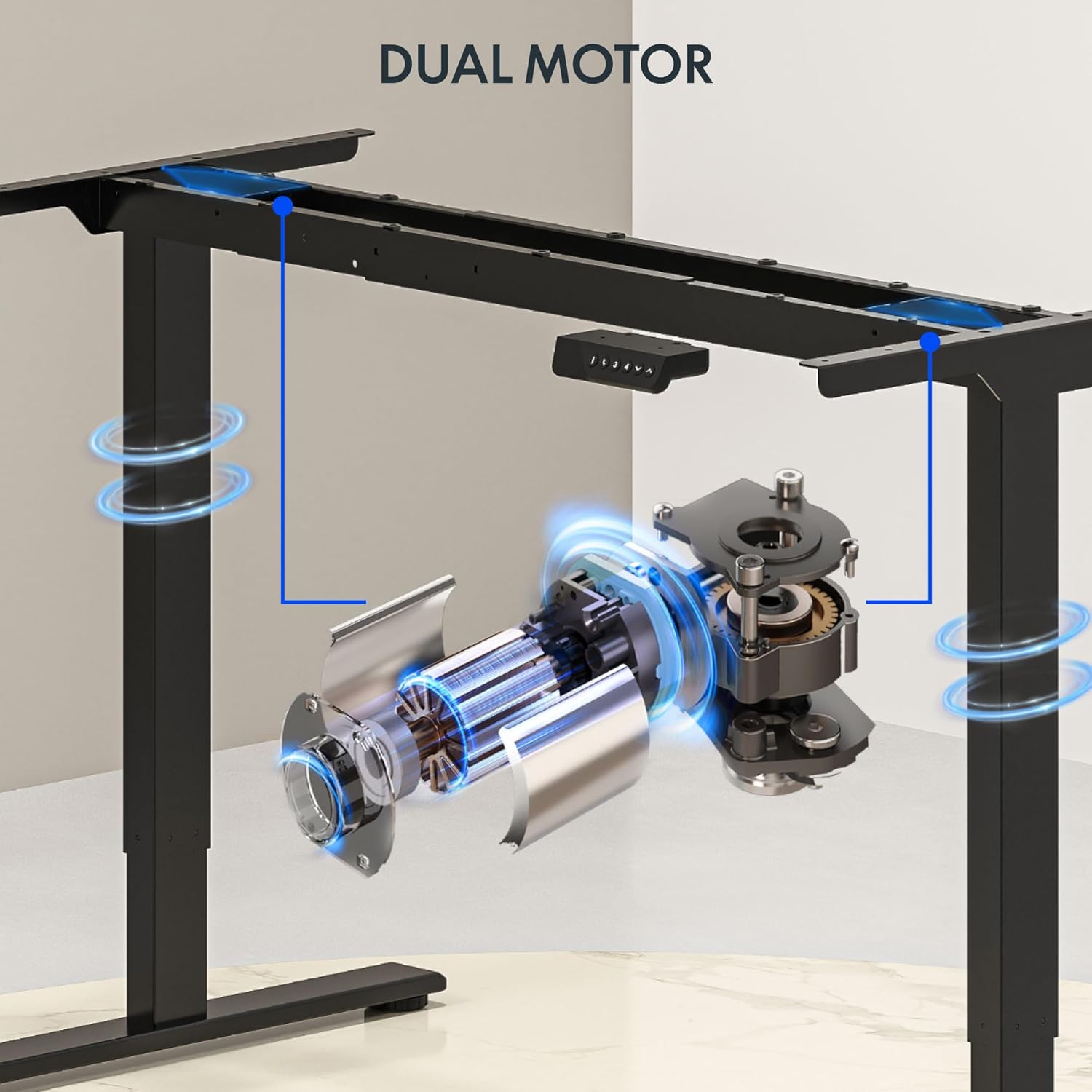
בילד: דעטאַלירט view of the dual motor desk frame, illustrating the motor placement and structural components.
4.3 אנשטעלן דעם דעסקטאפ
Carefully place the desktop upside down on a soft surface. Align the assembled frame with the pre-drilled holes on the desktop. Secure the desktop to the frame using the provided screws. Once secured, carefully flip the desk upright with assistance.
4.4 Connecting the Control Panel and Power
Connect the control panel cable to the control box, and then connect the power adapter to the control box. Plug the power cable into a standard electrical outlet. The desk is now ready for initial operation.

Image: Close-up of the desk's control panel, showing the LED display and buttons for height adjustment and memory presets.
Video: Demonstrates the dual-motor strength and smooth operation of the FLEXISPOT standing desk, highlighting its robust design and functionality.
5. אַפּערייטינג ינסטרוקטיאָנס
5.1 הייך צופּאַסן
- דרוק די אַרויף (∧) קנעפּל צו הייבן דעם טיש.
- דרוק די אַראָפּ (∨) קנעפּל צו נידעריקערן דעם טיש.
- Release the button at your desired height. The LED display will show the current height.
5.2 ניצן זכּרון פּרעסעטס
The control panel features four memory presets (1, 2, 3, 4) to save and recall your preferred sitting and standing heights.
- שטעל דעם טיש צו אייער געוואונטשענע הייך מיט די אַרויף/אַראָפּ קנעפּלעך.
- דרוק די "מ" button (or similar memory set button, indicated by 'i' on some models) once. The display will flash.
- Immediately press one of the number buttons (1, 2, 3, or 4) to save the current height to that preset.
- כדי צוריקצורופן א געשפארטע הייך, דריקט פשוט דעם קארעספאנדירנדיקן נומער קנעפל (1, 2, 3, אדער 4). דער טיש וועט זיך אויטאמאטיש באוועגן צו דער געשפארטער פאזיציע.

Image: Close-up of the memory controller, highlighting the numbered preset buttons and the up/down controls for precise height adjustments.
5.3 אַנטי-קאָליזיע סיסטעם
The desk is equipped with an anti-collision system. If the desk encounters an obstacle during height adjustment, it will automatically stop and reverse slightly to prevent damage. This feature enhances safety during operation.
6. וישאַלט
- רייניקונג: ווישט אָפּ די טיש־איבערפֿלאַך און ראַם מיט אַ ווייכן, דamp שטאָף. פֿאַרמײַדט שרײַבנדיקע רייניקונגס־מיטלען אָדער שאַרפֿע כעמיקאַלן וואָס קענען שאַטן דעם ענדיקונג.
- דורכקוק: Regularly check all screws and connections to ensure they are tight. Re-tighten if necessary.
- קאַבלע פאַרוואַלטונג: Ensure all cables are neatly organized and not pinched or tangled, especially during height adjustments.
- מאַכט שנור: קאָנטראָלירט דעם עלעקטרישן שנור פֿאַר יעדע סימן פֿון שאָדן. אויב עס איז געשעדיגט, שטעלט אָפּ דעם באַניץ און קאָנטאַקטירט קונה שטיצע.
7. טראָובלעשאָאָטינג
| פּראָבלעם | מעגלעך סיבה | לייזונג |
|---|---|---|
| דער טיש רירט זיך נישט. | שטראָם קאַבל אָפּגעטיילט; מאָטאָר קאַבל לויז; איבערלאַסטונג. | Check power connection; ensure all cables are securely plugged in; reduce weight on desk. |
| דער טיש באוועגט זיך נישט גלייך אדער מאכט אומגעווענליכע גערוישן. | אומגלייכע לאסט; פרייע פארבינדונגען; שטערונג. | Distribute weight evenly; check and tighten all screws; remove any obstructions. |
| הייך פאָר-אינסטאַלירטע אַרבעטן נישט. | Presets not properly set. | Re-program the memory presets following section 5.2. |
| די אַנטי-קאַליזשאַן סיסטעם טריגערט אָפט. | Obstacles in the path of movement; sensitivity setting too high. | Clear the area around the desk; consult the full manual for adjusting anti-collision sensitivity if available. |
If you encounter issues not listed here or if the solutions do not resolve the problem, please contact FLEXISPOT customer support.
8. ספּעסאַפאַקיישאַנז
| שטריך | דעטאַל |
|---|---|
| סאָרט | FLEXISPOT |
| מאָדעל | 63x28 Inch Dual Motor Electric Standing Desk |
| דעסקטאָפּ דימענשאַנז | 63"ברייט x 28"דיב |
| הייך ראַנגע | 28.3" ביז 47.6" |
| מאַקסימום וואָג קאַפּאַציטעט | 198 לבס |
| מאָטאָר טיפּ | צווייענדיק מאָטאָר |
| קאָנטראָל פּאַנעל | Memory Controller with 4 Presets |
| דעסקטאָפּ מאַטעריאַל | Engineered Wood (Black Top) |
| ראַם מאַטעריאַל | Alloy Steel (Black Frame) |
| ספּעציעלע פֿעיִקייטן | Dual Motor, 198 lbs Heavy-Duty Capacity, Memory Controller, 63"x28" Large Desktop |

Image: Diagram illustrating the dimensions of the FLEXISPOT 63x28 Inch Electric Standing Desk, including height range, width, and depth.
9. וואָראַנטי און שטיצן
9.1 לימיטעד וואָראַנטי
This FLEXISPOT product comes with a limited warranty against defects in materials and workmanship. The specific terms and duration of the warranty may vary. Please refer to the warranty card included in your package or visit the official FLEXISPOT webפּלאַץ פֿאַר דיטיילד וואָראַנטי אינפֿאָרמאַציע.
The warranty typically covers the desk frame, motors, and control panel under normal use conditions. Damage resulting from misuse, accidents, unauthorized modifications, or improper assembly is not covered.
9.2 קונה שטיצן
For technical assistance, warranty claims, or any questions regarding your FLEXISPOT standing desk, please contact our customer support team:
- Webפּלאַץ: www.flexispot.com
- בליצפּאָסט: support@flexispot.com
- טעלעפֿאָן: (Refer to your product packaging or webזייטל פֿאַר רעגיאָנאַלע קאָנטאַקט נומערן)
Please have your model number (B0F29ZD4DN) and purchase date ready when contacting support.


