1. הקדמה
This manual provides instructions for the proper use and maintenance of your ttec SoundFlow OWS Wireless Bluetooth Earphones, model KM156. Please read this manual thoroughly before using the product to ensure optimal performance and longevity.
The ttec SoundFlow OWS earphones feature an open-ear design for situational awareness, dynamic acoustic system for clear sound, and Bluetooth 5.4 for stable wireless connectivity.
2. פּעקל אינהאַלט
באַשטעטיקט אַז אַלע זאכן זענען פאַראַן אין אייער פּראָדוקט פּאַקעט:
- ttec SoundFlow OWS Wireless Bluetooth Earphones (Left and Right)
- טשאַרדזשינג קאַסע
- וסב-C טשאַרדזשינג קאַבלע
- באַניצער מאַנואַל
3. פּראָדוקט איבערview
Familiarize yourself with the components of your ttec SoundFlow OWS earphones.

Image 3.1: ttec SoundFlow OWS Earphones and Charging Case. The image displays the two black earphones with ear hooks, positioned above their open black charging case.
אויערפאָון קאָמפּאָנענטן:
- אויער קרוק: גיט אַ זיכערן און באַקוועמען פּאַסיק איבערן אויער.
- רעדנער אַפּאַראַט: דיליווערז אַודיאָ רעזולטאַט.
- מיקראָפאָן: פֿאַר רופֿן און שטימע באַפֿעלן.
- ריר סענסאר שטח: For controlling music, calls, and other functions.
- טשאַרדזשינג קאָנטאַקטן: פֿאַרבינדט זיך מיטן טשאַרדזשינג קעסטל פֿאַר מאַכט.

Image 3.2: Close-up of an earbud highlighting the touch sensor area. The image shows a detailed view of the earbud's outer surface, indicating the touch-sensitive zone for controls.
טשאַרדזשינג קעיס קאָמפּאָנענטן:
- אויערפאָון סלאָץ: Securely holds and charges the earphones.
- USB-C טשאַרדזשינג פּאָרט: פֿאַר טשאַרדזשינג די קאַסטן.
- LED ינדיקאַטאָר: ווײַזט די טשאַרדזשינג סטאַטוס און באַטאַרייע מדרגה.
4. סעטאַפּ
4.1 אויפלאָדן די אויערפאָונז און קעסטל
פארן ערשטן באַנוץ, לאָדן די אויערפאָונז און די טשאַרדזשינג קעסטל גאָר אויף.
- לייגט די אויערפאָנען אין דעם טשאַרדזשינג קעסטל. מאַכט זיכער אַז די טשאַרדזשינג קאָנטאַקטן זענען גלייך.
- פֿאַרבינדט דעם USB-C טשאַרדזשינג קאַבל צום טשאַרדזשינג פּאָרט אויף דער קעיס און דעם אַנדערן עק צו אַ מאַכט מקור (למשל, USB וואַנט אַדאַפּטער, קאָמפּיוטער USB פּאָרט).
- The LED indicator on the case will show the charging status. Once fully charged, the indicator will change or turn off.
A full charge provides up to 6 hours of earphone use, and the charging case provides up to 30 hours of additional battery life. The Charge&Go feature allows 2.5 hours of use from a 15-minute charge.
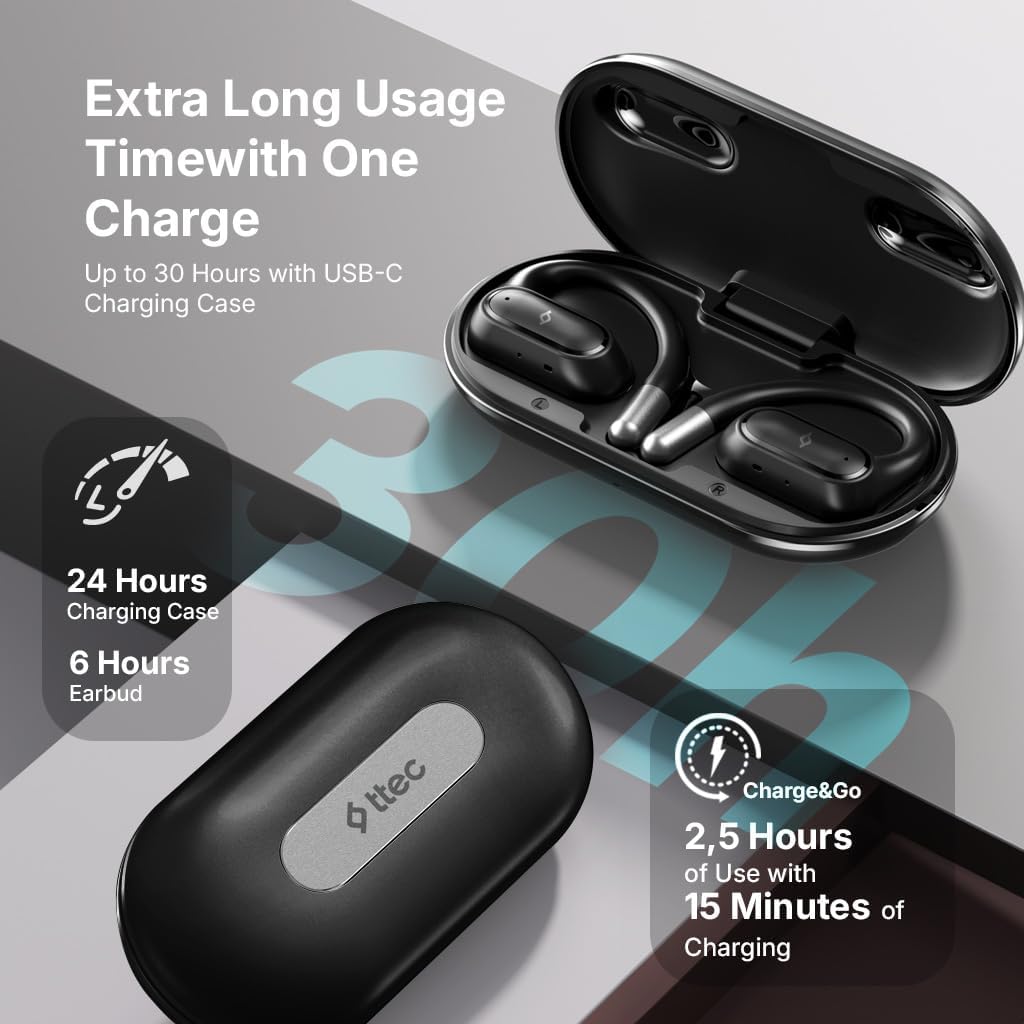
Image 4.1: Charging case displaying battery life. The image illustrates the charging case with text indicating 24 hours from the charging case, 6 hours from earbuds, and 2.5 hours of use from 15 minutes of charging.
4.2 פּאָרן מיט אַ בלועטוט מיטל
To connect your earphones to a smartphone or other Bluetooth-enabled device:
- זיכער מאַכן אַז די אויערפאָונז זענען אויפגעלאָדן און געשטעלט אין די טשאַרדזשינג קעסטל.
- עפֿנט דעם טשאַרדזשינג קעסטל. די אויערפֿאָנען וועלן אויטאָמאַטיש אַרײַנגיין אין פּערינג מאָדע, און זייערע LED אינדיקאַטאָרן וועלן בליצן.
- אויף דיין מיטל, געבן בלועטאָאָטה און זוכן פֿאַר בנימצא דעוויסעס.
- Select "ttec SoundFlow" from the list of found devices.
- Once connected, the earphone LED indicators will stop flashing or turn off, and you will hear a confirmation tone.
די אויערפאָונז וועלן זיך אויטאָמאַטיש ווידער פֿאַרבינדן צום לעצטן געפּאָרטן מיטל ווען מען נעמט זיי אַרויס פֿונעם קעסטל, אויב בלועטוט איז אַקטיוויזירט אויפן מיטל.
5. אַפּערייטינג ינסטרוקטיאָנס
5.1 טראָגן די אויערפאָנען
Gently place the ear hook over your ear and position the speaker unit comfortably in front of your ear canal. The open-ear design allows you to remain aware of your surroundings.

Image 5.1: A person cycling while wearing the ttec SoundFlow OWS earphones. The image highlights the open-ear design, allowing the user to stay connected to their surroundings.

Image 5.2: A woman wearing a ttec SoundFlow earbud, demonstrating the comfortable and secure fit. The image also indicates the lightweight design: 8.2g per earbud and 52g for the charging case.
5.2 ריר קאָנטראָלס
The earphones feature touch sensors for easy control of various functions:
| קאַמף | פֿונקציע |
|---|---|
| איין צאַפּ (לינקס/רעכטס) | שפּילן/פּויזירן מוזיק, ענטפֿערן רוף |
| טאָפּל טאַפּ (L) | פֿריִערדיקע שפּירט |
| טאָפּלט קלאַפּ (R) | ווייַטער שפּור |
| טריפל טאַפּ (לינקס/רעכטס) | אַקטאַווייט די קול אַססיסטאַנט |
| לאַנג דריקן (לינקס/רעכטס) | Reject Call, End Call |
5.3 שפּיל מאָדע
The earphones feature a low-latency game mode for an enhanced gaming and video experience. This mode reduces audio delay to 50ms.
- To activate Game Mode: Refer to the specific instructions in the quick start guide or product packaging for the exact touch gesture to enable/disable game mode. (Typically a specific tap sequence or long press).
- When Game Mode is active, you may notice a slight change in audio profile, optimized for lower latency.

Image 5.3: ttec SoundFlow earphones and charging case, surrounded by gaming console symbols, highlighting the 50ms low latency feature for an optimized gaming and video experience.
6. וישאַלט
6.1 רייניקונג
- ווישט די אויערפאָונז און די טשאַרדזשינג קעסטל מיט אַ ווייכן, טרוקענעם, לינט-פֿרייע שטאָף.
- ניצט נישט קיין שרײַבנדיקע רייניגער, אַלקאָהאָל, אדער כעמישע סאָלווענטן.
- Ensure charging contacts are clean and dry to prevent charging issues.
6.2 וואַסער און שווייס קעגנשטעל
The ttec SoundFlow OWS earphones are IPX6 rated, meaning they are resistant to high-pressure water jets from any direction. This makes them suitable for use during workouts and in light rain.
- דו זאלסט נישט סאַבמערדזש די ירפאָונז אין וואַסער.
- Ensure the earphones are dry before placing them back into the charging case to prevent damage.

Image 6.1: A man running outdoors, illustrating the sweat and water-resistant design of the ttec SoundFlow earphones, which are IPX6 rated.
6.3 סטאָרידזש
ווען נישט אין באַנוץ, לייגט די אויערפאָונז אין זייער טשאַרדזשינג קעסטל צו באַשיצן זיי און האַלטן זיי טשאַרדזשד. לייגט זיי אין אַ קיל, טרוקן אָרט אַוועק פון עקסטרעמע טעמפּעראַטורן.
7. טראָובלעשאָאָטינג
If you encounter issues with your earphones, refer to the following common solutions:
| פּראָבלעם | לייזונג |
|---|---|
| אויערפאָונז נישט פּערינג | Ensure earphones are charged. Turn off and on Bluetooth on your device. Forget the device in your Bluetooth settings and re-pair. |
| נאָר איין אויערפאָן אַרבעט | לייגט צוריק ביידע אויערפאָנען אין דעם קעסטל, מאַכט צו דעם דעקל, און עפֿנט ווידער. מאַכט זיכער אַז ביידע זענען אויפֿגעלאָדן. |
| קיין געזונט | קאָנטראָלירט די וואָלומען פונעם אַפּאַראַט. מאַכט זיכער אַז די אויערפאָונז זענען פֿאַרבונדן. פּרוּווט שפּילן אַנדערע אַודיאָ. |
| טשאַרדזשינג ישוז | Ensure charging cable is securely connected. Clean charging contacts on earphones and case. Try a different USB-C cable or power source. |
אויב די פראבלעם בלייבט, ביטע קאנטאקטירט קאסטומער סופארט.
8. ספּעסאַפאַקיישאַנז
| שטריך | דעטאַל |
|---|---|
| מאָדעל נאָמען | SoundFlow |
| מאָדעל נומער | KM156 |
| קאַנעקטיוויטי טעכנאָלאָגיע | ווירעלעס (בלוטוט 5.4) |
| פאָרם פאַקטאָר | True Wireless, Open-Ear |
| עאַרבוד ווייט | 8.2 גראַמז (יעדער) |
| טשאַרדזשינג קאַסע וואָג | 52 גראַמז |
| עאַרבוד באַטערי לעבן | ביז 6 שעה (איין אָפּצאָל) |
| גאַנץ באַטאַרייע לעבן (מיט קעסטל) | אַרויף צו 30 שעה |
| שנעל טשאַרדזשינג | 15 min charge for 2.5 hours use (Charge&Go) |
| וואַסער קעגנשטעל | IPX6 Rated (Sweat and Water Resistant) |
| נידעריק לייטאַנס | 50ms (שפּיל מאָדע) |
| פאַבריקאַנט | טטעק |
9. וואָראַנטי און שטיצן
Your ttec SoundFlow OWS Wireless Bluetooth Earphones are covered by a manufacturer's warranty. For detailed warranty information, please refer to the warranty card included in your product packaging or visit the official ttec webפּלאַץ.
For technical support, troubleshooting assistance, or to inquire about replacement parts, please contact ttec customer service through their official channels. Contact information can typically be found on the product packaging or the official ttec webפּלאַץ.


