1. הקדמה
This manual provides detailed instructions for the setup, operation, and maintenance of your ATTACK SHARK X11 Wireless Gaming Mouse and X60 HE Magnetic Switch Gaming Keyboard Combo. Please read this manual thoroughly before using the product to ensure optimal performance and longevity.
2. פּעקל אינהאַלט
באַשטעטיקן אַז אַלע זאכן זענען פאַראַן אין דיין פּעקל:
- ATTACK SHARK X60 HE Magnetic Switch Gaming Keyboard
- אַטאַק שאַרק X11 וויירלעס גיימינג מויז
- USB-C to USB-A Cable (for charging and wired connection)
- 2.4GHz USB ריסיווער דאָנגלע
- RGB Charging Dock for X11 Mouse
- באַניצער מאַנואַל (דעם דאָקומענט)

3. פּראָדוקט איבערview
3.1. ATTACK SHARK X60 HE Keyboard
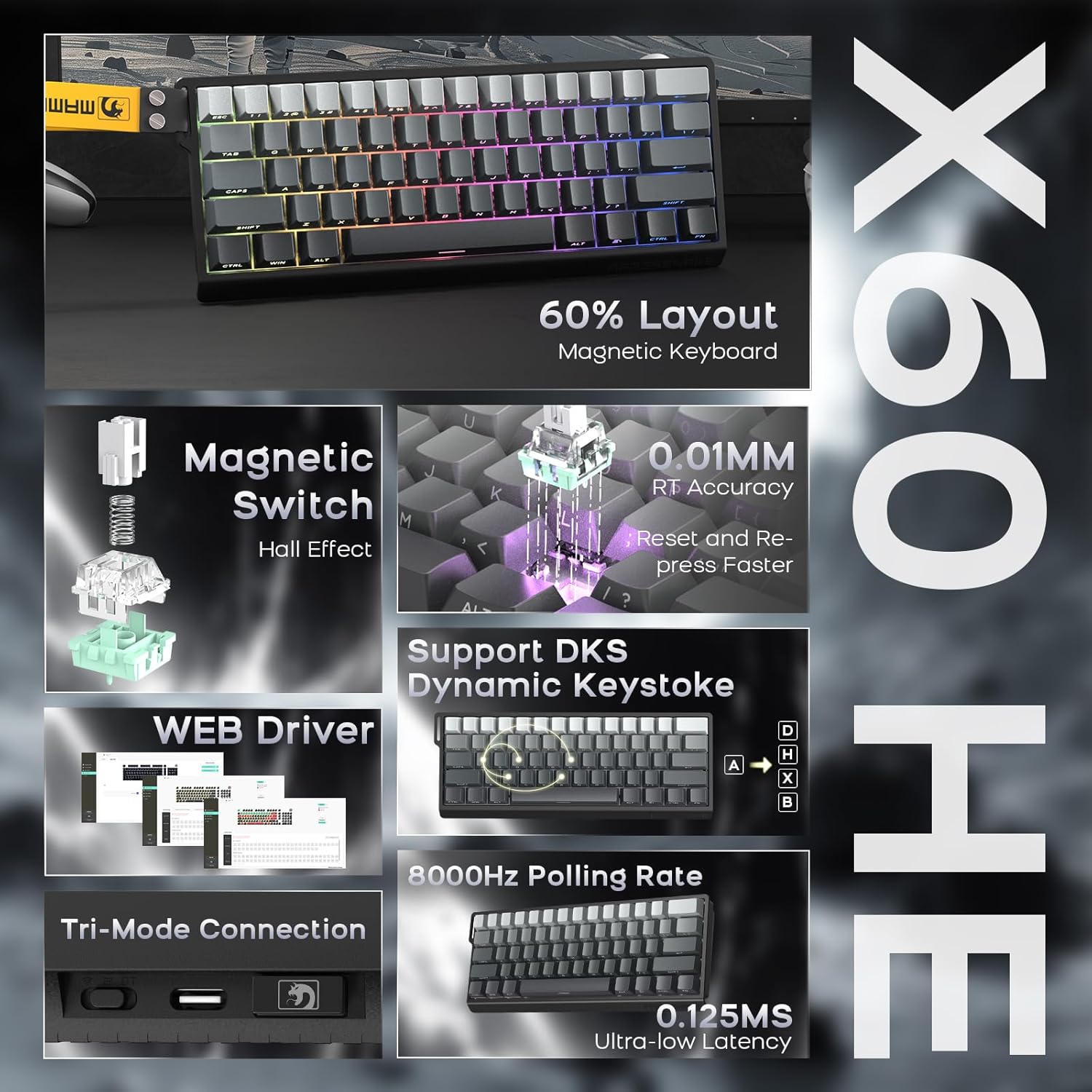
The X60 HE is a 60% layout magnetic switch keyboard designed for high-performance gaming. It features Hall effect switches with adjustable actuation points, rapid trigger functionality, and an 8000Hz polling rate for ultra-low latency response.
- מאַגנעטישע סוויטשיז: Hall effect switches with adjustable actuation from 0.1mm to 3.2mm.
- Rapid Trigger: Enables faster key resets and re-presses.
- 8000 הערץ פּאָלינג ראַטע: Provides 0.125ms response time in wired mode.
- דינאַמיש קיסטראָוק (DKS): Supports advanced key functionalities.
- טריי-מאָד קאַנעקטיוויטי: USB-C wired, 2.4GHz wireless, and Bluetooth.
- RGB באַקלייטונג: Customizable 16.8 million color RGB effects.
- הייס-סוואַפּפּאַבלע: Allows switch replacement without soldering.
- באַטערי: Integrated 4000mAh rechargeable battery.

3.2. ATTACK SHARK X11 Mouse
The X11 is a lightweight wireless gaming mouse equipped with a high-precision PAW3311 optical sensor and tri-mode connectivity. It features a magnetic charging dock that also functions as a 2.4GHz wireless receiver hub.
- סענסאָר: PAW3311 optical sensor.
- דפּי: Up to 22,000 DPI with 6 adjustable levels.
- פּאָללינג קורס: 1000 הז.
- וואָג: Approximately 62g for effortless control.
- סוויטשיז: HUYU switches with 20 million+ click lifespan.
- טריי-מאָד קאַנעקטיוויטי: USB-C wired, 2.4GHz wireless, and Bluetooth.
- טשאַרדזשינג: Magnetic fast charging via RGB dock.
- באַטאַרייע לעבן: Up to 65 hours of interval usage.


4. סעטאַפּ
4.1. ערשטע אויפלאָדונג
Before first use, it is recommended to fully charge both the keyboard and mouse.
- קלאַוויאַטור: Connect the USB-C cable to the keyboard and a power source (e.g., computer USB port, USB wall adapter).
- מויז: Place the X11 mouse onto its RGB charging dock. Connect the USB-C cable to the charging dock and a power source. The dock will also serve as the 2.4GHz wireless receiver hub.

4.2. קאָנעקטיוויטי מאָדעס
Both the X60 HE keyboard and X11 mouse support three connection modes: 2.4GHz wireless, Bluetooth, and USB-C wired.

4.2.1. 2.4GHz ווירעלעס מאָדע
- קלאַוויאַטור: Ensure the keyboard is in 2.4GHz mode (check indicator light). Plug the 2.4GHz USB receiver dongle into an available USB port on your computer.
- מויז: The 2.4GHz USB receiver dongle is integrated into the RGB charging dock. Connect the charging dock to your computer via the USB-C cable. Ensure the mouse is in 2.4GHz mode.
4.2.2. בלועטאָאָטה מאָדע
- קלאַוויאַטור: Switch the keyboard to Bluetooth mode. Activate Bluetooth on your device (computer, tablet, etc.) and search for available devices. Select "ATTACK SHARK X60 HE" to pair.
- מויז: Switch the mouse to Bluetooth mode. On your device, search for and select "ATTACK SHARK X11" to pair. The X11 mouse supports connecting to two Bluetooth devices (BT1/BT2) and can be switched between them.
4.2.3. USB-C ווייערד מאָדע
- קלאַוויאַטור: Connect the USB-C cable directly from the keyboard to your computer. The keyboard will automatically switch to wired mode and begin charging.
- מויז: פֿאַרבינדט דעם USB-C קאַבל גלייך פֿון דער מויז צו אײַער קאָמפּיוטער. די מויז וועט זיך אויטאָמאַטיש איבערקערן צו דראָטיקן מאָדע און אָנהייבן צו לאָדן.
5. אָפּעראַציע
5.1. X60 HE Keyboard Functions
- אַדזשאַסטאַבאַל אַקטואַציע פּונקט: Use the dedicated software (web driver) to customize the actuation distance of each magnetic switch from 0.1mm to 3.2mm.
- Rapid Trigger: This feature allows keys to activate and deactivate based on movement rather than a fixed point, enabling faster repeated inputs. Configure via the web שאָפער.
- דינאַמיש קיסטראָוק (DKS): Assign up to four different actions to a single keypress based on how far the key is pressed.
- RGB באַקלייטונג: Cycle through various preset RGB lighting effects using keyboard shortcuts (refer to the keyboard's specific function key combinations) or customize extensively via the web שאָפער.
- Web דרייווער: אַקסעס די web-באזירטער דרייווער ביי www.gmk.top for advanced customization of key functions, actuation points, DKS, macros, and lighting effects.

5.2. X11 Mouse Functions
- דפּי אַדזשאַסטמאַנט: The mouse features a DPI button (usually on the bottom or top) to cycle through 6 preset DPI levels: 800, 1600, 2400, 3200, 5000, and 22000 DPI.
- Tri-Mode Switching: Use the switch on the bottom of the mouse to select between 2.4GHz, Bluetooth (BT1/BT2), and wired modes.
- RGB Charging Dock: The dock provides magnetic charging and features customizable RGB lighting. It also acts as the 2.4GHz receiver.
- X11 Driver Software: Download the dedicated X11 driver software for advanced customization, including button remapping, macro creation, DPI fine-tuning, polling rate adjustment, and RGB lighting control.

6. וישאַלט
Proper maintenance ensures the longevity and performance of your gaming combo.
- רייניקונג: ניצט אַ ווייכע, טרוקענע שטאָף צו ווישן די קלאַוויאַטור און מויז. פֿאַר שווערע שמוץ, אַ ביסל טרוקןamp cloth with mild soap can be used, ensuring no liquid enters the devices. Use compressed air to clear debris from between keycaps.
- באַטערי זאָרגן: Avoid fully discharging the batteries frequently. For optimal battery health, charge the devices when the battery level is low, but avoid leaving them plugged in for extended periods after reaching full charge.
- סטאָרידזש: האַלט די דעוויסעס אין אַ קיל, טרוקן אָרט אַוועק פון דירעקט זונשייַן און עקסטרעמע טעמפּעראַטורן.
7. טראָובלעשאָאָטינג
אויב איר טרעפט פּראָבלעמען, באַציעט זיך צו די פאלגענדע געוויינטלעכע לייזונגען:
| פּראָבלעם | מעגלעך לייזונג |
|---|---|
| Device not connecting wirelessly |
|
| פאַרהאַלטונג אָדער אַרייַנגאַנג פאַרהאַלטונג |
|
| RGB לייטינג טוט נישט אַרבעטן |
|
| Keyboard keys not responding |
|
If the problem persists, please contact ATTACK SHARK customer support.
8. ספּעסאַפאַקיישאַנז
8.1. ATTACK SHARK X60 HE Keyboard
- באַשטימען טיפּ: Hall Effect Magnetic Switches (Linear)
- אַקטואַטיאָן פונט: Adjustable 0.1mm - 3.2mm (via software)
- פּאָללינג קורס: 8000Hz (Wired), 1000Hz (2.4GHz Wireless/Bluetooth)
- קאַנעקטיוויטי: יו-עס-בי-סי מיט ווייערס, 2.4 גי-הרץ ווייערלעס, בלועטוט
- באַטערי: 4000 מאַה קריקאָנלאָדלעך
- ספּעציעלע פֿעיִקייטן: Rapid Trigger, Dynamic Keystroke (DKS), RGB Backlighting, Hot-Swappable
8.2. ATTACK SHARK X11 Mouse
- סענסאָר: PAW3311 אָפּטישער סענסאָר
- דפּי: Up to 22,000 (6 adjustable levels: 800/1600/2400/3200/5000/22000)
- פּאָללינג קורס: 1000 הז
- וואָג: בעערעך. 62 ג
- סוויטשיז: HUYU (20 Million+ Clicks)
- קאַנעקטיוויטי: יו-עס-בי-סי מיט ווייערס, 2.4 גי-הרץ ווייערלעס, בלועטוט
- באַטאַרייע לעבן: Up to 65 hours (interval usage)
- טשאַרדזשינג: Magnetic Fast Charging Dock (with RGB)
8.3. אַלגעמיינע ספּעסאַפאַקיישאַנז
- פּעקל דימענשאַנז: 14.75 X 7 X 4.75 אינטשעס
- נומער וואָג: 2.94 פונט
- קאַמפּאַטאַבאַל דעוויסעס: Personal Computer, Laptop, Tablet (Windows, macOS, Switch, Xbox, PlayStation)
- פאַבריקאַנט: באַפאַלן שאַרק
9. וואָראַנטי און שטיצן
For warranty information or technical support, please contact the seller or visit the official ATTACK SHARK webזייטל. האַלט אייער קויף קוויטל ווי אַ באַווייַז פון קויפן.
פארקויפער : ATTACK SHARK US
באַאַמטער Webפּלאַץ: אַטאַק שאַרק קראָם אויף אַמאַזאָן


