1. הקדמה
Thank you for choosing the ASD 12 Inch Smart RGBW Flush Mount Ceiling Light. This fixture combines a stylish minimalist design with efficient, versatile lighting solutions. Featuring multicolor RGBW capabilities, smart app control, and remote operation, it offers a wide range of lighting effects for your space. This manual provides essential information for safe installation, effective operation, and proper maintenance of your new lighting fixture.

Figure 1.1: ASD 12 Inch Smart RGBW Flush Mount Ceiling Light with accessories.
3. פּעקל אינהאַלט
באַשטעטיקן אַז אַלע קאָמפּאָנענטן זענען פאַראַן איידער איר הייבט אָן די אינסטאַלאַציע:
- ASD 12 Inch Smart RGBW Flush Mount Ceiling Light Fixture (4 units)
- ווייַט קאָנטראָל
- מאָנטירונג האַרדווער (שרויף, דראָט ניסלעך)
- ינסטראַקשאַנז מאַנואַל
4. ספּעסאַפאַקיישאַנז
| שטריך | דעטאַל |
|---|
| סאָרט | אַסד |
| מאָדעל נאָמען | LOFT |
| טייל נומער | A-LFM12D20SRGBW-N-4p |
| קאָליר | 12" | Nickel | RGBW |
| מאַטעריאַל | Alloy Steel, Acrylic |
| סטייל | מאָדערן |
| פּראָדוקט דימענשאַנז | 11.3"ל x 11.3"בר x 3.4"ה |
| ספּעציפיש ניצט | דרינענדיק נוצן בלויז |
| מאַכט מקור | האַרדוויירעד |
| ליכט מקור טיפּ | געפירט |
| ענדיקן טיפּ | פּאַינטעד |
| שאָטן מאַטעריאַל | פּלאַסטיק |
| Voltage | 120 וואלטס |
| וואָסtage | 20 וואטס |
| מאַונטינג טיפּ | פלושמאָונט |
| דורכשניטלעך לעבן | 50,000 שעה |
| ספּעציעלע פֿעיִקייטן | 1064/1220LM, Remote Control, RGBW, Smart App, CCT Adjustable 2700-6500K |

פיגור 4.1: פּראָדוקט דימענסיעס און שליסל פֿעיִקייטן.
5. ינסטאַלירונג
Follow these steps to install your ASD Smart RGBW Flush Mount Ceiling Light:
- צוגרייטן פֿאַר ינסטאַלירונג: Turn off power at the circuit breaker before starting. Ensure the mounting surface is clean and stable.
- Remove the Lens: Gently remove the lens from the fixture by rotating it clockwise. This will expose the mounting holes and wiring connections.
- בארג די פיקסטור: Attach the fixture's base to the electrical outlet box using the provided screws. Ensure it is securely fastened.
- דראָט קאַנעקשאַנז: Connect the wires: Black to Black (Live), White to White (Neutral), and Ground to Ground. Secure all connections with wire nuts. Carefully tuck all wires back into the outlet box.
- צוטשעפּען די לינז: Once wiring is complete and secure, attach the lens by aligning it with the fixture and rotating it counter-clockwise until it locks into place.
- ומקערן מאַכט: קער די מאַכט צוריק אויף די קרייַז צוימען.
- Download ASD SMART App: For smart control features, download the "ASD SMART" application from your smartphone's app store. Scan the QR codes below or click the links to download.
Google פּלייַ סטאָר (אַנדרויד)
עפּל אַפּ סטאָר (יאָס) - Add Fixture to App: Follow the in-app instructions to add your new ceiling light to the ASD SMART app. This typically involves putting the light into pairing mode and connecting it to your Wi-Fi network.

Figure 5.1: Initial installation steps: removing the lens and wiring.
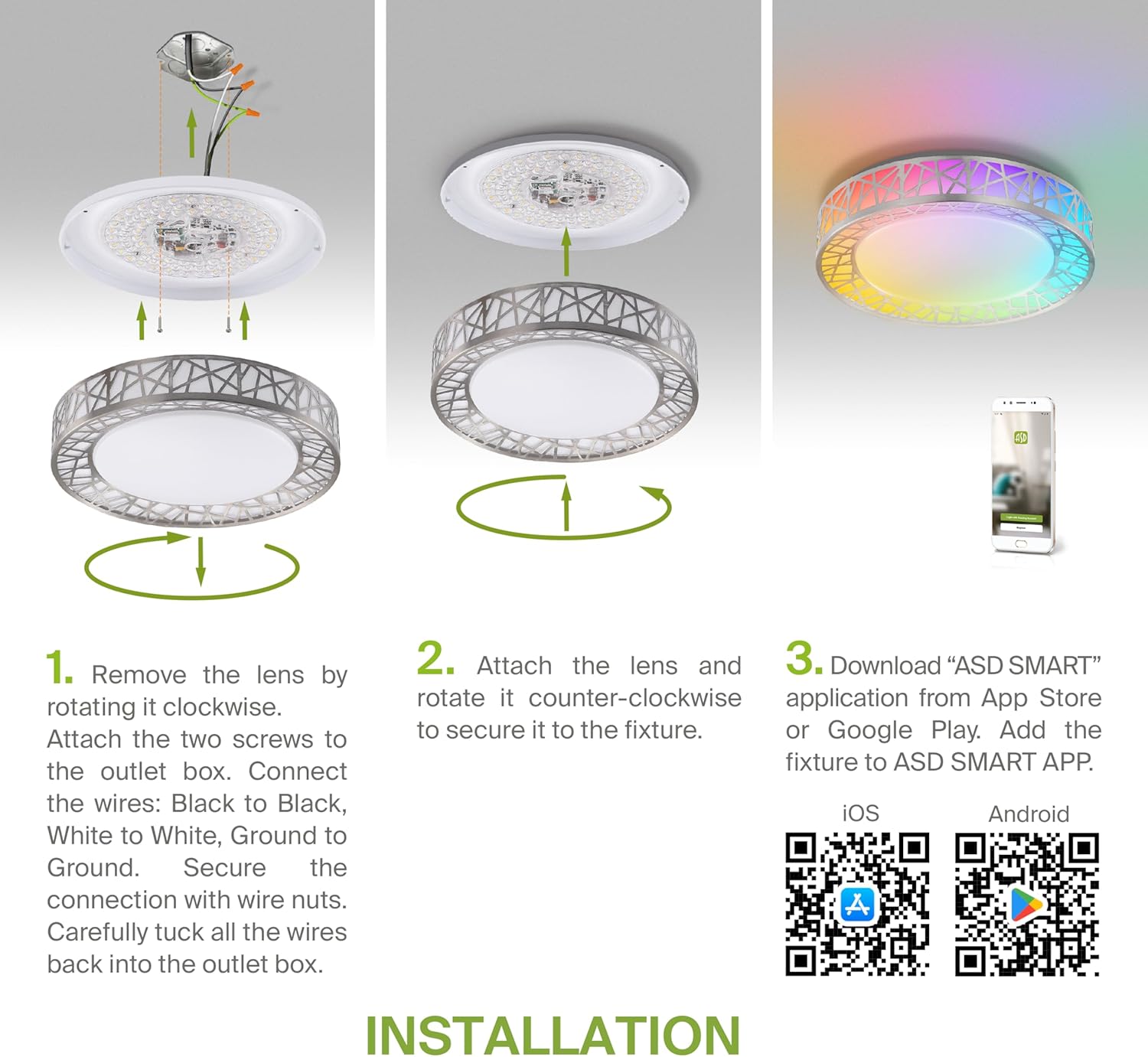
Figure 5.2: Complete installation overview including app download.
6. אַפּערייטינג ינסטרוקטיאָנס
Your ASD Smart RGBW Flush Mount Ceiling Light offers multiple control methods:
6.1 רימאָוט קאָנטראָל
די אַרייַנגערעכנטע ווײַטקאָנטראָל ערמעגליכט גרונטלעכע פֿונקציעס:
- אויף / אַוועק: מאַכט אָן אָדער אויס די ליכט.
- דימינג: Adjust brightness levels smoothly.
- CCT אַדזשאַסטמאַנט: Change color temperature (e.g., from warm white to cool white).
- RGB Color Selection: Cycle through or select specific RGB colors.
6.2 ASD SMART App Control
The ASD SMART app provides full control and advanced features:
- 16.7 מיליאָן קאָלאָרס: Choose any color from the full RGBW spectrum.
- Smooth Dimming & CCT: Precisely adjust brightness and color temperature (2700K-6500K).
- Lighting Patterns: Select pre-set or custom lighting scenes and effects.
- גרופּינג: Control multiple fixtures simultaneously.
- סקעדזשולינג: Set timers for lights to turn on/off or change settings automatically.

Figure 6.1: RGBW color capabilities.

Figure 6.2: Control via remote and smart app.

Figure 6.3: Seamless dimming functionality.
6.3 שטימע קאנטראל (אלעקסא און גוגל אסיסטענט)
The fixture is compatible with Amazon Alexa and Google Assistant for convenient voice commands:
- Ensure your ASD SMART app is linked to your Alexa or Google Home account.
- Use commands such as "Alexa, turn on the living room light" or "Hey Google, set the bedroom light to blue."

Figure 6.4: Compatibility with Alexa and Google Assistant.
7. וישאַלט
To ensure the longevity and optimal performance of your ceiling light:
- רייניקונג: טרענט אפ די עלעקטריציטעט איידער איר רייניגט. ווישט אפ די פיקסטשער מיט א ווייכן, טרוקענעם טוך. ניצט נישט קיין שארף רייניגער אדער לייזונגען.
- באַלב פאַרבייַט: די לעמפּל ניצט אינטעגרירטע LED טעכנאָלאָגיע און דאַרף נישט קיין ציבעלע-פאַרבייט.
8. טראָובלעשאָאָטינג
If you encounter issues with your ceiling light, refer to the following common problems and solutions:
| פּראָבלעם | מעגלעך סיבה | לייזונג |
|---|
| ליכט טוט נישט קער אויף | קיין מאַכט, פרייַ דראָטן, דעפעקטיווער סוויטש | קאָנטראָלירט דעם קרייז ברעיקער. זיכערט זיך אז אלע דראָט פֿאַרבינדונגען זענען זיכער. פּרובירט דעם וואַנט סוויטש. |
| ווייַט קאָנטראָל נישט ארבעטן | Dead battery, out of range, interference | Replace remote battery. Ensure you are within range. Remove any obstructions. |
| App cannot connect to light | Incorrect Wi-Fi password, light not in pairing mode, 5GHz Wi-Fi network | Verify Wi-Fi password. Reset light to pairing mode (refer to app instructions). Ensure you are on a 2.4GHz Wi-Fi network. |
| שטימע קאנטראל רעאגירט נישט | App not linked to voice assistant, incorrect device name | Check linking in ASD SMART app and voice assistant app. Verify device name in voice assistant app. |
9. וואָראַנטי און שטיצן
ASD גיט א 5-יאָר לימיטעד וואָראַנטי for this product, guaranteeing top quality and safety. The fixture is ETL certified, ensuring compliance with North American safety standards.
For technical support, warranty claims, or any questions not covered in this manual, please contact ASD customer service. Refer to the product packaging or the official ASD webפּלאַץ פֿאַר קאָנטאַקט אינפֿאָרמאַציע.


