הקדמה
The ATTACK SHARK X1 Superlight Wireless Gaming Mouse is engineered for high-performance gaming and versatile daily use. Featuring a PAW3395PRO gaming sensor, tri-mode connectivity (2.4G wireless, Bluetooth, and wired USB-C), and an innovative magnetic charging dock with RGB lighting, the X1 mouse provides precision, speed, and convenience. Its ultra-lightweight design and durable switches ensure comfort and longevity for extended use.
פּעקל אינהאַלט
- ATTACK SHARK X1 Superlight Wireless Gaming Mouse
- Magnetic RGB Charging Dock
- וסב-C צו וסב-א קאַבלע
- 2.4GHz Wireless Receiver (Nano Dongle)
- באַניצער מאַנואַל (דעם דאָקומענט)

Image: The ATTACK SHARK X1 mouse shown alongside its magnetic charging dock.
פּראָדוקט איבערview
The X1 mouse features a lightweight ergonomic design with programmable buttons and a high-precision optical sensor. The accompanying magnetic charging dock provides convenient charging and also houses the 2.4GHz wireless receiver.
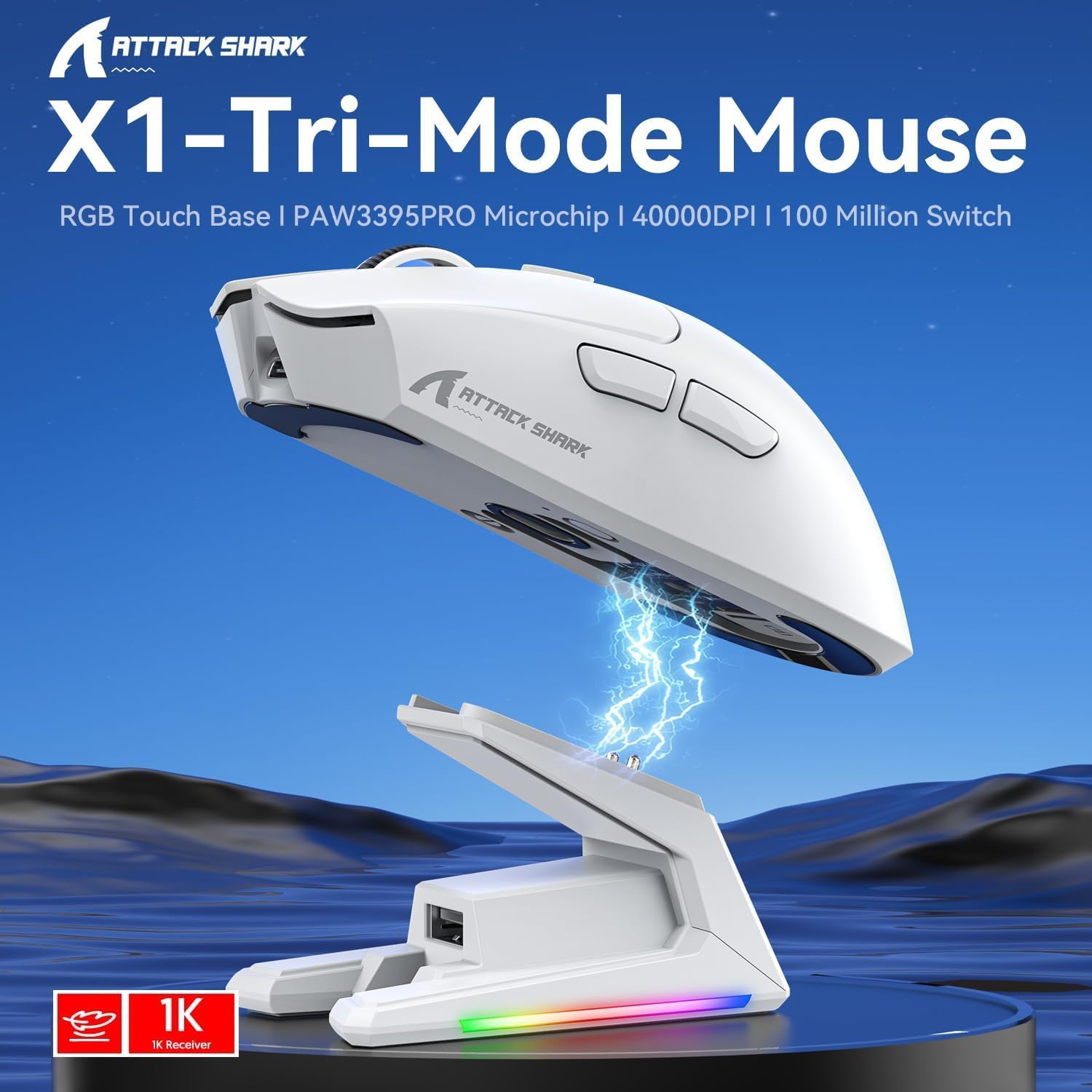
בילד: איבערview of the X1 Tri-Mode Mouse highlighting its key features.
מויז קאָמפּאָנענטן:
- לינקס/רעכטס קליק קנעפלעך: Standard mouse buttons with durable OMRON switches.
- סקראָל ראָד: פֿאַר ווערטיקאַל סקראָלינג און מיטל-קליק פאַנגקשאַנאַליטי.
- DPI קנעפּל: Located on top for quick sensitivity adjustments.
- זייַט קנעפּלעך: Two programmable buttons on the left side for forward/backward navigation or custom macros.
- וסב- C פּאָרט: פֿאַר דראָטיקער פֿאַרבינדונג און טשאַרדזשינג.
- מאַכט/מאָדע סוויטש: Located on the bottom, allows switching between OFF, 2.4G, and Bluetooth modes.
- PAW3395PRO Sensor: High-performance optical sensor for precise tracking.
Charging Dock Components:
- מאַגנעטישע טשאַרדזשינג פּינס: Align with the mouse for effortless charging.
- RGB לייטינג סטריפּ: קאַסטאַמייזאַבאַל לייטינג יפעקץ.
- Touch-Sensitive Panel: For controlling RGB lighting on the dock.
- USB-A פּאָרט: For connecting the 2.4GHz wireless receiver.
- USB-C טשאַרדזשינג פּאָרט: For powering the dock.

בילד: נאָענט-אַרויף view of the charging dock's USB data interface for the 2.4G receiver and the Type-C charging interface.
סעטאַפּ
1. ווייערד קאַנעקשאַן:
- Connect the USB-C end of the provided cable to the mouse's USB-C port.
- פֿאַרבינדט דעם USB-A עק פֿונעם קאַבל צו אַ פֿאַראַן USB פּאָרט אויף אייער קאָמפּיוטער.
- Ensure the power/mode switch on the bottom of the mouse is set to the 'OFF' position. The mouse will function in wired mode and charge simultaneously.

Image: The X1 mouse connected to a laptop via its USB-C cable, demonstrating wired mode and charging capability.
2. 2.4GHz ווירעלעס פֿאַרבינדונג:
- Plug the 2.4GHz wireless receiver into an available USB-A port on your computer or into the USB-A port on the charging dock.
- Set the power/mode switch on the bottom of the mouse to the '2.4G' position.
- די מויז זאָל אויטאָמאַטיש פאַרבינדן צו די ופנעמער.
3. בלועטאָאָטה קאַנעקשאַן:
- Set the power/mode switch on the bottom of the mouse to the 'BT' position.
- די מויז וועט אַרייַן אין פּערינג מאָדע (אַן אינדיקאַטאָר ליכט קען בליצן).
- אויף אייער קאָמפּיוטער אָדער מיטל, נאַוויגירט צו בלועטוט סעטטינגס און זוכט פֿאַר נייע דעוויסעס.
- Select 'ATTACK SHARK X1' (or similar name) from the list of available devices to pair. The mouse supports memory for up to 3 Bluetooth devices.
אַפּערייטינג ינסטראַקשאַנז
דפּי אַדזשאַסטמאַנט:
The X1 mouse features a dedicated DPI button on its top surface. Press this button to cycle through the preset DPI levels. The mouse supports up to 40,000 DPI with 6 programmable sensitivity presets. The current DPI level may be indicated by an LED color change (refer to the Web Cloud Driver for specific indications).

בילד: דעטאַלירט view of the PAW3395PRO gaming sensor, emphasizing its high precision.
Web Cloud Driver Software:
The ATTACK SHARK X1 utilizes an innovative web-based cloud driver for customization, eliminating the need for software installation. Access the driver through your web browser to configure advanced functions such as:
- DPI adjustment and custom profiles
- פּאָללינג קורס סעטטינגס
- Competitive mode activation
- Custom button assignments
- Macro recording and personalized key mapping
The open-source driver automatically identifies your computer system. Refer to the product packaging or official webפּלאַץ פֿאַר די ספּעציפיש URL צו אַקסעס די Web Cloud Driver.

Image: Screenshot of the X1 Web Cloud Driver interface, showing options for key settings, macros, and other functions.
RGB Lighting Customization (Dock):
The magnetic charging dock features an integrated touch-sensitive panel that allows you to customize its RGB lighting effects. Tap the panel to cycle through different lighting modes. Press and hold the panel to turn the RGB lighting on or off.
טשאַרדזשינג און באַטאַרייע לעבן
The X1 mouse can be charged via the included USB-C cable or by placing it on the magnetic charging dock. The dock provides effortless charging; simply align the mouse with the charging pins for instant power-up. A full charge typically takes approximately 2 hours and provides up to 65 hours of continuous working time.

Image: The X1 mouse magnetically docked for charging, showcasing the RGB lighting of the dock.

Image: An illustration depicting the optimized battery life of the X1 mouse, indicating efficient power usage.
וישאַלט
To ensure the longevity and optimal performance of your ATTACK SHARK X1 mouse and charging dock, follow these maintenance guidelines:
- רייניקונג: Use a soft, dry cloth to wipe down the mouse and dock. For stubborn dirt, a slightly damp cloth can be used, but ensure no moisture enters the internal components or charging pins. Avoid harsh chemicals or abrasive materials.
- סענסאָר זאָרגן: Keep the optical sensor on the bottom of the mouse clean and free of dust or debris to maintain accurate tracking.
- סטאָרידזש: When not in use for extended periods, store the mouse and dock in a cool, dry place away from direct sunlight and extreme temperatures.
- טשאַרדזשינג פּינס: Periodically inspect the charging pins on the dock and the corresponding contacts on the mouse for any residue or corrosion. Clean gently with a cotton swab if necessary.
טראָובלעשאָאָטינג
If you encounter issues with your ATTACK SHARK X1 mouse, refer to the following common troubleshooting steps:
- מויז ענטפערט נישט:
- זייט זיכער אז די מויז איז אויפגעלאָדן.
- Check the power/mode switch on the bottom of the mouse is set to the correct connection mode (2.4G, BT, or OFF for wired).
- For 2.4G wireless, ensure the receiver is properly plugged into a USB port. Try a different USB port.
- פֿאַר בלועטוט, זאָרגט אַז בלועטוט איז אַקטיווירט אויף אייער מיטל און די מויז איז געפּאָרט. פּרוּווט ווידער צו פאַרבינדן די מויז.
- Try connecting the mouse via the USB-C cable to see if it functions in wired mode.
- Inconsistent Tracking or Cursor Lag:
- רייניקט דעם אָפּטישן סענסאָר אויף דער אונטערשטער טייל פֿון דער מויז.
- זייט זיכער אַז איר ניצט די מויז אויף אַ פּאַסיקער ייבערפלאַך (למשל, אַ מויז פּאַד).
- Check for interference in 2.4G wireless mode (e.g., other wireless devices).
- Adjust DPI settings using the DPI button or Web Cloud Driver.
- טשאַרדזשינג ישוז:
- Ensure the USB-C cable is securely connected to the charging dock and a power source.
- Verify the mouse is correctly seated on the magnetic charging dock, ensuring the pins make proper contact.
- Try charging directly via the USB-C cable connected to the mouse.
- Web Cloud Driver Not Accessible:
- זיכער מאַכן אַז אייער קאָמפּיוטער האָט אַן אַקטיווע אינטערנעט פֿאַרבינדונג.
- באַשטעטיקן די URL פֿאַר די Web Cloud Driver is entered correctly.
- פּרוּווט אַ אַנדערש web בלעטערער.
ספּעסאַפאַקיישאַנז
| שטריך | באַשרייַבונג |
|---|---|
| מאָדעל | X1 |
| קאַנעקטיוויטי | Tri-Mode: 2.4G Wireless, Bluetooth 5.2, Wired USB-C |
| סענסאָר | PixArt PAW3395PRO Optical Gaming Sensor |
| DPI קייט | Up to 40,000 DPI (6 programmable presets) |
| IPS | 650 יפּס |
| אַקסעלעריישאַן | 50G |
| סוויטשיז | OMRON Mechanical Switches (100 Million Clicks lifespan) |
| וואָג | Approx. 53g (Ultra-light) |
| באַטערי לעבן | אַרויף צו 65 שעה (שטענדיק נוצן) |
| טשאַרדזשינג | Magnetic Charging Dock / USB-C Wired |
| פּאָללינג קורס | 1000Hz (1ms response) |
| דימענשאַנז (פּאַקאַץ) | 7.09 X 4.53 X 2.17 אינטשעס |
| Item Weight (Packaged) | 7.7 אונסעס |
וואָראַנטי און שטיצן
פֿאַר וואָראַנטי אינפֿאָרמאַציע און טעכנישע שטיצע, ביטע זען די באַאַמטער אַטאַק שאַרק webזייטל אדער קאנטאקט זייער קאסטומער סערוויס גלייך. האלט אייער קויף קוויטל אלס באווייז פון קויפן פאר יעדע גאראנטיע טענות.
פֿאַר ווייַטער הילף, באַזוכן די אַטאַק שאַרק קראָם אויף אַמאַזאָן.


