הקדמה
Welcome and thank you for choosing the HTC Wireless Earbuds TWS6 5.3. This manual provides detailed instructions to help you set up, operate, and maintain your earbuds for optimal performance. Please read this manual thoroughly before using your device.
פּעקל אינהאַלט
ביטע באַשטעטיקן אַז אַלע זאכן זענען פאַראַן אין דיין פּעקל:
- 2 x HTC Earbuds
- 1 רענטגענ וסב- C טשאַרדזשינג קאַבלע
- 1 רענטגענ טשאַרדזשינג קאַסע
- 2 פּאָר x גומענע אויערשטיפטן (S/L)
- 1 x Quick Start Guide (physical document)

פּראָדוקט איבערview
Familiarize yourself with the components of your HTC TWS6 earbuds.
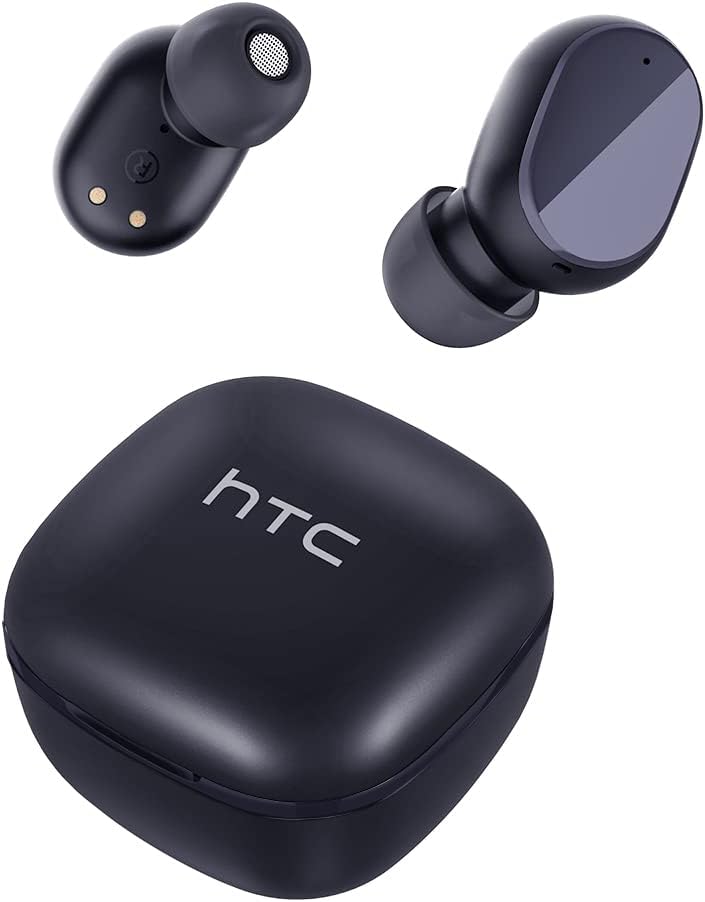

סעטאַפּ
טשאַרדזשינג די עאַרבודז און קאַסטן
פארן ערשטן באניץ, לאדט גוט אויף די אויערפאנען און די טשאַרדזשינג קעיס.
- שטעלן די עאַרבודז אין די טשאַרדזשינג פאַל.
- פֿאַרבינדט דעם USB-C קאַבל צום טשאַרדזשינג פּאָרט אויף דער קעיס און אַ מאַכט מקור.
- די אינדיקאַטאָר ליכט אויף דער קעיס וועט ווייַזן די טשאַרדזשינג סטאַטוס.
- A full charge provides approximately 5 hours of playback for earbuds and up to 22 hours with the charging case.

בלועטאָאָטה פּערינג
גייט נאך די שריט צו פארבינדן אייערע אויערן-קנעפלעך מיט אייער דעווייס:
- עפֿנט דעם טשאַרדזשינג קעסטל. די אויערקנעפּלעך וועלן אויטאָמאַטיש אַרײַן אין פּערינג מאָדע.
- אויף אייער דעווייס (סמאַרטפאָן, טאַבלעט, אאז"וו), אַקטיווירט בלועטוט.
- זוכן פֿאַר "HTC TWS6" in the list of available Bluetooth devices.
- Select "HTC TWS6" to connect. A voice prompt will confirm successful pairing.

טראָגן די עאַרבודז
For optimal sound quality and comfort, choose the correct eartip size and wear the earbuds properly.
- Select the eartips (S, M, L) that best fit your ears.
- פֿאָרזיכטיק אַרײַנשטעלן יעדן אויערקנעפּל אין אײַער אויער קאַנאַל.
- Rotate slightly to ensure a secure and comfortable fit.
אַפּערייטינג ינסטראַקשאַנז
סמאַרט ריר קאָנטראָלס
The HTC TWS6 earbuds feature intuitive touch controls:
- שפּיל / פּויזע מוזיק: איין צאַפּן אויף יעדער עאַרבוד.
- ווייַטער שפּור: צאַפּ צוויי מאָל אויף די רעכטע אויערקנעפּל.
- פֿריִערדיקע שפּור: צאַפּ צוויי מאָל אויף די לינקע אויערקנעפּל.
- באַנד אַרויף: טרייפאַך צאַפּן אויף די רעכטע אויערקנעפּל.
- באַנד אַראָפּ: טרייפאַך צאַפּן אויף די לינקע אויערקנעפּל.
- ענטפֿערן / סוף רופן: איין צאַפּן אויף יעדער עאַרבוד.
- אָפּוואַרפן רופן: דריקן און האַלטן יעדער עאַרבוד פֿאַר 2 סעקונדעס.
- אַקטאַווייט קול אַססיסטאַנט: דריקן און האַלטן יעדער עאַרבוד פֿאַר 3 סעקונדעס.

מאַכט אויף / אַוועק
The earbuds automatically power on when removed from the charging case and power off when placed back into the case and the lid is closed.
To manually power on, press and hold the touch area for 3 seconds. To manually power off, press and hold the touch area for 5 seconds.
וישאַלט און זאָרג
רייניקונג
רייניקט רעגולער אייערע אויערן-קנעפּלעך און טשאַרדזשינג קעסטל צו ענשור אָפּטימאַלע פאָרשטעלונג און היגיענע.
- ניצט אַ ווייכן, טרוקענעם, לינט-פֿרייעם שטאָף צו ווישן די אויערקנעפּלעך און די טשאַרדזשינג קעסטל.
- אַראָפּנעמען די אויער־שפּיצן און רייניקן זיי מיט מילד זייף און וואַסער, און דערנאָך טרוקן זיי גוט איידער איר עס צוריק באַפעסטיקט.
- דו זאלסט נישט נוצן אַברייסיוו קלינערז אָדער סאָלוואַנץ.
וואַסער קעגנשטעל (IPX5)
The HTC TWS6 earbuds are IPX5 sweatproof, meaning they are resistant to splashes and sweat.
באַמערקונג: They are not designed for submersion in water. Avoid exposing them to heavy rain, showering, or swimming. Ensure the charging port is dry before charging.

סטאָרידזש
ווען נישט אין באַנוץ, לייגט די אויערן-קנעפּלעך אין זייער טשאַרדזשינג קעסטל צו באַשיצן זיי און האַלטן זיי טשאַרדזשד.
האַלטן אין אַ קיל, טרוקן אָרט אַוועק פון עקסטרעמע טעמפּעראַטורן.
טראָובלעשאָאָטינג
| פּראָבלעם | לייזונג |
|---|---|
| עאַרבודס נישט פּערינג | Ensure earbuds are charged. Turn off and on Bluetooth on your device. Forget "HTC TWS6" from your device's Bluetooth list and re-pair. |
| בלויז איין עאַרבוד אַרבעט | Place both earbuds back into the charging case, close the lid, then open it again. Ensure both earbuds are charged. |
| נידעריקע באַנד אָדער שלעכטע געזונט קוואַליטעט | Adjust volume on your device. Clean eartips and earbud mesh. Try different eartip sizes for a better seal. |
| טשאַרדזשינג אַרויסגעבן | Check USB-C cable and power adapter. Ensure charging contacts on earbuds and case are clean and dry. |
| אויערקנעפּלעך ווערן אָפט אָפּגעריסן | Ensure your device is within the Bluetooth range (approx. 10 meters/33 feet) and there are no significant obstructions. |
אויב פראבלעמען בלייבן, ביטע קאנטאקטירט קאסטומער סופארט.
ספּעסאַפאַקיישאַנז
| שטריך | דעטאַל |
|---|---|
| מאָדעל נאָמען | טווס 6 |
| בלועטאָאָטה ווערסיע | 5.3 |
| קאַנעקטיוויטי טעכנאָלאָגיע | ווירעלעסס |
| ווירעלעסס קאָמוניקאַציע טעכנאָלאָגיע | בלועטאָאָטה |
| באַטעריע לעבן (אויערקנעפּלעך) | 5 שעה |
| גאַנץ שפּילצייט (מיט קעסטל) | 22 שעה |
| טשאַרדזשינג צייט (קאַסע) | בעערעך 5 שעה |
| וואַסער קעגנשטעל מדרגה | IPX5 (שווייספּרוף) |
| קאָנטראָל מעטאָד | ריר |
| מיקראָפאָן | Yes (with ENC) |
| קאַמפּאַטאַבאַל דעוויסעס | Android and iOS Smartphones, Gaming Devices |
| מאַטעריאַל | פּלאַסטיק |
| פּונקט וואָג | 3.17 אונסעס |
| UPC | 734257974554 |
| ראַש קאָנטראָל | אַדאַפּטיוו ראַש קאַנסאַליישאַן |
| אַודיאָ דרייווער טיפּ | דינאַמיש דרייווער |
| ימפּידאַנס | 199.99 Ohm |
וואָראַנטי און שטיצן
HTC provides a 360-day warranty extension for this product, as detailed in the product information.
For technical assistance, warranty claims, or any inquiries, please contact HTC customer support.
קונה שטיצן: Refer to the contact information provided in your product packaging or visit the official HTC webזייטל פֿאַר די מערסט אַרויף-צו-דאַטע שטיצע אָפּציעס.