1. הקדמה
1.1 פּראָדוקט איבערview
The Truman TM-I VISION PRO is a Full HD digital satellite receiver designed to provide a comprehensive entertainment experience. It features a powerful Sunplus 1506HV processor, ensuring smooth performance and high-quality video output. With multiple connectivity options including USB, HDMI, and Ethernet, it offers versatility for various home entertainment setups. The device supports Full HD resolution, multi-language interfaces, and includes parental control features for a family-friendly viewing environment. It also comes with a one-year activated IPTV service.

פיגורע 1.1: פראָנט view of the Truman TM-I VISION PRO Satellite Receiver, showing its compact design and front-facing USB ports.
1.2 פּעקל אינהאַלט
ביטע באַשטעטיקן אַז אַלע זאכן וואָס זענען ליסטעד אונטן זענען אַרייַנגערעכנט אין דיין פּעקל:
- Truman TM-I VISION PRO Satellite Receiver
- מאַכט אַדאַפּטער
- נאָרמאַל רימאָוט קאָנטראָל
- Digital LED Lens
- HDMI קאַבלע
- ינסטראַקשאַנז מאַנואַל

Figure 1.2: Marketing image highlighting key features such as Wi-Fi, Ultra HD support, ISO 9001 certification, and 5G compatibility.
2. זיכערקייַט אינפֿאָרמאַציע
כדי צו זיכער מאַכן זיכערע אָפּעראַציע און פאַרמייַדן שאָדן, ביטע לייענט און האַלט זיך צו די פאלגענדע זיכערהייט גיידליינז:
- דו זאלסט נישט ויסשטעלן די מיטל צו וואַסער אָדער נעץ.
- Avoid placing the receiver in direct sunlight or near heat sources.
- ענשור געהעריק ווענטאַליישאַן אַרום די מיטל צו פאַרמייַדן אָוווערכיטינג.
- ניצן בלויז די צוגעשטעלט מאַכט אַדאַפּטער.
- פרובירט נישט צו עפענען אדער פאררעכטן דעם אפאראט אליין. ווענדט זיך צו קוואַליפֿיצירטע סערוויס פּערסאָנעל.
- האַלטן די מיטל און אַקסעסעריז אויס פון דערגרייכן פון קינדער.
- טרענט אפ דעם עלעקטרישן שטעקער בעת בליץ-שטורעמס אדער ווען עס ווערט נישט גענוצט פאר לאנגע צייטן.
3. סעטאַפּ
3.1 פֿאַרבינדן דעם ריסיווער
- Connect the Satellite Antenna: Connect your satellite dish cable to the "LNB IN" port on the back of the receiver.
- פאַרבינדן צו טעלעוויזיע (HDMI): Use the provided HDMI cable to connect the receiver's HDMI OUT port to an available HDMI IN port on your television.

Figure 3.1: The included HDMI cable for connecting the receiver to your television.
- פאַרבינדן מאַכט: Connect the power adapter to the DC IN port on the receiver, then plug the adapter into a wall outlet.
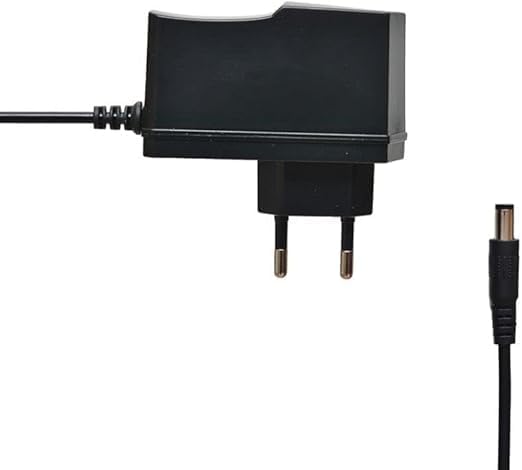
Figure 3.2: The power adapter supplied with the receiver.
- Connect Digital LED Lens: Plug the digital LED lens into its dedicated port on the receiver. This lens displays channel numbers and receives remote control signals.
- Optional: Connect Ethernet/USB: If you plan to use wired internet or external storage, connect an Ethernet cable to the LAN port or a USB drive to one of the USB ports.

פיגורע 3.3: דערציען view of the receiver showing the LNB IN, HDMI OUT, USB, Ethernet, and DC IN ports.
3.2 ערשטע סעטאַפּ וויזאַרד
Upon first power-on, the receiver will guide you through an initial setup wizard:
- שפּראַך סעלעקציע: קלייַבט אייער בילכער שפּראַך פֿאַר די אויף-עקראַן אַרויסווייַזונג.
- צייט זאָנע באַשטעטיקן: שטעלט איין די ריכטיגע צייט זאנע פאר אייער ראיאן.
- אַנטענע סעטאַפּ: Select your satellite (e.g., Nilesat, Hotbird) and configure LNB settings if necessary.
- קאַנאַל יבערקוקן: Perform an automatic or manual channel scan to find available TV and radio channels.
- נעץ סעטאַפּ (אפציאָנעל): Configure Wi-Fi or Ethernet connection for internet-based features like IPTV.
4. אַפּערייטינג ינסטרוקטיאָנס
4.1 יקערדיק פאַנגקשאַנז
- מאַכט אויף / אַוועק: דרוק די מאַכט קנעפּל אויף די ווייַט קאָנטראָל.
- קאַנאַל נאַוויגאַציע: ניצן די CH + / CH- buttons to change channels sequentially, or enter the channel number directly using the numeric keypad.
- באַנד קאָנטראָל: ניצן די VOL + / VOL- קנעפּלעך צו סטרויערן די באַנד.
- שטום: דרוק די שטום קנעפּל צו שטיל מאַכן דעם אַודיאָ.
- מעניו אַקסעס: דרוק די MENU button to access the main menu for settings and features.
- OK קנעפּל: Confirms selections in menus or displays channel information during viewing.
- אַרויסגאַנג: דרוק די אַרויסגאַנג button to return to the previous screen or live TV.
4.2 אַוואַנסירטע פֿעיִקייטן
- פּאַרענטאַל קאָנטראָל: Access the Parental Control menu to set age restrictions for channels or lock specific programs. A default PIN (usually 0000 or 1234) may be required.
- מולטי-שפּראַך שטיצן: Change audio languages (if available) or subtitle languages via the audio/subtitle options in the menu.
- IPTV: The receiver includes a pre-activated IPTV service for one year. Access this feature through the main menu. Ensure your receiver is connected to the internet for IPTV functionality.
- וסב מידיאַ פּלייבאַק: Insert a USB drive into one of the USB ports to play media files (videos, music, photos) or record TV programs.
- ווייכווארג דערהייַנטיקן: Regularly check for software updates via USB or network to ensure optimal performance and access to new features. (Refer to Section 5.2 for details).
5. וישאַלט
5.1 רייניקונג
To clean the receiver, disconnect it from the power supply. Use a soft, dry cloth to wipe the exterior. Do not use liquid cleaners or abrasive materials.
5.2 ווייכווארג דערהייַנטיקונגען
Keeping your receiver's software updated is crucial for performance and security. Updates can be performed via USB or over the network (if connected to the internet).
- USB דערהייַנטיקן: דאַונלאָוד די לעצטע פירמווער (.bin file) from the official Truman website to a USB flash drive. Insert the USB drive into the receiver and navigate to the "System Update" or "Software Upgrade" option in the menu. Follow the on-screen instructions.
- נעץ דערהייַנטיקן: If your receiver is connected to the internet, navigate to the "Network Upgrade" or "Online Update" option in the system settings. The receiver will check for available updates and prompt you to install them.
וואָרענען: Do not power off the receiver during a software update, as this may cause permanent damage.
6. טראָובלעשאָאָטינג
If you encounter issues with your Truman TM-I VISION PRO, refer to the following common problems and solutions:
| פּראָבלעם | מעגלעך סיבה | לייזונג |
|---|---|---|
| קיין מאַכט | Power adapter not connected; Power outlet faulty. | Ensure power adapter is securely connected to the receiver and a working power outlet. |
| קיין סיגנאַל / שוואַרצער עקראַן | Antenna cable loose; Incorrect satellite selected; TV input not set to HDMI. | Check antenna cable connection. Verify satellite settings in menu. Ensure TV input is set to the correct HDMI port. |
| ווייַט קאָנטראָל איז נישט ארבעטן | Batteries low/dead; Obstruction between remote and receiver's LED lens. | Replace remote control batteries. Ensure clear line of sight to the digital LED lens. |
| Frozen Picture / Lagging | Weak signal; Overheating; Software issue. | Check signal strength in menu. Ensure proper ventilation. Try a software update or factory reset (last resort). |
| IPTV Not Working | No internet connection; IPTV service expired. | Verify internet connection (Ethernet or Wi-Fi). Contact support if service is within the one-year period and still not working. |
7. ספּעסאַפאַקיישאַנז
| שטריך | דעטאַל |
|---|---|
| מאָדעל | TM-I VISION PRO |
| פּראַסעסער | Sunplus 1506HV |
| קעסטל טיפּ | Full HD Digital |
| פלאַש זכּרון | 4 MB (SPI SOP8/SOIC8) |
| ווידעא רעזולטאַט | HDMI (Full HD Resolution Support) |
| אַודיאָ רעזולטאַט מאָדע | Stereo (Dolby Digital, DTS, PCM supported) |
| קאַנעקטיוויטי | וסב, הדמי, עטהערנעט |
| קאַמפּאַטאַבאַל דעוויסעס | טעלעוויזיע, פערזענלעכע קאָמפּיוטער |
| ספּעציעלע פֿעיִקייטן | User-friendly display, Remote Control, Multi-language support, Parental Control, 1-year IPTV activation. |
| פּונקט וואָג | 10 גראַמז |
| פאַבריקאַנט | טרומאן |
8. וואָראַנטי און שטיצן
For warranty information, please refer to the warranty card included with your product or contact your point of purchase. The receiver includes a 1-year activated IPTV service.
For technical support or further assistance, please contact Truman customer service or visit their official website. Contact details are typically provided in the product packaging or on the manufacturer's webפּלאַץ.


