1. הקדמה
Welcome to the user manual for your GPD Pocket 4 Mini Laptop. This document provides essential information for setting up, operating, maintaining, and troubleshooting your device. The GPD Pocket 4 is a high-performance, ultra-portable 2-in-1 device designed for both productivity and entertainment, featuring an AMD Ryzen AI 9 HX 370 CPU and an 8.8-inch 2.5K 144Hz touchscreen display.
Please read this manual thoroughly before using your GPD Pocket 4 to ensure proper operation and to maximize its capabilities.
2. זיכערקייַט אינפֿאָרמאַציע
- מאַכט צושטעלן: Use only the original power adapter provided with the device. Using unauthorized adapters may damage the device and void the warranty.
- באַטערי זאָרגן: Do not attempt to replace the battery yourself. Avoid exposing the device to extreme temperatures (below 0°C or above 35°C) or direct sunlight for prolonged periods.
- וואַסער און נעץ: Keep the device away from water, rain, and excessive humidity. Do not operate with wet hands.
- ווענטילאַטיאָן: Ensure proper ventilation. Do not block the ventilation openings, especially during heavy use, to prevent overheating.
- רייניקונג: Disconnect the power before cleaning. Use a soft, dry cloth. Avoid liquid cleaners or aerosols.
- דיסאַססעמבלי: Do not attempt to disassemble or repair the device yourself. This may cause damage and void the warranty. Contact authorized service personnel for repairs.
3. פּעקל אינהאַלט
ביטע קאָנטראָלירט די אינהאַלט פון דער פּאַקעט ווען איר נעמט עס אויס. אויב עס פעלט עפּעס אָדער עס זענען צעבראָכן, קאָנטאַקטירט גלייך אייער הענדלער.
- GPD Pocket 4 מיני לאַפּטאַפּ
- USB-C Power Adapter (100W PD Fast Charging)
- וסב-C צו וסב-C קאַבלע
- באַניצער מאַנואַל (דעם דאָקומענט)
4. פּראָדוקט איבערview
The GPD Pocket 4 is a versatile 2-in-1 device, combining a mini laptop with a tablet. It features a high-resolution touchscreen and a physical keyboard.
4.1 שליסל פֿעיִקייטן
- פּראַסעסער: AMD Ryzen AI 9 HX 370 CPU (up to 5.1 GHz)
- גראַפיקס: AMD Radeon 890M iGPU (RDNA 3.5 architecture)
- ווייַז: 8.8-inch 2.5K (2560x1600) IPS Touchscreen, 144Hz refresh rate
- זכּרון: 32GB LPDDR5X RAM (7500 MT/s)
- סטאָרידזש: 2TB M.2 NVMe PCIe 4.0 SSD
- אַפּערייטינג סיסטעם: Windows 11 היים
- קאַנעקטיוויטי: Wi-Fi 6E, בלועטוט 5.3
- באַטערי: 44.8Wh, up to 9 hours video playback
- פּאָרץ: HDMI 2.1, 2x USB-C (full-featured), USB-A, RJ45 Network Port, Earphone/Microphone Ports
- Modular IO: Support for 4G, MicroSD, KVM, and RS-232 modules.
4.2 מיטל אויסלייג

פיגור 4.2.1: זייט און הינטן view of the GPD Pocket 4 highlighting ports and features.
- Top/Rear: Charge Indicator, USB4, Memory Card Readers, Reset Button, HDMI 2.1, USB A 3.2 Gen 2, Speaker Port.
- לינקע זייט: Full-Featured USB-C, Air Outlet, RJ45 Network Port, Lanyard Hole, Earphone/Microphone Ports, USB-A, Power Button/Fingerprint.
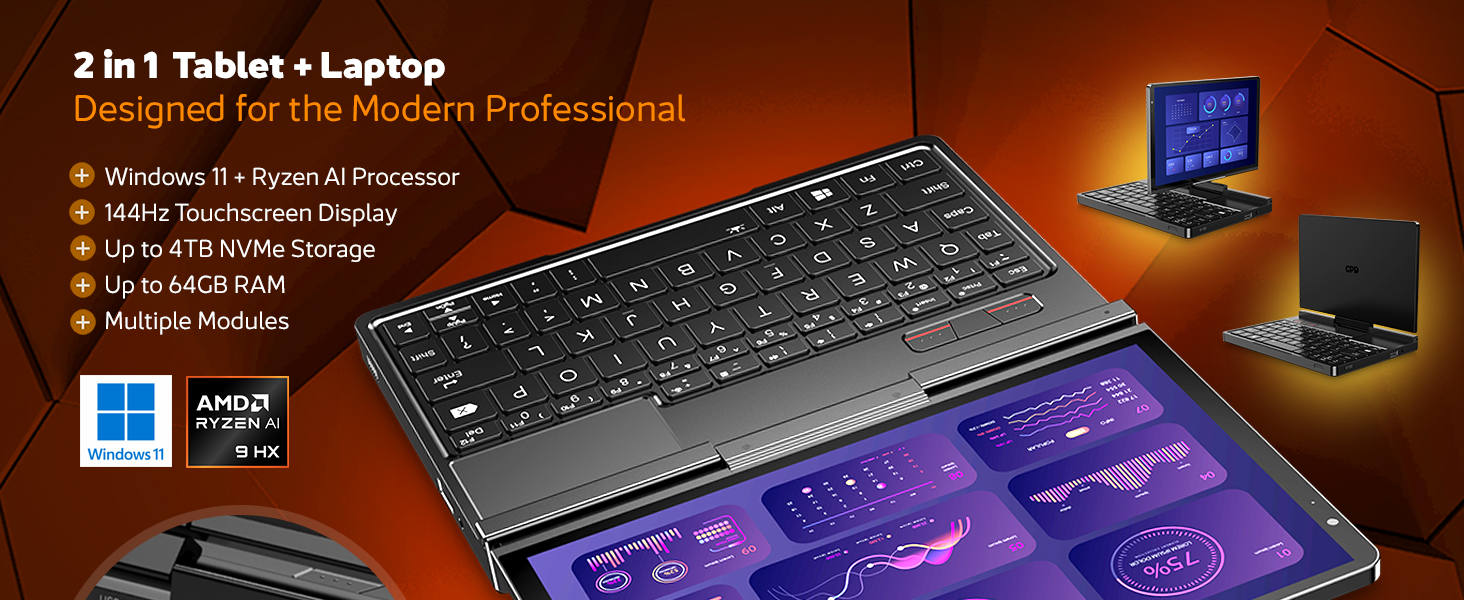
פיגורע 4.2.2: איבערview of the GPD Pocket 4's core specifications and 2-in-1 design.
This image illustrates the device's key technical specifications, including its modular IO, screen, CPU, GPU, RAM, storage, OS, battery, and connectivity, emphasizing its nature as a pocket-sized modular AI PC.

Figure 4.2.3: Modular expansion options for the GPD Pocket 4.
The GPD Pocket 4 supports various modular expansions, including KVM, Memory Card Reader, 4G LTE, and RS-232 modules, enhancing its versatility for different professional needs.
5. סעטאַפּ
5.1 ערשט מאַכט אויף
- טשאַרדזשינג די מיטל: Before first use, connect the GPD Pocket 4 to the power adapter using the provided USB-C cable. Plug the adapter into a wall outlet. The charge indicator light will illuminate.
- מאַכט אויף: Press and hold the Power Button (integrated with the fingerprint sensor) for a few seconds until the GPD logo appears on the screen.
- Windows סעטאַפּ: Follow the on-screen instructions to complete the Windows 11 Home setup process. This includes selecting your region, language, connecting to Wi-Fi, and creating a user account.
5.2 קאַנעקטינג פּעריפעראַלס
- פונדרויסנדיק ווייַז: Connect an external monitor via the HDMI 2.1 port or one of the full-featured USB-C ports.
- USB דעוויסעס: Use the USB-A or USB-C ports for connecting external keyboards, mice, USB drives, or other peripherals.
- נעץ: For a wired internet connection, connect an Ethernet cable to the RJ45 network port.
- אַודיאָ: Connect headphones or external speakers to the 3.5mm earphone/microphone port.
6. Operating the GPD Pocket 4
6.1 מאָדעס פון אָפּעראַציע
- לאַפּטאָפּ מאָדע: Use the integrated keyboard and touchpad for traditional laptop functionality. The 8.8-inch display provides a compact yet clear workspace.
- טאַבלעט מאָדע: Fold the screen back to transform the device into a tablet. The 10-point multi-touch display allows for intuitive navigation and interaction.

Figure 6.1.1: GPD Pocket 4 in tablet mode, showcasing its touch interface.
The device seamlessly transitions between laptop and tablet modes, offering flexibility for various tasks.
6.2 קלאַוויאַטור און טאָוטשפּאַד
- The integrated keyboard is designed for comfortable typing in a compact form factor.
- The touchpad supports multi-touch gestures for navigation. Refer to Windows settings for customization.
- The power button doubles as a fingerprint sensor for secure login.

Figure 6.2.1: User interacting with the GPD Pocket 4's keyboard and touchpad.
This image highlights the comfortable keyboard and backlit trackpad, along with the integrated camera and microphone for meetings.
6.3 באַטערי מאַנאַגעמענט
- The GPD Pocket 4 features a 44.8Wh battery.
- For optimal battery life, adjust power settings in Windows.
- The device supports 100W PD fast charging. Use the provided charger for quickest recharge times.

פיגורע 6.3.1: אינערלעכער view showing the 44.8Wh battery and device dimensions.
This image provides a visual representation of the device's internal battery and its compact dimensions, emphasizing its portability and power endurance.
7. וישאַלט
7.1 רייניקונג
- Always power off the device and disconnect the charger before cleaning.
- Use a soft, lint-free cloth to wipe the screen and chassis. For stubborn smudges on the screen, lightly dampen the cloth with water or a screen-specific cleaner (do not spray directly on the screen).
- Use a soft brush or compressed air to clean dust from the keyboard and ventilation openings.
- ויסמיידן ניצן שטרענגע כעמיקאַלן, אַברייסיוו רייניגער, אָדער סאָלוואַנץ.
7.2 ווייכווארג דערהייַנטיקונגען
- Regularly check for Windows updates to ensure your system has the latest security patches and performance improvements. Go to סעטטינגס > ווינדאָוס אַפּדייט.
- Periodically check the GPD official website for driver updates, especially for graphics (AMD Radeon 890M) and chipset drivers, to ensure optimal performance.
7.3 סטאָרידזש פאַרוואַלטונג
- רעגולער אויסמעקן נישט-נייטיקע זאכן files and applications to free up storage space.
- Consider using cloud storage for large files to reduce local storage consumption.
- The 2TB M.2 NVMe SSD is expandable; consult GPD support for compatible upgrade options if needed.
8. טראָובלעשאָאָטינג
| פּראָבלעם | מעגלעך סיבה | לייזונג |
|---|---|---|
| די מיטל טוט נישט מאַכט אויף. | Low battery; Power adapter not connected; Hardware issue. | Ensure the device is fully charged. Verify the power adapter and cable are securely connected. If issues persist, perform a hard reset (press and hold power button for 15 seconds). |
| דער עקראַן איז ליידיק אָדער פליקערט. | Display driver issue; Incorrect resolution; Hardware fault. | Restart the device. Update graphics drivers. Check display settings in Windows. |
| Wi-Fi אדער בלועטוט ארבעט נישט. | Wireless adapter disabled; Driver issue; Interference. | Check Wi-Fi/Bluetooth settings in Windows. Restart the device. Update wireless drivers. Ensure no physical obstructions or strong interference sources. |
| די דעווייס איז שטייט אדער רעאגירט נישט. | Too many applications running; Low storage space; Overheating. | Close unnecessary applications. Free up disk space. Ensure ventilation is not blocked. Check Task Manager for resource-intensive processes. |
| דער טאָוטשסקרין רעאַגירט נישט. | Software glitch; Driver issue; Physical damage. | Restart the device. Check for touchscreen driver updates. If physically damaged, contact support. |
9. ספּעסאַפאַקיישאַנז
| שטריך | דעטאַל |
|---|---|
| סאָרט | גפּד |
| מאָדעל נאָמען | Pocket (RM-Pocket-4) |
| פּראַסעסער | AMD Ryzen AI 9 HX 370 (5.1 GHz) |
| גראַפיקס קאָופּראַסעסער | Radeon™ 890M |
| באַראַן | 32 גיגאבייט LPDDR5X |
| סטאָרידזש | 2 TB NVMe PCIe Gen4 SSD |
| פאַרשטעלן גרייס | 8.8 אינטשעס |
| פאַרשטעלן האַכלאָטע | 2560 X 1600 בילדצעלן (2.5K) |
| דערפרישן קורס | 144 הז |
| אָפּערייטינג סיסטעם | Windows 11 היים |
| ווירעלעסס טיפּ | 802.11ax (Wi-Fi 6E), בלועטוט 5.3 |
| דורכשניטלעך באַטאַרייע לעבן | 9 שעה (ווידעא ווידערשפּיל) |
| פּונקט וואָג | 1.6 פונט (725 גראַמז) |
| פּראָדוקט דימענשאַנז | 8.11 X 5.67 X 0.87 אינטשעס |
| קאָליר | שוואַרץ |
10. וואָראַנטי און שטיצן
GPD products typically come with a limited manufacturer's warranty. Please refer to the warranty card included in your package or visit the official GPD webוועבזייטל פֿאַר דעטאַלירטע וואָראַנטי טערמינען און באַדינגונגען ספּעציפֿיש פֿאַר אייער געגנט.
For technical support, troubleshooting assistance beyond this manual, or warranty claims, please contact GPD customer support through their official website or the retailer from whom you purchased the device.
GPD Official Webפּלאַץ: www.gpd.hk
Please have your product model number (RM-Pocket-4) and purchase information ready when contacting support.


