1. הקדמה
This manual provides essential instructions for the installation, operation, and maintenance of your Lockly Smart Lock Secure Pro with Knob. Please read this manual thoroughly before installation and retain it for future reference. This smart lock offers multiple access methods including fingerprint, PIN Genie keypad, smartphone app, and traditional physical keys, along with built-in Wi-Fi connectivity.
2. זיכערקייַט אינפֿאָרמאַציע
- פרובירט נישט צו צענעמען אדער פאררעכטן דעם שלאָס אליין. דאס קען בטל מאכן די גאראנטיע און שאפן שאדן.
- Use only the specified battery type (AA alkaline batteries). Do not mix old and new batteries or different types of batteries.
- זיכער מאַכן אַז אַלע קאָמפּאָנענטן זענען זיכער באַפעסטיקט בעת דער אינסטאַלאַציע צו פאַרמייַדן אַ דורכפאַל.
- Keep physical keys in a secure location away from the lock.
- Protect the keypad from direct sunlight and extreme weather conditions to prolong its lifespan.
3. פּראָדוקט איבערview
The Lockly Smart Lock Secure Pro with Knob integrates advanced security features into a convenient door locking solution. It features a biometric fingerprint sensor, a patented PIN Genie keypad, and Wi-Fi for remote access.

Image: Lockly Smart Lock Secure Pro with Knob illustrating its various unlocking methods: fingerprint, PIN Genie keypad, physical key, and smartphone app control.
4. Door Preparation & Compatibility
Before installation, verify your door's dimensions meet the requirements for the Lockly Smart Lock Secure Pro with Knob. Proper door preparation is crucial for correct functionality.

Image: Diagram showing required door measurements for Lockly Smart Lock installation, including door thickness (1 3/8" - 2") and backset (2 3/8" or 2 3/4").

בילד: פראָנט view diagram detailing standard door bore hole (2 inch / 50mm) and backset (2.8 inch / 71mm) dimensions for knob installation.
Ensure your door thickness is between 1 3/8 inches and 2 inches. The backset should be either 2 3/8 inches or 2 3/4 inches. The bore hole diameter for the knob should be 2 inches (50mm).
5. ינסטאַללאַטיאָן גייד
דער אָפּטיילונג גיט אַ גענעראַל איבערבליקview of the installation process. For detailed step-by-step instructions, refer to the dedicated installation guide included with your product packaging.
5.1 מעטשאַניקאַל ינסטאַלירונג
- צוגרייטן די טיר: Ensure the door is properly drilled according to the compatibility requirements.
- ינסטאַלירן די לאַטש: אַרײַנשטעלן דעם לאַטש אין דעם טיר־ראַנד און זיכערן עס מיט שרויפן.
- אינסטאַלירן די עקסטעריאָר אַסעמבלי: Place the exterior lock assembly onto the door, ensuring the spindle passes through the latch.
- אינסטאַלירן די אינעווייניקסטע מאַונטינג פּלאַטע: באַפֿעסטיקן די אינעווייניקסטע מאָונטינג פּלאַטע צו דער אויסווייניקסטער פֿאַרזאַמלונג מיט די צוגעשטעלטע שרויפֿן.
5.2 Electronic Installation
- פאַרבינדן קאַבלעס: Carefully connect the cable from the exterior assembly to the interior assembly.
- ינסטאַלירן די ינטעריאָר אַסעמבלי: Mount the interior assembly onto the mounting plate and secure it.
- אַרייַנלייגן באַטעריז: Open the battery cover on the interior assembly and insert four (4) AA alkaline batteries.
- Perform Handing Process: Follow the on-screen or app instructions to calibrate the lock for your door's handing (left or right).
6. Initial Setup & App Pairing
After physical installation, download the Lockly App from your device's app store to complete the setup and connect your smart lock to Wi-Fi.
- Download Lockly App: זוכן פֿאַר "Lockly" in the App Store or Google Play Store.
- שאַפֿן אַ חשבון: עפֿנט די אַפּ און פֿאָלגט די אינסטרוקציעס צו שאַפֿן אַ נײַעם באַניצער אַקאַונט.
- לייג אַ נייַ מיטל: Select "Add New Device" and choose your Lockly Smart Lock model.
- Pair Lock: Follow the in-app instructions to pair your lock via Bluetooth and connect it to your home Wi-Fi network. This enables remote control and monitoring.
7. Operating Your Lockly Smart Lock
7.1 אַנלאַקינג מיט פינגערפּרינט
The Lockly Smart Lock features AI Biometric Fingerprint Technology for quick access.

Image: A finger placed on the Lockly Smart Lock's biometric sensor, demonstrating its 0.2-second recognition speed and capacity for up to 99 unique fingerprints.
- פאַרשרייַבן פינגערפּרינץ: Use the Lockly App to register up to 99 unique fingerprints.
- Place Finger: Gently place your registered finger on the fingerprint sensor.
- ופשליסן: The lock will unlock in approximately 0.2 seconds if the fingerprint is recognized.
7.2 Unlocking with PIN Genie Keypad
The patented PIN Genie keypad prevents code guessing by dynamically shuffling numbers.

בילד: נאָענט-אַרויף view of the Lockly Smart Lock's PIN Genie keypad, illustrating how the digit locations dynamically shuffle after each use to prevent password guessing.
- אַקטיווירן קלאַוויאַטור: ריר די פאַרשטעלן צו אַקטאַווייט די קיפּאַד.
- אַרייַן PIN: Enter your 6-8 digit PIN code. The numbers will shuffle after each digit entry.
- באַשטעטיקן: Press the Lockly button (bottom center) to confirm.
7.3 Unlocking with Lockly App
Control your lock remotely using the Lockly App via built-in Wi-Fi.
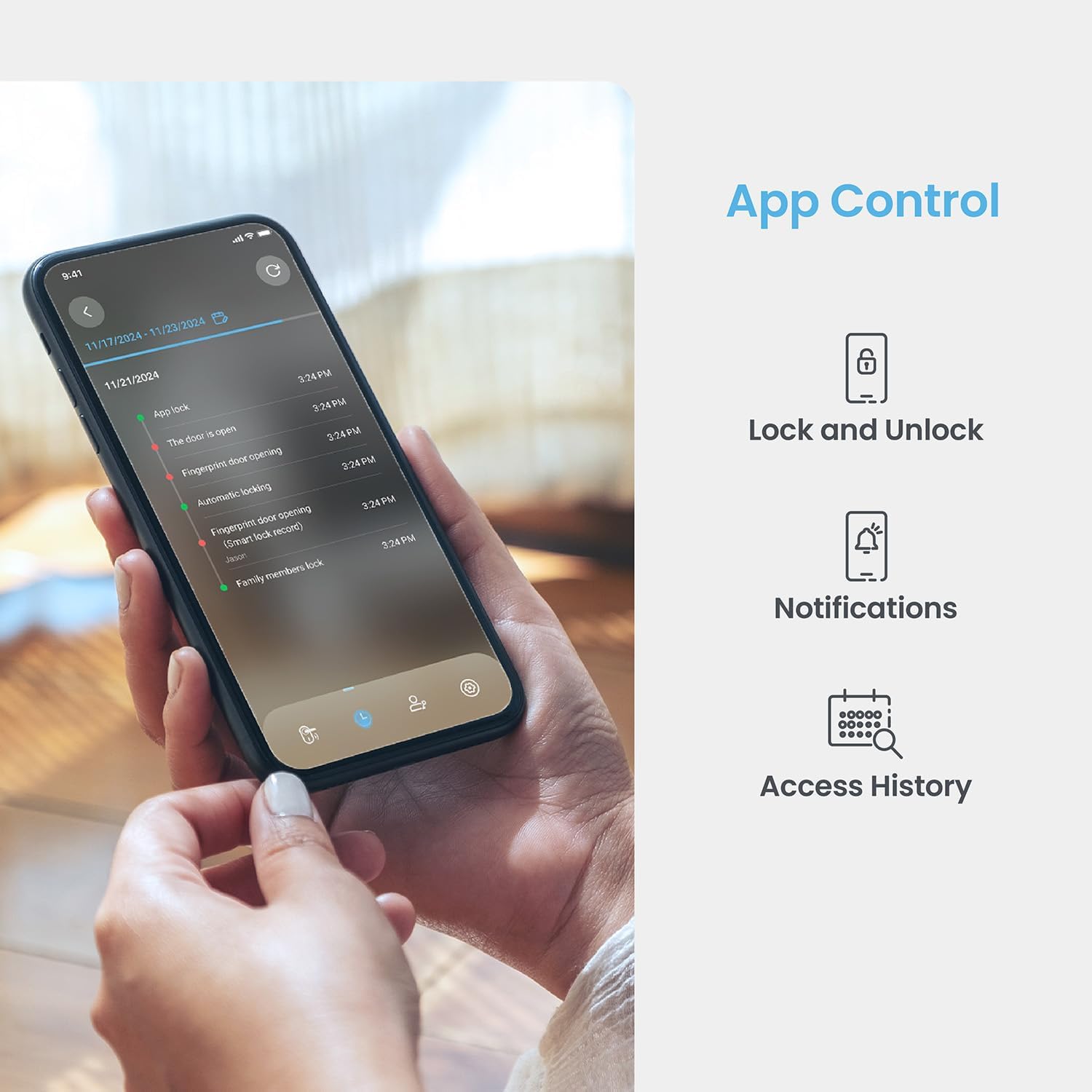
Image: A smartphone displaying the Lockly App, showing options for remote lock/unlock, notifications, and access history logs.
- עפענען אַפּ: Launch the Lockly App on your smartphone.
- אויסקלייבן שלאָס: Choose the desired lock from your device list.
- פאַרשליסן / ופשליסן: Tap the lock/unlock icon to control the deadbolt.
7.4 אַנלאַקינג מיט גשמיות שליסל
Two physical backup keys are provided for manual unlocking.
- אַרײַנשטעלן שליסל: Insert the physical key into the keyhole located on the exterior assembly.
- דריי שליסל: Turn the key to unlock the deadbolt.
7.5 אויטאָ-שלאָס פֿונקציע
The programmable auto-lock feature ensures your door is always secured.
- געבן / דיסייבאַל: Configure auto-lock settings via the Lockly App.
- שטעלן פארלענגערונג: Customize the delay time before the lock automatically engages after being closed.
7.6 שטימע קאנטראל אינטעגראציע
Integrate your Lockly Smart Lock with smart home assistants.
- פאַרבינדן צו אַלעקסאַ/גוגל אַסיסטאַנט: Follow the instructions in the Lockly App to link your lock with Amazon Alexa or Google Assistant.
- קול קאַמאַנדז: Use voice commands to lock or unlock your door (e.g., "Alexa, lock the front door").
8. באַניצער מאַנאַגעמענט
Manage access for multiple users through the Lockly App.
- Add/Remove Users: Create or delete user profiles, assigning unique fingerprints or PIN codes.
- eKeys/eBadges: Grant temporary or permanent access to guests via eKeys or eBadges, which can be sent directly from your smartphone.
- Offline Access Codes: Generate time-sensitive or single-use access codes that do not require internet connectivity for the recipient.
- Activity Logs: Review a detailed history of lock activity, including who accessed the door and when.
9. וישאַלט
9.1 באַטערי פאַרבייַט
The lock operates on 4 AA alkaline batteries, providing approximately 8 months of battery life. Replace batteries when the low battery indicator appears on the lock or in the app.
- צוטריט באַטעריע אָפּטייל: אַראָפּנעמען די באַטעריע דעקל אויף דער אינעווייניקסטער פֿאַרזאַמלונג.
- פאַרבייַטן באַטעריז: Remove old batteries and insert four new AA alkaline batteries, ensuring correct polarity.
- פֿאַרמאַכן דעקל: פאַרבייַטן די באַטאַרייע דעקן.
9.2 רייניקונג
רייניקט די אויסערליכע זייט פון דעם שלאָס מיט אַ ווייכן, דamp שטאָף. פֿאַרמײַדט אַברייסיוו רייניגער אָדער סאָלווענטן וואָס קענען שאַטן די ענדיקונג אָדער עלעקטראָנישע קאָמפּאָנענטן.
10. טראָובלעשאָאָטינג
- שלאָס ענטפֿערט נישט: Check battery levels. Replace batteries if low. Ensure cables are securely connected.
- Keypad Not Activating: Ensure the screen is clean and free of debris. Try touching different areas of the screen.
- פינגער-אפדרוק נישט דערקענט: זיכער מאַכן אַז אייער פינגער איז ריין און טרוקן. רעגיסטרירט ווידער אייער פינגער-אפדרוק אויב די פראבלעמען בלייבן.
- אַפּ קאַנעקטיוויטי ישוז: Verify your home Wi-Fi network is active and the lock is within range. Restart the lock and your router if necessary.
- אויטאמאטישער שלאָס פראבלעם: Check auto-lock settings in the Lockly App. Ensure the door sensor is not obstructed.
11. ספּעסאַפאַקיישאַנז
| שטריך | דעטאַל |
|---|---|
| מאָדעל | Secure Pro with Knob |
| ASIN | B0DZXB86LZ |
| אַנלאַקינג מעטהאָדס | Fingerprint, PIN Genie Keypad, Lockly App, Physical Key |
| דערקענונג פון פינגערפּרינט | 0.2 seconds, up to 99 fingerprints |
| Keypad Technology | Patented PIN Genie (dynamic number shuffling) |
| קאַנעקטיוויטי | Built-in Wi-Fi, Bluetooth |
| מאַכט מקור | 4 רענטגענ אַאַ אַלקאַלינע באַטעריז |
| באַטערי לעבן | בעערעך 8 חדשים |
| טיר גרעב קאָמפּאַטאַביליטי | 1 3/8" - 2" |
| באַקסעט קאָמפּאַטאַביליטי | 2 3/8" or 2 3/4" |
| קול קאָנטראָל | Alexa, Google Assistant compatible |
| נאָרמאַל | Built-to ANSI Standard |
12. וואָראַנטי און שטיצן
For warranty information, technical support, or to register your product, please visit the official Lockly website or contact Lockly customer service. Keep your purchase receipt as proof of purchase.
אָנליין שטיצן: www.lockly.com/support


