1. הקדמה
This manual provides detailed instructions for the proper setup, operation, and maintenance of your Daakro AK45 Home Audio Amplifier. Please read this manual thoroughly before using the device to ensure optimal performance and safety. The AK45 is a 2-channel stereo amplifier designed for passive speakers, featuring Bluetooth 5.4 connectivity, multiple input options, and adjustable audio controls.

Figure 1: Daakro AK45 Home Audio Amplifier and Remote Control
2. פּראָדוקט איבערview
2.1 פראָנט פּאַנעל קאָנטראָלס

פיגורע 2: פראָנט פּאַנעל אויסלייג
- מאַכט סוויטש: טאַגאַלז די ampליפער אויף אָדער אַוועק.
- USB/SD Input: Ports for connecting USB flash drives or SD cards for media playback.
- טרעבל קאָנטראָל: Adjusts the high-frequency audio output (±12dB).
- באַס קאָנטראָל: Adjusts the low-frequency audio output (±12dB).
- מיקראָפאָן באַנד קאָנטראָל: Adjusts the volume level for connected microphones.
- מיקראָפאָן איינגאַבעס (MIC1, MIC2): Two 1/4" (6.5mm) jacks for connecting microphones.
- בעל באַנד קאָנטראָל: Adjusts the overall output volume (0-32dB).
- מאָדע קנעפּל: Cycles through input sources (Bluetooth, RCA, USB, SD, FM).
- פּלייבאַק קאָנטראָלס: Buttons for previous track, play/pause, next track.
- געפֿירט ווייַז: Shows current mode, volume level, and track information.
2.2 דערציען פּאַנעל קאַנעקשאַנז
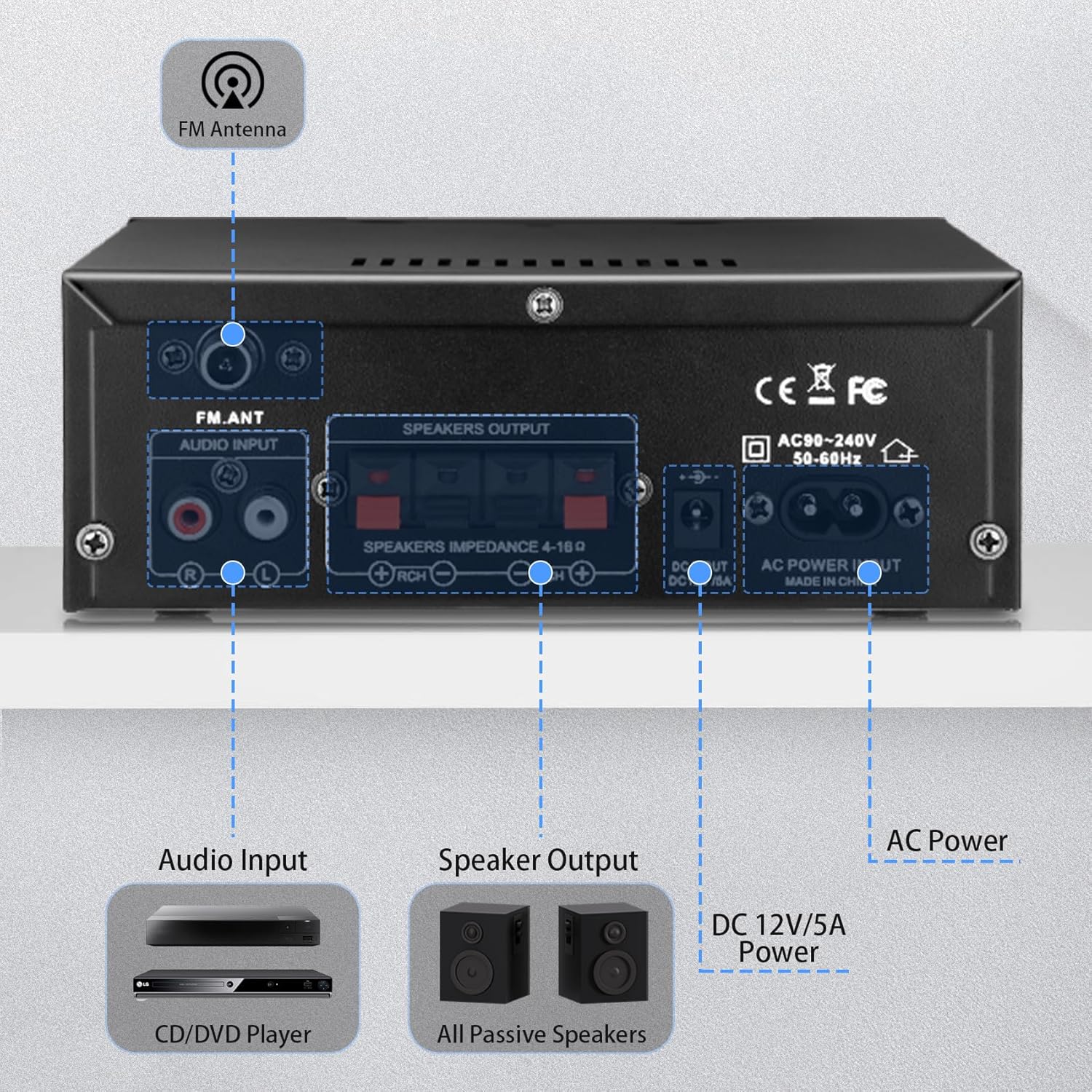
פיגור 3: הינטערשטע פּאַנעל קאַנעקשאַנז
- FM אַנטענע אַרייַנשרייַב: פֿאַרבינדט די אַרייַנגערעכנטע FM אַנטענע פֿאַר ראַדיאָ אָפּנאַם.
- אַודיאָ אַרייַנגאַנג (RCA): Red and white RCA jacks for connecting external audio sources like CD players or tape decks.
- רעדנער רעזולטאַט: Terminals for connecting passive speakers (4-16Ω impedance). Ensure correct polarity (+ to + and - to -).
- DC 12V/5A מאַכט אַרייַנגאַנג: Connects to a 12V/5A DC power adapter (not included).
- אַק מאַכט אַרייַנשרייַב: Connects the included AC power cable (AC90-240V, 50-60Hz).
2.3 רימאָוט קאָנטראָל
די אַרייַנגערעכנטע ווײַטקאָנטראָל ערמעגליכט באַקוועמע אָפּעראַציע פון די amplifier from a distance. Functions include power on/off, mode selection, volume adjustment, track control, and EQ settings (if available).
פיגורע 4: רימאָוט קאָנטראָל
באַמערקונג: Remove the isolation plastic sheet from the battery compartment of the remote control before first use.
3. סעטאַפּ
- פֿאַרבינדן רעדנערס: Connect your passive speakers to the 'SPEAKERS OUTPUT' terminals on the rear panel. Ensure the positive (+) terminal of the amplifier connects to the positive (+) terminal of the speaker, and the negative (-) terminal connects to the negative (-). The amplifier supports speakers with an impedance of 4-16Ω.
- פאַרבינדן אַודיאָ קוואלן:
- RCA אַרייַנשרייַב: Use an RCA cable to connect devices like CD players or tape decks to the 'AUDIO INPUT' jacks.
- USB/SD קאָרט: Insert a USB flash drive or SD card into the respective slots on the front panel.
- בלועטאָאָטה: For Bluetooth connection, ensure the amplifier is powered on and in Bluetooth mode.
- פאַרבינדן FM אַנטענע: Attach the included FM antenna to the 'FM_ANT' connector on the rear panel for improved radio reception.
- פֿאַרבינדן מיקראָפֿאָנען: If using microphones, plug them into the 'MIC1' or 'MIC2' 1/4" jacks on the front panel.
- מאַכט קשר: Connect the AC power cable to the 'AC POWER INPUT' on the rear panel and then to a wall outlet. Alternatively, if using a DC power source, connect a 12V/5A DC adapter to the 'DC 12V/5A' input.
4. אַפּערייטינג ינסטרוקטיאָנס
4.1 פּאַוערינג אויף / אַוועק
Press the 'POWER' switch on the front panel to turn the amplifier on or off. The LED display will illuminate when the unit is powered on.
4.2 אויסקלייבן אינפוט מאָדע
Press the 'MODE' button on the front panel or remote control to cycle through the available input sources: Bluetooth (BLUE), RCA (AUX), USB, SD, and FM radio.
4.3 בלועטאָאָטה פּערינג
- באַשטימען די amplifier to Bluetooth mode using the 'MODE' button. The LED display will show 'BLUE'.
- אויף אייער דעווייס (סמאַרטפאָן, טאַבלעט, קאָמפּיוטער), אַקטיווירט בלועטוט און זוכט פֿאַר פֿאַראַן דעווייסעס.
- Select 'AK45' from the list of devices to pair. A confirmation sound will indicate successful pairing.
באַמערקונג: Maintain a distance of within 30ft/10m between the device and amplifier without obstructions for optimal Bluetooth performance. For TV or PC connections, keep the distance within 15ft/5m.

פיגור 5: בלועטוט 5.4 קאָנעקטיוויטי
4.4 אַדזשאַסטירן אַודיאָ לעוועלס
- בעל באַנד: Rotate the large 'VOLUME' knob on the front panel or use the volume buttons on the remote control to adjust the overall sound level.
- דרייבאַל / באַס: Use the 'TREBLE' and 'BASS' knobs to fine-tune the high and low frequencies according to your preference.
- מיק באַנד: Adjust the 'MIC/VOL' knob to control the volume of connected microphones.
4.5 USB/SD קאַרטל ווידערשפּיל
When a USB drive or SD card is inserted, the ampדי לייפייער וועט אויטאמאטיש איבערגיין צו יו-עס-בי/ס-די מאָדע און אנהייבן שפילן קאמפאטיבלע אודיא files. Use the playback controls (previous, play/pause, next) on the front panel or remote to manage your music.
4.6 מיקראָפאָן באַניץ
Connect up to two microphones to the 'MIC1' and 'MIC2' inputs. Adjust the 'MIC/VOL' knob to control microphone volume. This feature is suitable for home karaoke or public address applications.
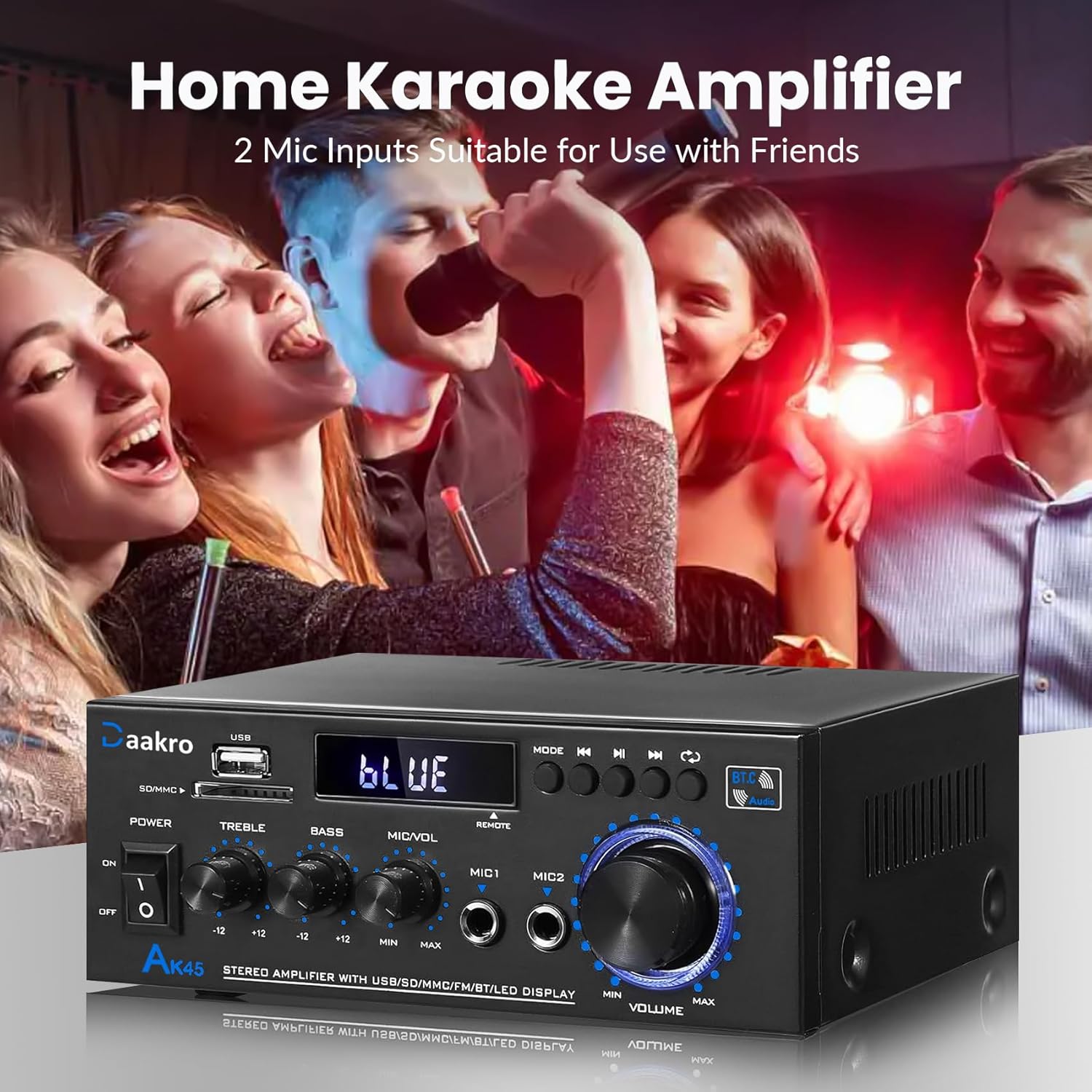
Figure 6: Home Karaoke Application
5. וישאַלט
- רייניקונג: ניצן אַ ווייך, טרוקן שטאָף צו ריין די יקסטיריער פון די amplifier. Avoid using liquid cleaners or solvents, as they may damage the finish or internal components.
- ווענטילאַטיאָן: פאַרזיכערן די amplifier has adequate ventilation. Do not block the ventilation openings on the top or sides of the unit.
- סטאָרידזש: ווען נישט אין באַנוץ פֿאַר לענגערע צייטן, זאָל מען עס אַוועקלייגן ampהאַלטן די ליפיער אין אַ קיל, טרוקן אָרט אַוועק פון דירעקט זונשייַן און עקסטרעמע טעמפּעראַטורן.
- מאַכט דיסקאַנעקשאַן: Always disconnect the power cable from the wall outlet before performing any cleaning or maintenance.
6. טראָובלעשאָאָטינג
- קיין מאַכט:
- Check if the power cable is securely connected to both the amplifier and the wall outlet.
- Ensure the power switch on the front panel is in the 'ON' position.
- איבערצייגט אז די וואנט-אויסשטעל ארבעט דורך אריינשטעקן אן אנדער אפאראט.
- קיין קול:
- Confirm that speakers are correctly connected to the 'SPEAKERS OUTPUT' terminals with correct polarity.
- Check that the correct input mode is selected (Bluetooth, RCA, USB, SD, FM).
- Increase the 'MASTER VOLUME' knob and ensure it is not at minimum.
- Verify that the audio source device is playing and its volume is turned up.
- Ensure passive speakers are used, as the AK45 is not compatible with active speakers.
- בלועטאָאָטה קאַנעקשאַן ישוז:
- פאַרזיכערן די amplifier is in Bluetooth mode ('BLUE' on display).
- Delete 'AK45' from your device's Bluetooth list and attempt to re-pair.
- Reduce the distance between your device and the amplifier, and remove any obstructions.
- ריסטאַרט ביידע די ampליפיער און אייער בלוטוט דעווייס.
- שלעכטע קלאַנג קוואַליטעט (דיסטאָרשאַן, נידעריק באַנד):
- Check speaker connections for loose wires or incorrect polarity.
- Adjust 'TREBLE' and 'BASS' controls.
- זיכער מאַכן אַז די אַודיאָ מקור גיט אַ ריין סיגנאַל.
- Verify that the speaker impedance is within the supported 4-16Ω range.
- די amplifier uses an upgraded TPA3116 chip for clear audio.

Figure 7: TPA3116D2 Chip for Enhanced Audio Performance
- USB/SD Card Not Reading:
- Ensure the USB drive or SD card is inserted correctly.
- טשעק אַז די files on the USB/SD card are in a compatible audio format.
- פרובירט אן אנדערן USB דרייוו אדער SD קארטל.
- רימאָוט קאָנטראָל נישט ארבעטן:
- Ensure the isolation plastic sheet has been removed from the battery compartment.
- פאַרבייַטן די באַטאַרייע אין די ווייַט קאָנטראָל.
- Point the remote directly at the amplifier's front panel sensor.
7. ספּעסאַפאַקיישאַנז
- מאָדעל: AK45
- רעזולטאַט מאַכט: 50W + 50W (Theoretical, at 24V/5A, 4-8Ω impedance)
- Ampליפיער שפּאָן: TPA3116
- בלועטאָאָטה ווערסיע: 5.4 (QCC3040 core)
- אַרייַנשרייַב ינטערפייסיז: 1x RCA, 2x 1/4" Microphone, 1x USB, 1x SD Card Slot, Bluetooth 5.4, FM Radio
- רעדנער ימפּידאַנס: 4-16Ω (Passive Speakers Only)
- אָפטקייַט ענטפער: 20 הערץ - 20 קילאָהרץ
- טאָן קאָנטראָל: Treble ±12dB, Bass ±12dB
- מאַכט צושטעלן: AC90-240V, 50-60Hz (or DC 12V/5A)
- דימענסיעס: 8.78 X 8.31 X 3.7 אינטשעס
- נומער וואָג: 1.94 פונט
7.1 Output Power vs. Power Supply and Impedance

Figure 8: Power Output Table
| מאַכט צושטעלן | רעדנער ימפּידאַנס | מאַקס רעזולטאַט מאַכט |
|---|---|---|
| 9V | 4Ω | 15 וו |
| 6Ω | 12 וו | |
| 8Ω | 10 וו | |
| 12V | 4Ω | 20 וו |
| 6Ω | 15 וו | |
| 8Ω | 12 וו | |
| 18V | 4Ω | 30 וו |
| 6Ω | 20 וו | |
| 8Ω | 15 וו | |
| 22V | 4Ω | 40 וו |
| 6Ω | 30 וו | |
| 8Ω | 20 וו | |
| 24V | 4Ω | 50 וו |
| 6Ω | 40 וו | |
| 8Ω | 30 וו |
8. וואָס איז אין דער קעסטל
Upon opening your Daakro AK45 Home Audio Amplifier package, you should find the following items:
- 1x Daakro AK45 Home Audio Ampליפיער אַפּאַראַט
- קסנומקסקס רימאָוט קאָנטראָללער
- 1x אַק מאַכט קאַבלע
- 1x עפעם אַנטענע
- 1x אינסטרוקציע מאַנואַל (דאָס דאָקומענט)
פיגורע 9: פּעקל אינהאַלט
9. וואָראַנטי און שטיצן
Daakro is committed to providing high-quality audio equipment and customer satisfaction.
- וואָראַנטי: דאס פּראָדוקט קומט מיט אַ 30-טאָגיקע וואָראַנטי פֿון דעם קויפֿדאַטום.
- קונה סערוויס: We offer 24-hour online customer service to assist with any inquiries or issues you may encounter.
- צופֿרידנקייט גאַראַנטירן: We strive for 100% customer satisfaction.
For support, please refer to the contact information provided with your purchase or visit the official Daakro store on Amazon.


