1. הקדמה
Welcome to the user manual for your Amazon STAR WARS Echo Dot (5th Gen) and TIE Fighter Stand Bundle. This guide provides essential information for setting up, operating, maintaining, and troubleshooting your new smart speaker and its unique display stand. Please read this manual thoroughly to ensure optimal performance and enjoyment of your product.
2. פּראָדוקט איבערview
2.1 Echo Dot (5th Gen, 2022 release)
The Echo Dot (5th Gen) is a compact smart speaker with Alexa, designed to deliver improved audio quality with clearer vocals and deeper bass. It allows you to play music, set timers, get information, control smart home devices, and more, all using voice commands.
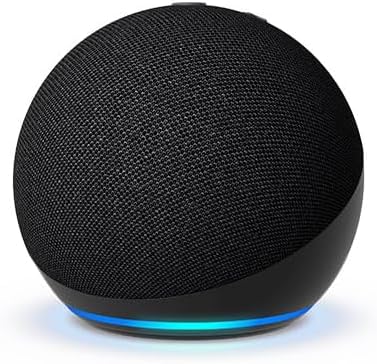
Image: The Echo Dot (5th Gen) in charcoal, a spherical smart speaker with a fabric finish and a light ring at its base.
2.2 STAR WARS TIE Fighter Stand
The Limited Edition STAR WARS TIE Fighter Stand is a custom-designed accessory that transforms your Echo Dot into an iconic Imperial TIE Fighter. It provides a secure and visually appealing display for your Echo Dot, integrating it into a TIE Fighter hangar diorama. The stand is designed for easy interaction and does not interfere with the Echo Dot's functions.

Image: The STAR WARS TIE Fighter Stand, shown from the front, ready to house the Echo Dot.

Image: The Echo Dot (5th Gen) integrated into the TIE Fighter Stand, illuminated by its base light.
3. סעטאַפּ
3.1 אויספּאַקן און אינהאַלט
Carefully remove all components from the packaging. The bundle typically includes:
- אַמאַזאָן עקאָ דאָט (5טע דור)
- STAR WARS TIE Fighter Stand
- Power adapter for Echo Dot
- שנעל אָנהייב גייד

Image: The product packaging, featuring the TIE Fighter Stand and Echo Dot, designed as a hangar diorama.
3.2 Echo Dot (5th Gen) Initial Setup
- מאַכט אויף: Connect the included power adapter to your Echo Dot and then to a wall outlet. The light ring on the Echo Dot will turn blue, then orange, indicating it's ready for setup.
- דאַונלאָוד אַלעקסאַ אַפּ: On your smartphone or tablet, download the Amazon Alexa app from your device's app store.
- פֿאָלגן די אינסטרוקציעס אין דער אַפּ: Open the Alexa app and sign in with your Amazon account. The app will guide you through connecting your Echo Dot to your Wi-Fi network and personalizing settings.
- שטימע פּראָfile (אָפּטיאָנאַל): Consider setting up a voice profile for a more personalized Alexa experience.
3.3 TIE Fighter Stand Assembly
- Place Echo Dot: Gently insert your Echo Dot (5th Gen) into the central spherical housing of the TIE Fighter Stand. Ensure it sits securely.
- קאַבלע פאַרוואַלטונג: Route the Echo Dot's power cable through the designated channel at the bottom or rear of the stand to maintain a clean appearance.

בילד: הינטערשטע view of the Echo Dot within the TIE Fighter Stand, illustrating the power cable connection point.

בילד: א ווינקלדיקע view of the Echo Dot securely nestled in the TIE Fighter Stand, showcasinג זײַן דיזײַן.
4. אַפּערייטינג ינסטרוקטיאָנס
4.1 Using Your Echo Dot (5th Gen)
Your Echo Dot is voice-controlled. Simply say the wake word "Alexa" followed by your command.
- מוזיק און אַודיאָ: "Alexa, play pop music," "Alexa, play my audiobook," "Alexa, play the news." You can also connect via Bluetooth: "Alexa, pair Bluetooth."
- אינפֿאָרמאַציע: "Alexa, what's the weather?" "Alexa, what's 5 plus 7?" "Alexa, tell me a joke."
- Timers & Alarms: "Alexa, set a timer for 10 minutes," "Alexa, set an alarm for 7 AM." Tap the top of the Echo Dot to snooze an alarm.
- סמאַרט היים קאָנטראָל: "Alexa, turn on the living room lights" (requires compatible smart home devices).
- קאָמוניקאַציע: "Alexa, call Mom" (requires Alexa Calling setup).
4.2 Displaying Your TIE Fighter Stand
The TIE Fighter Stand is designed to be a prominent display piece. Place it on a shelf, desk, or end table where it can be admired and where your Echo Dot has clear access to power and Wi-Fi. Ensure the stand is on a stable, flat surface.

Image: The Echo Dot within the TIE Fighter Stand, showcased as a decorative item on a bookshelf.
5. וישאַלט
5.1 רייניקונג
To clean your Echo Dot and TIE Fighter Stand:
- Unplug the Echo Dot from the power outlet.
- Use a soft, dry, lint-free cloth to wipe down both devices.
- ניצט נישט קיין שרײַבענדיקע רייניגער, סאָלווענטן אדער אַעראָסאָל ספּרײַ.
- פֿאַרמײַדט אַרײַנצוקומען פֿײַכטקײַט אין קיין עפענונגען.
5.2 ווייכווארג דערהייַנטיקונגען
Your Echo Dot automatically receives software updates over Wi-Fi. Ensure your device is connected to the internet to receive the latest features and security enhancements.
6. טראָובלעשאָאָטינג
If you encounter issues with your Echo Dot or TIE Fighter Stand, refer to the following common solutions:
- קיין מאַכט / רעאַגירט נישט: Ensure the power adapter is securely connected to both the Echo Dot and a working wall outlet. Try a different outlet.
- Wi-Fi קאַנעקטיוויטי ישוז: Check your Wi-Fi router and internet connection. Restart your router. Use the Alexa app to reconfigure Wi-Fi settings for your Echo Dot.
- נעבעך געזונט קוואַליטעט: Ensure the Echo Dot is not obstructed. Adjust volume using voice commands or the Alexa app.
- אַלעקסאַ ענטפֿערט נישט: Ensure the microphone is not muted (the light ring will be red). Speak clearly and ensure you are within range.
- TIE Fighter Stand Fit: If the Echo Dot does not fit correctly, ensure you have the correct Echo Dot model (5th Gen) and that no debris is obstructing the stand's housing.
- ריסטאַרט דיווייס: For many issues, unplugging the Echo Dot from power for 30 seconds and then plugging it back in can resolve the problem.
7. ספּעסאַפאַקיישאַנז
7.1 Echo Dot (5th Gen)
- אַודיאָ: Front-firing speaker (improved audio quality)
- קאַנעקטיוויטי: Dual-band Wi-Fi (2.4 GHz and 5 GHz), Bluetooth Low Energy (BLE)
- מיקראָפאָן: Multiple microphones for far-field voice recognition
- דימענסיעס: Approximately 3.9” x 3.9” x 3.5” (99 x 99 x 89 mm)
- וואָג: בעערעך 10.7 אַז (304 ג)
7.2 STAR WARS TIE Fighter Stand
- קאַמפּאַטאַבילאַטי: Specifically designed for Echo Dot (5th Gen)
- מאַטעריאַל: דוראַבאַל פּלאַסטיק
- פּלאַן: TIE Fighter with hangar diorama base
- עלטער רעקאָמענדאַציע: פֿאַר עלטער 13+
8. וואָראַנטי און שטיצן
Your Amazon Echo Dot (5th Gen) and STAR WARS TIE Fighter Stand Bundle is covered by a limited warranty. For specific warranty details, please refer to the warranty information provided with your product or visit the Amazon Devices Support page on the official Amazon webפּלאַץ.
For further assistance, technical support, or to report issues, please contact Amazon Customer Service through the Alexa app or the Amazon webפּלאַץ.


