1. הקדמה
This manual provides essential information for the safe and effective operation of your ION Audio Retro Glow Boombox. This device combines classic audio playback with modern connectivity, featuring an AM/FM radio, cassette player/recorder, Bluetooth 5.3, USB, and SD card playback capabilities. Please read this manual thoroughly before use and retain it for future reference.
2. זיכערקייַט אינפֿאָרמאַציע
- דו זאלסט נישט ויסשטעלן די אַפּאַראַט צו וואַסער אָדער נעץ.
- ויסמיידן פּלייסינג די אַפּאַראַט לעבן היץ קוואלן אָדער אין דירעקט זונשייַן.
- זאָרגט פֿאַר געהעריקע ווענטילאַציע; פֿאַרשטאָפּט נישט קיין ווענטילאַציע עפענונגען.
- ניצן בלויז אַטאַטשמאַנץ / אַקסעסעריז ספּעסיפיעד דורך דער פאַבריקאַנט.
- אָפּשטעקן די אַפּאַראַט בעשאַס בליץ סטאָרמז אָדער ווען אַניוזד פֿאַר לאַנג פּיריאַדז.
- אָפּשיקן אַלע סערוויסעס צו קוואַלאַפייד סערוויס פּערסאַנעל.
3. וואָס איז אַרייַנגערעכנט
ביים אויספּאַקן, זיכער מאַכן אַז אַלע זאכן וואָס זענען אויסגערעכנט אונטן זענען פאַראַן און אין גוטן צושטאַנד:
- ION Audio Retro Glow Boombox
- מאַכט קאַבלע
- קוויקקסטאַרט גייד
4. פּראָדוקט איבערview
The Retro Glow Boombox features a translucent housing with multi-colored LED lights that synchronize with music. It includes dual full-range speakers for robust audio output.
פראָנט פּאַנעל

פיגורע 1: פראָנט view of the Retro Glow Boombox, showcasing the cassette deck, radio tuner, and illuminated dual speakers.
Top קאָנטראָלס

פיגורע 2: דעטאַילעד view of the top panel, including volume, bass, treble controls, cassette function buttons (Pause, Stop/Eject, F.FWD, REW, Play, REC), and mode selectors (Tape, Aux, Radio, Bluetooth/USB/SD).
Side Panel and Rear
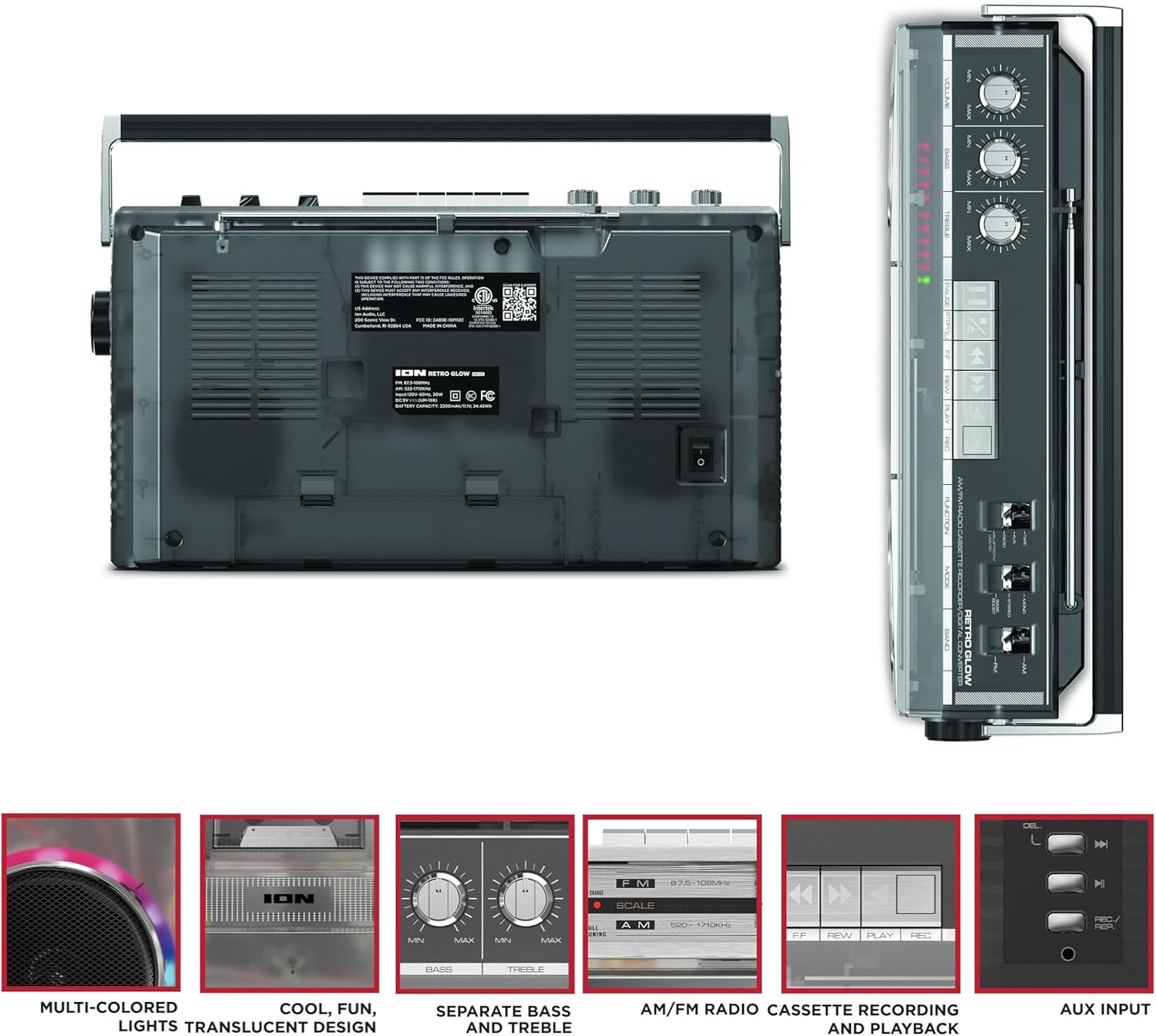
Figure 3: Side panel illustrating the USB port, SD card slot, and playback control buttons. The rear panel includes the power input and battery compartment.
5. סעטאַפּ
מאַכט די בומבאַקס
The Retro Glow Boombox can be powered via the included AC power cable or by batteries for portable use.
- AC מאַכט: Connect the power cable to the AC input on the rear of the unit and then to a wall outlet.
- באַטאַרייע מאַכט: Open the battery compartment on the rear and insert the required batteries (type and quantity specified in specifications).

פיגורע 4: דערציען view of the boombox, highlighting the power input and the battery compartment for portable operation.
6. אַפּערייטינג ינסטרוקטיאָנס
אַלגעמיינע אָפּעראַציע
- מאַכט אויף / אַוועק: ניצט דעם מאַכט קנעפּל צו דרייען דעם אַפּאַראַט אָן אָדער אויס.
- באַנד קאָנטראָל: Adjust the 'VOLUME' knob on the top panel to increase or decrease the sound level.
- טאָן קאָנטראָל: Use the 'BASS' and 'TREBLE' knobs to customize the audio output to your preference.
- LED לייץ: The multi-colored LED lights around the speakers dance in sync with the music. Refer to the Quickstart Guide for specific controls to change light modes or turn them off.
ראַדיאָ פאַנגקשאַנאַליטי
- Switch the 'FUNCTION' selector to 'RADIO'.
- Select 'AM' or 'FM' using the 'BAND' switch.
- פארלענגערט די טעלעסקאָפּישע אַנטענע פֿאַר אַן אָפּטימאַלן FM אָפּנאַם. פֿאַר AM, דרייט דעם אַפּאַראַט פֿאַר דעם בעסטן אָפּנאַם.
- Use the 'TUNING' knob to scan for stations.
Cassette Player/Recorder
- פּלייבאַק: Press the 'STOP/EJ' button to open the cassette door. Insert a cassette tape and close the door. Press 'PLAY' to begin playback.
- רעקאָרדינג: To record from the radio, built-in microphone, or an external source (via Aux input), ensure a blank cassette is inserted. Select the desired source using the 'FUNCTION' switch. Press the 'REC' button (often simultaneously with 'PLAY') to start recording.
- שנעל פאָרויס / צוריק: Use the 'F.FWD' and 'REW' buttons for tape navigation.
בלועטאָאָטה קאַנעקטיוויטי
- Switch the 'FUNCTION' selector to 'BLUETOOTH/USB/SD'. The unit will enter pairing mode.
- On your Bluetooth-enabled device, search for 'Retro Glow Boombox' and select it to pair.
- Once paired, you can stream audio wirelessly to the boombox.
USB און SD קאַרטל פּלייבאַק
- Insert a USB drive or SD card into the respective slot on the side panel.
- Switch the 'FUNCTION' selector to 'BLUETOOTH/USB/SD'. The unit should automatically detect and begin playing audio fileס פון די אריינגעשטעלטע מעדיע.
- Use the playback control buttons (play/pause, skip forward/backward) on the side panel to manage your audio.
אַגזיליערי אַרייַנשרייַב
- Connect an external audio device (e.g., smartphone, MP3 player) to the 'AUX' input using a 3.5mm audio cable (not included).
- Switch the 'FUNCTION' selector to 'AUX'. Audio from your external device will play through the boombox speakers.
7. וישאַלט
- רייניקונג: ניצט אַ ווייכע, טרוקענע שטאָף צו רייניקן די אויסערלעכע זייט פון דעם אַפּאַראַט. ניצט נישט קיין שרײַבנדיקע רייניגער אָדער סאָלווענטן.
- קאַסעטע דעק זאָרג: Regularly clean the tape heads and pinch rollers with a cotton swab lightly dampבאדעקט מיט איזאָפּראָפּיל אַלקאָהאָל צו ענשור אָפּטימאַלע געזונט קוואַליטעט און פאַרמייַדן טייפּ שעדיקן.
- סטאָרידזש: When not in use, store the boombox in a cool, dry place away from direct sunlight and extreme temperatures.
8. טראָובלעשאָאָטינג
קיין מאַכט
- זיכער מאַכן אַז דער מאַכט קאַבל איז זיכער פארבונדן צו ביידע די אַפּאַראַט און אַ אַרבעטנדיק מאַכט ווענטיל.
- If using batteries, check if they are inserted correctly and are not depleted.
קיין געזונט
- Check the volume level on the boombox and the connected audio source (if applicable).
- Ensure the correct function mode (Radio, Tape, Bluetooth, USB/SD, Aux) is selected.
- For cassette playback, verify the tape is inserted correctly and the heads are clean.
בלועטאָאָטה פּערינג ישוז
- Make sure the boombox is in Bluetooth pairing mode.
- Ensure your Bluetooth device is within range (typically 30 feet or 10 meters).
- פּרוּווט אָפּצופּאַרן און ווידער צופּאַרן דעם דעווייס.
9. ספּעסאַפאַקיישאַנז
| פּראָדוקט דימענשאַנז | 9.25 X 16.25 X 5.25 אינטשעס |
| פּונקט וואָג | 8.93 פונט |
| קאַנעקטיוויטי טעכנאָלאָגיע | Bluetooth 5.3, USB, SD Card, Aux Input |
| רעדנער טיפּ | Stereo, Full-Range |
| מאַכט מקור | AC Power Cable, Rechargeable Battery (approx. 10-hour life) |
| ספּעציעלע פֿעיִקייטן | AM/FM Radio, Cassette Player/Recorder, Multi-colored LED Lights, Retro VU Meters, Separate Bass and Treble Controls |
10. וואָראַנטי און שטיצן
For warranty information or technical support, please refer to the Quickstart Guide included with your product or visit the official ION Audio webזייטל. האַלט אייער קויף קוויטל ווייל אַ באַווייַז פון קויפן קען זיין פארלאנגט פֿאַר וואָראַנטי קליימז.


